
Muesli
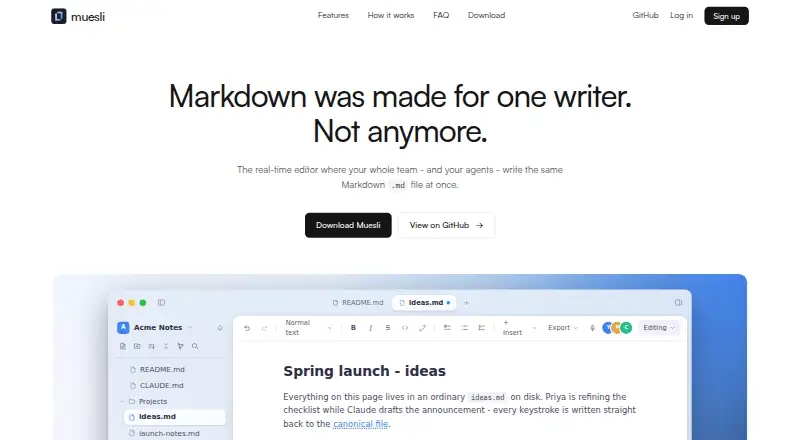
Muesli is a real-time collaborative Markdown editor for teams and AI agents working in the same plain .md file.
What Muesli is
Muesli is a real-time collaborative Markdown editor for teams and AI agents working in the same plain .md file. People can follow live cursors and presence, discuss changes in comment threads, submit tracked suggestions, and use append-only history with snapshots. Editing tools include inline preview, a source toggle, KaTeX math, Mermaid diagrams, editable tables and callouts, wikilinks, and backlinks. Claude Code, Cursor, Codex, Copilot, and Gemini CLI can contribute through MCP or by editing the file directly. When a person is present, agent edits become suggestions for review. Guest links offer viewer, commenter, or editor roles without requiring accounts. Storage options include local files, S3-compatible services such as AWS S3, Cloudflare R2, and MinIO, plus GitHub, Gitea, Forgejo, and Google Drive. Muesli is free and open source under AGPL-3.0, with web, Windows, macOS, Linux, and self-hosted availability. Self-hosting uses one Docker image, but durable documents and history require Postgres and Redis. The hosted service says document contents stay in user-chosen storage and are not used for training.
Good
- Live collaboration includes comments and tracked suggestions.
- Guest links provide role-based access without accounts.
- Supports several AI coding agents through MCP or direct editing.
- Free and open source under AGPL-3.0.
Watch out
- Durable self-hosted documents and history require Postgres and Redis.
- CLI installation details differ by operating system.
Who it suits
Muesli suits teams that collaborate on Markdown files and want AI agents to contribute alongside people. It also fits users who want local or self-hosted storage options.
Verdict
Muesli combines Markdown editing, team review, and AI-agent contributions around plain .md files. Consider its Postgres and Redis requirements if you plan to self-host durable documents and history.
Plans and prices
From Muesli's own pricing page, checked 2 Oct 2026.
| Plan | Price | What it gives you |
|---|---|---|
| Muesli | Free | Service currently free · open source under AGPL-3.0 |
The facts
Each one read from Muesli's own pages, with the date it was checked.
What it does
- Agent review
- When a human is present in a document, agent edits become suggestions for review.checked 2 Oct 2026
- AI agents
- Claude Code, Cursor, Codex, Copilot, and Gemini CLI can collaborate through MCP or by editing the file directly.checked 2 Oct 2026
- CLI
- A CLI is available to install with the maker’s shell installer on macOS and Linux, with a Windows ZIP linked from releases.checked 2 Oct 2026
- Cloud sync
- Yeschecked 20 Sep 2026
- Data handling
- The hosted service collects account data, session data, audit logs, workspace and document metadata, connected-storage credentials, and transient request data; it says it runs no analytics or third-party trackers.checked 2 Oct 2026
- License
- The project is open source under the AGPL-3.0 license.checked 2 Oct 2026
- Live collaboration
- It offers live cursors and presence, comment threads, tracked suggestions, and append-only history with snapshots.checked 2 Oct 2026
- Local file support
- Yeschecked 20 Sep 2026
- Markdown tools
- The editor includes inline preview and source toggle, KaTeX math, Mermaid diagrams, editable tables and callouts, wikilinks, and backlinks.checked 2 Oct 2026
- Privacy
- The hosted service says document contents remain in storage chosen by the user and are not read, mined, or used for training.checked 2 Oct 2026
- Product
- Muesli is a real-time collaborative Markdown editor for teams and AI agents that edit the same plain .md file.checked 2 Oct 2026
- Real-time collaboration
- Yeschecked 20 Sep 2026
- Security
- The privacy policy states service traffic uses TLS, production access is restricted, and audit logs record security-relevant actions.checked 2 Oct 2026
- Self-hosting
- Muesli can be self-hosted with one Docker image; durable documents and history require Postgres and Redis, and sign-in can use an OIDC issuer.checked 2 Oct 2026
- Sharing
- Role-scoped guest links support viewer, commenter, and editor access without requiring collaborators to have accounts.checked 2 Oct 2026
- Storage integrations
- The maker lists local files, S3-compatible storage including AWS S3, Cloudflare R2, and MinIO, GitHub, Gitea, Forgejo, and Google Drive.checked 2 Oct 2026
- Support
- The maker provides support and privacy contact by email at [email protected].checked 2 Oct 2026
Money
- Free plan
- Yeschecked 20 Sep 2026
Where it runs
- Platforms
- The maker lists browser use and desktop builds for macOS, Windows, and Linux; the download page labels the desktop downloads “Coming soon.”checked 2 Oct 2026
- Supported platforms
- web,windows,macos,linux,self_hostedchecked 20 Sep 2026
The full review of Muesli
Muesli is a collaborative Markdown editor for people and AI agents working on the same plain-text documents. It suits teams that want shared review without moving away from .md files. Its strongest case is the combination of live collaboration and agent edits routed through human review.
Overview
Muesli brings live editing, comments, and change suggestions together around Markdown files. That makes it a better fit for collaborative documentation than for someone seeking only a personal writing surface. Documents can use local files or connected storage, and the project is open source under the AGPL-3.0 license.
On the hosted service, document contents remain in storage chosen by the user and are not read, mined, or used for training. The service uses TLS, restricts production access, and keeps audit logs for security-relevant actions. It collects account and session data, audit logs, workspace and document metadata, connected-storage credentials, and transient request data, while running no analytics or third-party trackers.
For more options in the category, see our Markdown editors guide.
Key features
Collaboration and review
Live cursors and presence make concurrent work visible; comment threads and tracked suggestions give teams ways to discuss and propose changes. When a person is present in a document, edits from an AI agent become suggestions for review. That is a useful safeguard for teams using agents, though it adds a review step rather than treating agent edits as automatically accepted.
Guest links support viewer, commenter, and editor roles without requiring collaborators to create accounts. This lets a team involve occasional reviewers while limiting what they can do. Append-only history and snapshots preserve a record of document changes.
Markdown and AI tools
The editor pairs an inline preview with a source toggle, and supports KaTeX math, Mermaid diagrams, editable tables and callouts, wikilinks, and backlinks. These features suit technical notes and linked documentation, not just plain prose. Claude Code, Cursor, Codex, Copilot, and Gemini CLI can contribute through MCP or by editing the file directly.
Storage and self-hosting
Storage options include local files, S3-compatible services such as AWS S3, Cloudflare R2, and MinIO, plus GitHub, Gitea, Forgejo, and Google Drive. Self-hosting uses one Docker image, but durable documents and history require Postgres and Redis. That dependency is a meaningful operational cost for anyone who wants lasting records on their own infrastructure. Sign-in can use an OIDC issuer.
A CLI is available through the maker's shell installer on macOS and Linux, with a Windows ZIP linked from releases. Muesli also supports web, Windows, macOS, Linux, API, and self-hosted use.
Pricing
Muesli is free: its plan costs nothing. The service is currently free, and the software is open source under AGPL-3.0. There is no paid tier or seat or usage cap stated for Muesli, so teams can consider it without a listed subscription charge; self-hosters still need to operate Postgres and Redis for durable documents and history.
Platforms
Muesli supports web, Windows, macOS, Linux, API, and self-hosted deployments. The CLI installer covers macOS and Linux, with a Windows ZIP release.
Who it's for
Muesli is a strong fit for teams writing Markdown together, especially those that want AI agents to contribute while keeping human review in the loop. Its guest roles help bring in reviewers without account setup, and its storage choices suit teams with existing file or repository workflows. It is less compelling for someone who wants a simple solo editor or a self-hosted service without supporting Postgres and Redis.
Pros and cons
- Pro: Agent changes become suggestions when a human is present, giving teams a review point instead of silent direct edits.
- Pro: Guest links offer three access roles without requiring accounts, making limited collaboration practical.
- Pro: Broad storage support and an open-source license give teams options for where documents live.
- Con: Self-hosting durable documents and history requires both Postgres and Redis, adding services to maintain.
- Con: The free offer has no stated paid tier, so teams looking for a priced service plan with explicit support or capacity commitments should compare alternatives.
Alternatives
- Markra is another free option for Linux, macOS, web, and Windows; choose it if you want core features free and can configure a provider for AI features.
- StackEdit is a free, open-source web editor; choose it if web-only access is enough and you prefer an option with no paid plans or usage limits stated by its maker.
- HackMD is a web-based freemium alternative; its free plan is capped at three teammates and includes limits on invitees, templates, GitHub pushes, and image size, so compare those constraints against your collaboration needs.
- Dillinger is a free web option with no signup, paywall, or usage limits; choose it when those constraints matter more than Muesli's team and agent review features.
- PanWriter is a free, open-source desktop option for Linux, macOS, and Windows; consider it if you want a desktop alternative.
- MarkText is free and open source for Linux, macOS, and Windows, with no account or subscription; it suits readers who want a desktop editor without signing up.
- Zettlr is a free desktop alternative for Linux, macOS, and Windows.
- Typora costs $14.99 a month for a full license, with a 15-day free evaluation and activation on up to three devices for one user; choose it if you want a paid desktop license rather than Muesli's collaborative workflow.
Verdict
Choose Muesli if your team wants to work on plain Markdown files together and bring AI agents into the same review process. Its role-based guest access, varied storage integrations, and free open-source plan make that specific workflow attractive. Look elsewhere if you need a solo-first editor or want to self-host without running Postgres and Redis.