Dillinger
Dillinger is a free web-based Markdown editor for writing and previewing documents, with no signup requirement.
What Dillinger is
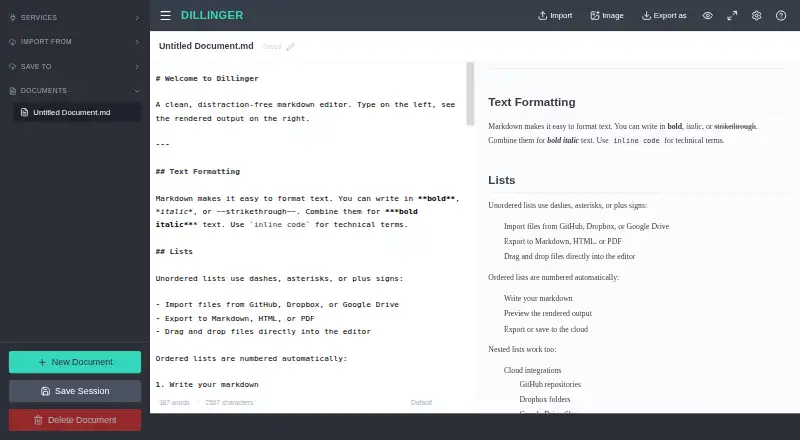
Dillinger is a free web-based Markdown editor for writing and previewing documents, with no signup requirement. Its Monaco editor includes syntax highlighting, multiple cursors, find and replace, and autocompletion. A side-by-side preview renders as you type and keeps its scrolling aligned with the editor. You can drag and drop files to import them, then export Markdown, styled HTML, or PDF. Dillinger can also import and save files through GitHub, Dropbox, Google Drive, OneDrive, and Bitbucket; GitHub support includes public and private repositories and saving edits back. After its initial load, the editor works offline and keeps drafts in local storage, while cloud sync requires connectivity. The editor offers dark mode, fullscreen Zen mode, and Vim and Emacs keybindings. Its site describes use by developers, technical writers, and AI builders for READMEs, documentation, blog posts, and LLM prompts. Documents save automatically in the browser, and Dillinger says they are not stored on its servers.
Good
- Free plan has no signup or usage limits.
- Live preview stays aligned with editor scrolling.
- Exports Markdown, styled HTML, and PDF.
- Works offline after the initial load.
- Supports GitHub, Dropbox, Google Drive, OneDrive, and Bitbucket.
Watch out
- Cloud sync requires connectivity.
- Web platform only.
Who it suits
Dillinger suits developers, technical writers, and AI builders who write Markdown for documentation, blog posts, READMEs, or LLM prompts. It also fits writers who want browser-based editing with file and cloud-service integrations.
Verdict
Dillinger combines Markdown editing, live preview, offline drafts, and several import and export options in a free web editor. Cloud sync is not available offline, but local drafts remain accessible after the initial load.
Plans and prices
From Dillinger's own pricing page, checked 3 Oct 2026.
| Plan | Price | What it gives you |
|---|---|---|
| Free | Free | No signup · no paywall · no usage limits |
The facts
Each one read from Dillinger's own pages, with the date it was checked.
What it does
- AI workflows
- Dillinger describes Markdown editing for prompts, AI-generated content, technical documentation, and knowledge bases used with LLMs.checked 3 Oct 2026
- Audience
- The homepage describes the editor as a tool for developers, technical writers, and AI builders writing READMEs, documentation, blog posts, and LLM prompts.checked 3 Oct 2026
- Cloud sync
- Yeschecked 20 Sep 2026
- Editor
- It uses the Monaco editor and includes syntax highlighting, multiple cursors, find and replace, and autocompletion.checked 3 Oct 2026
- Export formats
- Markdown,HTML,PDFchecked 20 Sep 2026
- GitHub support
- Dillinger can import Markdown files from public and private GitHub repositories and save edits back to GitHub.checked 3 Oct 2026
- Import and export
- Users can import files by drag and drop and export documents as Markdown, styled HTML, or PDF.checked 3 Oct 2026
- Integrations
- Dillinger can import and save files with GitHub, Dropbox, Google Drive, OneDrive, and Bitbucket.checked 3 Oct 2026
- Local file support
- Yeschecked 20 Sep 2026
- OAuth
- The integrations page says Dropbox connects via OAuth and describes the credentials as secure.checked 3 Oct 2026
- Offline use
- After the initial load, the editor works offline and keeps drafts in local storage; cloud sync requires connectivity.checked 3 Oct 2026
- Preview
- The side-by-side preview renders Markdown as you type and keeps scrolling aligned with the editor.checked 3 Oct 2026
- Purpose
- Dillinger is a free online Markdown editor with a live preview, cloud sync, and no signup requirement.checked 3 Oct 2026
- Security
- The features page says documents save automatically in the browser and that no data is stored on Dillinger’s servers.checked 3 Oct 2026
- Writing modes
- The editor offers dark mode, fullscreen Zen mode, and Vim and Emacs keybindings.checked 3 Oct 2026
Money
- Free plan
- Yeschecked 20 Sep 2026
Where it runs
- Supported platforms
- webchecked 20 Sep 2026
The full review of Dillinger
Dillinger is a free, browser-based Markdown editor aimed at developers, technical writers, and AI builders. It suits people who want a capable drafting workspace without an account, especially when files need to move between local storage and cloud repositories. Its strongest case is focused Markdown work with immediate rendered feedback; readers seeking a full note-taking system or a dedicated desktop app should look elsewhere.
Overview
Dillinger puts editing and rendered output side by side, updating the preview as you type and keeping scrolling aligned between panes. That arrangement makes document structure visible while you draft, reducing the need to switch modes when checking headings, lists, links, or other Markdown formatting.
The service requires no signup and automatically saves documents in the browser. Dillinger says documents are not stored on its servers, which makes the browser-local workflow attractive for drafts that should remain under the writer's control. After the first page load, the editor continues working offline and retains drafts in local storage. Offline work does not extend to cloud synchronization, so online services still require a connection before changes can be imported or saved.
Key features
Editor and preview
The Monaco-based editor provides syntax highlighting, multiple cursors, find and replace, and autocompletion. These are meaningful advantages for technical documentation, README files, and long drafts with repeated terminology or structural changes. They make Dillinger more capable than a plain browser text box, while the product remains deliberately centered on Markdown rather than a broad writing suite.
Live rendering and synchronized scrolling help catch formatting problems during composition instead of at the end. Dark mode and fullscreen Zen mode offer alternate visual environments, while Vim and Emacs keybindings accommodate writers who already rely on those editing conventions.
Files and integrations
Drag-and-drop import handles existing files, and documents can be exported as Markdown, styled HTML, or PDF. That range covers source-file handoff, browser-ready pages, and a shareable document format without requiring another conversion tool.
Dillinger connects with GitHub, Dropbox, Google Drive, OneDrive, and Bitbucket for importing and saving files. GitHub support includes Markdown files in both public and private repositories, with edits saved back to GitHub. These integrations make the editor a practical bridge for documentation stored across services, though they do not remove the need for connectivity when syncing.
AI-oriented writing
Dillinger positions its Markdown workflow for prompts, AI-generated content, technical documentation, and knowledge bases used with large language models. That focus is useful for builders who want clean, portable Markdown around AI projects, but it does not turn the editor into an AI generation or management platform.
Pricing
Dillinger has one plan:
| Plan | Price | What it includes |
|---|---|---|
| Free | free | No signup, no paywall, and no usage limits |
There is no free trial because the product is free outright. The absence of seats, quotas, or a subscription makes it suitable for solo writers, occasional contributors, and teams evaluating a browser Markdown workflow without procurement overhead. Users who need paid support, expanded collaboration controls, or an offline cloud replica will not find a higher tier to provide them.
Platforms
Dillinger runs on the web. The browser format makes it available across supported devices without installation, while offline drafting begins only after the initial load and keeps work in local storage.
Who it's for
Developers can edit and return README files through GitHub, technical writers can maintain documentation with a live structural check, and AI builders can keep prompts and knowledge-base material in portable Markdown. It also fits anyone who wants unlimited, no-account drafting and export to HTML or PDF.
It is a weaker fit for readers who prefer a native desktop application, need a broader note-taking environment, or depend on cloud access while disconnected. Local drafts remain usable offline, but synchronized copies cannot be updated until the network returns.
Pros and cons
Pros
- Unlimited free access: the 0.00 USD plan has no signup, paywall, or usage limit.
- Strong Markdown workflow: Monaco editing tools, aligned live preview, and keyboard modes support technical and repetitive writing.
- Flexible file movement: drag-and-drop import plus Markdown, styled HTML, and PDF export cover common handoff needs.
- Broad storage connections: GitHub, Dropbox, Google Drive, OneDrive, and Bitbucket reduce manual downloading and uploading.
- Offline local drafts: writing can continue after the initial load without a network connection.
Cons
- Web-only: readers wanting a dedicated Linux, macOS, or Windows application need another editor.
- Sync depends on connectivity: offline local storage cannot update cloud repositories until the connection is restored.
- Focused scope: it is a Markdown editor, not a full note-taking or general writing suite.
Alternatives
StackEdit is the closest free web alternative for readers who also value open-source software and no stated usage limits.
HackMD is the better choice when collaboration matters and a free workspace for up to three teammates is sufficient, though its free plan has stated limits such as GitHub pushes, invitees, templates, and image size.
MarkText, Ghostwriter, and Zettlr are preferable when you want free, open-source desktop software for Linux, macOS, or Windows.
HedgeDoc fits readers seeking a self-hosted or web deployment under the AGPL 3.0 license.
Markra is an option for users who want cross-platform access and are comfortable configuring a provider for its AI features.
Muesli suits readers looking for a free, open-source service spanning web, desktop, API, and self-hosted deployments.
For broader category browsing, see Markdown editors and Note-taking apps.
Verdict
Choose Dillinger if you want an unrestricted, no-account Markdown editor with a genuinely useful live preview, practical cloud connectors, and offline local drafting. Its focused browser design is the main reason to choose it; the same web-only, Markdown-first scope is the main reason to look elsewhere for a native app, richer notes, or collaboration beyond file synchronization.