MarkText
MarkText is a free, open-source desktop Markdown editor that renders formatting as text is entered.
What MarkText is
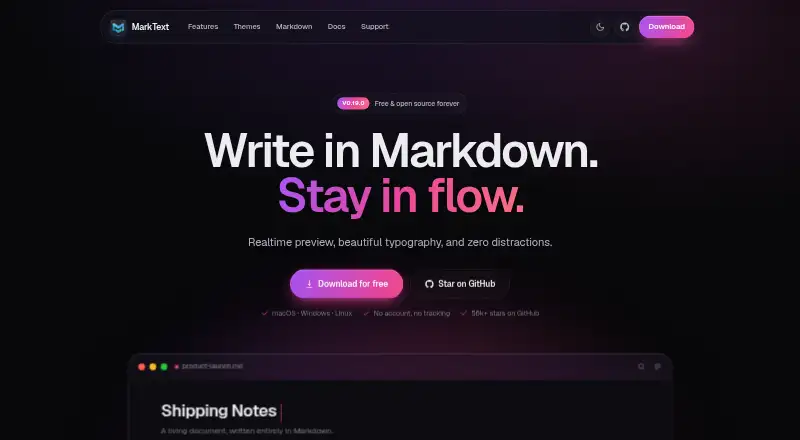
MarkText is a free, open-source desktop Markdown editor that renders formatting as text is entered. It offers WYSIWYG preview, source-code editing, focus mode, and typewriter mode. Supported writing features include tables, KaTeX math, diagrams, footnotes, code highlighting, and YAML, TOML, and JSON front matter. Diagram options listed include Mermaid, Vega, and Vega-Lite. The editor includes 33 light and dark themes, which can also be customized with CSS. Documents can be exported as PDF or self-contained HTML, and local files are supported. MarkText is available for Linux, macOS, and Windows. Installation notes specify macOS 11 or later and Windows 10 or 11, with arm64 and x64 installers for both. Homebrew, Chocolatey, and Winget are also listed as installation options. The homepage says the editor requires no account and has no tracking. It is licensed under MIT, has no subscription, and the project is described as volunteer-built.
Good
- Free and open source under the MIT License.
- Renders Markdown formatting as you type.
- Includes 33 built-in light and dark themes.
- Exports to PDF and self-contained HTML.
- Supports local files and requires no account.
Watch out
- There are no mobile apps.
- Windows requires version 10 or 11.
- macOS requires version 11 or later.
Who it suits
MarkText suits desktop users who write Markdown and want formatting rendered while they type. Its modes and export options may also work for writers who want to switch between visual and source editing.
Verdict
MarkText offers Markdown editing, multiple writing modes, and document export across Linux, macOS, and Windows. Its desktop-only availability and listed operating-system requirements are worth checking before choosing it.
Plans and prices
From MarkText's own pricing page, checked 2 Oct 2026.
| Plan | Price | What it gives you |
|---|---|---|
| Free | Free | Free and open source · no account · no subscription |
The facts
Each one read from MarkText's own pages, with the date it was checked.
What it does
- Audience
- The homepage describes MarkText as a desktop Markdown editor for writing with real-time rendering and minimal distractions.checked 2 Oct 2026
- Diagrams
- The site lists Mermaid, Vega and Vega-Lite for flowcharts and charts.checked 2 Oct 2026
- Editing modes
- The editor offers WYSIWYG preview, source-code mode, focus mode and typewriter mode.checked 2 Oct 2026
- Export
- The site says documents can be exported as PDF or self-contained HTML.checked 2 Oct 2026
- Export formats
- basicchecked 22 Sep 2026
- Integrations
- The repository lists Homebrew, Chocolatey and Winget installation options.checked 2 Oct 2026
- License
- The homepage identifies MarkText as free and open source under the MIT License.checked 2 Oct 2026
- Local file support
- Yeschecked 20 Sep 2026
- Markdown features
- It supports tables, KaTeX math, diagrams, footnotes, code highlighting and YAML, TOML and JSON front matter.checked 2 Oct 2026
- Markdown flavor
- customchecked 20 Sep 2026
- Privacy
- The homepage says MarkText requires no account and has no tracking.checked 2 Oct 2026
- Product
- MarkText is a real-time Markdown editor that renders formatting as you type.checked 2 Oct 2026
- Publishing tools
- Yeschecked 22 Sep 2026
- Publishing workflow
- nonechecked 20 Sep 2026
- Support
- The homepage says the project is built by volunteers and invites users to sponsor development on GitHub.checked 2 Oct 2026
- Themes
- MarkText includes 33 built-in light and dark themes, and themes can be customized with CSS.checked 2 Oct 2026
Money
- Free plan
- Yeschecked 22 Sep 2026
Where it runs
- macOS requirements
- The repository installation notes require macOS 11 or later and provide arm64 and x64 installers.checked 2 Oct 2026
- Mobile apps
- Nochecked 22 Sep 2026
- Platforms
- Downloads are offered for macOS, Windows and Linux.checked 2 Oct 2026
- Supported platforms
- windows,macos,linuxchecked 20 Sep 2026
- Windows requirements
- The repository installation notes require Windows 10 or 11 and provide x64 and arm64 installers.checked 2 Oct 2026
The full review of MarkText
MarkText is a free desktop Markdown editor for people who want formatting rendered as they write, with a way to switch back to source. It is strongest for technical and structured writing on a computer. Its range of Markdown features and document exports is useful, but it has no mobile apps or publishing workflow.
Overview
MarkText’s real-time rendering gives Markdown writers a document-like view without removing access to the underlying syntax: WYSIWYG preview and source-code mode serve different preferences, while focus and typewriter modes offer more controlled ways to work through a passage. Local file support suits writers who want to work with documents on their desktop rather than depend on a publishing service.
The project is free and open source under the MIT License, requires no account, and says it does not track users. Volunteers build it, and the project invites sponsorship on GitHub. That makes the cost and account burden minimal; readers who need a formal publishing workflow or a mobile companion should choose another tool.
Key features
MarkText goes beyond basic prose with tables, footnotes, code highlighting, KaTeX math, and YAML, TOML, and JSON front matter. Mermaid, Vega, and Vega-Lite cover diagrams and charts, making the editor a more compelling option for technical notes and structured documents than a plain text-focused Markdown tool. Its Markdown flavor is custom, so writers who rely on a particular standard should confirm that it suits their workflow.
Thirty-three built-in light and dark themes provide a range of starting points, and CSS customization gives users control beyond those presets. This is useful for writers who care about their editing environment, though the facts do not indicate shared or centrally managed theme settings.
Documents can be exported as PDF or self-contained HTML. Those formats make it practical to hand off a finished document, but MarkText has no publishing workflow, so users looking to publish directly from the editor will need another step or another product.
Pricing
The Free plan costs nothing and includes free and open-source software, no account, and no subscription. There is no free trial because there is no paid tier to trial. No seat or usage caps are specified for the plan. This is a straightforward fit for individual writers who want a desktop Markdown editor without recurring charges; users should not expect a paid support tier, as the project is volunteer-built and instead invites sponsorship through GitHub.
Platforms
MarkText is available for Linux, macOS, and Windows, with no mobile apps. The installation notes require macOS 11 or later and Windows 10 or 11; installers are provided for arm64 and x64 on both systems. Homebrew, Chocolatey, and Winget are also listed as installation options. The desktop coverage is broad, but writers who switch to a phone or tablet cannot continue in a MarkText mobile app.
Who it's for
MarkText is a good fit for desktop writers who prefer live-rendered Markdown, need technical document features such as math, diagrams, code highlighting, or front matter, and want local files with PDF or HTML export. Its free, account-free setup also suits people who want to avoid a subscription. It is a weaker choice for teams that need a specific Markdown standard, users who need to publish from the editor, and anyone who needs mobile editing.
Pros and cons
- Pro: Multiple editing modes let writers choose between rendered editing, source control, and more focused writing views.
- Pro: Support for math, diagrams, code highlighting, tables, footnotes, and structured front matter serves technical and documentation work.
- Pro: Free, open-source software with local file support, no account requirement, and no tracking makes it a low-friction desktop option.
- Con: The custom Markdown flavor may not suit workflows that depend on a particular Markdown standard.
- Con: No publishing workflow means finished work must be handled elsewhere for publication.
- Con: No mobile apps limits editing to supported desktop platforms.
- Con: Volunteer development may not meet the expectations of users seeking a paid support arrangement.
Alternatives
StackEdit is the alternative to consider if a web-based Markdown editor is a better fit than a desktop app; it is free and open source.
HackMD suits readers looking for a web-based, freemium option with a free plan that supports up to three teammates, among other stated limits.
HedgeDoc is worth considering when a self-hosted or web option is preferable; it is free and open source under AGPL 3.0.
Ghostwriter is another free, open-source desktop option for Linux, macOS, and Windows.
Dillinger may suit writers who prefer a web editor; its free plan has no signup, paywall, or usage limits.
Zettlr is a free, open-source desktop alternative for Linux, macOS, and Windows.
Markra is an option for readers who want web access as well as desktop platforms; its core features are free, while AI features require a configured provider.
Muesli offers another free option across web, desktop, and self-hosted platforms, and is open source under AGPL-3.0.
For more choices, browse Markdown editors or Writing Apps.
Verdict
Choose MarkText if you want a free desktop Markdown workspace that combines live rendering with source access and useful support for technical documents. Its strongest reasons to choose it are the breadth of its Markdown features, local-file workflow, and PDF or self-contained HTML export. Look elsewhere if mobile editing or direct publishing is essential, or if your work depends on a specific Markdown standard.
Getting started
- Open https://marktext.me/
- Download the installer for Windows, macOS, or Linux
- Use Windows 10 or 11, or macOS 11 or later where applicable
- Alternatively install through Homebrew, Chocolatey, or Winget
- Open a local Markdown file or create a document
- Choose an editing mode and theme, then export to PDF or self-contained HTML
Questions
How much does MarkText cost?
MarkText is free and open source. The Free plan costs nothing and has no subscription.
Which operating systems are supported?
MarkText runs on Linux, macOS, and Windows. Installation notes specify macOS 11 or later and Windows 10 or 11.
Does MarkText require an account?
No. The homepage says MarkText requires no account and has no tracking.
What files can it export?
Documents can be exported as PDF or self-contained HTML.
Is MarkText open source?
Yes. It is released under the MIT License and described as free and open source.
Does it have mobile apps?
No. The listed platforms are desktop systems, and mobile apps are not provided.