
Markra
Markra is a local-first, open-source Markdown workspace with native AI review, available as a desktop app and web editor.
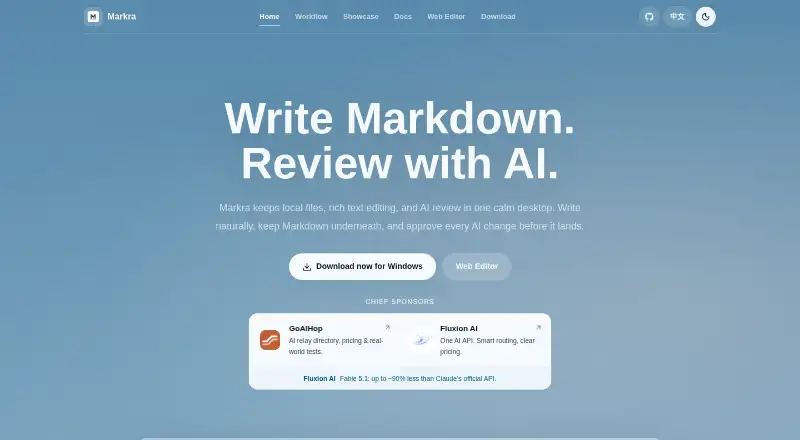
What Markra is
Markra is a local-first, open-source Markdown workspace with native AI review, available as a desktop app and web editor. It supports both WYSIWYG and source editing, with inline rendering for links, images, tables, tasks, callouts, code, math, and Mermaid diagrams. You can open local files or folders and keep files, tabs, and editing together; documents remain ordinary .md files, and writing does not require an account. AI can answer questions, rewrite or summarize text, and propose edits, but changes require user approval. AI features need at least one configured provider, which can be a cloud service, Ollama, or an OpenAI-compatible endpoint. Provider API keys and custom headers are stored in local settings, and exported settings may include them. Notes can optionally sync through WebDAV, which preserves conflict copies. Desktop downloads are available for macOS on Apple Silicon and Intel, Windows, and Linux. Desktop exports include HTML, PDF, and Pandoc formats when configured; the web editor supports HTML download and browser print or PDF. The Free plan costs nothing.
Good
- Writing Markdown does not require an account.
- Supports WYSIWYG and source editing.
- AI changes require user approval.
- Desktop versions support macOS, Windows, and Linux.
Watch out
- AI features require a configured provider.
- Exported settings can include provider keys and custom headers.
- WebDAV is the listed notes sync provider.
Who it suits
Markra suits people writing notes, drafts, product documentation, research writing, or technical documents in Markdown. It may appeal to users who want local files and AI-assisted review, provided they configure an AI provider for those features.
Verdict
Markra combines local Markdown editing with optional AI review and multiple export paths. Consider the provider setup and local credential handling before enabling AI features.
Plans and prices
From Markra's own pricing page, checked 29 Sep 2026.
| Plan | Price | What it gives you |
|---|---|---|
| Free | Free | Core features are free to use · AI features require a configured provider |
The facts
Each one read from Markra's own pages, with the date it was checked.
Where it runs
- AI approval
- AI changes require user approval before being appliedchecked 28 Sep 2026
- Desktop platforms
- Desktop downloads are available for macOS (Apple Silicon and Intel), Windows, and Linux.checked 29 Sep 2026
- macOS support
- Available for macOS on Apple Siliconchecked 28 Sep 2026
What it does
- AI interface
- Showcase includes an inline command and AI agentchecked 28 Sep 2026
- AI providers
- Markra supports cloud providers, local providers such as Ollama, and OpenAI-compatible endpoints; AI features require at least one configured provider.checked 29 Sep 2026
- AI review
- AI can polish, rewrite, summarize, translate, and propose document edits that users can preview, accept, reject, or copy.checked 29 Sep 2026
- Cloud sync
- Yeschecked 20 Sep 2026
- Credentials
- Provider API keys and custom headers are stored in local Markra settings, and exported settings can include them.checked 29 Sep 2026
- Daily workflow
- Write a note, review it with AI, keep related files nearby, then continue with Markdownchecked 28 Sep 2026
- Document types
- Supports daily notes, drafts, and long-form documentschecked 28 Sep 2026
- Editing mode
- WYSIWYG Markdown editing with rich text supportchecked 28 Sep 2026
- Export
- The desktop app can export to HTML, PDF, and Pandoc formats when configured; the Web Editor supports HTML download and browser print/PDF.checked 29 Sep 2026
- Export formats
- HTML,PDF,DOCX,EPUB,LaTeXchecked 20 Sep 2026
- Integrations
- Built-in provider families include OpenAI, Anthropic, Google Gemini, DeepSeek, Mistral, Groq, OpenRouter, Together.ai, Qwen, Xiaomi MiMo, Volcengine Ark, xAI, Azure OpenAI, and Ollama.checked 29 Sep 2026
- Interface style
- The interface is designed to stay light and calmchecked 28 Sep 2026
- Local data
- Markra does not require an account to write Markdown, keeps files as ordinary .md files, and sends AI requests only to the provider the user configures.checked 29 Sep 2026
- Local files
- Can open files or folders and keep the workspace portablechecked 28 Sep 2026
- Local file support
- Yeschecked 20 Sep 2026
- Markdown behavior
- Keeps Markdown underneath while allowing natural writingchecked 28 Sep 2026
- Markdown editing
- It supports WYSIWYG and source editing, with inline rendering for links, images, tables, tasks, callouts, code, math, and Mermaid diagrams.checked 29 Sep 2026
- Plain Markdown
- Documents remain useful as plain Markdownchecked 28 Sep 2026
- Pricing information
- The page mentions pricing through a sponsor description but gives no Markra pricechecked 28 Sep 2026
- Product
- Markra is a local-first, open-source Markdown editor with native AI review.checked 29 Sep 2026
Money
- Free plan
- Yeschecked 20 Sep 2026