Mobile Worker
Mobile Worker is a field operations app for commercial and technical teams.
What Mobile Worker is
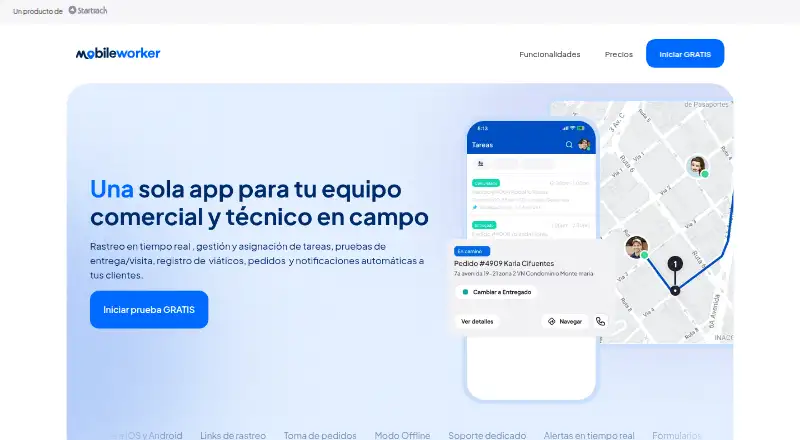
Mobile Worker is a field operations app for commercial and technical teams. It brings task assignment, visits, orders, expenses, and customer updates into a workflow that workers can use on mobile, with synced orders available to a web administrator. Tasks can be brought in from Excel or CSV, or connected through an API, then assigned and planned automatically. The app uses workers’ smartphone GPS for location and trip history, and can flag unexpected stops as well as entry to or exit from geofences. Teams can send customers ETA and status messages by SMS or email and share live tracking links. Workers can record delivery, service, installation, and sales activity with photos, signatures, and other details. They can also place orders using a product catalog and attach receipt photos to expenses. Mobile Worker supports offline work and sends data when connectivity returns. It is available on Android, iOS, and the web, with an API platform also listed. The maker recommends iOS 15 or later and Android 11 or later and says no extra tracking equipment is needed. Plans include a free tier, Pro at $25/user/mo, and a sales-quoted Advanced tier; a 15-day trial is available.
Good
- Imports tasks from Excel or CSV and supports API connections.
- Plans and assigns tasks automatically.
- Tracks location and trip history using workers’ smartphones.
- Sends customer ETA and status updates by SMS or email.
- Records proof of work with photos and signatures.
- Supports offline work and syncs when connectivity returns.
Watch out
- The free plan is limited to five users and 100 tasks monthly.
- Pro costs $25/user/mo.
- The Advanced plan requires contacting sales for a tailored quote.
Who it suits
Mobile Worker suits commercial and technical field teams that need to coordinate tasks, visits, orders, and expenses across workers. It is also relevant to teams that want customer ETA updates, proof of work, GPS-based tracking, or offline data entry.
Verdict
Choose Mobile Worker if your field team needs task planning, customer updates, proof of work, and order or expense entry in one app. The free Básico tier covers small teams with limited monthly tasks; teams needing API integrations or higher support levels should consider Advanced, whose price is quoted by sales.
Plans and prices
From Mobile Worker's own pricing page, checked 15 Oct 2026.
| Plan | Price | What it gives you |
|---|---|---|
| Básico | Free | máximo 5 usuarios · 100 tareas/mes · 100 geocercas · 1 archivo por tarea · 1 GB almacenamiento · 1 supervisor · soporte básico por email · $0/mes por usuario |
| Pro | $25 a month | máximo 15 usuarios · 800 tareas/mes · 800 geocercas · formularios y pruebas ilimitados · rastreo en tiempo real · viáticos · SMS y email · 5 supervisores · alertas · soporte por chat o email · $25/mes por usuario |
| Avanzado | Priced on request | todo lo incluido en Pro · integraciones por API · account manager dedicado · soporte personalizado por chat, email o teléfono · Contacta a nuestro ejecutivo de ventas |
The facts
Each one read from Mobile Worker's own pages, with the date it was checked.
What it does
- Alertas geográficas
- Puede avisar cuando un usuario entra o sale de una geocerca o realiza una parada inesperada.checked 15 Oct 2026
- API
- El proveedor afirma que ofrece una API para que otros sistemas envíen y reciban datos de la plataforma.checked 15 Oct 2026
- Capterra descripción
- Capterra describe el producto como una herramienta para registrar horas, gastos y documentos, enviar tareas y supervisar avances.checked 15 Oct 2026
- Capterra despliegue
- Capterra lista despliegue cloud-based y on-premise, además de soporte telefónico y chat.checked 15 Oct 2026
- Customer updates
- The product can send ETA and status updates by SMS or email and share real-time tracking links with customers.checked 8 Oct 2026
- Data handling
- The privacy policy says information is processed and stored on servers in the United States and may be stored in other countries; it cites Standard Contractual Clauses for certain transfers outside Guatemala.checked 8 Oct 2026
- Disponibilidad mundial
- El proveedor indica que Mobile Worker funciona en cualquier país sin equipos adicionales, usando teléfonos iOS o Android.checked 15 Oct 2026
- Documentación pública
- Las páginas consultadas describen funciones y preguntas frecuentes, pero no muestran documentación técnica pública detallada, SDK ni portal de desarrolladores.checked 15 Oct 2026
- Empresa desarrolladora
- Google Play identifica al desarrollador como Startrack S.A., con dirección en Zona 4 de Guatemala y teléfono +502 5526 3422.checked 15 Oct 2026
- Gestión de tareas
- Las tareas pueden importarse desde Excel o CSV, asignarse y planificarse automáticamente.checked 15 Oct 2026
- Google Play adopción
- La aplicación de Startrack tiene más de 1K descargas en Google Play.checked 15 Oct 2026
- Google Play novedades
- La actualización publicada incorpora rastreo de última milla, rutas de tareas en mapa, pago contra entrega y correcciones de errores.checked 15 Oct 2026
- Integraciones
- El plan Avanzado incluye integraciones por API, mientras que la página también permite importar tareas desde Excel o CSV.checked 15 Oct 2026
- Licencia
- Las páginas consultadas no indican que el software sea open source ni publican una licencia de código.checked 15 Oct 2026
- Limit: conectividad
- Un revisor de G2 se quejó de que no puede acceder a detalles o actualizaciones cuando pierde la conexión de red.checked 15 Oct 2026
- Limit: evidencia limitada
- G2 dice que existen muy pocas reseñas para ofrecer suficiente información de compra.checked 15 Oct 2026
- Live tracking
- The app uses a worker’s smartphone GPS to show location and trip history, and can alert users to unexpected stops or geofence entry and exit.checked 8 Oct 2026
- Modo offline
- Los trabajadores pueden usar la aplicación sin conexión y sincronizar la información cuando recuperan internet.checked 15 Oct 2026
Where it runs
- Apple requisitos
- La aplicación de Startrack es gratuita, solo para iPhone y requiere iOS 15.1 o posterior.checked 15 Oct 2026
- Datos compartidos
- Google Play indica que la aplicación puede compartir ubicación, actividad de la aplicación y otros datos con terceros, y que los datos no se pueden borrar.checked 15 Oct 2026
- Device requirements
- The maker recommends iOS 15 or later and Android 11 or later, and says no additional tracking equipment is needed.checked 8 Oct 2026
- Formularios
- Incluye formularios personalizables para visitas técnicas, instalaciones, entregas y ventas.checked 15 Oct 2026
- GetApp plataformas
- GetApp lista compatibilidad con web, Android e iPhone/iPad y opciones de soporte por email, teléfono, base de conocimiento, chat y foro.checked 15 Oct 2026
- GetApp precio listado
- GetApp muestra un precio inicial de 69.98 por usuario al mes y marca versión gratuita y prueba gratuita.checked 15 Oct 2026
The full review of Mobile Worker
Mobile Worker brings task coordination, customer communication, and field records together for commercial and technical teams. It is a good fit for organizations that need visibility into mobile work without installing dedicated tracking equipment. The free tier is a useful small-team starting point, but its task and seat limits make Pro the more capable option for growing operations.
Overview
The app links incoming work to field execution: tasks can be imported from spreadsheets or connected through an API, then assigned and planned automatically. Workers can record visits and deliveries, enter orders and expenses, and keep working offline until connectivity returns. That joined-up workflow is its main strength; it is focused on field operations rather than broad workforce management.
Smartphone GPS supplies location and trip history, with alerts for unexpected stops and geofence entry or exit. Customers can receive ETA and status messages by SMS or email, as well as real-time tracking links. This can make field activity easier to follow for both dispatchers and customers, without separate tracking hardware.
Key features
- Task planning: Excel and CSV imports provide a practical way to move existing work into the app, while API connections can link customer systems. Automatic assignment and planning can reduce manual coordination, though teams should match their task volume to the plan caps.
- Proof of work: Photos, signatures, and other information can document deliveries, technical visits, installations, and sales. This creates a more complete record of completed work than task status alone.
- Orders and expenses: Mobile users can enter orders from a product catalog and log expenses with receipt photos. Orders sync to the web administrator, connecting field sales or service activity with office oversight.
- Offline operation: Workers can use the app without a connection, and data is sent when connectivity returns. That is useful for field work in areas with unreliable service, although updates will not reach the office until a connection is restored.
- API and equipment: The maker says its API can send and receive data between customer systems and the platform; API integrations are included in Advanced. Tracking relies on workers’ phones, with no extra tracking equipment required. The maker recommends iOS 15 or later and Android 11 or later.
The privacy policy describes encryption for certain personal information and physical and electronic safeguards, while acknowledging that interception cannot be ruled out. Information is processed and stored on servers in the United States and may be stored elsewhere; the policy cites Standard Contractual Clauses for certain transfers outside Guatemala. Organizations with specific data residency or security requirements should assess whether these arrangements suit them.
Pricing
Mobile Worker has a free Básico plan, a per-user Pro plan, and a custom-priced Advanced tier. The free option can support a small operation, but its five-user maximum and 100 tasks per month are meaningful constraints. Pro costs $25 a month, billed at $25/mes por usuario; its 15-user cap and 800 monthly tasks suit larger teams, but organizations exceeding either limit will need another arrangement.
| Plan | Price and limits | Best fit |
|---|---|---|
| Básico | free; billed $0/mes por usuario. Maximum 5 users, 100 tasks/month, 100 geofences, 1 file per task, up to 1GB storage, and 1 supervisor. Basic email support. | Small teams trying a no-cost workflow with modest task volume and limited file needs. |
| Pro | $25 a month; billed $25/mes por usuario. Maximum 15 users and 800 tasks/month, 800 geofences, unlimited forms and proof of delivery, real-time tracking, per diem, SMS and email notifications, 5 supervisors, and chat or email support. | Field teams that need live tracking, customer notifications, and substantially more capacity than Básico. |
| Avanzado | Custom pricing. Includes Pro, API integrations, a dedicated account manager, and personalized chat, email, or phone support. | Organizations that need system integrations or a higher-touch support relationship. |
A 15-day trial is offered. The published plan terms specify monthly billing and per-user rates, but do not state separate renewal terms. Pro is a significant step up from Básico not only in task allowance but also in tracking, notifications, supervisors, and support. Advanced is the route for API integrations, but its custom pricing means teams must contact sales to assess the cost.
Platforms
Mobile Worker is available on Android, iOS, and the web, with an API for integrations. The recommended mobile OS versions are iOS 15 or later and Android 11 or later. The employee mobile app is part of the product.
Who it's for
Mobile Worker is strongest for commercial and technical field teams coordinating visits, documenting work, and keeping customers informed. It is particularly suitable where workers may lose connectivity and where managers want smartphone-based location visibility alongside task and order records. Teams with very low monthly volume can start on Básico; those needing real-time tracking and customer messaging should consider Pro. Teams that need API integrations should assess Advanced pricing. It is less suitable for organizations seeking a broad workforce-management suite rather than a field-operations workflow.
Pros and cons
- Pro: Field work and proof stay connected. Tasks, photos, signatures, orders, and expenses can be handled through one mobile workflow, with orders syncing to the web administrator.
- Pro: Useful visibility without extra hardware. Smartphone GPS, trip history, geofence alerts, and customer tracking links connect dispatch oversight with customer updates.
- Pro: Offline use supports intermittent connectivity. Workers can continue using the app and send data once service returns.
- Con: Básico is tightly capped. Five users, 100 monthly tasks, one file per task, and 1GB of storage can limit a team that grows or needs richer records.
- Con: Pro also has a hard team ceiling. Its 15-user maximum and 800 monthly tasks may rule it out for larger or busier operations.
- Con: API access requires custom-priced Advanced. Teams that need system integration cannot get it on the free or Pro plans.
Alternatives
For a wider category comparison, see Workforce Management Software. The alternatives below serve different needs from Mobile Worker’s field-task focus:
- ZebraDesigner is a better match when the priority is barcode label and tag design and printing, including support for Zebra Link-OS and Link-OS Basic printers; its Essentials 3 plan is free.
- Bannerman may suit companies managing security officers in its qualifying audience: its software is currently free for companies with 5–15 guards in priority and serving at least one listed area.
- Infor Workforce Management is worth considering for buyers seeking a workforce-management product and prepared to contact Infor for sales information.
- GetWFM is a fit for teams seeking web and API-based scheduling, attendance, team management, and time-off tools; its free Team plan supports unlimited employees, with limits of 3 teams, 1 timezone, and 1 month of history.
- ADP WorkForce Suite is an enterprise workforce-management option with quote-based pricing.
- Logile Workforce Management is an enterprise retail workforce-management suite with pricing by quote.
- OnTheJob is another paid option with customized pricing through sales.
- Aspect Workforce uses per-seat pricing tailored to team size and custom quotes.
Verdict
Choose Mobile Worker for a commercial or technical field team that needs task planning, customer updates, location visibility, and documented proof of work in one app. Its offline support and smartphone GPS make it practical for mobile operations without extra tracking equipment. Look elsewhere if your team exceeds Pro’s 15-user limit, needs API integration but cannot accommodate custom pricing, or wants a broader workforce-management suite.
Getting started
- Visit https://www.mobileworkerapp.com/.
- Choose the free Básico plan or review the paid plans.
- Use the 15-day trial if you want to try a plan before committing.
- Set up access on Android, iOS, or the web.
- Import tasks from Excel or CSV, or connect through the API.
Limits worth knowing
Básico supports up to five users, 100 tasks per month, 100 geofences, one file per task, up to 1GB of storage, and one supervisor. Pro costs $25/user/mo and allows up to 15 users and 800 tasks and geofences; Advanced pricing is sales-quoted.
Questions
Is there a free plan?
Yes. Básico is free at $0 per user per month and supports up to five users and 100 tasks monthly.
How much does Pro cost?
Pro costs $25/user/mo. It supports up to 15 users and 800 tasks and geofences.
Is there a free trial?
Yes, a 15-day trial is listed.
Which platforms does Mobile Worker support?
Android, iOS, and web are listed, along with an API platform. The maker recommends iOS 15 or later and Android 11 or later.
Does the product offer API integrations?
Yes. API integrations are listed with Advanced, which also includes Pro features.
Who makes Mobile Worker?
The listed website is https://www.mobileworkerapp.com/. The privacy policy says information is processed and stored on servers in the United States and may also be stored in other countries.
Alternatives to Mobile Worker
- 1

Workforce.com
AndroidiOSWebAPI7.9From C$12.80 a month - 2
Push Operations
AndroidiOSWebAPI7.6From $6 a month - 3

Aspect Workforce
AndroidiOSWebAPI7.4From $1 a month - 4

Bannerman
Free planAndroidiOSWebAPI7.3Free plan - 5

GetWFM
Free planWebAPI6.9Free plan - 6

Infor Workforce Management
AndroidiOSWebAPI6.9