
mitmproxy
mitmproxy is a free set of tools for inspecting and changing HTTP/1, HTTP/2, WebSocket, and SSL/TLS traffic as it passes through a proxy.
What mitmproxy is
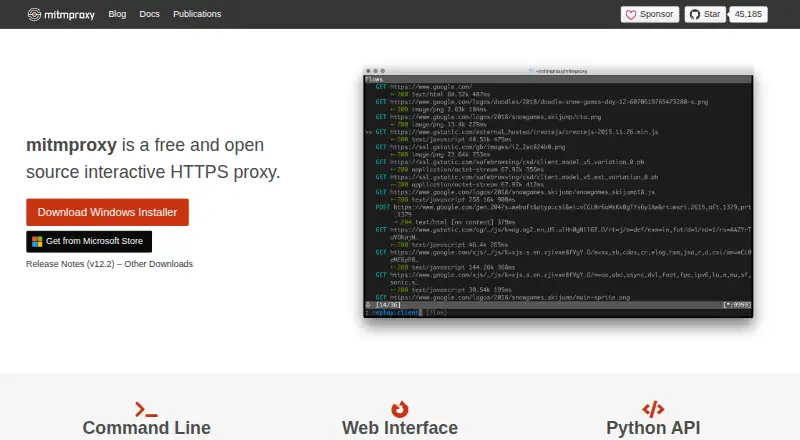
mitmproxy is a free set of tools for inspecting and changing HTTP/1, HTTP/2, WebSocket, and SSL/TLS traffic as it passes through a proxy. It can intercept HTTP and HTTPS requests and responses for editing, save conversations for later analysis, and replay client requests or recorded server responses. Users can choose an interactive console, a browser-based GUI, or non-interactive terminal output through mitmproxy, mitmweb, and mitmdump. Proxy modes include regular, local capture, WireGuard, reverse, transparent, TUN, upstream, SOCKS5, and DNS. Python addons can respond to events, change proxy behavior, and expose commands. WireGuard mode can capture traffic from external devices or individual Android apps. The tool includes a certificate authority that creates interception certificates as needed. Installation options include Windows, macOS, Linux, PyPI, and official Docker images. The project says it does not phone home or check for updates. Documentation notes that HTTP/3 client replay is currently broken and that dependencies in precompiled binaries and Docker images are frozen at release rather than updated in place.
Good
- Edits intercepted HTTP and HTTPS requests and responses
- Saves conversations and replays traffic
- Offers console, browser, and terminal interfaces
- WireGuard mode can capture Android app traffic
- Python addons can customize proxy behavior
Watch out
- HTTP/3 client replay is currently broken
- Bundled dependencies cannot be updated in place
- Documentation directs support questions to GitHub
Who it suits
mitmproxy suits developers and other technical users who need to inspect, edit, record, or replay proxied traffic. Its Python addons may also suit users who want to customize proxy behavior.
Verdict
mitmproxy offers several interfaces and proxy modes for working with HTTP and related traffic. Before choosing precompiled binaries or Docker images, consider their frozen dependencies and the documented HTTP/3 replay limitation.
Plans and prices
From mitmproxy's own pricing page, checked 15 Oct 2026.
| Plan | Price | What it gives you |
|---|---|---|
| Free | Free | Open-source software · no paid tier stated |
| mitmproxy | Free | Free and open source interactive HTTPS proxy |
The facts
Each one read from mitmproxy's own pages, with the date it was checked.
What it does
- Addon options
- Third-party addons can define typed options that work through the shared configuration file and interactive editors.checked 15 Oct 2026
- Authentication replay limit
- Sticky authentication supports HTTP Basic replay, while HTTP Digest replay is not supported.checked 15 Oct 2026
- Binary maintenance risk
- Bundled binary dependencies are frozen per release and are not updated in place, so users are told to update regularly.checked 15 Oct 2026
- Binary security limit
- Dependencies in precompiled binaries and Docker images are frozen at release and cannot be updated in place; the documentation recommends updating regularly.checked 30 Sep 2026
- Certificate handling
- Mitmproxy includes a certificate authority implementation that generates interception certificates on the fly.checked 30 Sep 2026
- Customization
- Python addons can respond to events to change proxy behavior, and can expose commands for users to invoke.checked 30 Sep 2026
- Documentation
- The documentation includes tutorials, concepts, installation guidance, feature references, options and addon examples.checked 15 Oct 2026
- Ecosystem
- The official site highlights community addons, mitmproxy2swagger for OpenAPI conversion and kubetap for Kubernetes service proxying.checked 15 Oct 2026
- Independent review availability
- A 2026 HTTP debugging comparison reports no comparable mainstream product-review sample for mitmproxy and therefore adds no review-based satisfaction claim.checked 15 Oct 2026
- Independent review score
- Legit.Show reports a public-surface production-readiness score of 68 out of 100 measured on 2026-10-08.checked 15 Oct 2026
- Installation
- Official installation paths cover macOS Homebrew, Linux binaries, Windows installers, PyPI, WSL and Docker images.checked 15 Oct 2026
- Interfaces
- The project provides a terminal interface called mitmproxy, a headless command-line tool called mitmdump and a browser interface called mitmweb.checked 15 Oct 2026
- Licence
- The repository code is released under the permissive MIT licence.checked 15 Oct 2026
- Limit: certificate pinning
- Independent reviews report that applications using certificate pinning reject the proxy certificate and require separate bypass work such as instrumentation or repackaging.checked 15 Oct 2026
- Limit: large bodies
- Official documentation warns that enabling streaming removes body visibility and prevents body modifications.checked 15 Oct 2026
- Limit: mobile trust changes
- An independent review notes that modern Android and iOS apps may ignore user-installed CAs, requiring debugging changes, instrumentation or rooted/jailbroken devices.checked 15 Oct 2026
- Limit: setup learning curve
- An independent review says the README omits invocation and certificate setup examples, leaving newcomers to consult the deeper documentation.checked 15 Oct 2026
- Mobile traffic
- WireGuard mode can capture traffic from external devices or individual Android apps.checked 30 Sep 2026
- Praise: programmability
- An independent review highlights the Python addon API for rewriting requests, logging traffic and automating security tests.checked 15 Oct 2026
- Praise: protocol coverage
- An independent review credits mitmproxy with HTTP/1, HTTP/2, HTTP/3, WebSocket and TLS interception support.checked 15 Oct 2026
- Praise: three front ends
- An independent technical review praises the combination of console, command-line and web interfaces for serving interactive, automated and graphical workflows.checked 15 Oct 2026
- Project origin
- The project publication citation dates mitmproxy to 2010 onward.checked 15 Oct 2026
The company
- Company founders
- The project identifies Aldo Cortesi as founder and lists Maximilian Hils and Thomas Kriechbaumer among core developers.checked 15 Oct 2026
- Project team
- The about page names Aldo Cortesi as project founder and lists Maximilian Hils and Thomas Kriechbaumer among the developers.checked 30 Sep 2026
The full review of mitmproxy
Overview
mitmproxy is a free toolkit for intercepting and working with HTTP and WebSocket traffic, including HTTPS. It is best suited to developers and other technical users who need to inspect or alter network exchanges.
It is a particularly useful choice when requests and responses need to be changed in transit, saved, or replayed. Readers looking for a general-purpose proxy service rather than traffic inspection and control should look elsewhere.
Key features
Inspect, edit, and replay exchanges
mitmproxy can intercept HTTP and HTTPS requests and responses and modify them as they pass through the proxy. Breakpoint rules allow selective pauses, while replay and response mocking support workflows that need to revisit exchanges or test against a simulated response. WebSocket inspection extends its reach beyond conventional request-response traffic. These controls are valuable for debugging, but they suit users comfortable configuring proxies and working with intercepted traffic.
HTTP conversations can be saved for later analysis, and client requests or recorded server responses can be replayed. HTTP/3 client replay is currently broken, however, and HTTP/3 support has been extensively tested only with cURL. Teams whose work depends on broader HTTP/3 replay should treat that limitation as decisive.
Interfaces and modes
The interactive console, browser-based mitmweb interface, and non-interactive mitmdump output cover different working styles, from inspecting traffic interactively to terminal-oriented workflows. Proxy modes include regular, local capture, WireGuard, reverse, transparent, TUN, upstream, SOCKS5, and DNS. That breadth makes mitmproxy adaptable to varied network setups, though it also puts configuration choices in the user's hands.
Addons and certificates
Python addons can react to events, change proxy behavior, and expose commands for users to invoke. This makes the tool extensible for workflows that go beyond its built-in controls, especially for users able to write Python. Its certificate authority generates interception certificates on the fly, enabling SSL/TLS traffic inspection.
WireGuard mode can capture traffic from external devices or individual Android apps, a practical option for mobile traffic analysis. The project says mitmproxy does not phone home or check for updates.
Pricing
mitmproxy is free and open source. The mitmproxy plan costs nothing and includes request and response editing, breakpoint rules, traffic replay, response mocking, WebSocket inspection, and proxy chaining. There are no paid tiers or seat and quota limits to weigh in this plan.
Installation options include Windows, macOS, and Linux instructions, PyPI installation, and official Docker images. One operational trade-off affects precompiled binaries and Docker images: their dependencies are frozen at release and cannot be updated in place. The project recommends updating regularly, so users of these packages need to keep up with releases rather than expect dependency updates within an installed build.
Platforms
mitmproxy supports Linux, macOS, Windows, web, and self-hosted use. The web interface is mitmweb; the project also documents installation for the three desktop operating systems and offers PyPI installation and Docker images.
Who it's for
Developers, security practitioners, and technically confident users who need visibility into HTTP traffic, in-flight editing, or replay will find a capable set of tools in one free package. Python addon support makes it a better fit for users who want to customize proxy behavior. WireGuard capture can also serve workflows involving external devices or individual Android apps.
It is a weaker fit for users who want a managed service, a minimal setup, or dependable HTTP/3 client replay. Those requirements point away from mitmproxy's strengths or run into its documented limitations.
Pros and cons
- Pros: Three interfaces let users choose interactive console, browser GUI, or non-interactive terminal output.
- Pros: Broad proxy modes, traffic editing, recording, replay, and response mocking cover many inspection workflows without a paid plan.
- Pros: Python addons and WireGuard capture provide routes to custom behavior and mobile traffic analysis.
- Cons: HTTP/3 client replay is broken, and HTTP/3 testing has been extensive only with cURL.
- Cons: Dependencies in precompiled binaries and Docker images cannot be updated in place, so users need to update regularly.
- Cons: Proxy configuration and certificate interception make it a tool for technical users, not a turnkey service.
Alternatives
Privoxy is another free option for Linux, macOS, Windows, and self-hosted use; consider it when a free proxy tool is a better match than mitmproxy's traffic-inspection workflow.
3proxy is freeware and open source for Linux, macOS, Windows, and self-hosted use. Choose it when that general-purpose platform fit matters more than mitmproxy's editing and replay controls.
Squid is free, self-hosted proxy software for Linux, macOS, and Windows, with third-party commercial support potentially available. It is a reasonable alternative when self-hosted proxy software is the priority.
Cloudflare Gateway offers a free plan for up to 50 users with standard log retention of up to 24 hours, alongside a $7 a month pay-as-you-go plan billed monthly. Consider it when those plan terms and its Android, iOS, Linux, macOS, web, or Windows platform coverage fit better.
Skyhigh Private Access is a paid alternative with custom pricing.
Zscaler Private Access is a paid alternative with no free plan and custom pricing.
Check Point Harmony SASE is a paid alternative with a 30-day trial before a license is required.
iboss Cloud is a paid alternative with custom pricing.
Verdict
Choose mitmproxy if you need free, configurable control over HTTP traffic, including editing, replay, and multiple proxy modes. Its interfaces and extensibility make it a strong toolkit for technical workflows. Look elsewhere if you need reliable HTTP/3 client replay or cannot accommodate regular updates to bundled binaries and Docker images.
Getting started
- Visit https://www.mitmproxy.org/
- Choose an installation route for Windows, macOS, or Linux, or use PyPI or an official Docker image
- Select mitmproxy, mitmweb, or mitmdump for the interface you want
- Choose a proxy mode for the traffic you need to handle
- Use the certificate authority for interception certificates when handling SSL/TLS traffic
Limits worth knowing
The free plan is listed as free. HTTP/3 client replay is currently broken, and precompiled binary and Docker dependencies are frozen at release and cannot be updated in place.
Questions
How much does mitmproxy cost?
The listed mitmproxy plan is free, and the pricing model is free.
Which platforms can I use?
The listed platforms are Linux, macOS, self-hosted, web, and Windows. Installation is documented for Windows, macOS, and Linux, with PyPI and official Docker images also available.
Can mitmproxy inspect and replay traffic?
It can intercept and modify HTTP and HTTPS requests and responses, record conversations, and replay client requests or recorded server responses.
Does it support Android device traffic?
WireGuard mode can capture traffic from external devices or individual Android apps.
What is the HTTP/3 limitation?
HTTP/3 client replay is currently broken. The documentation says HTTP/3 support has been extensively tested only with cURL.
Alternatives to mitmproxy
- 1

Cloudflare Gateway
Free planAndroidiOSWebAPI8.3$7 usage-based - 2
Privoxy
Free planOpen sourceLinuxmacOSSelf-hostedWindows7.4Free plan - 3

Check Point Harmony SASE
AndroidiOSWebLinux7.3 - 4

Prisma Access
AndroidiOSWebAPI7.3 - 5

3proxy
Free planOpen sourceLinuxmacOSSelf-hostedWindows7.2Free plan - 6

Apache Traffic Server
Free planOpen sourceAPILinuxmacOSSelf-hosted7.2Free plan