Miniforge
Miniforge is a free installer for conda and mamba, including both tools and their dependencies.
What Miniforge is
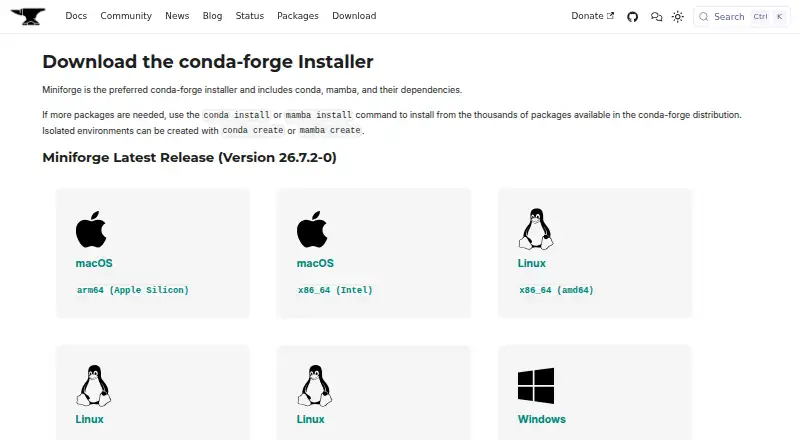
Miniforge is a free installer for conda and mamba, including both tools and their dependencies. It sets conda-forge as the default and only package channel for the base environment, where thousands of packages are available. Users can create isolated environments with either conda create or mamba create, and install other Python versions separately; the latest installers use Python 3.14 in the base environment. Installers support Windows, macOS, and Linux, with current builds for Windows x86_64, macOS x86_64 and arm64, and Linux x86_64, aarch64, and ppc64le. Minimum requirements are Windows 10, macOS 11, or Linux glibc 2.17 or later for the listed architectures. Apple Silicon and Linux RISC-V builds are experimental. Batch installation instructions cover non-interactive use such as CI pipelines. On Windows, commands are available in the Miniforge Prompt by default; adding Miniforge to PATH is optional but may cause software conflicts. The project is BSD 3-Clause licensed and supports lockfiles, environment management, and private registries.
Good
- Free installer with conda and mamba included
- Conda-forge provides thousands of packages
- Creates isolated conda or mamba environments
- Supports Windows, macOS, and Linux
- Includes batch installation guidance for CI
Watch out
- Apple Silicon and Linux RISC-V builds are experimental
- Adding Miniforge to PATH may cause conflicts
- Homebrew installation is not recommended
- Linux requires glibc 2.17 or later
Who it suits
Miniforge suits developers and administrators who need conda or mamba environments across Windows, macOS, or Linux. It also fits CI workflows and systems using supported CPU architectures.
Verdict
Miniforge provides a free, cross-platform entry point to conda and mamba with conda-forge configured by default. Check the platform requirements and Windows PATH guidance before installing.
The facts
Each one read from Miniforge's own pages, with the date it was checked.
What it does
- Architecture focus
- The project emphasizes support for x86_64, ppc64le, and aarch64 architectures, including Apple Silicon.checked 5 Oct 2026
- Architecture support
- The project says it emphasizes support for x86_64, ppc64le, and aarch64 CPU architectures, including Apple Silicon.checked 4 Oct 2026
- Base Python
- The project README says the latest installers have Python 3.14 in the base environment and that other Python versions can be installed in separate environments.checked 4 Oct 2026
- CI testing
- The project says installers are tested in CI against a range of Linux distributions matching the installer architecture.checked 5 Oct 2026
- CI use
- The README provides batch installation instructions for non-interactive use, including CI pipelines.checked 4 Oct 2026
- Default package source
- Packages in the base environment come from conda-forge, which is configured as the default and only channel.checked 5 Oct 2026
- Environments
- Users can create isolated environments with conda or mamba and install packages from conda-forge.checked 5 Oct 2026
- Experimental builds
- The README says Apple Silicon and Linux RISC-V builds are experimental and have not received the same testing as other platforms.checked 5 Oct 2026
- Included tools
- The installer includes conda, mamba, and their dependencies.checked 5 Oct 2026
- Installation limit
- The project does not recommend installing Miniforge through Homebrew because repackaging can cause incompatibilities it does not test.checked 5 Oct 2026
- License
- The repository identifies Miniforge as BSD 3-Clause licensed.checked 5 Oct 2026
- Minimum requirements
- The README lists Windows 10 or later, macOS 11 or later, and Linux glibc 2.17 or later for x86_64, aarch64, and ppc64le installers.checked 5 Oct 2026
- Package availability
- The download page says thousands of packages are available in the conda-forge distribution.checked 4 Oct 2026
- Package source
- Packages in the base environment come from the conda-forge channel, which is set as the default and only channel.checked 4 Oct 2026
- Project scope
- The project describes Miniforge as an entry point to the conda and mamba commands and says package-specific issues should be reported to the associated feedstock.checked 4 Oct 2026
- Purpose
- Miniforge is a minimal installer for conda and mamba designed for conda-forge.checked 5 Oct 2026
- Signing
- The macOS PKG installers are signed and notarized with NumFOCUS certificates.checked 5 Oct 2026
- Support
- The conda-forge documentation directs users with bugs or questions to GitHub issues or the Zulip chatroom.checked 4 Oct 2026
- Supported systems
- Current installers are listed for Windows x86_64, macOS x86_64 and arm64, and Linux x86_64, aarch64, and ppc64le.checked 5 Oct 2026
- Testing
- The README says installers are tested in CI against distributions including CentOS 7, Debian 11–13, and Ubuntu 18.04–24.04.checked 4 Oct 2026
Where it runs
- macOS installer security
- The project says its macOS PKG installers are signed and notarized with NumFOCUS certificates.checked 4 Oct 2026
- Platforms
- The download page lists installers for Windows x86_64, macOS arm64 and x86_64, and Linux x86_64, aarch64, and ppc64le.checked 4 Oct 2026
- Windows limitation
- The README says Windows commands are available in the Miniforge Prompt by default and warns that adding Miniforge to PATH may cause serious software conflicts.checked 4 Oct 2026
- Windows usage
- With the default Windows installer choices, conda and mamba are available in the Miniforge Prompt; adding Miniforge to PATH is optional and is not selected by default due to potential software conflicts.checked 5 Oct 2026