MineBackup
MineBackup is a free, open-source program for backing up and restoring Minecraft saves, and it can also back up any folder on a PC.
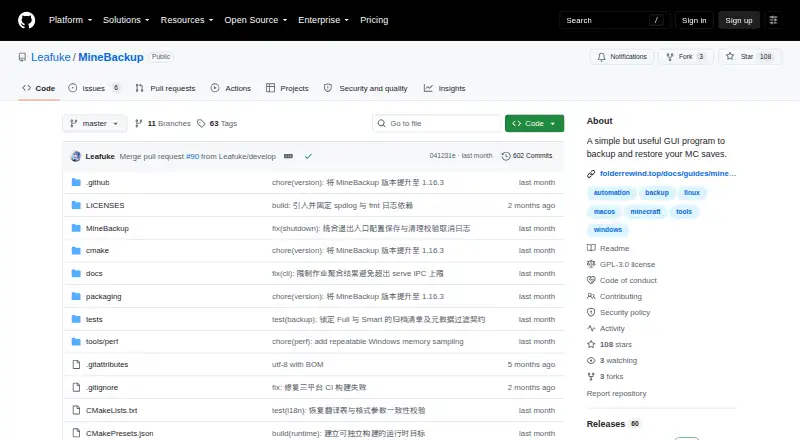
What MineBackup is
MineBackup is a free, open-source program for backing up and restoring Minecraft saves, and it can also back up any folder on a PC. It supports Full and Smart incremental backups, with Smart mode intended to reduce time and storage use. Restores can come from a local backup or a .7z archive, and compression uses a built-in 7-Zip core. A hotkey can trigger a live backup, while exit detection can start one when Minecraft closes. First-run setup can discover supported Minecraft locations and launcher data, including HMCL, Prism Launcher, and Modrinth App. KnotLink lets MineBackup communicate with mods or other tools; hot restore requires the companion mod, version 3.0.0 or newer. Its headless CLI can create backups, verify archive chains, and perform confirmed cold restores. Server packages are available for Windows and Linux, with guidance for scheduled jobs through systemd or Task Scheduler. Desktop releases cover Windows x64, Linux x86_64, and Apple Silicon macOS 15 or later. The project uses GPL-3.0. The release notes warn that incremental detection may not catch changes that preserve both file size and modification time.
Good
- Supports Full and Smart incremental backups.
- Can back up any folder on a PC.
- Offers a headless CLI for server use.
- Can trigger backups by hotkey or Minecraft exit.
Watch out
- Incremental detection may miss certain same-size, same-time changes.
- Hot restore requires the companion mod.
- Apple Silicon macOS release requires macOS 15 or later.
- Windows Service Mode is deprecated and cannot be newly installed.
Who it suits
It suits Minecraft players who want local backups of saves, or users who also need to back up other PC folders. Server operators can use the headless CLI packages for Windows or Linux.
Verdict
MineBackup offers several backup and restore paths, including a headless CLI and automatic triggers. Check its incremental-detection limit and platform requirements when choosing how to protect saves.
Plans and prices
From MineBackup's own pricing page, checked 9 Oct 2026.
| Plan | Price | What it gives you |
|---|---|---|
| MineBackup | Free | Free software; no paid plans or usage limits stated |
The facts
Each one read from MineBackup's own pages, with the date it was checked.
What it does
- Automation
- Alt+Ctrl+S triggers a live backup, and DetectOnExit can back up when Minecraft closes.checked 9 Oct 2026
- Backup modes
- Smart Mode creates Git-like incremental backups to save time and storage.checked 9 Oct 2026
- Backup types
- It supports Full and Smart incremental backups, with Smart backups intended to save time and storage.checked 8 Oct 2026
- CLI
- The headless CLI can create Full or Smart backups, verify archive chains, and perform confirmed cold restores without starting the GUI.checked 8 Oct 2026
- Compression
- The program uses a built-in 7-Zip core for compression.checked 8 Oct 2026
- Compression and restore
- The app includes a 7-Zip core and can restore from a .7z file or a local backup.checked 9 Oct 2026
- Integration
- KnotLink lets MineBackup communicate with mods or other tools, and hot restore requires the MineBackup companion mod.checked 8 Oct 2026
- Integrations
- KnotLink lets MineBackup communicate with mods or other tools to request a save before backup; the companion mod must be version 3.0.0 or newer.checked 9 Oct 2026
- Integrity checks
- The README instructs users to verify downloaded assets against SHA256SUMS, and says the macOS build is not notarized.checked 9 Oct 2026
- Launcher discovery
- The setup wizard can discover game directories for HMCL, Prism Launcher, Modrinth App, NetEase Minecraft on Windows, and PCL2/PCLCE.checked 9 Oct 2026
- License
- The repository identifies its license as GPL-3.0.checked 9 Oct 2026
- Limit
- The release notes say changes that preserve both file size and modification time are not guaranteed to be detected by incremental change detection.checked 8 Oct 2026
- Limits
- Windows Service Mode is deprecated and cannot be newly installed or started.checked 9 Oct 2026
- Logging
- Logging defaults to an Info-level rotating log, and the app can export diagnostics with known paths redacted.checked 9 Oct 2026
- Maintenance
- The maker says MineBackup will continue receiving critical bug and security fixes, but updates may lag behind FolderRewind, its second-generation product.checked 9 Oct 2026
- Purpose
- MineBackup is a GUI program for backing up and restoring Minecraft saves, and it can also back up any folder on a PC.checked 9 Oct 2026
- Restore
- Users can restore from a .7z archive or a local backup.checked 8 Oct 2026
- Security and integrity
- The README instructs users to verify downloads against SHA256SUMS; the latest release says its commit has GitHub’s verified signature.checked 8 Oct 2026
- Server CLI
- The headless minebackup-cli can create Full or Smart backups, verify archive chains, and perform confirmed cold restores; server assets are offered for Windows and Linux.checked 9 Oct 2026
- Server use
- The release includes CLI server packages and documents using systemd on Linux or Task Scheduler on Windows for scheduled jobs.checked 8 Oct 2026
- Support
- The project directs users to GitHub Issues to report bugs or request features.checked 9 Oct 2026
Where it runs
- Desktop platforms
- The project lists Windows x64, Linux x86_64, and Apple Silicon macOS 15 or later; Linux downloads include a deb package and AppImage.checked 9 Oct 2026
- Platforms
- The project lists Windows x64, Linux x86_64, and macOS 15 or later on arm64; its macOS build is not notarized.checked 8 Oct 2026
The full review of MineBackup
Overview
MineBackup is a free, open-source backup tool for Minecraft worlds and other PC folders. It is best suited to players who want local control and server operators comfortable with command-line jobs. Its strongest case is the combination of a GUI and headless CLI; Smart incremental detection has an important caveat.
Backups stay on local storage, and restores operate at world level. MineBackup supports both Minecraft editions, but it is not a remote backup service or a way to schedule backups from the desktop app.
Key features
- Full and Smart backups: Smart Mode uses Git-like incrementals to reduce backup time and storage. It may miss changes that leave both file size and modification time unchanged, so users whose workflow can produce those changes should favor Full backups or verify their archives rather than treating Smart detection as complete protection.
- Automatic capture: A hotkey can start a live backup, and exit detection can trigger one when Minecraft closes. These are useful safeguards against forgotten manual backups, but they do not replace scheduled desktop jobs.
- Save coordination: KnotLink can let mods or other tools request a save before backup. Hot restore requires the MineBackup companion mod, version 3.0.0 or newer, adding a dependency for that workflow.
- Restore and compression: MineBackup uses a built-in 7-Zip core and can restore from a .7z archive or local backup. That gives users two practical restore sources without requiring a separate compression tool.
- Launcher discovery: First-run setup can find supported Minecraft locations and launcher data, including HMCL, Prism Launcher, and Modrinth App. This can reduce setup work for users with supported launchers.
- Headless operation: The CLI can create Full or Smart backups, verify archive chains, and perform confirmed cold restores without opening the GUI. Server packages support scheduled jobs through systemd on Linux or Task Scheduler on Windows; Windows Service Mode is deprecated and cannot be newly installed or started.
Pricing
MineBackup costs nothing. It is GPL-3.0 open-source software, with no paid plans or stated usage caps. There is no free trial because the software is free. The trade-off is that users handle their own local storage and should account for the incremental-detection limitation when choosing Smart backups.
Platforms
Desktop releases support Windows x64, Linux x86_64, and Apple Silicon macOS 15 or later. Linux downloads include deb and AppImage packages. The headless server CLI is offered for Windows and Linux, making scheduled server jobs a better fit than desktop scheduling. The macOS build is not notarized, so Mac users should factor that into installation decisions.
For download integrity, the README recommends checking assets against SHA256SUMS; the latest release commit has GitHub's verified signature. Logging defaults to Info-level rotating logs, and diagnostics can be exported with known paths redacted.
Who it's for
MineBackup suits players who want local, world-level protection for Java or Bedrock saves, especially if they value launcher discovery, live backups, or a GUI alongside a CLI. It also fits server operators who can use scheduled systemd or Task Scheduler jobs and want archive-chain verification or confirmed cold restores.
It is a weaker fit for anyone requiring remote destinations, scheduled desktop backups, or incremental detection that catches every possible file change. The maker says critical bug and security fixes will continue, but updates may lag behind FolderRewind, the second-generation product.
Pros and cons
- Pro: The GUI and headless CLI cover both personal world backups and scheduled server workflows.
- Pro: Full and Smart modes, archive-chain verification, and restore from either local backups or .7z files provide useful control over backup and recovery.
- Pro: Hotkey capture, exit detection, and save coordination through KnotLink can reduce the chance of backing up an unsaved world.
- Con: Smart detection is not guaranteed to catch changes that preserve both size and modification time.
- Con: Backups are local, and the desktop app does not provide scheduled backups.
- Con: Hot restore depends on the companion mod, while the macOS build is not notarized.
Alternatives
Compare Minecraft backup software if you want to weigh MineBackup against other options. InstantBackup is another free, open-source Minecraft server mod for Linux, macOS, Windows, and self-hosted use. FastBack is a free GPL version 2 Minecraft backup mod for Linux, macOS, and Windows; choose it if a mod-based option better fits your setup.
Just Enough Backups is a free Fabric mod for server-side world backups. Minecraft Backup is a free Linux server backup script. BtrBack is a free Linux plugin that requires a Btrfs subvolume. CaCl2Backup is a free self-hosted Fabric server mod requiring Minecraft 26.0+, Fabric Loader 0.15.0+, Fabric API, and Java 25+. FolderRewind is the maker's free, open-source Windows 10 / 11 second-generation product, which may suit users prioritizing the newer product line. ServerBackup is a free Linux and self-hosted Minecraft server backup plugin.
Verdict
Choose MineBackup if you want free, local Minecraft world protection with both a GUI and a capable headless CLI. Its automation and server scheduling options are compelling, but players who need desktop scheduling, remote storage, or confidence in every Smart-mode change should look elsewhere or use Full backups.
Getting started
- Visit the MineBackup GitHub project.
- Choose a desktop release for Windows x64, Linux x86_64, or Apple Silicon macOS 15 or later.
- Verify downloaded assets against SHA256SUMS.
- Run first-time setup to discover supported Minecraft locations and launcher data.
- Choose Full or Smart backups; use the CLI for headless backup, archive verification, or confirmed cold restore.
- For server jobs, use the documented systemd guidance on Linux or Task Scheduler guidance on Windows.
Questions
Does MineBackup cost anything?
The MineBackup plan is free. The project identifies its license as GPL-3.0.
Which desktop platforms are supported?
The project lists Windows x64, Linux x86_64, and Apple Silicon macOS 15 or later.
Can it back up folders besides Minecraft saves?
Yes. MineBackup can back up any folder on a PC.
How can I restore a backup?
Users can restore from a local backup or a .7z archive. Hot restore requires the MineBackup companion mod, version 3.0.0 or newer.
Does it support command-line or server use?
Yes. The headless CLI can create Full or Smart backups, verify archive chains, and perform confirmed cold restores. Server assets are offered for Windows and Linux.
How can I get help or report a problem?
The README directs users to GitHub Issues for bug reports and feature requests.
Alternatives to MineBackup
- 1
FastBack
Free planOpen sourceLinuxmacOSWindows7.2Free plan - 2
Just Enough Backups
Free planOpen sourceLinuxmacOSSelf-hostedWindows7.1Free plan - 3
FolderRewind
Free planOpen sourceAPIWindows7.0Free plan - 4
DriveBackupV2
Free planOpen sourceAPISelf-hosted6.9Free plan - 5
InstantBackup
Free planLinuxmacOSSelf-hostedWindows6.5Free plan - 6
Minecraft Backup
Free planLinuxSelf-hosted6.3Free plan