Just Enough Backups
Just Enough Backups is a Fabric mod for Java Edition Minecraft that adds server-side world backups and an in-game browser for managing them.
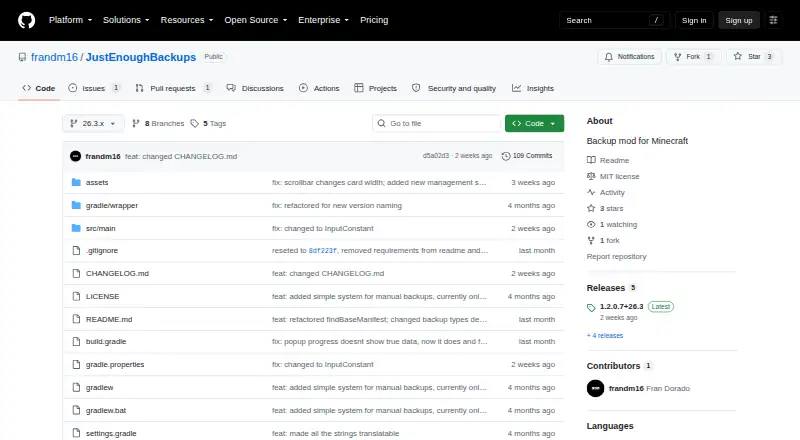
What Just Enough Backups is
Just Enough Backups is a Fabric mod for Java Edition Minecraft that adds server-side world backups and an in-game browser for managing them. It supports full, partial, and differential backups, with separate automatic schedules by type and options to run backups when a server starts or stops. Retention settings can keep a chosen number of each type and optionally set a total size cap per world. The browser can create, rename, delete, search, filter, and restore backups. A restore is prepared asynchronously; the server then shuts down so it can be applied on the next startup. Configurable worker threads handle world scanning, ZIP compression, and restore extraction. Before a backup, the mod checks destination space and aborts unless it meets twice the current world size plus the configured reserve. Mod Menu integration is optional. Dedicated-server settings must be edited in the server configuration file; the client screen only exposes HUD and preview settings. The project is MIT-licensed, and the listed latest release is 1.2.0.7+26.3. It is free.
Good
- Supports full, partial, and differential backups.
- Schedules can run at server start or stop.
- Browser can search and filter backups.
- Optional total backup size cap per world.
- Configurable worker threads for scans and compression.
Watch out
- Dedicated-server settings require editing the server configuration file.
- Restore applies only after the server shuts down and restarts.
- Backups abort when destination space is below the required threshold.
Who it suits
It suits Java Edition server operators who want scheduled world backups and an in-game way to manage them. It is also relevant to operators who need separate retention settings or partial and differential backups.
Verdict
Just Enough Backups combines several backup types with scheduling, retention controls, and an in-game management browser. Server operators should account for its dedicated-server configuration workflow and destination-space check.
Plans and prices
From Just Enough Backups's own pricing page, checked 4 Oct 2026.
| Plan | Price | What it gives you |
|---|---|---|
| Free, open-source mod | Free | Minecraft Fabric mod · server-side world backups |
The facts
Each one read from Just Enough Backups's own pages, with the date it was checked.
What it does
- Announcements
- Backup notices can be sent to chat, the action bar, or disabled.checked 15 Oct 2026
- Automatic scheduling
- Separate FULL, DIFFERENTIAL, and PARTIAL schedulers can run at independent intervals.checked 15 Oct 2026
- Backup types
- It creates full, partial, and differential backups.checked 15 Oct 2026
- Commands
- The /jeb command set includes now, create for each backup type, list, next, restore, and config reload.checked 15 Oct 2026
- Configuration
- Server configuration is stored in config/justenoughbackups.json and includes scheduling, retention, permissions, integrity, paths, exclusions, and popup settings.checked 15 Oct 2026
- Current release
- The releases page lists version 1.2.0.7+26.3 as the latest release.checked 4 Oct 2026
- CurseForge downloads
- CurseForge displayed 3,556 project downloads when opened.checked 15 Oct 2026
- Dedicated-server setup
- On dedicated servers, server settings must be edited in the server file and reloaded with /jeb config reload; the client screen handles HUD and preview settings.checked 15 Oct 2026
- Dependency handling
- Backup dependencies are tracked so retention and deletion preserve required base backups.checked 15 Oct 2026
- Developer interface
- The documented operator interface is commands and JSON configuration; no public API or SDK is documented.checked 15 Oct 2026
- Differential backups
- A differential backup contains files changed since the latest full backup and has its own retention bucket.checked 15 Oct 2026
- Full backups
- A full backup captures the complete world and can serve as the base for later incremental backups.checked 15 Oct 2026
- Independent availability
- CurseForge lists the project for client and server environments, Fabric, and Minecraft versions including 26.3, 26.2, 26.1.x, and 1.21.x.checked 15 Oct 2026
- Independent rating
- ModDex states that the project has no reviews yet and shows zero ratings.checked 15 Oct 2026
- Integration
- The mod offers optional Mod Menu integration.checked 4 Oct 2026
- Keybindings
- The default client keybindings are B for backup management and N for configuration.checked 15 Oct 2026
- Licence
- The project is licensed under the MIT License.checked 15 Oct 2026
- License
- The project is licensed under the MIT License.checked 4 Oct 2026
- Limit: configuration
- Independent catalog descriptions repeat that dedicated-server settings require editing a configuration file.checked 15 Oct 2026
- Limit: storage requirement
- The published documentation warns that backups fail when the conservative destination-space threshold is not met.checked 15 Oct 2026
- Management UI
- The backup browser supports creating, renaming, deleting, restoring, searching, and filtering backups.checked 4 Oct 2026
Money
- Free-space safeguard
- Creation is aborted unless destination free space meets twice the current world size plus minimumFreeSpaceReserveMb.checked 15 Oct 2026
The company
- Maker identity
- The GitHub account identifies the maker as Fran Dorado under username frandm16.checked 15 Oct 2026
Where it runs
- Management browser
- The in-game browser supports refresh, create, rename, delete, restore, dependency details, and search/filtering.checked 15 Oct 2026
The full review of Just Enough Backups
Just Enough Backups is a free Fabric mod for backing up Minecraft Java server worlds. It is best suited to operators who want several backup strategies and in-game backup management without paying for a separate service. Its controls are substantial for a world-focused tool, but dedicated-server setup takes configuration-file work.
Overview
The mod covers world data rather than a broader server backup scope. Full, partial, and differential backups let operators choose how much to capture, while separate schedules for each type and options to run backups at server start or stop support different routines. That flexibility is useful when one backup pattern does not fit every need; it does not remove the need to configure the server deliberately.
Backup creation includes a destination-space check: the mod aborts unless free space is at least twice the current world size plus the configured reserve. This helps avoid starting a backup when the destination is too constrained, but operators still need to plan for that threshold and the space their chosen retention policy will consume.
Key features
- Scheduling and retention: Set schedules by backup type, then retain a configured number of each type and optionally cap total backup size per world. These controls give operators ways to balance recovery coverage against storage use.
- In-game browser: Search and filter backups, and create, rename, delete, or restore them. A restore is prepared asynchronously; the server then shuts down so it can be applied safely on the next startup. That safeguards the restore process, though it means restoration is not an uninterrupted in-game action.
- Configurable worker threads: World scanning, ZIP compression, and restore extraction can use multiple worker threads. Operators can configure that work rather than being limited to a single worker.
- Optional Mod Menu integration: Mod Menu integration is available, but on dedicated servers the client config screen exposes only HUD and preview settings; server settings must be changed in the server configuration file.
Pricing
Just Enough Backups is free, with no free trial needed: the Free, open-source mod plan costs nothing. It is an MIT-licensed Minecraft Fabric mod for server-side world backups. The plan is limited to worlds rather than full server data, and restore granularity is full backup. Its custom retention policy and support for both storage destinations provide configuration choice without a paid tier.
Platforms
The platform coverage is Linux, macOS, and Windows. The mod targets Minecraft Java and runs server-side; it is not a general-purpose backup utility for other applications or files.
Who it's for
Choose it if you run a Fabric server and want scheduled world backups, per-type retention, and an in-game way to manage or restore backup files. It is a stronger fit for operators comfortable editing server configuration files and planning destination capacity. Look elsewhere if you need backups beyond Minecraft worlds or a restore workflow that avoids a server shutdown.
Pros and cons
- Pro: Full, partial, and differential backups, with separate schedules, offer more control than a single undifferentiated backup routine.
- Pro: Search, filtering, and backup-management actions are available through an in-game browser.
- Pro: Retention counts and an optional per-world size cap help control storage use.
- Con: Dedicated-server settings require editing the server configuration file; the client screen does not expose them.
- Con: Restoring shuts down the server so the change can be applied on the next startup.
- Con: The scope is Minecraft worlds, not a complete server backup.
Alternatives
Minecraft Backup Software is the broader category for comparing tools. Consider InstantBackup for another free, open-source Minecraft server mod with Linux, macOS, Windows, and self-hosted platform coverage. Minecraft Backup is a free backup script for Minecraft servers on Linux, making it the relevant option if you want a script rather than a Fabric mod. CaCl2Backup is another free, MIT-licensed Fabric server mod, but it requires Minecraft 26.0+, Fabric Loader 0.15.0+, Fabric API, and Java 25+.
FolderRewind is free and open source for Windows 10 and 11. FastBack is a free option with Linux, macOS, and Windows coverage. DriveBackupV2 is a free, MIT-licensed Minecraft server plugin for Java 8+ on Bukkit-based servers, so it fits that server stack rather than Fabric. Chronos Backups is free and covers Linux, macOS, and Windows. mcwrapper is a free option for Linux and macOS.
Verdict
Just Enough Backups is a sensible pick for Fabric server operators who want flexible world-backup schedules, configurable retention, and in-game management at no cost. Its standout advantage is the combination of multiple backup types and practical controls; its clearest drawbacks are the server-file configuration workflow and shutdown required to restore. Choose it for managed Minecraft world backups, not as a full-server backup solution.
Getting started
- Install the Fabric mod for Java Edition Minecraft
- Place it on the Minecraft server using a supported Linux, macOS, or Windows environment
- Edit dedicated-server settings in the server configuration file
- Configure backup types, schedules, retention, and storage limits
- Open the in-game backup browser to create, search, filter, or manage backups
- Enable optional Mod Menu integration if desired
Limits worth knowing
Before a backup, available destination space must equal at least twice the current world size plus the configured reserve. On dedicated servers, most settings are unavailable in the client configuration screen and must be edited in the server configuration file.
Questions
Is Just Enough Backups free?
Yes. The listed plan is a free, open-source mod listed as free.
Which Minecraft edition does it support?
It is for Minecraft Java Edition.
What backup types are available?
It supports full, partial, and differential backups.
Can backups run automatically?
Yes. Each backup type can have its own schedule, and runs can occur when the server starts or stops.
How does restoring work?
The backup browser prepares a restore asynchronously. The server then shuts down so the restore can be applied at the next startup.
What license does it use?
The project is licensed under the MIT License.
Alternatives to Just Enough Backups
- 1
FastBack
Free planOpen sourceLinuxmacOSWindows7.2Free plan - 2
FolderRewind
Free planOpen sourceAPIWindows7.0Free plan - 3
DriveBackupV2
Free planOpen sourceAPISelf-hosted6.9Free plan - 4
MineBackup
Free planLinuxmacOSSelf-hostedWindows6.6Free plan - 5
InstantBackup
Free planLinuxmacOSSelf-hostedWindows6.5Free plan - 6
Minecraft Backup
Free planLinuxSelf-hosted6.3Free plan