FolderRewind
FolderRewind is a free Windows application for backing up and restoring files, project data, and game saves.
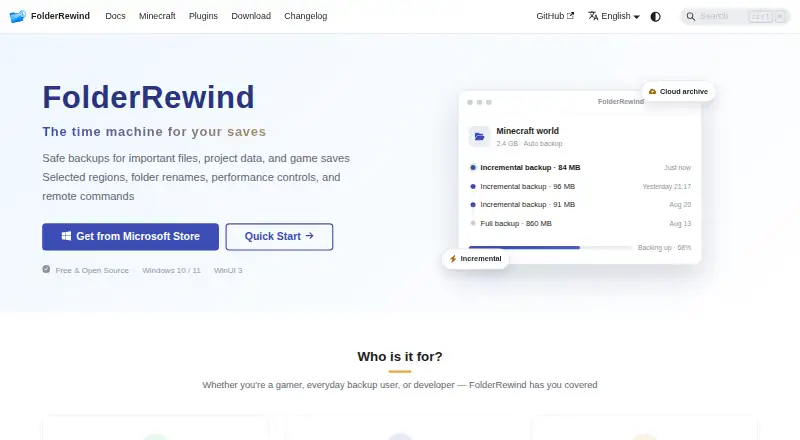
What FolderRewind is
FolderRewind is a free Windows application for backing up and restoring files, project data, and game saves. It offers full, smart incremental, and overwrite backup modes using 7-Zip, with 7z and zip compression and configurable levels, methods, and thread counts. The home page says encrypted backups use AES-256. Backups can be automated at intervals, on a schedule, at startup, for selected targets, or when conditions are met. For an additional redundancy layer, FolderRewind uses rclone to transfer local backup chains to cloud storage; its guide demonstrates OneDrive and mentions WebDAV bridges such as OpenList. The official MineRewind extension adds Minecraft save discovery, hot backup and restore, hotkeys, and coordination with the current world. For partial backups, restore is restricted to Overwrite mode and Clean is disabled to avoid deleting files outside the backup scope. Requirements list Windows 10 version 1809 or later, or Windows 11, for x64 or ARM64. The maker recommends the Microsoft Store; MSI is marked beta and MSIX is offered for advanced sideloading.
Good
- Offers full, incremental, and overwrite backup modes
- Supports 7z and zip compression
- Can automate backups in several ways
- Uses rclone to transfer backup chains to cloud storage
- Free for Windows 10 and 11
Watch out
- Partial restores force Overwrite and disable Clean
- MSI distribution is marked beta
- Requires Windows 10 version 1809 or later, or Windows 11
Who it suits
FolderRewind suits Windows users who want scheduled or automated backups for files, projects, and game saves. Minecraft Java users may find the MineRewind extension useful for handling saves and the current world.
Verdict
FolderRewind provides multiple backup modes, automation options, and cloud transfer through rclone, with a Minecraft extension for save handling. Check the partial-restore behavior and installation options before relying on a particular restore or deployment workflow.
Plans and prices
From FolderRewind's own pricing page, checked 2 Oct 2026.
| Plan | Price | What it gives you |
|---|---|---|
| FolderRewind | Free | Free and open source; Windows 10 / 11 |
| Free | Free | Windows 10/11 · x64/ARM64 · open source |
The facts
Each one read from FolderRewind's own pages, with the date it was checked.
What it does
- API
- The plugin system exposes a standalone SDK with current source API 3.6 and fifteen extension contracts.checked 15 Oct 2026
- Automation
- Automatic tasks can run at intervals, scheduled times, startup or file-unlocked transitions.checked 15 Oct 2026
- Backup modes
- Full, Smart and Rolling modes provide independent, incremental-chain and rebuilt-complete-state archives.checked 15 Oct 2026
- Changelog
- Version 1.9.6 was released on October 6, 2026 with read-only world maps, migration improvements and Quick Restore changes.checked 15 Oct 2026
- Cloud integrations
- Cloud archives use rclone and support WebDAV, OneDrive, S3 and OpenList connections.checked 15 Oct 2026
- Cloud providers
- The cloud guide demonstrates OneDrive setup through rclone and mentions WebDAV bridges such as OpenList.checked 2 Oct 2026
- Cloud storage
- FolderRewind uses rclone to transfer local backup chains to cloud storage and describes cloud as an extra redundancy layer.checked 2 Oct 2026
- Compression
- The application bundles 7-Zip and supports 7z compression settings and multiple compression methods.checked 15 Oct 2026
- Developer integration
- The home page describes a 1.8 Plugin API, KnotLink protocol v2 / Server v3, backup scopes, and restore interceptors.checked 2 Oct 2026
- Developer stack
- The repository documents WinUI 3, .NET 10, Windows App SDK 2.5.1 and x64/ARM64 builds.checked 15 Oct 2026
- Distribution
- The maker recommends Microsoft Store; MSI is marked beta and MSIX is offered for advanced sideloading.checked 2 Oct 2026
- Documentation
- Documentation includes installation, migration, backup modes, history, cloud archives, Minecraft, plugins, architecture and FAQ sections.checked 15 Oct 2026
- Encryption
- The product advertises AES-256 encrypted backups.checked 15 Oct 2026
- History
- History supports searchable versions, comments, protection, branches, checkout and file-level merging.checked 15 Oct 2026
- Independent adoption
- The CurseForge companion project lists 1,056 downloads and supports client and server environments.checked 15 Oct 2026
- Independent integration license
- The CurseForge MineBackup companion is listed under the MIT License.checked 15 Oct 2026
- Install channels
- Microsoft Store is recommended; Setup EXE is available from GitHub, and channel data directories do not migrate automatically.checked 15 Oct 2026
- KnotLink protocol
- KnotLink exposes runtime capability discovery and commands for listing, backup, restore and automation over wire protocol v2.checked 15 Oct 2026
- Limit: cloud
- Cloud storage is an additional redundancy layer and local backup and restore should be validated first.checked 15 Oct 2026
- Limit: dedicated-server restore
- Dedicated-server restoration requires a restart script and players must reconnect manually after the server restarts.checked 15 Oct 2026
- Limit: incremental chains
- Deleting Smart-chain dependencies in File Explorer can make later restores fail.checked 15 Oct 2026
- Limit: Minecraft partial restore
- Selected-region and other partial captures force Overwrite restore and cannot safely clear files outside the captured range.checked 15 Oct 2026
- Limit: plugin compatibility
- Older version 1.8 plugins are incompatible with the version 3 plugin system.checked 15 Oct 2026
Where it runs
- Limit: platform
- The documented desktop application supports Windows only, with no macOS, Linux, iOS or Android build listed.checked 15 Oct 2026
The full review of FolderRewind
FolderRewind is free Windows software for backing up and restoring files, project data, and game saves. It is best for Windows users who want configurable backup schedules and optional cloud redundancy, particularly Minecraft players using its companion extension. Its range of backup modes is a strength, though partial restores and Windows-only support narrow the workflows it suits.
Overview
FolderRewind combines general file backup with tools for game-save handling. Full, smart incremental, and overwrite modes, plus configurable archive settings, offer useful control over how backup chains are created. The trade-off is that restore behavior is not uniform: restoring only part of a backup forces Overwrite and disables Clean, a safeguard against deleting files outside the selected scope that also limits how partial restores can be managed.
Cloud transfer runs through rclone, sending local backup chains to cloud storage as an added redundancy layer. The setup guide demonstrates OneDrive and mentions WebDAV bridges such as OpenList. This makes cloud an option alongside local storage rather than a replacement for it; users should be prepared to configure and maintain their chosen destination.
Key features
Backup modes, compression, and automation
Full backups provide a straightforward baseline, smart incremental backups avoid treating every run as a fresh full copy, and overwrite mode writes over existing backup content. Archives can use 7z or zip, with configurable compression levels, methods, and thread counts. Those controls give users room to balance archive handling against processing resources, without locking them into one format.
Automation can run at intervals, on a schedule, at startup, for selected targets, or when conditions are met. That range suits users protecting data without manually initiating every backup, while letting them narrow automation to particular targets or circumstances.
Encryption and Minecraft support
The home page says encrypted backups use AES-256. Minecraft users can add the official MineRewind extension, which discovers saves, supports hot backup and restore, provides hotkeys, and coordinates with the current world. Its world-level restore granularity makes it a more focused fit for Minecraft saves than a general-purpose archive workflow alone.
For developers, the home page describes a 1.8 Plugin API, KnotLink protocol v2 / Server v3, backup scopes, and restore interceptors. These are relevant to integrations and scoped backup behavior, but users who only need routine file protection can ignore that layer.
Pricing
FolderRewind costs free. The free and open-source Windows plan includes the core backup software; there are no paid tiers or seat and quota trade-offs to weigh. Its cost advantage does not change the platform restriction or the partial-restore behavior.
| Plan | Price | Includes |
|---|---|---|
| FolderRewind | free | Free and open source; Windows 10 / 11 |
Platforms
FolderRewind supports Windows 10 version 1809 or later and Windows 11, on x64 or ARM64. The maker recommends the Microsoft Store; MSI is marked beta, while MSIX is offered for advanced sideloading. Readers who require native Linux or macOS support should choose another tool.
Who it's for
FolderRewind is a strong fit for Windows users who want scheduled file and project backups, control over archive formats, and cloud transfer through rclone. Minecraft players who want save discovery and hot backup or restore have an additional reason to consider it. It is less suitable for anyone whose recovery process depends on flexible partial-restore behavior or whose devices run Linux or macOS.
Pros and cons
- Pros: Full, smart incremental, and overwrite modes support different backup approaches; configurable 7z and zip compression gives control over archive handling.
- Pros: Multiple automation triggers and rclone-based cloud transfer support unattended backups with an additional storage destination.
- Pros: MineRewind adds Minecraft save discovery, hot backup and restore, and current-world coordination.
- Cons: Partial restores force Overwrite and disable Clean, limiting restore choices to protect files outside the backup scope.
- Cons: Windows-only support excludes users who need a native Linux or macOS app.
- Cons: MSI is beta; users who do not want the recommended Microsoft Store route may need to be comfortable with advanced sideloading via MSIX.
Alternatives
For Minecraft-focused comparisons, start with Minecraft Backup Software. Pick InstantBackup instead if you want a free, open-source Minecraft server mod that runs on Linux, macOS, self-hosted systems, or Windows. FastBack is another free option for Linux, macOS, and Windows.
Minecraft Backup is a free Linux and self-hosted alternative. Chronos Backups offers free support for Linux, macOS, and Windows. Choose Just Enough Backups if a free, open-source, server-side Minecraft Fabric mod suits your setup. DriveBackupV2 is a free, open-source option for self-hosted Bukkit-based servers and requires Java 8 or later.
FastBack is a free alternative for Windows, macOS, and Linux. CaCl2Backup is a free self-hosted Fabric server mod, but its requirements include Minecraft 26.0 or later, Fabric Loader 0.15.0 or later, Fabric API, and Java 25 or later.
Verdict
Choose FolderRewind if you want free Windows backups with configurable modes, broad automation, optional rclone cloud transfer, or dedicated Minecraft save handling. Its main advantage is the combination of general file protection and Minecraft-specific tools without a subscription. Look elsewhere if you need Linux or macOS support, or if partial restores must offer more flexibility than Overwrite-only behavior with Clean disabled.
Alternatives to FolderRewind
- 1
FastBack
Free planOpen sourceLinuxmacOSWindows7.2Free plan - 2
Just Enough Backups
Free planOpen sourceLinuxmacOSSelf-hostedWindows7.1Free plan - 3
DriveBackupV2
Free planOpen sourceAPISelf-hosted6.9Free plan - 4
MineBackup
Free planLinuxmacOSSelf-hostedWindows6.6Free plan - 5
InstantBackup
Free planLinuxmacOSSelf-hostedWindows6.5Free plan - 6
Minecraft Backup
Free planLinuxSelf-hosted6.3Free plan