BtrBack
BtrBack is a free Minecraft Java server plugin that uses Btrfs snapshots for full-server backups and rollbacks.
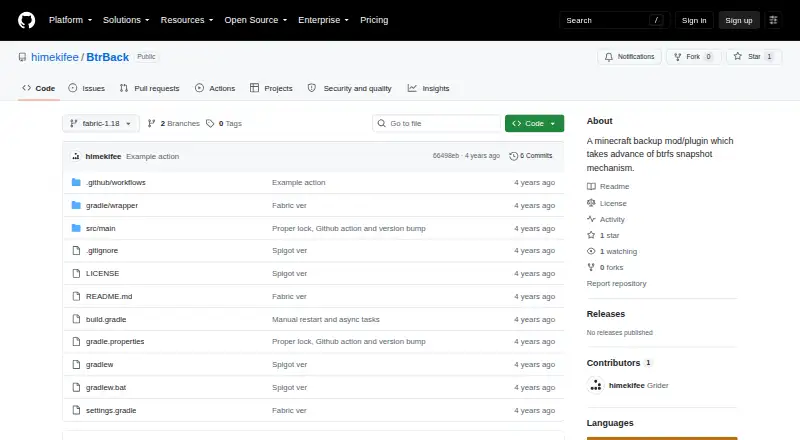
What BtrBack is
BtrBack is a free Minecraft Java server plugin that uses Btrfs snapshots for full-server backups and rollbacks. Operators run `/btrback [backup/rollback]` to create a backup or begin restoring one. Normal backup records appear in the `backupSnapshots` section of `backups.json`. Before rollback, the plugin also snapshots the current server state and records it under `rollbackSnapshots`, separate from the regular backup list. A rollback reboots the server twice: first to restore the selected backup, then to start the server normally. Setup requires putting the server directory in a Btrfs subvolume and mounting the root subvolume with `user_subvol_rm_allowed`. The documented use is for Minecraft server operators whose server directory is on Btrfs. Listed characteristics include scheduled backups, local storage, full-backup restore granularity, and a custom retention policy. The public repository includes the Good Luck With That Public License, which permits various uses at the user's own risk. Its page shows no releases and zero open issues.
Good
- Free and open source.
- Supports scheduled full-server backups.
- Snapshots current state before rollback.
- Stores backups locally.
Watch out
- Requires a Btrfs subvolume.
- Rollback reboots the server twice.
- The repository page shows no releases.
Who it suits
BtrBack is for operators of Minecraft Java servers whose server directory is on Btrfs. It is not a fit for server setups that do not meet that filesystem requirement.
Verdict
BtrBack offers snapshot-based backups and rollback for a specific Minecraft server setup. Its Btrfs requirement and two-reboot rollback behavior are important operational constraints.
Plans and prices
From BtrBack's own pricing page, checked 7 Oct 2026.
| Plan | Price | What it gives you |
|---|---|---|
| Free | Free | Minecraft backup plugin · requires a Btrfs subvolume |
The facts
Each one read from BtrBack's own pages, with the date it was checked.
What it does
- Availability
- The GitHub repository is public and its page shows no releases.checked 7 Oct 2026
- Backup records
- Normal backups are listed in the `backupSnapshots` section of `backups.json`.checked 7 Oct 2026
- Commands
- The plugin is used with `/btrback [backup/rollback]`.checked 7 Oct 2026
- Install
- The README instructs users to put the plugin in the server's plugins folder.checked 7 Oct 2026
- Intended users
- The documented setup is for operators of Minecraft servers whose server directory is on Btrfs.checked 7 Oct 2026
- License
- The repository includes the Good Luck With That Public License, which permits copying, distribution, modification, merging, selling, publishing, and sublicensing at the user's own risk.checked 7 Oct 2026
- Purpose
- BtrBack is a Minecraft backup plugin that uses Btrfs snapshots.checked 7 Oct 2026
- Release availability
- The repository page showed no releases when viewed.checked 7 Oct 2026
- Repository activity
- The repository page shows zero open issues.checked 7 Oct 2026
- Rollback behavior
- A rollback reboots the server twice: once to restore the backup and again to launch the server normally.checked 7 Oct 2026
- Rollback safety
- Before rollback, BtrBack also snapshots the current state, recorded under `rollbackSnapshots` in `backups.json`.checked 7 Oct 2026
- Rollback snapshot
- Before rollback, the current state is also snapshotted and recorded under `rollbackSnapshots` in `backups.json`, rather than appearing in the backup list.checked 7 Oct 2026
- Setup
- The server directory must be a Btrfs subvolume, and the root subvolume must be mounted as `user_subvol_rm_allowed`.checked 7 Oct 2026
The company
- Project owner
- The GitHub profile identifies the project owner as Grider, with the username himekifee.checked 7 Oct 2026
The full review of BtrBack
BtrBack is a Minecraft Java server plugin for operators whose server files already live on Btrfs. Its snapshot-based approach is tailored to that setup, but the filesystem requirements and reboot sequence make it a specialized choice rather than a general-purpose backup tool.
It makes the most sense when local, full-server snapshots are sufficient and a two-reboot restore is acceptable.
Overview
Install the plugin in the server’s plugins folder and use /btrback [backup/rollback] to create or restore a backup. The server directory must be inside a Btrfs subvolume, and the root subvolume must be mounted with user_subvol_rm_allowed. If your server is not already configured that way, BtrBack’s central requirement may outweigh its simple plugin-based workflow.
Normal backups cover the full server and appear in the backupSnapshots section of backups.json. Before a rollback, the current state is also snapshotted and recorded separately under rollbackSnapshots, rather than in the ordinary backup list. That preserves the state being replaced, but does not offer selective restoration: backups and restores operate at full-server granularity.
Key features
Scheduled local snapshots
BtrBack supports scheduled backups, stores them locally and uses a custom retention policy. This suits operators who want control over how long snapshots remain on the server, but local storage alone is not a separate copy elsewhere. The full-server scope is appropriate for recovering the whole server, not for restoring an individual file or world selectively.
Rollback with a recovery copy
The pre-rollback snapshot offers a useful safeguard when a restore replaces a newer server state. The operational cost is significant: rollback reboots the server once to restore the selected backup and a second time to start normally. That makes recovery less suitable when downtime must be brief or precisely predictable.
Pricing
BtrBack is free: the Free plan costs nothing and is open source. There is no paid tier or free trial. The plan includes the Minecraft backup plugin and requires a Btrfs subvolume; its focused filesystem requirement is the main constraint, not a plan quota or seat limit.
The repository includes the Good Luck With That Public License. It permits copying, distribution, modification, merging, selling, publishing and sublicensing, with use at the user's own risk. The GitHub repository is public and has no releases, so operators should account for that when deciding how to obtain and manage the plugin.
Platforms
BtrBack is for Linux and self-hosted use, specifically Minecraft Java servers. Its documented storage and mount requirements make it a fit for operators managing the underlying server filesystem, not players looking for a client-side backup app.
Who it's for
Choose BtrBack if you operate a Java server on a Btrfs subvolume, want scheduled local snapshots of the full server, and can accommodate the two-reboot rollback. Look elsewhere if you need cross-platform flexibility, remote backup storage, or finer-grained restores; those needs do not match BtrBack’s documented scope.
Pros and cons
Pros
- Free and open source, with no paid plan or trial decision to navigate.
- Scheduled, local full-server snapshots suit operators who want to keep backup data alongside a Btrfs-hosted server.
- A separate pre-rollback snapshot preserves the state being replaced without mixing it into the normal backup list.
Cons
- Requires a Btrfs subvolume and a specific root-subvolume mount option, ruling it out for servers on other filesystem setups.
- Rollback requires two reboots, extending downtime during recovery.
- Full-server restore granularity does not suit selective recovery, and local storage is not an off-site copy.
- The public repository has no releases, which leaves operators without a published release channel.
Alternatives
For a wider range of Minecraft server platforms, consider InstantBackup, a free open-source mod for Linux, macOS, Windows and self-hosted setups. MineBackup is another free option across those platforms, with no paid plans or usage limits stated.
If you want a free Minecraft backup mod for Linux, macOS or Windows, FastBack is distributed under GNU GPL version 2. Just Enough Backups is a free Fabric mod for server-side world backups on Linux, macOS or Windows, making it a better match when world-level backups are the priority.
For a Linux server backup script, Minecraft Backup is also free and supports Linux and self-hosted use. CaCl2Backup is a free, MIT-licensed Fabric server mod for self-hosted use, but requires Minecraft 26.0+, Fabric Loader 0.15.0+, Fabric API and Java 25+. Windows users can consider FolderRewind, a free open-source option for Windows 10 and 11. ServerBackup is another free Minecraft server backup plugin for Linux and self-hosted setups.
Browse the Minecraft Backup Software category for more options.
Verdict
BtrBack is a sensible pick for a Linux Minecraft Java server already stored on Btrfs when local full-server snapshots and a pre-rollback safety copy meet your recovery needs. Its free, scheduled snapshot workflow is compelling in that narrow setting. Choose another tool if you cannot meet the Btrfs setup, need selective or off-site backups, or cannot accept two reboots during rollback.
Alternatives to BtrBack
- 1
FastBack
Free planOpen sourceLinuxmacOSWindows7.2Free plan - 2
Just Enough Backups
Free planOpen sourceLinuxmacOSSelf-hostedWindows7.1Free plan - 3
FolderRewind
Free planOpen sourceAPIWindows7.0Free plan - 4
DriveBackupV2
Free planOpen sourceAPISelf-hosted6.9Free plan - 5
MineBackup
Free planLinuxmacOSSelf-hostedWindows6.6Free plan - 6
InstantBackup
Free planLinuxmacOSSelf-hostedWindows6.5Free plan