
mercuryScribe
mercuryScribe is a locally run transcription tool for audio and video, with a browser-based interface for working on transcripts.
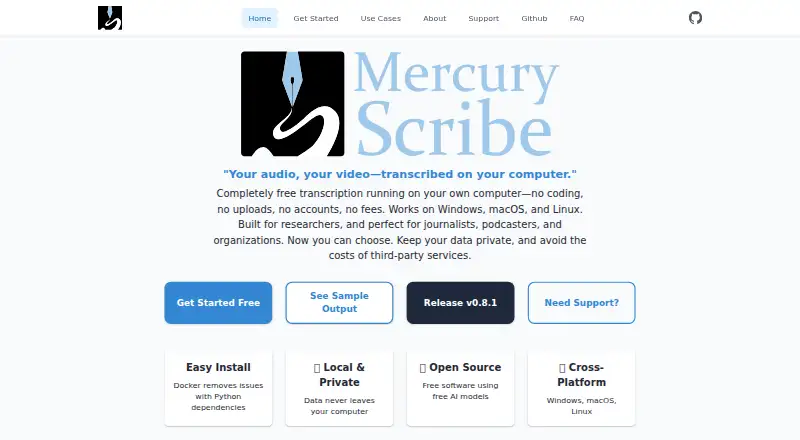
What mercuryScribe is
mercuryScribe is a locally run transcription tool for audio and video, with a browser-based interface for working on transcripts. It uses Faster Whisper to transcribe speech and pyannote models to separate speakers. Users can edit transcripts in a browser, save them as VTT files, and create HTML or DOCX outputs that include speaker names and timestamps. The FAQ says audio, transcripts, and metadata stay off external services, while the required models are obtained from Hugging Face. Users need a Hugging Face access token and must accept the model terms. MAXQDA is supported by default, and custom integrations can be developed. The software is free and open source under the MIT license, with personal, academic, and commercial use allowed. It runs on Linux, macOS, Windows, and the web; installation options include Docker, a Windows package, and a Python package. The maker describes it as built for researchers and also suitable for journalists, podcasters, educators, organizations, accessibility groups, and other professionals.
Good
- Free and open source under the MIT license
- Edits transcripts in a browser
- Exports VTT, HTML, and DOCX
- Supports speaker labels and timestamps
- Available on Linux, macOS, Windows, and web
Watch out
- Requires a Hugging Face access token
- Users must accept terms for required models
- Compliance suitability depends on implementation
Who it suits
It suits researchers and other professionals who need to transcribe audio or video, label speakers, and edit transcripts. It may also fit teams seeking local operation and MAXQDA support.
Verdict
mercuryScribe combines local transcription with transcript editing and several export options. Check model access requirements and confirm compliance with your organization's team before use.
Plans and prices
From mercuryScribe's own pricing page, checked 15 Oct 2026.
| Plan | Price | What it gives you |
|---|---|---|
| Free | Free | Personal, academic, and commercial use · core software free and open-source · No licensing fees |
The facts
Each one read from mercuryScribe's own pages, with the date it was checked.
What it does
- Accuracy statement
- The FAQ says Faster Whisper Base typically reaches above 80% accuracy on clear English audio, depending on recording quality and language.checked 15 Oct 2026
- API extensibility
- Professional services include API integrations with existing tools, but the public pages do not document a standalone public API.checked 15 Oct 2026
- Batch processing
- The companion command-line interface supports batch transcription from the command line.checked 15 Oct 2026
- Compliance
- The FAQ says suitability for HIPAA or GDPR depends on the user's implementation and advises consulting their compliance team.checked 3 Oct 2026
- Custom integrations
- The provider offers custom integrations with content-management systems, analysis software, and other tools.checked 15 Oct 2026
- Docker distribution
- A multi-architecture Docker web image is published through GitHub Container Registry.checked 15 Oct 2026
- DOCX output
- The software generates DOCX files containing speaker and timestamp information.checked 15 Oct 2026
- Editing
- Users can edit transcripts in a browser and save changes to VTT files.checked 3 Oct 2026
- GPU deployment
- Enterprise deployments can use GPU acceleration for initial transcription and cheaper instances for editing and inspection.checked 15 Oct 2026
- HTML output
- Transcription produces an HTML page containing the transcript and synchronized media playback.checked 15 Oct 2026
- Install options
- The maker documents Docker, a Windows package, and Python package installation.checked 3 Oct 2026
- Integration
- MAXQDA support is the default, and custom integrations can be developed.checked 3 Oct 2026
- Intended users
- The maker describes it as built for researchers and suitable for journalists, podcasters, organizations, educators, accessibility groups, and professionals.checked 3 Oct 2026
- Licence
- The maker states that mercuryScribe is open source under the MIT licence.checked 15 Oct 2026
- Limit: model access
- Required Hugging Face models may require account creation, access requests, and acceptance of model terms.checked 15 Oct 2026
- Limit: setup complexity
- The FAQ warns that installing Python dependencies can be difficult and recommends Docker for most users.checked 15 Oct 2026
- Local processing
- The application runs on the user’s computer or private server rather than requiring cloud transcription.checked 15 Oct 2026
- MAXQDA integration
- DOCX timestamps are designed to be compatible with MAXQDA, which the maker identifies as the default integration.checked 15 Oct 2026
- Model access
- Users need a Hugging Face access token and must accept terms for the required models.checked 3 Oct 2026
- Output
- The tool generates HTML and DOCX files with speaker names and timestamps.checked 3 Oct 2026
- Paid services
- Enterprise support may include priority support, custom installations, SLAs, and pre-configured solutions; the software itself is free.checked 3 Oct 2026
- Performance statement
- The maker reports approximately real-time processing on tested Intel Linux and Intel or M2 Mac systems.checked 15 Oct 2026
The company
- Headquarters
- Nashville, Tennessee, USAchecked 28 Sep 2026
Where it runs
- Limit: Windows testing
- The project documentation says Windows support is not well tested.checked 15 Oct 2026
The full review of mercuryScribe
mercuryScribe is a free, locally run transcription application for audio and video. It suits researchers, journalists, educators, podcasters, accessibility teams, and organizations that need speaker-labelled text while keeping processing on their own infrastructure.
Overview
mercuryScribe uses Faster Whisper to convert speech to text and pyannote models to separate speakers. In practice, that combination is valuable for interviews, focus groups, meetings, and recordings where knowing who said what matters. It is not positioned as a managed cloud service, so teams wanting a vendor to handle the transcription pipeline may prefer a hosted alternative.
Audio, transcripts, and metadata stay off external services according to the FAQ, while models are downloaded from Hugging Face. That local approach can reduce data-sharing concerns, but it does not remove operational responsibility. A Hugging Face access token is required, and users must accept the terms for the necessary models before they can work. HIPAA or GDPR suitability depends on how an organization deploys and governs the software; the FAQ directs users to their own compliance team rather than promising certification.
Key features
Transcription and speaker labels
Faster Whisper handles transcription and pyannote distinguishes speakers, producing labelled dialogue rather than an undifferentiated block of text. This is especially useful for qualitative research and published conversations, although the value of speaker separation depends on the recording and the user's model setup.
Browser editing and exports
The in-browser editor lets users correct transcripts and save their changes to VTT files. mercuryScribe also creates HTML and DOCX exports that retain speaker names and timestamps, giving researchers and editors both caption-oriented output and conventional documents. Caption export and a transcript editor are core strengths for workflows that require review before publication.
Integration and deployment
MAXQDA support is included as the default integration, a practical advantage for research teams already working in that environment. Custom integrations can be developed when the standard connection is not enough. Installation is documented through Docker, a Windows package, and Python package options, so technical teams can choose a deployment method that fits their infrastructure rather than relying on one installer.
Pricing
The Free plan costs free. The software is free and open-source under the MIT license for personal, academic, or commercial use. There is no free trial because the product itself is free, and no recurring software charge is attached to the plan.
Free means users receive the complete software without a paid feature tier described here, but they supply the environment, model access, and implementation work. Organizations that need help can purchase professional services such as installation assistance, team training, workshops, or private-server setup with GPUs. Enterprise support may add priority support, custom installations, service-level agreements, and pre-configured solutions; those services use custom pricing and are separate from the free software.
Platforms
mercuryScribe supports Linux, macOS, Windows, and the web. The documented Docker and Python routes make it suitable for self-managed servers, while the Windows package offers a more conventional desktop installation path. The web interface is where transcript editing takes place, but deployment still requires users to arrange the underlying application and model access.
Who it's for
Researchers are the clearest audience, particularly those using MAXQDA or handling sensitive interview material. Journalists, podcasters, educators, accessibility groups, and professional teams can also benefit from speaker-labelled exports and editable captions. It is a strong fit when local processing and control over files outweigh the convenience of a hosted subscription. Buyers without technical staff, or organizations that need a provider to assume compliance and infrastructure duties, should look elsewhere.
Pros and cons
- Pros: Free MIT-licensed software supports personal, academic, and commercial use.
- Pros: Local processing keeps audio, transcripts, and metadata away from external services according to the FAQ.
- Pros: Speaker labels, browser editing, VTT saving, and HTML/DOCX export cover both caption and document workflows.
- Pros: MAXQDA support and custom integration development suit research-oriented teams.
- Cons: A Hugging Face token and model-term acceptance are prerequisites, adding setup and account administration.
- Cons: HIPAA and GDPR suitability is an implementation decision, so organizations must conduct their own compliance review.
- Cons: Installation and infrastructure are self-managed unless professional or enterprise services are purchased.
Alternatives
Podcast Transcription Software is the broader category to browse when you want to compare tools aimed at podcast workflows.
Simon Says is a better choice for a hosted, freemium workflow spanning web, desktop, mobile, extensions, and self-hosted deployment, with pay-as-you-go billing at $15 a month plus usage terms.
Happy Scribe suits buyers wanting a freemium service with a free plan that includes unlimited meeting recordings capped at 45 minutes per recording and a 10-minute AI trial.
OpenWhispr is worth choosing when its cross-platform freemium setup and free allowance of 2,000 transcription words per week and five hours of meeting recordings per month match your volume.
Speechmatics fits teams seeking API or self-hosted access with free credits, two concurrent real-time sessions, and support for pre-recorded files.
Rev is a hosted option for English transcription and captioning, with its free plan limited to 45 AI minutes per month, five files at once, and one user.
AssemblyAI is aimed at developers who need API or self-hosted transcription and usage-based Universal-2 billing rather than a local browser editor.
AudioPod AI is a broader media-generation service with a free monthly credit allowance, not a direct local-transcription replacement.
Whipscribe offers a freemium web, macOS, API, and extension workflow with a free first transcript and automatic detection across 99-plus languages.
Verdict
Choose mercuryScribe if you need free, open-source transcription with local processing, speaker labels, editable VTT captions, and document exports—especially in a research or MAXQDA workflow. Look elsewhere if you want turnkey hosting, provider-managed compliance, or a service that removes model and infrastructure setup from your team.
Alternatives to mercuryScribe
- 1
Rev
Free planAndroidiOSWebAPI8.1From $25.49 a month - 2

Speechmatics
Free planWebAPILinuxmacOS7.9From $0.01 a month - 3

AudioPod AI
Free planiOSWebAPI7.8From $20 a month - 4

Happy Scribe
Free planAndroidiOSAPImacOS7.8From $8.50 a month - 5
Simon Says
Free planiOSWebExtensionmacOS7.7From $15 a month - 6

ElevenLabs
Free planWebAPI7.6From $6 a month