Mate Translate
Mate Translate is a translation app for iOS, macOS, and browsers, with website translation across 250 supported languages.
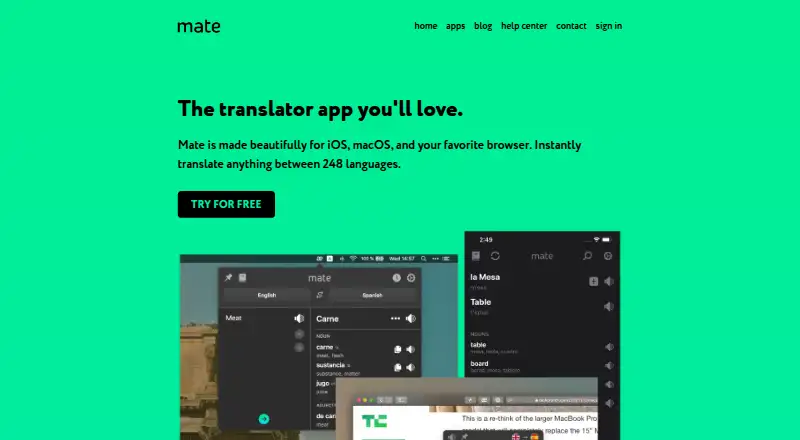
What Mate Translate is
Mate Translate is a translation app for iOS, macOS, and browsers, with website translation across 250 supported languages. It offers Basic, Advanced, and AI translation styles; Pro adds a formality control. Translations can be spoken, with phonetics, word genders, and synonyms also available. Users can save and categorize phrases, while Pro syncs History and Phrasebook across devices. Browser tools include selected-text and manual full-page translation, a right-click action, and Netflix subtitle translation. On iOS, Mate can work with Safari, iMessage, PDFs, Mail, and other apps. Pro includes offline translation; iPhone and iPad support it in more than 55 languages. Advanced and AI use have daily and monthly fair-use allowances and a maximum request size, after which translation falls back to Basic. Mate has a free plan and a 7-day trial. The browser extension is free forever; Pro subscription prices vary by plan and are shown in the app or account. There is no native Windows or Android app, though the extension works on Windows and Linux, and Firefox for Android supports it.
Good
- Supports 250 languages.
- Offers Basic, Advanced, and AI translation styles.
- Can speak translations and show phonetics.
- Free browser extension includes local History and Phrasebook.
- iOS translation works in Safari, Mail, and other apps.
Watch out
- No document translation.
- No native Windows or Android app.
- Advanced and AI translations have fair-use limits.
- Pro offline language coverage varies by device.
Who it suits
Mate suits people who translate frequently and want translation within their browser or app workflow. It may also suit iPhone and iPad users who need offline translation.
Verdict
Mate combines browser and iOS translation tools with phrase saving, pronunciation aids, and several translation styles. Check its fair-use limits and platform details, and note that Pro prices vary by plan.
Plans and prices
From Mate Translate's own pricing page, checked 21 Sep 2026.
| Plan | Price | What it gives you |
|---|---|---|
| Mate Monthly | — | Mate Pro subscription |
| Mate Annual | — | Mate Pro subscription |
| Mate Weekly | — | Mate Pro subscription |
| Mate Educational Annual | — | Educational subscription |
| Browser extension | Free | Popup and on-page translations · Three synonyms per translation · Local History and Phrasebook · Click-to-translate Netflix subtitles · Free forever |
| Mate Pro | — | One subscription covers Mac, iPhone, iPad, and browser extensions · Advanced and AI styles have fair-use limits · Monthly; price varies by plan shown in the app or account |
| Mate Pro | — | One subscription covers Mac, iPhone, iPad, and browser extensions · Advanced and AI styles have fair-use limits · Annually; price varies by plan shown in the app or account |
The facts
Each one read from Mate Translate's own pages, with the date it was checked.
Where it runs
- App integrations
- Mate for iOS supports translation in Safari, iMessage, PDF files, Mail, and other apps; browser add-ons are listed for Chrome, Firefox, Opera, and Edge.checked 12 Oct 2026
- Browser features
- The browser extension supports page selection, manual full-page translation, a right-click action, and Netflix subtitle translation.checked 12 Oct 2026
- Platform availability
- Mate has no native Windows or Android app, but its browser extension works on Windows and Linux and Firefox for Android supports the extension.checked 12 Oct 2026
What it does
- Document translation
- Nochecked 21 Sep 2026
- Fair-use limits
- Advanced and AI translations have daily and monthly fair-use allowances and a maximum request size, after which Mate falls back to Basic.checked 12 Oct 2026
- Intended users
- Mate describes itself as made for people who translate frequently and want translation integrated into their workflow.checked 12 Oct 2026
- Offline use
- Offline translation is included in Pro; iPhone and iPad support offline translation in 55+ languages.checked 12 Oct 2026
- Phrasebook and sync
- Users can save and categorize phrases, and Pro syncs History and Phrasebook across devices.checked 12 Oct 2026
- Privacy controls
- Without an account, History and Phrasebook stay on the device; synced account data can be viewed and deleted by the user.checked 12 Oct 2026
- Pronunciation
- Mate can speak translations and display phonetics; it also offers word genders and synonyms.checked 12 Oct 2026
- Purpose
- Mate is a translation app for iOS, macOS, and browsers, and its homepage says it translates between 248 languages.checked 12 Oct 2026
- Security
- Mate says passwords are stored hashed and that Apple handles App Store payments while Paddle processes purchases made directly from Mate.checked 12 Oct 2026
- Support
- Mate offers email support and asks users to identify the app and platform when requesting help.checked 12 Oct 2026
- Supported languages
- 250checked 21 Sep 2026
- Translation data
- Mate says text sent for translation goes to translation providers with the language pair, and those providers' terms do not allow use of the text for training.checked 12 Oct 2026
- Translation tools
- Mate offers Basic, Advanced, and AI translation styles, with a formality control in Pro.checked 12 Oct 2026
- Website translation
- Yeschecked 21 Sep 2026
Money
- Free plan
- Yeschecked 21 Sep 2026
The company
- Headquarters
- Berlin, Germanychecked 28 Sep 2026
The full review of Mate Translate
Mate Translate is built for frequent translators who want translation woven into browser and Apple-device workflows rather than confined to a standalone text box. Its phrasebook, pronunciation aids and selectable translation styles make it especially useful for language learners and multilingual browsing. It is a weaker fit for anyone whose core requirement is translating documents or running a native Windows or Android app.
Overview
Mate supports 250 languages and translates websites, but it does not translate documents. The service is freemium, with a free plan and a seven-day trial. Its strongest case is everyday text and web translation, where saved phrases, pronunciation information and browser actions can shorten repeated work.
Mate is made by a Berlin-based company. For category-wide comparison, browse the Translation Software list.
Key features
Translation styles and language help
Basic, Advanced and AI styles give users a choice of translation approach. Pro adds a formality control, so paid users can steer wording toward a more appropriate tone. Advanced and AI are not unlimited: they have daily and monthly fair-use allowances and a maximum request size. When an allowance or request limit is reached, Mate falls back to Basic. That preserves access, but users who rely on the higher-tier styles should plan around those caps.
Mate speaks translations and shows phonetics, word genders and synonyms. Those additions are practical for pronunciation checks, vocabulary building and judging a word's grammatical use, not just for reading a translated sentence.
Phrasebook and cross-device continuity
Users can save and categorize phrases. Pro syncs History and Phrasebook across devices, which suits people moving between a Mac, iPhone, iPad and browser. Without an account, those records remain on the device; synced account data can be viewed and deleted by the user.
Browser and Apple integrations
The extension can translate selected page text, manually translate a full page, expose a right-click action and translate Netflix subtitles. Add-ons are offered for Chrome, Firefox, Opera and Edge. On iOS, Mate works inside Safari, iMessage, PDFs, Mail and other apps, making it more convenient than switching to a separate translator for each passage.
Offline and privacy considerations
Offline translation is a Pro feature, with iPhone and iPad support for more than 55 languages. For online requests, Mate says text is sent to translation providers alongside the language pair, and those providers' terms prohibit using the text to train models. Passwords are stored hashed; Apple handles App Store payments and Paddle processes purchases made directly through Mate. Email support is available, and support requests should identify the app and platform.
Pricing
The free browser extension costs free, billed Free forever. It includes popup and on-page translations, three synonyms per translation, local History and Phrasebook, and click-to-translate Netflix subtitles. It is a sensible starting point for occasional browser users, but local-only records and the three-synonym limit make it less suitable for people who need synchronized, richer reference tools.
Mate Pro is billed annually, with one subscription covering Mac, iPhone, iPad and browser extensions. The price varies by plan and is shown in the app or account, so ongoing cost is custom pricing rather than a published figure. Pro brings offline translation, cross-device History and Phrasebook sync, and the Advanced and AI styles, while those styles remain subject to fair-use limits.
Mate Monthly, Mate Annual and Mate Weekly are Mate Pro subscriptions; Mate Educational Annual is an educational subscription. Prices are not published for any of them.
Platforms
Mate offers web access and browser extensions for desktop browsers, including Windows and Linux use, plus apps for macOS and iOS. Firefox for Android supports the extension. There is no native Windows or Android app, despite those systems being reachable through the browser route. That distinction matters to users who expect an installed desktop or mobile client.
Who it's for
Choose Mate if you translate frequently across websites and Apple apps, want saved phrases and pronunciation support, or need Netflix subtitle translation. Pro is aimed at users who benefit from offline access and synchronized records across Apple devices and browsers. Look elsewhere if document translation, a native Android or Windows application, or unlimited Advanced and AI usage is essential.
Pros and cons
- Pros: 250-language coverage and website translation support broad multilingual browsing.
- Pros: Phrase categorization, phonetics, speech, genders and synonyms add useful learning and reference context.
- Pros: Browser actions, Netflix subtitles and iOS app integrations reduce copying between apps.
- Cons: No document translation, ruling it out for file-centered workflows.
- Cons: No native Windows or Android app; those users depend on extensions.
- Cons: Advanced and AI styles fall back to Basic after fair-use or request-size limits.
- Cons: Pro prices are not published, making subscription cost difficult to compare in advance.
Alternatives
Crowdin is the better choice for localization projects and teams needing a free plan with API and broad platform coverage. Papago suits users who want explicitly stated monthly allowances for image, document and voice translation. Localizely is preferable for software localization, offering hosted string keys and project management. QuillBot fits writers seeking paraphrasing and grammar tools rather than primarily browser translation. iTranslate is an alternative for text translation with a keyboard extension and custom phrase features. Lara Translate is aimed at API and document-oriented use with a stated monthly character allowance. Apertium is the free, open-source option, including self-hosting. LILA-Rajbhasha is a free choice focused on Hindi learning packages.
Verdict
Mate Translate is a strong fit for frequent web and Apple-device translators who value phrase memory, pronunciation aids, offline access and in-context browser controls. Its main reasons to look elsewhere are the absence of document translation and native Windows or Android apps, compounded by unpublished Pro pricing and usage ceilings on Advanced and AI styles.
Getting started
- Open the Mate Translate website
- Install the app or browser extension for your platform
- Choose the free plan or start the listed seven-day trial
- Use popup, page-selection, full-page, or right-click translation
- Upgrade to Mate Pro through the app or account for advanced features
Limits worth knowing
The free browser extension provides popup and on-page translation, three synonyms per translation, local History and Phrasebook, and Netflix subtitle translation. Advanced and AI translations have daily and monthly fair-use allowances plus a maximum request size; after those limits, Mate falls back to Basic.
Questions
Is Mate Translate free?
Yes. A free plan is available, and the browser extension is listed as free forever. A seven-day trial is also listed.
Which platforms does it support?
Mate lists Android, extension, iOS, Linux, macOS, web, and Windows coverage. Windows and Android use the browser extension rather than native apps.
Does it translate documents?
No. The listed translation scope includes websites, not documents.
What does Mate Pro add?
Pro includes Advanced and AI styles, offline translation, and History and Phrasebook synchronization across devices. Advanced and AI use fair-use limits.
How many languages are supported?
Mate lists support for 250 languages.
Who makes Mate Translate?
Mate Translate makes the product and lists its headquarters in Berlin, Germany.
Alternatives to Mate Translate
- 1
QuillBot
Free planAndroidiOSWebExtension8.3Free plan - 2

iTranslate
Free planAndroidiOSWebAPI8.2Free plan - 3

locize
Free planAndroidiOSWebAPI8.2From $7 a month - 4
SimpleLocalize
Free planAndroidiOSWebAPI8.2Free plan - 5

Lara Translate
Free planAndroidiOSWebAPI7.9From $9.99 a month - 6
Localizely
Free planWebAPILinuxmacOS7.9From $16 a month