
iTranslate
iTranslate is a translation app for travelers, students, business professionals, employers, and medical staff who need to read, write, or speak across more t…
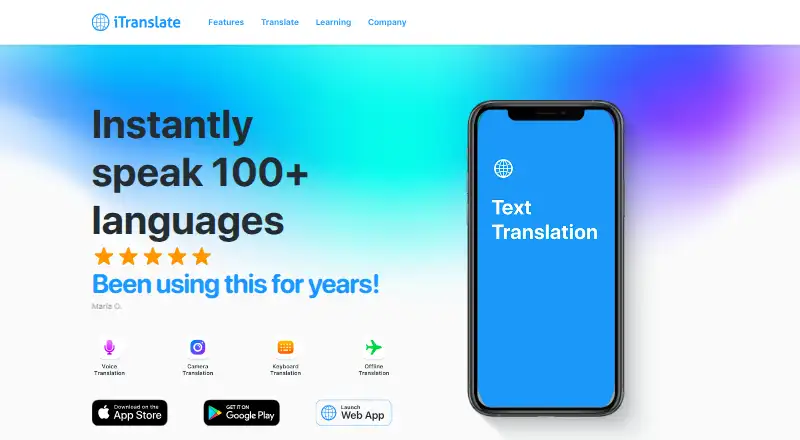
What iTranslate is
iTranslate is a translation app for travelers, students, business professionals, employers, and medical staff who need to read, write, or speak across more than 100 languages. Its text translation includes autocomplete and alternative translations. The app can recognize spoken input and translate it into a selected language; voice translation is available offline in four languages. Camera translation lets users point a phone at text such as menus, cards, or signs. Offline translation works in many popular languages after downloading the required language packs.
The keyboard extension brings translation into messaging apps, while the share extension can translate selected text from other apps. Other listed tools include voice output, translation history, favorites, verb conjugations, Siri Shortcuts, transliteration, and a phrasebook. iTranslate is available on Android, iOS, macOS, web, and Windows, as well as an extension. Its free plan covers text translation and is listed as free. The site also lists a 7-day trial. Trial availability and length can vary by subscription, and cancellation before a trial ends is required to avoid payment. The support center offers FAQs and a form for support requests.
Good
- Text translation offers autocomplete and alternatives in over 100 languages
- Camera translation handles menus, cards, and signs
- Offline translation is available after downloading language packs
- Keyboard extension translates within messaging apps
- Share extension translates selected text from other apps
Watch out
- Offline use requires downloading language packs
- Voice translation offline is available in four languages
- Trial availability and length vary by subscription
- Cancellation before a trial ends is required to avoid payment
Who it suits
iTranslate suits travelers and other users who need text, voice, or camera translation across many languages. It may also fit people who want translation within messaging apps or offline after downloading language packs.
Verdict
Choose iTranslate if you want text, voice, and camera translation across more than 100 languages, with extensions for messaging and other apps. The free plan covers text translation. Consider the trial terms and language-pack requirement if you need paid features or offline use.
Plans and prices
From iTranslate's own pricing page, checked 22 Sep 2026.
| Plan | Price | What it gives you |
|---|---|---|
| iTranslate PRO | Priced on request | Text translation · Keyboard extension · Custom phrases · Voice mode · Offline mode · Camera translation |
| iTranslate PRO | — | Text translation · Keyboard extension · Custom phrases · Voice mode · Offline mode · Camera translation |
| Free | Free | Text translation |
| iTranslate PRO Monthly | $12.99 a month | Voice mode · Offline mode · Camera translation · Keyboard extension · Custom phrases · monthly |
| iTranslate PRO Yearly | $99.99 a year | Voice mode · Offline mode · Camera translation · Keyboard extension · Custom phrases · yearly |
The facts
Each one read from iTranslate's own pages, with the date it was checked.
What it does
- Account limitation
- The official help article says creating and managing iTranslate accounts and cross-platform logins are no longer supported.checked 15 Oct 2026
- Additional features
- The site lists voice output, translation history, favorites, verb conjugations, Siri Shortcuts, transliteration, phrasebook, and alternative translations.checked 8 Oct 2026
- API availability
- A Deepgram developer tutorial documents a public iTranslate REST endpoint at dev-api.itranslate.com/translation/v2 using bearer authentication and source and target dialect fields.checked 15 Oct 2026
- API capabilities
- The documented API supports automatic source-language detection, text translation and use in prerecorded or live transcription workflows.checked 15 Oct 2026
- Camera translation
- The camera feature translates menus, cards, signs and other photographed content.checked 15 Oct 2026
- Cancellation process
- Subscriptions bought through Apple or Google must be cancelled in the respective store, while website subscriptions require contacting support with invoice details.checked 15 Oct 2026
- Integrations
- The site lists Siri Shortcuts and a keyboard extension, and says selected text can be translated from any app using its share extension.checked 8 Oct 2026
- Keyboard extension
- The keyboard extension provides translations inside messaging apps.checked 8 Oct 2026
- Keyboard integration
- The iTranslate keyboard extension translates text inside messaging and other apps.checked 15 Oct 2026
- Language coverage
- The language-availability page lists more than 100 languages and offline translation across 38 languages.checked 15 Oct 2026
- Licence status
- The store listing presents iTranslate as a copyrighted commercial app and does not state an open-source licence.checked 15 Oct 2026
- Limit: advertising and paywalls
- Laptop Mag reported ads in the free version and paywalls around the best features in its review.checked 15 Oct 2026
- Limit: premium gating
- WIRED said offline and image translation are locked behind Pro even though competing apps offer them free.checked 15 Oct 2026
- Limit: subscription complaints
- Trustpilot reviewers repeatedly described unwanted weekly or annual charges, difficulty cancelling and poor refund or support responses.checked 15 Oct 2026
- Limit: translation quality
- WIRED reported vocabulary, gender and structural errors and rated iTranslate 4/10 in its comparison.checked 15 Oct 2026
- Offline mode
- The app supports offline translation in many popular languages, and offline use requires downloading language packs.checked 8 Oct 2026
- Offline translation
- Offline mode supports text translation in 41 languages and voice translation in five languages on the offline-features page.checked 15 Oct 2026
Where it runs
- Apple integrations
- The product page lists an iPhone/iPad universal app, Apple Watch app, Siri Shortcuts, share extension, widgets and multitasking support.checked 15 Oct 2026
- Limit: platform imbalance
- BabelRank said Android and web experiences lag behind the iOS app and that translation quality trails Google Translate or Papago in their strongest languages.checked 15 Oct 2026
- Other platforms
- The apps page lists macOS, a browser webapp and a Samsung Bixby capsule in addition to mobile apps.checked 15 Oct 2026
- Platforms
- The site links to iOS, macOS, Android, and a web app; the iOS listing describes the keyboard extension.checked 8 Oct 2026
The company
- Company facts
- LinkedIn lists iTranslate as privately held, founded in 2009, headquartered in Graz, Austria, with 11–50 employees.checked 15 Oct 2026
- Ownership/legal entity
- The Apple listing identifies Mosaic S.r.l. as seller and credits Bending Spoons Operations S.p.A. for copyright.checked 15 Oct 2026
Money
- Free plan
- Yeschecked 22 Sep 2026
The full review of iTranslate
iTranslate is a translation app for travelers, students, professionals, employers, and medical staff who need to read, write, or speak across languages. Its broad set of text, voice, and camera tools makes it a flexible option, but the free plan is text-only and the price of Pro is custom.
Overview
iTranslate supports 100 languages and offers several ways to handle everyday translation: type a phrase, speak it, or use a phone camera on printed text. Extras such as a phrasebook, favorites, and translation history help with recurring needs. That breadth suits people moving between languages in varied settings, although the free tier serves a narrower purpose than the full app.
Key features
Text, voice, and camera translation
Text translation includes autocomplete and alternative translations in more than 100 languages. Those options are useful when a first rendering does not fit the intended phrasing. Voice mode recognizes speech and translates it into a selected language, while the camera can translate menus, cards, signs, and other text. The combination is especially practical for travelers, but voice and camera translation are paid-plan features.
Offline use and app extensions
Offline translation works in many popular languages after downloading language packs, so it can help when connectivity is unavailable. Voice translation offline is available in four languages, a tighter constraint for travelers relying on speech. A keyboard extension brings translation into messaging apps, and a share extension can translate selected text from other apps. Siri Shortcuts, transliteration, verb conjugations, voice output, and custom phrases round out the toolkit.
Privacy and support
iTranslate describes privacy as a core value and says its products are designed to keep customer data safe. Its support center offers FAQs and a request form. These are useful assurances and help routes, but they do not replace checking whether a particular workflow or language is supported.
Pricing
The Free plan costs nothing and includes text translation. It is a sensible fit for occasional typed lookups, but it omits the modes that distinguish iTranslate for travel and conversation.
iTranslate PRO includes text translation, keyboard extension, custom phrases, voice mode, offline mode, and camera translation; it has custom pricing. Choose it if those capabilities justify a subscription, particularly for frequent mobile use. Some subscriptions may offer a free trial, with length and availability varying, and cancellation must happen before the trial ends to avoid payment. The pricing note gives a 7-day trial, but readers should confirm the terms for the subscription they choose. Monthly plans have a 20-day refund request window and yearly plans a 60-day window, with exceptions including App Store purchases.
Platforms
iTranslate is available on Android, iOS, macOS, web, Windows, and as an extension. Its mobile camera translation and keyboard extension make the phone the strongest fit for on-the-go use, while the wider platform range accommodates people who also translate from desktop or browser contexts.
Who it's for
Travelers who want text, speech, camera, and offline options in one app are the clearest fit, provided their needed offline languages are covered by downloaded packs. Students and professionals can benefit from alternative translations, conjugations, and saved phrases. People who only need typed translation can stay on the free plan; those who need camera or voice tools should compare the custom-priced Pro plan against their actual frequency of use.
Pros and cons
- Pro: Text, voice, and camera input cover more situations than typed translation alone.
- Pro: Offline translation and extensions for messaging and shared text make the app useful beyond its main screen.
- Con: The free plan covers only text translation, putting the travel-oriented modes behind Pro.
- Con: Offline voice translation covers four languages, and offline use requires language-pack downloads.
- Con: Pro has custom pricing, so its cost is harder to judge before deciding whether paid features are worthwhile.
Alternatives
Choose Papago if its image, document, or voice monthly allowances better match your translation needs. Lara Translate is worth considering for a free plan with a 60,000-character monthly allowance and one user. For free personal, noncommercial text and web-page translation, Yandex Translate is a straightforward alternative. Google Translate may suit readers who want free translation with document support, including PDFs up to 300 pages. Pick LibreTranslate if its self-hosted and wider platform options are a better fit. Baidu Translate is another freemium option. Google Cloud Translation is an API-only alternative with a free monthly character allowance and paid text translation. PROMT is an alternative for readers seeking paid language-pair plans, including a multilingual plan with offline translation.
Browse more options in AI Translation Tools and Translation Software.
Verdict
Choose iTranslate if you want one app for typed, spoken, camera, and offline translation across a broad language set, with extensions that reach into other apps. Its free tier is useful for text, but the main reason to look elsewhere is the combination of custom Pro pricing and a four-language limit for offline voice.
Getting started
- Visit the iTranslate website
- Choose the free plan for text translation
- Use iTranslate on Android, iOS, macOS, web, Windows, or as an extension
- Download language packs for offline translation
- If starting a trial, cancel before it ends to avoid payment
Limits worth knowing
The free plan covers text translation. Offline translation requires downloaded language packs, and offline voice translation is available in four languages.
Questions
Is iTranslate free?
Yes. Its Free plan is listed as free and covers text translation.
Is there a free trial?
A 7-day trial is listed. Trial availability and length can vary by subscription, and cancellation before the trial ends is required to avoid payment.
Which platforms support iTranslate?
It is listed for Android, iOS, macOS, web, Windows, and as an extension.
Can I translate text from other apps?
Yes. The share extension can translate selected text from any app, and the keyboard extension provides translations inside messaging apps.
Does it work offline?
Offline translation is available in many popular languages after downloading language packs. Voice translation is available offline in four languages.
Alternatives to iTranslate
- 1
QuillBot
Free planAndroidiOSWebExtension8.3Free plan - 2

locize
Free planAndroidiOSWebAPI8.2From $7 a month - 3
SimpleLocalize
Free planAndroidiOSWebAPI8.2Free plan - 4

Lara Translate
Free planAndroidiOSWebAPI7.9From $9.99 a month - 5
Localizely
Free planWebAPILinuxmacOS7.9From $16 a month - 6

TranslatePress
Free planOpen sourceWebAPISelf-hosted7.9From €99 a year