MaShot
MaShot is a free document scanning and management app for Android and iOS, intended for personal and business use.
What MaShot is
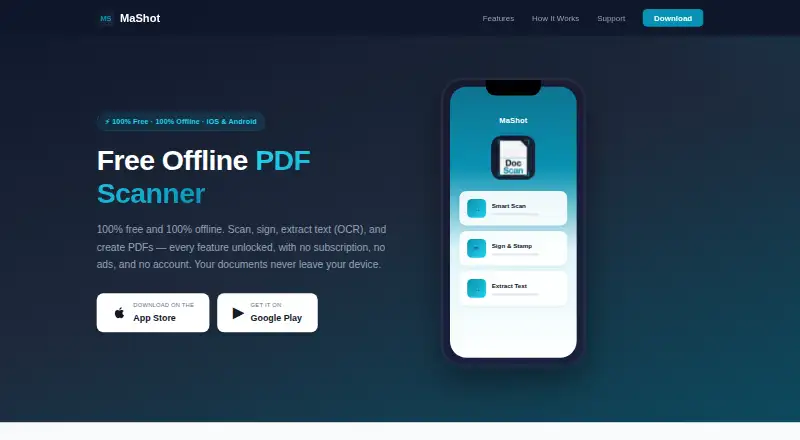
MaShot is a free document scanning and management app for Android and iOS, intended for personal and business use. It detects page edges, corrects perspective, and improves scan clarity, with automatic capture available. On-device OCR extracts text from scans and images for copying or sharing. Scanning, OCR, and document processing run locally, and the app says these tasks do not need an internet connection. Users can create and place digital signatures, add date stamps, and adjust their color and weight. PDF tools include merging, splitting, compression, page reordering and rotation, and watermarks. MaShot converts PDFs to and from Word and exports documents as PDF, image, Word, or plain text. Its interface supports over 20 languages, with dark mode that can follow system settings or be selected manually. Documents are stored locally. The privacy policy says the app does not collect personal identification information, scanned document content, or location, though anonymous crash reports and aggregated usage analytics may be collected. The maker says document security relies primarily on the device’s built-in security features.
Good
- Free with all features included
- Scanning and OCR work locally without internet
- Supports signatures and date stamps
- Exports PDF, image, Word, and plain text
- Available on Android and iOS
Watch out
- Documents are stored on the device
- Anonymous crash reports and usage analytics may be collected
- Document security depends primarily on device features
- Users are responsible for maintaining backups
Who it suits
MaShot suits Android and iOS users who want to scan, edit, and manage documents on a mobile device. Its local processing and offline scanning, OCR, and document tools may suit users working without an internet connection.
Verdict
MaShot combines mobile scanning, OCR, signature, and PDF tools in a free app without a subscription, ads, or account. Keep its local storage and backup responsibility in mind when choosing it.
Plans and prices
From MaShot's own pricing page, checked 11 Oct 2026.
| Plan | Price | What it gives you |
|---|---|---|
| MaShot | Free | All features included · no subscription, ads, or account |
The facts
Each one read from MaShot's own pages, with the date it was checked.
Where it runs
- Android app
- Yeschecked 23 Sep 2026
- iOS app
- Yeschecked 23 Sep 2026
- Platforms
- The app is available for iPhone, iPad, and Android phones and tablets.checked 11 Oct 2026
What it does
- Auto capture
- Yeschecked 23 Sep 2026
- Data collection
- The privacy policy says it does not collect personal identification information, scanned document content, or location, but may collect anonymous crash reports and aggregated usage analytics.checked 11 Oct 2026
- File formats
- It can convert PDFs to and from Word and export as PDF, image, Word, or plain text.checked 11 Oct 2026
- Languages and display
- The interface supports over 20 languages and includes a dark mode that can follow system settings or be set manually.checked 11 Oct 2026
- Multipage PDF
- Yeschecked 23 Sep 2026
- OCR
- On-device OCR extracts text from scanned documents and images for copying or sharing.checked 11 Oct 2026
- OCR included
- Yeschecked 23 Sep 2026
- Offline use
- Scanning, OCR, and document processing run locally, and the app says it needs no internet connection for these tasks.checked 11 Oct 2026
- PDF tools
- The app can merge, split, and compress PDFs, reorder or rotate pages, and add watermarks.checked 11 Oct 2026
- Purpose
- MaShot is a mobile app for scanning, editing, managing, and sharing documents for personal and business use.checked 11 Oct 2026
- Scanning
- It detects document edges, corrects perspective, and enhances scan clarity.checked 11 Oct 2026
- Security
- Documents are stored locally; the maker says document security primarily depends on the device’s built-in security features.checked 11 Oct 2026
- Signatures
- Users can create and place digital signatures and add date stamps, with controls for color and weight.checked 11 Oct 2026
- Support
- Support is available by email at [email protected], with a stated response time of 24–48 hours.checked 11 Oct 2026
- Third-party service
- Firebase Crashlytics is the only third-party service identified, used for anonymous crash reports and diagnostics.checked 11 Oct 2026
- Usage limit
- The terms say users are responsible for maintaining backups and that the maker is not liable for data loss.checked 11 Oct 2026
Money
- Free plan
- Yeschecked 23 Sep 2026
Alternatives to MaShot
- 1

Smallpdf
Free planAndroidiOSWebWindows8.9From $10 a month - 2

DocuWare
AndroidiOSWebAPI8.6From £1,060 a month - 3

CamScanner
Free planAndroidiOSWebmacOS8.4From $59.99 a year - 4

Docutain
Free planAndroidiOSWindows8.4From €2.08 a month - 5

Google Photos
Free planAndroidiOSWebAPI8.4Free plan - 6

Easy Scanner
Free planAndroidiOS8.2From $4.49 a month