
Mail Track for Gmail
Mail Track for Gmail adds open tracking and read receipts to messages sent through Gmail.
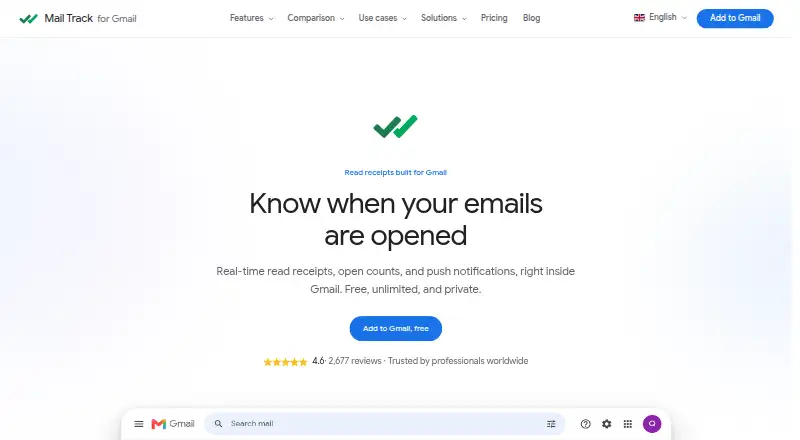
What Mail Track for Gmail is
Mail Track for Gmail adds open tracking and read receipts to messages sent through Gmail. In Gmail, tracked messages show double check marks with open counts and timestamps, and the product can send instant push notifications when a message is opened. It works inside Gmail, is available through the Google Workspace Marketplace, and supports sending tracked emails and receiving notifications with Gmail on Android and iOS as well as web and extension platforms. Tracking uses a small pixel, so an open is recorded when the recipient’s email client loads the message images; if images are blocked, the record may wait until the recipient chooses to display them. The free plan offers unlimited tracked emails and a visible signature. Premium removes that signature and adds tracking history, daily reports, and priority support. Premium is $2.99/mo (annual), and Lifetime is $99.99 once. Mail Track says it does not read message content, records open events only for messages sent with the product, and complies with GDPR.
Good
- Shows open counts and timestamps in Gmail.
- Sends instant push notifications when a message is opened.
- Works with Gmail on Android and iOS.
- Free plan includes unlimited tracked emails.
Watch out
- Free tracked emails include a visible signature.
- Image blocking can delay open records.
- Premium costs $2.99/mo (annual).
Who it suits
It suits professionals and teams who want to see whether Gmail messages have been opened and follow up. The free plan may suit users who do not mind a visible tracking signature.
Verdict
Mail Track adds open status and notifications to Gmail, with a free option and paid features for users who want history and reports. Keep in mind that tracking depends on the recipient’s email client loading message images.
Plans and prices
From Mail Track for Gmail's own pricing page, checked 15 Oct 2026.
| Plan | Price | What it gives you |
|---|---|---|
| Free | Free | Unlimited tracked emails · real-time read receipts · open counts and timestamps · instant push notifications · desktop and mobile · Free forever |
| Premium | $2.99 a month | Everything in Free · invisible tracker · full tracking history · daily email reports · priority support · Billed yearly; $36/year |
| Lifetime | $99.99, paid once | Everything in Premium forever · no subscription · invisible tracker · full tracking history · daily email reports · One-time payment |
The facts
Each one read from Mail Track for Gmail's own pages, with the date it was checked.
What it does
- Accuracy limitation
- Open tracking depends on the recipient loading images, so image blocking can prevent an open from being recorded.checked 15 Oct 2026
- API limitation
- A TrustRadius reviewer said they did not see an API and wanted more specific tracking objects such as links.checked 15 Oct 2026
- Compliance
- The maker says Mail Track complies with the European General Data Protection Regulation 2016/679 (GDPR).checked 8 Oct 2026
- Documentation
- The public help center provides installation, FAQ, tracking-report and subscription-management guides.checked 15 Oct 2026
- Follow-up alerts
- The extension advertises open-spike, revival and no-reply alerts, including reminders after 24–48 hours or 24–72 hours depending on alert type.checked 15 Oct 2026
- Funding record
- Dealroom lists a June 2014 seed round of €400,000 from Big Sur Ventures and Vitamina K.checked 15 Oct 2026
- Gmail integration
- Mail Track runs inside Gmail through a Chrome extension or Google Workspace add-on rather than a separate inbox.checked 15 Oct 2026
- Group-recipient tracking
- Mailtrack says it can identify which individual recipients opened a group email.checked 15 Oct 2026
- How tracking works
- It adds a small tracking pixel, and records an open when the recipient's email client loads the message images.checked 8 Oct 2026
- Integration
- The add-on is available through the Google Workspace Marketplace and works inside Gmail.checked 8 Oct 2026
- Intended users
- The maker presents Mail Track as useful for professionals and teams who want to track email opens and follow up.checked 8 Oct 2026
- Limit: false or inaccurate opens
- Trustpilot and Apple reviewers report false opens, missed subsequent opens and unreliable tracking in some situations.checked 15 Oct 2026
- Limit: mobile reliability
- TrustRadius reviews include complaints that the free version sometimes does not work on phones.checked 15 Oct 2026
- Limit: pricing complaints
- Trustpilot reviewers complain that features moved from free to paid tiers and that subscriptions can feel expensive for basic information.checked 15 Oct 2026
- Limit: recipient identification
- A TrustRadius reviewer wanted better detail about who received a forwarded message and more forwarding information.checked 15 Oct 2026
- Limit: support
- Trustpilot reviewers repeatedly report slow or absent support responses, including unresolved connection and billing problems.checked 15 Oct 2026
- Link tracking
- The product reports when recipients click links in tracked emails.checked 15 Oct 2026
The company
- Company founded
- LinkedIn lists Mailsuite as founded in 2013.checked 15 Oct 2026
- Company headquarters
- Mailsuite lists its registered office at Carrer de Còrsega 301, Barcelona, Spain.checked 15 Oct 2026
- Company legal name
- The terms identify the owner as Mailsuite S.L., formerly associated with The Mail Track Company S.L.checked 15 Oct 2026
- Company size
- LinkedIn lists Mailsuite's company size as 11–50 employees.checked 15 Oct 2026
Money
- Free plan limit
- The free plan adds a visible signature to tracked emails; Premium includes an invisible tracker without a signature.checked 8 Oct 2026
- Free-plan signature
- The free tier adds a visible tracking signature, while Premium removes it with an invisible tracker.checked 15 Oct 2026
- Limit: free tier
- Independent reviews repeatedly mention the visible watermark or signature, upgrade prompts and restricted features in the free version.checked 15 Oct 2026
The full review of Mail Track for Gmail
Mail Track for Gmail is an in-Gmail open-tracking add-on for professionals and teams that need a prompt follow-up signal. It suits users who want simple receipts rather than a full sales-engagement system, provided they accept that image blocking can delay or prevent an open record.
Overview
Mail Track works inside Gmail through the Google Workspace Marketplace. Double check marks identify tracked messages, while open counts and timestamps show recorded activity. Instant push notifications can alert you when a message opens, making the service practical for time-sensitive one-to-one outreach.
Tracking uses a small pixel and records an open when the recipient’s email client loads message images. If images are blocked by default, the event may not register until the recipient displays them. An alert therefore indicates image loading, not certain reading or understanding of the message.
Key features
Receipts and alerts
Unlimited tracked emails are included on every listed plan. Real-time read receipts, counts and timestamps provide a quick history of engagement, while push alerts reduce the need to repeatedly check sent mail. This focused approach fits follow-up workflows better than users seeking broader campaign automation.
Gmail, mobile and privacy
The add-on operates within Gmail, with support for sending tracked messages and receiving notifications on Android and iOS as well as desktop access. Mail Track says it does not read email content and records only open events for messages sent with the product. The maker also says the service complies with the European Union’s GDPR (2016/679). Premium customers receive priority support, with questions directed to the help center.
Pricing
| Plan | Price and terms | What you get |
|---|---|---|
| Free | free; free forever | Unlimited tracked emails, real-time read receipts, open counts and timestamps, instant push notifications, desktop and mobile access, and a visible tracking signature |
| Premium | $2.99 a year; billed yearly | Everything in Free, plus an invisible tracker, full tracking history, daily email reports and priority support |
| Lifetime | 99.99 USD once; one-time payment | Premium features with lifetime access and no subscription |
The Free plan is suitable when unlimited volume matters and a branded signature is acceptable. Premium is the better fit for professional correspondence that should not carry a visible tracking mark, or for users who need historical records and daily summaries. Lifetime costs more upfront but removes recurring subscription payments. Premium subscribers who cancel within 30 days of purchase can request a full refund through support.
Platforms
Mail Track supports Gmail on web, Android and iOS, with the browser add-on distributed through the Google Workspace Marketplace. Its email-client support is Gmail.
Who it's for
Professionals and small teams following up on individual messages are the clearest audience. Free works for users comfortable with a visible signature; Premium better serves client-facing communication and anyone who needs history or reports. It is not the right choice when image-blocking policies make dependable open measurement essential.
Pros and cons
Pros
- Unlimited tracking on Free: volume is not restricted for users who can accept the signature.
- Immediate notifications: push alerts can support faster follow-up than periodic inbox checks.
- Gmail and mobile coverage: sending and notifications extend across desktop, Android and iOS.
- Clear privacy position: the maker says content is not read and only open events are recorded.
Cons
- Image-dependent receipts: blocked images can postpone or eliminate an open event.
- Visible Free signature: professional messages may require Premium to remove the branding.
- Focused feature set: the service centers on opens and reports rather than a broader sales workflow.
Alternatives
Sales Email Tracking Software is a useful category starting point when you want to compare several tracking tools. Choose Mailbutler Smart Assistant instead if you need a freemium assistant across Android, iOS, Linux, macOS, Windows and web. ReadNotify offers a free tier limited to 20 tracked emails per month, so it may suit lighter usage. Boomerang is the alternative for Gmail scheduling and reminders, with a Basic plan providing 10 message credits monthly. Mixmax fits users wanting sequences, though its free plan allows 20 tracked emails and 50 sequence recipients per month. DidTheyReadIt is another paid tracking option with a free subscription tier. Mailsuite provides a Mailtrack plan at $6.99 per user/month with seven days of history and additional link and campaign allowances. Right Inbox is aimed at limited solo use, while Yesware combines basic open and attachment tracking with campaign recipients and meeting scheduling.
Verdict
Choose Mail Track for Gmail if you want unlimited, lightweight open tracking that stays in Gmail and sends mobile alerts. Premium is the sensible professional upgrade for an invisible tracker and retained history. Look elsewhere if image-blocking makes receipts too uncertain or if your workflow needs substantial sequencing, campaign controls or broader sales automation.
Alternatives to Mail Track for Gmail
- 1

Mailbutler Smart Assistant
Free planAndroidiOSWebExtension8.2Free plan - 2
Boomerang
Free planAndroidiOSWebAPI8.1From $4.98 a month - 3

LeadBoxer
Free planAndroidiOSWebAPI8.1From €99 a month - 4
Mixmax
Free planWebAPIExtensionLinux8.1From $29 a month - 5

ReadNotify
Free planAndroidiOSWebExtension8.0From $24 a year - 6

Right Inbox
Free planWebExtensionLinuxmacOS7.9From $9.95 a month