
LucidLink
LucidLink streams files from cloud storage into a shared filespace, letting collaborators work with large files without downloading or syncing each entire fi…
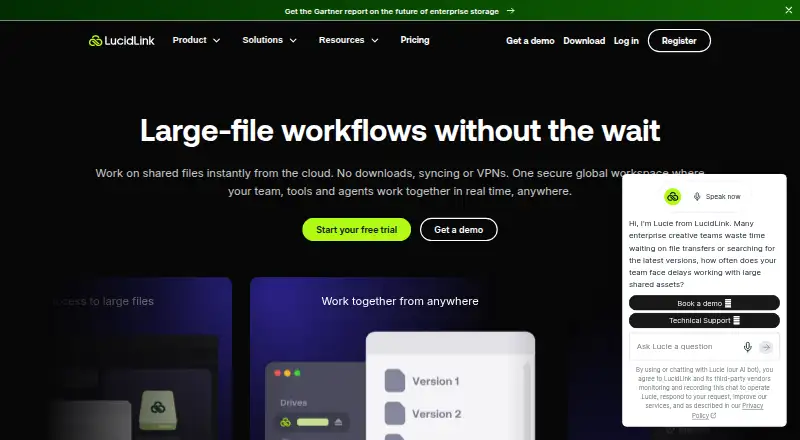
What LucidLink is
LucidLink streams files from cloud storage into a shared filespace, letting collaborators work with large files without downloading or syncing each entire file. When an application opens a file, the platform streams only the data it needs. LucidLink mounts like a local drive and works with tools including Adobe Creative Cloud, AutoCAD, Figma, and Final Cut. Its iOS and Android apps support uploading, browsing, previewing, and sharing files. Connect can bring storage from services such as Google Drive, Dropbox, SharePoint, and S3 into one filespace. LucidLink says it encrypts files end to end with AES-256 and lets customers control the keys under a zero-knowledge model. Access controls include SAML 2.0 SSO, SCIM provisioning, folder permissions, and real-time enforcement; audit logs record file access events, and snapshots can recover files, folders, or filespaces. Starter is limited to 10 members and 1 TB; Business is limited to 25 members and is described as suitable for up to 10 TB. Starter costs $7.00 per billed member/month, and the service offers a 30-day trial.
Good
- Streams only file data an application needs.
- Mounts like a local drive.
- Mobile apps support browsing and sharing files.
- Snapshots can recover files, folders, or filespaces.
Watch out
- Starter is limited to 10 members and 1 TB.
- Business is limited to 25 members.
- No free plan is listed.
Who it suits
LucidLink suits teams collaborating on large files, including people using supported creative and design tools. Its plans specify member and storage limits, so teams should check those against their needs.
Verdict
LucidLink offers shared access to cloud-stored files without syncing entire files, along with mobile apps and access controls. Check the plan limits and $7.00 per billed member/month Starter price before choosing it.
Plans and prices
From LucidLink's own pricing page, checked 29 Sep 2026.
| Plan | Price | What it gives you |
|---|---|---|
| Starter | $7 a month | 10 members · 100 GB included per member, shared · 1 filespace · 10 active guest links · $7 / 100 GB / month additional storage · member/month; annual billing saves 15% |
| Business | — | 25 members · 400 GB included per member, shared · unlimited storage capacity (recommended up to 10 TB) · unlimited filespaces · 100 active guest links · $8 / 100 GB / month additional storage · 30-day snapshots · Premium 24/7 support · member/month; page shows $32$27 |
| Enterprise | Priced on request | Unlimited members · unlimited storage capacity · AWS or bring your own storage · unlimited filespaces · unlimited active guest links · unlimited snapshots · tailored onboarding · Let’s talk |
The facts
Each one read from LucidLink's own pages, with the date it was checked.
What it does
- Access controls
- Security features include SAML 2.0 SSO, SCIM provisioning, folder-level read-only or read-write permissions, and real-time access enforcement.checked 29 Sep 2026
- Audit and recovery
- File access events can be recorded in audit logs, and snapshots can recover files, folders or filespaces.checked 29 Sep 2026
- Compliance
- LucidLink lists SOC 2 Type II, ISO 27001, GDPR and TPN Blue among its security and compliance credentials.checked 29 Sep 2026
- Connect integrations
- LucidLink Connect brings existing storage such as Google Drive, Dropbox, SharePoint and S3 into a unified filespace for streaming.checked 29 Sep 2026
- Creative Cloud
- LucidLink offers Premiere Pro and After Effects panels, with pinning, search and clip information features.checked 29 Sep 2026
- Local drive
- LucidLink mounts like a local drive and works with tools including Adobe Creative Cloud, AutoCAD, Figma and Final Cut.checked 29 Sep 2026
- Mobile
- The iOS and Android apps support uploading, browsing, previewing and sharing files.checked 29 Sep 2026
- On-demand access
- The platform streams only the data an application needs when users open large files.checked 29 Sep 2026
- Paid from
- 7checked 21 Sep 2026
- Product
- LucidLink streams files from cloud storage into a shared filespace for real-time collaboration without downloading or syncing entire files.checked 29 Sep 2026
- Security
- LucidLink says files are encrypted end to end using AES-256 and that customers control the keys under its zero-knowledge model.checked 29 Sep 2026
- Support
- The pricing page lists Slack community support for Starter, Standard support for Business, and Premium 24/7 support for Enterprise.checked 29 Sep 2026
The company
- Company history
- LucidLink says George Dochev and Peter Thompson founded the company in 2016.checked 29 Sep 2026
Money
- Free plan
- Nochecked 21 Sep 2026
- Plan limits
- Starter is limited to 10 members and 1 TB, while Business is limited to 25 members and is described as best for up to 10 TB.checked 29 Sep 2026
The full review of LucidLink
Overview
LucidLink streams files from cloud storage into a shared filespace, so collaborators can work without syncing entire files to their devices. It is best suited to teams working with large creative or technical files across locations. Its on-demand access and local-drive workflow are compelling, but member, storage and guest-link limits make plan choice important.
Key features
When an application opens a large file, LucidLink streams the data it needs rather than requiring the whole file to be downloaded first. The filespace mounts like a local drive and works with tools including Adobe Creative Cloud, AutoCAD, Figma and Final Cut. That approach suits teams whose projects are too large or active for routine full-file syncing; it is less compelling if the main need is simply a conventional cloud storage folder.
LucidLink's iOS and Android apps support uploading, browsing, previewing and sharing files. Premiere Pro and After Effects panels add pinning, search and clip information for creative workflows. Connect can bring existing Google Drive, Dropbox, SharePoint and S3 storage into a unified filespace for streaming, which may help teams with assets spread across services.
Security features include AES-256 end-to-end encryption and customer-controlled keys under a zero-knowledge model, according to LucidLink. SAML 2.0 SSO, SCIM provisioning, folder-level read-only or read-write permissions, and real-time access enforcement provide controls for managing team access. Audit logs can record file-access events, and snapshots can restore files, folders or entire filespaces. LucidLink lists SOC 2 Type II, ISO 27001, GDPR and TPN Blue credentials.
Pricing
LucidLink is paid software with no free plan and a 30-day trial. Starter costs $7 a month, billed per member/month; annual billing saves 15%. It allows 10 members, includes 100 GB per member in shared storage, one filespace and 10 active guest links, with additional storage at $7 / 100 GB / month. This is the entry point for smaller teams, but the shared quota and guest-link cap need attention as projects grow. Starter includes Slack community support.
Business costs $3,227 a month (the page shows $32$27), billed per member/month. It allows 25 members, includes 400 GB per member in shared storage, unlimited storage capacity (recommended up to 10 TB), unlimited filespaces and 100 active guest links. Additional storage is $8 / 100 GB / month. The plan includes 30-day snapshots and Premium 24/7 support. Its greater headroom and recovery window better suit larger teams, though the listed price and per-member billing merit close review before committing. Business is also described as best for up to 10 TB.
Enterprise has custom pricing, unlimited members, storage, filespaces and active guest links. It is the fit for organizations that exceed Business's stated limits; teams that do not need that scale have less reason to move beyond the lower tiers. Enterprise support is Premium 24/7.
Platforms
LucidLink supports Android, iOS, Linux, macOS, web, Windows and an extension. It uses a cloud deployment model, with a global namespace and local caching, and supports S3-compatible object storage. Listed cloud storage targets include AWS S3 and GovCloud, Microsoft Azure, Backblaze, Google Cloud, IBM Cloud, Oracle Cloud, Wasabi and Alibaba Cloud, among others. Edge synchronization is not supported, so teams requiring that capability should look elsewhere.
Who it's for
LucidLink is a strong candidate for distributed creative and technical teams that need shared access to large working files through familiar desktop applications, and for organizations that want granular access controls and recovery options. Small teams should compare their likely storage and guest-link use against Starter's caps. It is a weaker fit for anyone seeking a free tier or edge synchronization.
Pros and cons
- Pros: On-demand streaming avoids syncing entire files, which can suit large-file collaboration.
- Pros: Local-drive access and named integrations support established creative and technical tools.
- Pros: SSO, provisioning, folder permissions, audit logs and snapshots provide useful governance and recovery controls.
- Cons: There is no free plan, and Starter caps teams at 10 members, one filespace and 10 active guest links.
- Cons: Starter's shared storage allowance and paid storage additions can constrain expanding projects.
- Cons: Edge synchronization is not supported.
Alternatives
For another cloud-file workflow, compare Cloud Storage Gateway Software, Distributed File System Software and Cloud Storage Services.
- Synology Active Backup for SaaS is worth considering if a free, self-hosted option for Microsoft 365 and Google Workspace is the priority.
- Triofox is a paid alternative with a free trial and Android, iOS, macOS, self-hosted, web and Windows platforms.
- Morro Data CloudNAS is a paid alternative with a free trial and a Business plan from from $129 (priced on request).
- QNAP HybridMount offers a free plan and paid annual tiers, including a Small plan at $19.99 a year.
- Hitachi Universal Volume Manager is a paid alternative requiring a license on the local storage system.
- Nasuni File Data Platform is a paid alternative on a 3-Year Contract, Paid Annually.
- ObjectiveFS is a paid alternative with a free trial and Linux, macOS and self-hosted platforms.
- AWS Storage Gateway is a paid alternative with usage-based pricing that varies by region and gateway host.
Verdict
Choose LucidLink if your team needs shared, on-demand access to large cloud-stored files through local-drive workflows, with access controls and recovery features. Its clearest advantage is avoiding full-file syncing; its main drawbacks are the absence of a free plan and the need to keep close watch on member, storage and guest-link allowances. Teams needing edge synchronization or a simpler free option should look elsewhere.
Getting started
- Open the LucidLink website.
- Start the 30-day trial.
- Choose a plan for the team.
- Install or access it on a supported platform.
- Mount the filespace and connect supported storage as needed.
Limits worth knowing
Starter is limited to 10 members and 1 TB total, with one filespace and 10 active guest links. Business is limited to 25 members and is described as recommended up to 10 TB; its listed allowance is 400 GB per member shared, with unlimited storage capacity and filespaces.
Questions
Is there a free plan or trial?
There is no free plan. A 30-day trial is available.
Which platforms does LucidLink support?
Listed platforms are Android, iOS, Linux, macOS, web, Windows and extension.
Which cloud storage can LucidLink connect?
LucidLink Connect can bring Google Drive, Dropbox, SharePoint and S3 into a unified filespace. Listed cloud storage targets also include AWS S3, Microsoft Azure, Backblaze and others.
What security controls does it include?
LucidLink says files are encrypted end to end using AES-256, with customers controlling keys. Features include SAML 2.0 SSO, SCIM provisioning, folder permissions, audit logs and snapshots.
Who founded LucidLink?
LucidLink says George Dochev and Peter Thompson founded the company in 2016.
Alternatives to LucidLink
- 1
JuiceFS
Free planOpen sourceAPILinuxmacOSSelf-hosted7.9From $0.02 a month - 2
Google Cloud Managed Lustre
Free planWebAPILinuxSelf-hosted7.4From $0.06 a month - 3

MooseFS
Free planWebAPILinuxmacOS7.1€9 one-time - 4
Tahoe-LAFS
Free planWebAPILinuxmacOS7.1Free plan - 5

SeaweedFS
Free planAPILinuxmacOSSelf-hosted7.0From $20 a year - 6

Ceph
Free planAPILinuxSelf-hostedWindows6.6Free plan