Tahoe-LAFS
Tahoe-LAFS is free, open-source software for storing files across multiple servers.
What Tahoe-LAFS is
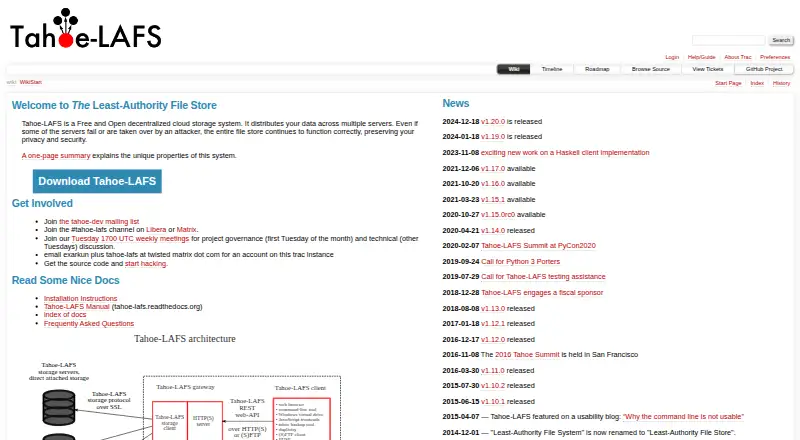
Tahoe-LAFS is free, open-source software for storing files across multiple servers. A client encrypts each file with its own key before it reaches storage, while erasure coding divides it into shares so files can be recovered when servers fail. The documented defaults use 10 shares on at least 7 servers, with recovery from any 3. A gateway checks integrity and ignores corrupted shares. Files can be immutable or mutable; mutable files and directories can have read-only or read-write access. Users access a storage grid through HTTP(S) or SFTP, and a REST-style Web API supports programmatic operations. You can run a gateway or operate a full grid with storage nodes and an introducer. The project documents installation on Windows, macOS, Linux, and BSD, and describes use with Tor and I2P. Tahoe-LAFS does not provide anonymity or protect file size. Its public test grid is for experimentation, not reliable or large-scale storage.
Good
- Encrypts each file with a unique key before storage.
- Can recover files from any 3 of 10 shares.
- Gateway detects and ignores corrupted shares.
- Offers HTTP(S), SFTP, and a REST-style Web API.
- Free and open source.
Watch out
- Default uploads need at least 7 storage nodes.
- Public test grid is not intended for reliable storage.
- Does not provide anonymity or conceal file size.
Who it suits
It suits people who want to operate a decentralized storage grid or connect a gateway to storage servers on other computers. Users should be prepared to manage server availability and configure small grids where needed.
Verdict
Tahoe-LAFS combines client-side encryption and recoverable shares with gateway-based access and integrity checks. It is oriented toward users who can run or connect to storage infrastructure, rather than those seeking a hosted storage plan.
Plans and prices
From Tahoe-LAFS's own pricing page, checked 9 Oct 2026.
| Plan | Price | What it gives you |
|---|---|---|
| Free and open-source software | Free | Self-hosted storage grid · no hosted plan or paid tier stated |
The facts
Each one read from Tahoe-LAFS's own pages, with the date it was checked.
What it does
- Access control
- Tahoe-LAFS supports immutable files and mutable files with separate read-only and read-write capabilities.checked 9 Oct 2026
- API
- Tahoe-LAFS documents a REST-style Web API for programmatic operations.checked 4 Oct 2026
- Community support
- The project points users to its tahoe-dev mailing list and Libera.chat for help with deployments.checked 4 Oct 2026
- Default redundancy
- The documentation gives defaults of 10 shares across at least 7 storage servers, with recovery from any 3 shares.checked 9 Oct 2026
- Encryption
- The client encrypts each file with a unique key before uploading it to storage servers.checked 4 Oct 2026
- Fault tolerance
- Its erasure coding lets a client recover files from a subset of shares even if some storage servers fail.checked 9 Oct 2026
- Gateway deployment
- Users typically run their own gateway, while a remote gateway can be accessed over HTTPS or SFTP and its operator can view and modify the data.checked 9 Oct 2026
- Installation
- The project documents installation on Windows, macOS, Linux, and BSD systems.checked 4 Oct 2026
- Integrations
- A Tahoe-LAFS client node can provide an SFTP server for use with regular SFTP clients.checked 9 Oct 2026
- Integrity
- The gateway checks file integrity and detects and ignores corrupted shares.checked 4 Oct 2026
- Intended users
- The project describes a typical deployment where each user runs a gateway on their own machine and connects it to storage servers on other computers.checked 9 Oct 2026
- Interfaces
- A gateway provides access to a storage grid through HTTP(S) and SFTP.checked 4 Oct 2026
- License
- The project offers the software under GNU GPL version 2 or later, or the Transitive Grace Period Public Licence version 1.0 or later.checked 4 Oct 2026
- Protocols
- The documentation describes HTTP(S) and SFTP access through a gateway, and storage-server communication over HTTPS or Foolscap.checked 9 Oct 2026
- Provider-independent security
- The project says storage servers cannot read or modify file contents because encryption and integrity checks happen at the gateway.checked 9 Oct 2026
- Purpose
- Tahoe-LAFS is a decentralized file storage system that encrypts files, splits them into shares, and distributes those shares across storage servers.checked 9 Oct 2026
- Redundancy
- Files are erasure-coded into shares so the system can recover them even when some storage servers fail; the documented defaults are 10 shares across at least 7 servers, recoverable from any 3.checked 4 Oct 2026
- Requirements
- The project README says Python 3.9 or later is required and directs Python 2.7 users to version 1.17.1.checked 9 Oct 2026
- Retention limits
- Storage servers may delete shares after leases expire if garbage collection is enabled; garbage collection is disabled by default.checked 9 Oct 2026
- Security limits
- The architecture documentation says Tahoe-LAFS does not attempt to provide anonymity and that file size is not protected.checked 9 Oct 2026
- Self-hosting
- Users can run a client gateway or operate a complete grid of storage nodes and an introducer.checked 4 Oct 2026
- Small-grid limitation
- The default shares.happy setting is 7, so uploads will not succeed on grids with fewer than 7 storage nodes unless it is adjusted.checked 4 Oct 2026
The company
- Founded
- 2007checked 28 Sep 2026
Where it runs
- Platforms
- The installation guide lists Windows, macOS, Linux, and BSD as supported operating systems.checked 9 Oct 2026
The full review of Tahoe-LAFS
Tahoe-LAFS is free, open-source software for distributing files across multiple storage servers. It is best suited to people prepared to run a gateway and connect it to a storage grid. Its key advantage is recoverable, encrypted storage without trusting storage servers with file contents; the trade-off is that users must arrange and operate the infrastructure.
Overview
Tahoe-LAFS splits files into erasure-coded shares and distributes them across storage nodes. Its documented defaults create 10 shares across at least 7 servers, with recovery possible from any 3 shares. That gives the system room to withstand server failures, but the default shares.happy setting prevents uploads on grids with fewer than 7 storage nodes unless it is adjusted.
Encryption and integrity checks take place at the gateway, so storage servers cannot read or modify file contents. This is a meaningful protection against untrusted storage operators, provided you control the gateway: an operator of a remote gateway can view and change the data. Tahoe-LAFS does not provide anonymity, and it does not conceal file size. Tor and I2P integrations are documented, but do not change those stated limits.
Key features
Recovery and integrity
Erasure coding lets clients recover files from a subset of shares when storage servers fail. The gateway also checks integrity and ignores corrupted shares. This makes Tahoe-LAFS a stronger fit for distributed infrastructure with imperfect availability than for a simple single-server file store. The default redundancy settings also mean that a small deployment needs configuration changes before uploads will work.
Gateway access and permissions
A gateway connects users to a storage grid over HTTP(S) or SFTP, and a REST-style Web API supports programmatic operations. Files can be immutable or mutable; mutable files and directories can allow either read-write or read-only access. These options suit deployments that need controlled sharing and application access, though they do not remove the work of maintaining a gateway and storage nodes.
Deployment and retention
Users can run a gateway against other people’s storage nodes or operate a complete grid with storage nodes and an introducer. The project documents installation for Windows, macOS, Linux, and BSD, and requires Python 3.9 or later; Python 2.7 users are directed to version 1.17.1. The public test grid is for experimentation, not dependable or large-scale storage. Storage servers may delete shares after leases expire if garbage collection is enabled; garbage collection is disabled by default, so retention depends on deployment settings.
Pricing
Free and open-source software: free. The self-hosted storage grid is the included model; there is no hosted plan or paid tier stated. That makes it a practical choice for users willing to provide their own infrastructure, not for readers looking to buy managed storage. The software is offered under GNU GPL version 2 or later, or the Transitive Grace Period Public Licence version 1.0 or later.
Platforms
Tahoe-LAFS is listed for API, Linux, macOS, self-hosted, web, and Windows use. Its installation guide also covers BSD systems. The typical setup has each user running a gateway locally and connecting to storage servers on other computers. Users who need deployment help can turn to the tahoe-dev mailing list or Libera.Chat.
Who it's for
Choose Tahoe-LAFS if you can run a gateway, arrange storage nodes, and want files encrypted before they reach storage servers, with recovery across failed nodes. It is a poor fit if you want a provider-managed storage plan, a dependable public test service, or anonymity. The default minimum of seven storage nodes is also a significant consideration for small grids.
Pros and cons
- Pros: Gateway-side encryption and integrity checks keep storage servers from reading or modifying file contents.
- Pros: Recovery from any 3 of the default 10 shares offers tolerance for unavailable storage nodes.
- Pros: HTTP(S), SFTP, and a REST-style API support both interactive and programmatic gateway access.
- Cons: The default configuration requires at least 7 storage nodes for uploads, making an unadjusted small grid unsuitable.
- Cons: A remote gateway operator can view and modify data, so users must trust the gateway or run their own.
- Cons: It has no hosted plan, and the public test grid is explicitly unsuitable for reliable or large-scale storage.
- Cons: It does not attempt anonymity and does not protect file size.
Alternatives
For a broader comparison, browse Distributed File System Software or Secure Cloud Storage.
- SeaweedFS is worth considering if its free Community support plan, which covers any cluster size and offers public documentation and GitHub support without a guaranteed response time, better matches your deployment.
- MooseFS offers a free GPLv2 Community plan with a single active master and single-parity erasure coding; choose it if those stated limits suit your cluster needs.
- Hadoop Distributed File System is another free, self-hosted cluster option under the Apache License 2.0.
- JuiceFS has a self-hosted Community Edition with support through GitHub and Discord; it may suit readers looking for those channels.
- OpenAFS is a free, open-source distributed filesystem to consider as another self-hosted option.
- OrangeFS offers a downloadable open-source release for readers comparing free filesystem software.
- Quobyte may suit readers whose needs fit its free edition, capped at 150 TB.
- Ceph is free distributed storage software for readers who have a running Ceph cluster for block storage.
Verdict
Tahoe-LAFS is a strong choice for technically capable users who want encrypted, recoverable files across storage servers they can connect to and a gateway they can trust. Its combination of gateway-side protection and recovery from a subset of shares is compelling; look elsewhere if you want managed storage, a small default-ready grid, or anonymity.
Getting started
- Visit the Tahoe-LAFS website.
- Install on Windows, macOS, Linux, or BSD, with Python 3.9 or later.
- Run a client gateway and connect it to storage servers on other computers, or operate a grid with storage nodes and an introducer.
- Access the grid through the gateway using HTTP(S) or SFTP, or use the REST-style Web API.
Limits worth knowing
The software is free and self-hosted, with no hosted plan or paid tier stated. Under the documented defaults, uploads need at least 7 storage servers; the public test grid is for experimentation rather than reliable or large-scale storage.
Questions
How much does Tahoe-LAFS cost?
The listed plan is free: free. It is open-source software, with no hosted plan or paid tier stated.
Which systems can run it?
Installation is documented for Windows, macOS, Linux, and BSD. The project README requires Python 3.9 or later and directs Python 2.7 users to version 1.17.1.
How does Tahoe-LAFS protect stored files?
The client encrypts each file with a unique key before upload, and the gateway checks integrity. Storage servers cannot read or modify file contents according to the project’s description, but the system does not protect file size or provide anonymity.
Can files be recovered if servers fail?
Yes. The documented defaults make 10 shares across at least 7 servers, recoverable from any 3 shares.
Can I use a public storage grid?
The public test grid is available for experimentation, but is explicitly not intended for reliable or large-scale storage.
What access methods and integrations are documented?
A gateway provides HTTP(S) and SFTP access, and a REST-style Web API supports programmatic operations. The documentation also describes use with Tor and I2P.
Alternatives to Tahoe-LAFS
- 1
JuiceFS
Free planOpen sourceAPILinuxmacOSSelf-hosted7.9From $0.02 a month - 2
Google Cloud Managed Lustre
Free planWebAPILinuxSelf-hosted7.4From $0.06 a month - 3

LucidLink
AndroidiOSWebExtension7.1From $7 a month - 4
MooseFS
Free planWebAPILinuxmacOS7.1€9 one-time - 5

SeaweedFS
Free planAPILinuxmacOSSelf-hosted7.0From $20 a year - 6

Ceph
Free planAPILinuxSelf-hostedWindows6.6Free plan