LSDJ
LSDJ (Little Sound Dj) is a Game Boy music sequencer for making music with the console’s sound.
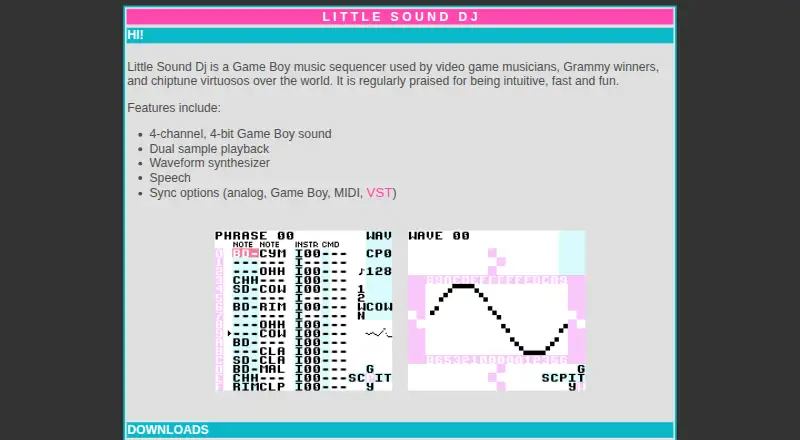
What LSDJ is
LSDJ (Little Sound Dj) is a Game Boy music sequencer for making music with the console’s sound. Its engine provides four channels of 4-bit audio, with dual sample playback, a waveform synthesizer, and speech among its listed tools. Sync options include analog, Game Boy, MIDI, and VST. The download area offers the ROM image and manual, as well as a save-file manager, a sample patcher for adding users’ samples, and player versions.
For computer use, the maker recommends BGB, which runs on Windows and is described as working on Mac and Linux with Wine; SameBoy is another emulator option. The ROM can also run on an original Game Boy with a reprogrammable flash cartridge, and the site names RG300, BittBoy, and Odroid-GO as hardware emulator examples. The ROM is free for personal and educational use. Commercial users should seek the copyright holder’s permission. Its license restricts copying and distribution, and provides the software as-is without warranty.
Good
- Four-channel, 4-bit Game Boy sound engine
- Includes dual sample playback and waveform synthesis
- Sync options include analog, Game Boy, MIDI, and VST
- ROM and manual are available for download
Watch out
- Commercial users should seek permission first
- License prohibits copying, publishing, or selling copies
- Software is provided without warranty
Who it suits
LSDJ suits video game musicians, chiptune musicians, and others making music with Game Boy sound. It is available for personal and educational use, with commercial use requiring permission from the copyright holder.
Verdict
LSDJ combines Game Boy-focused sequencing and multiple sync options with emulator and hardware use choices. Check the license before using it commercially or redistributing copies.
Plans and prices
From LSDJ's own pricing page, checked 7 Oct 2026.
| Plan | Price | What it gives you |
|---|---|---|
| Personal and educational use | Free | personal or educational use · commercial users should seek permission |
The facts
Each one read from LSDJ's own pages, with the date it was checked.
What it does
- Additional utilities
- The download area lists a save-file manager, a sample patcher for adding users’ samples, and player versions.checked 7 Oct 2026
- Computer use
- The maker recommends BGB, which runs on Windows and is described as working on Mac and Linux with Wine; it also lists SameBoy as an emulator option.checked 7 Oct 2026
- Distribution limit
- The license prohibits copying, publishing, distributing, sublicensing, or selling copies of the software.checked 7 Oct 2026
- Donations
- The maker says donations support ongoing development, web hosting, and other costs.checked 7 Oct 2026
- Hardware use
- The ROM can be used on an original Game Boy with a reprogrammable flash cartridge, and the site names RG300, BittBoy, and Odroid-GO as hardware emulator examples.checked 7 Oct 2026
- License
- The ROM is free for personal and educational use; commercial users should seek the copyright holder’s permission first.checked 7 Oct 2026
- Purpose
- Little Sound Dj is a Game Boy music sequencer used by video game musicians, Grammy winners, and chiptune musicians.checked 7 Oct 2026
- ROM and manual
- The site offers a ROM image and manual for download.checked 7 Oct 2026
- Sampling
- Its listed features include dual sample playback.checked 7 Oct 2026
- Sound engine
- It provides 4-channel, 4-bit Game Boy sound.checked 7 Oct 2026
- Support
- The maker invites bug reports by email and says reported bugs will be fixed.checked 7 Oct 2026
- Sync
- The site lists analog, Game Boy, MIDI, and VST sync options.checked 7 Oct 2026
- Synthesis
- Its listed features include a waveform synthesizer and speech.checked 7 Oct 2026
- Warranty
- The license provides the software as-is without express or implied warranty and disclaims liability for damages arising from its use.checked 7 Oct 2026
The company
- Headquarters
- Stockholm, Swedenchecked 28 Sep 2026
The full review of LSDJ
LSDJ is a Game Boy music sequencer for chiptune musicians and video-game composers who want arrangements built around the handheld’s distinctive limitations. It is best for creators willing to work through a ROM, emulator, or compatible hardware rather than a conventional DAW. Its dedicated four-channel engine and unusually broad sync support are compelling; the licensing restrictions and setup requirements are the important reasons to look elsewhere.
Overview
Little Sound Dj produces four channels of 4-bit Game Boy sound. That narrow architecture is a creative advantage when authentic Game Boy character is the goal, because every arrangement stays within a clearly defined palette. It is not a sensible replacement for a full multitrack workstation when you need unrestricted track counts or a general production environment.
Dual sample playback, a waveform synthesizer, and speech add contrast without abandoning the Game Boy focus. The package is supplied as a ROM image with a manual, while the download area adds a save-file manager, a sample patcher for adding your own samples, and player versions. The maker accepts bug reports by email and says reported bugs will be fixed; donations support development, hosting, and related costs.
Key features
Game Boy sequencing
The four-channel, 4-bit engine is deliberately constrained, making LSDJ a strong choice for chiptune and game-music work that benefits from an identifiable console sound. Dual samples, synthesis, and speech broaden the palette, but they do not turn it into a general-purpose studio. Choose it for focused Game Boy composition, not flexible orchestration.
Synchronization
LSDJ supports analog, Game Boy, MIDI, and VST sync. That range gives it a practical role beside other hardware or software: MIDI and VST suit computer-based setups, while analog and Game Boy options address more hardware-centered performances. The breadth is useful, but the workflow still assumes you are comfortable arranging around the sequencer’s specialized format.
Emulator and hardware choices
For computer use, the maker recommends BGB. It runs on Windows and is described as working on macOS and Linux through Wine; SameBoy is also offered as an emulator option. The ROM can run on an original Game Boy with a reprogrammable flash cartridge, and RG300, BittBoy, and Odroid-GO are named hardware-emulator examples. This flexibility lets you choose an authentic device or a desktop route, though neither is as immediate as installing a standard native sequencer.
Pricing
LSDJ has one free plan: Personal and educational use costs free. There is no free trial because the software is already free, and no paid tier or usage quota is stated. Personal and educational users get the ROM and associated materials without a purchase. Commercial users must seek the copyright holder’s permission before use.
The license is a significant condition of the zero price. It prohibits copying, publishing, distributing, sublicensing, or selling copies. The software is provided as-is without express or implied warranty, and the license disclaims liability for damages arising from use. Anyone planning commercial releases, redistribution, or a packaged product should resolve permission before committing to LSDJ.
Platforms
LSDJ is listed for Linux, macOS, and Windows, with desktop computer use centered on an emulator. BGB is recommended for Windows and is described as working on macOS and Linux with Wine; SameBoy is another emulator choice. Hardware use extends to an original Game Boy with a reprogrammable flash cartridge and named devices including RG300, BittBoy, and Odroid-GO. VST support also makes it relevant to compatible desktop audio setups.
Who it's for
LSDJ is for chiptune musicians, video-game composers, and performers who specifically want Game Boy sound, whether on original hardware, a handheld emulator, or a computer. It suits users who value four-channel discipline and need analog, Game Boy, MIDI, or VST synchronization. It is a poor fit for producers seeking an all-purpose DAW, native plug-and-play desktop operation, or permission to redistribute the software without contacting the copyright holder.
Pros and cons
Pros
- Authentic, focused engine: Four channels of 4-bit Game Boy audio deliver a consistent chiptune identity.
- Useful sound expansion: Dual sample playback, waveform synthesis, and speech add variety within the console’s limits.
- Broad sync options: Analog, Game Boy, MIDI, and VST support can connect it to both hardware and computer-based rigs.
- Flexible deployment: A ROM, multiple emulator choices, and compatible hardware options support different working styles.
- Helpful utilities: The save-file manager, sample patcher, and player versions extend the core sequencer.
Cons
- Strict channel and bit-depth limits: The design is unsuitable for unrestricted multitrack production.
- Setup overhead: Computer users need an emulator, while hardware users need a flash cartridge or compatible device.
- Commercial restrictions: Commercial use requires permission, and redistribution, sublicensing, and selling copies are prohibited.
- No warranty: The license disclaims express or implied warranty and liability for resulting damages.
Alternatives
SunVox is the better pick when you want a freemium modular synthesizer and tracker across Android, iOS, Linux, macOS, web, Windows, and extensions, with MIDI import and export noted for its Android offering.
DefleMask suits users who want a broader multi-platform tracker with a one-time paid version at 14.99 USD, while its free Legacy release is a limited, unsupported 32-bit demo.
Pro Tools is preferable for conventional desktop recording, with macOS and Windows support and a free Intro option capped at eight audio, instrument, and MIDI tracks.
Reason is the alternative for a commercial DAW and rack-plugin workflow on macOS or Windows, including a free trial and a Reason+ subscription option.
LMMS is a fully free, open-source, community-driven choice for Windows, macOS, and Linux when you do not need LSDJ’s Game Boy-specific engine.
MilkyTracker is a free tracker for Linux, macOS, and Windows with optional donations.
OpenMPT is free software for Windows or Wine users who want a tracker that supports Windows 7 SP1 or newer, Wine 1.8 or newer, and SSE2-capable CPUs or ARM/ARM64.
Schism Tracker is a free, open-source alternative with no paid plans or usage limits stated.
Browse the Game Music Software list for more options.
Verdict
Choose LSDJ if you want a purpose-built Game Boy sequencer, authentic four-channel sound, and synchronization that can bridge emulators, hardware, and desktop tools. Look elsewhere if you need a general DAW, a simpler native desktop setup, or unrestricted commercial distribution. Its zero price is attractive, but the ROM-centered workflow and license terms make it a specialist choice rather than an all-purpose music application.