LMMS
LMMS is a free, open-source desktop tool for making music on Linux, macOS, and Windows.
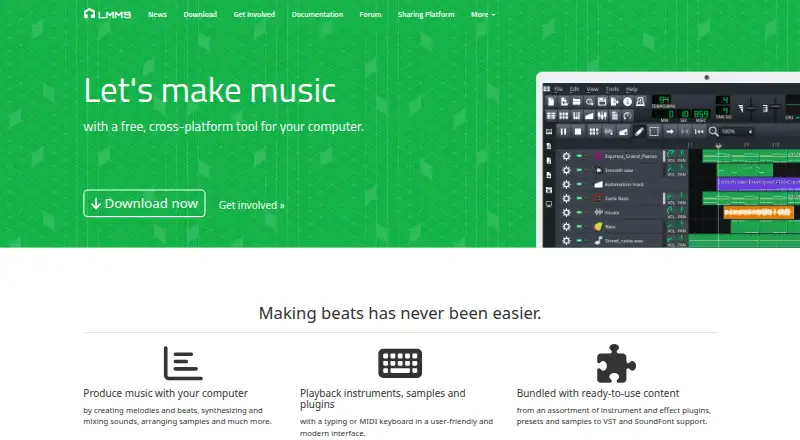
What LMMS is
LMMS is a free, open-source desktop tool for making music on Linux, macOS, and Windows. It provides a workflow for sequencing, composing, mixing, and automating songs, including creating melodies and beats, synthesizing and mixing sounds, and arranging samples. Users can play notes with a MIDI or typing keyboard and import MIDI files or Hydrogen project files. The software lists 16 built-in synthesizers, with emulations of the TB-303, Commodore 64 SID, NES, GameBoy, and Yamaha OPL2. It supports multisample instruments in SoundFont (SF2), Giga (GIG), and Gravis UltraSound (GUS) formats. Effects include LADSPA and VST plugins, plus built-in tools such as reverb, delay, distortion, compression, and equalizers. LMMS supports 64-bit VST instruments, with a 32-bit VST bridge on 64-bit Windows, but does not support VST3 plugins. Its manual says backups are enabled by default and a backup file is created when saving a project.
Good
- Free and open source.
- Runs on Linux, macOS, and Windows.
- Includes 16 built-in synthesizers.
- Supports MIDI and Hydrogen project imports.
- Project backups are enabled by default.
Watch out
- VST3 plugins are not supported.
- Windows builds require Windows 10 or 11.
- Newer macOS builds require macOS 10.13 or later for x86_64.
Who it suits
LMMS suits people who want a free desktop music-making tool across Linux, macOS, or Windows. Its MIDI and plugin support may interest users building a workflow around instruments and effects.
Verdict
LMMS offers composition, mixing, instruments, and effects without a listed price. Its lack of VST3 support is an important limitation for users who require that plugin format.
Plans and prices
From LMMS's own pricing page, checked 19 Sep 2026.
| Plan | Price | What it gives you |
|---|---|---|
| Free | Free | Open-source software · Available for Windows, macOS, and Linux |
| LMMS | Free | 100% free · open source · community-driven project |
The facts
Each one read from LMMS's own pages, with the date it was checked.
What it does
- Built-in instruments
- The site lists 16 built-in synthesizers, including emulations of the TB-303, Commodore 64 SID, NES, GameBoy, and Yamaha OPL2.checked 5 Oct 2026
- Download requirements
- The download page lists Windows 10 or 11 builds and macOS 10.13 or newer for x86_64, or macOS 11 or newer for arm64.checked 5 Oct 2026
- Effects and plugins
- The site lists LADSPA and VST effect plugin support, plus built-in compressor, limiter, delay, reverb, distortion, bass enhancer, equalizers, and a spectrum analyzer.checked 5 Oct 2026
- Import
- LMMS can import MIDI files and Hydrogen project files.checked 5 Oct 2026
- Input
- LMMS supports note playback using a MIDI or typing keyboard.checked 5 Oct 2026
- Instrument formats
- LMMS lists native multisample support for SoundFont (SF2), Giga (GIG), and Gravis UltraSound (GUS) formats.checked 5 Oct 2026
- Project model
- The home page describes LMMS as a 100% free, open-source, community-driven project hosted on GitHub.checked 5 Oct 2026
- Release notes
- The download page says the release includes 8 new native plugins, ARM64 builds, and many features, fixes, and performance improvements.checked 5 Oct 2026
- Security and backups
- The user manual says the backup feature is on by default and describes a backup file created when saving a project.checked 5 Oct 2026
- VST3 limitation
- The user manual states that LMMS does not yet support VST3 plugins.checked 5 Oct 2026
- VST instruments
- The site lists built-in 64-bit VST instrument support with a 32-bit VST bridge on 64-bit Windows.checked 5 Oct 2026
- What it does
- LMMS is a cross-platform tool for making music on a computer, including creating melodies and beats, synthesizing and mixing sounds, and arranging samples.checked 5 Oct 2026
- Workflow
- It provides an interface to sequence, compose, mix, and automate songs.checked 5 Oct 2026
Where it runs
- Desktop platforms
- The home page describes LMMS as a tool for Linux, Windows, and macOS.checked 5 Oct 2026
Money
- Free plan
- Yeschecked 19 Sep 2026
The full review of LMMS
LMMS is a free desktop music-production environment for composing, sequencing, mixing, and arranging samples. It suits beatmakers, electronic composers, and game-music creators who want substantial built-in sound tools on Linux, macOS, or Windows. The breadth of instruments and effects is impressive at no cost, while workflows that depend on VST3 plugins should look elsewhere.
Overview
LMMS combines song sequencing, composition, mixing, and automation in one workspace. Notes can be entered from a MIDI keyboard or the computer keyboard, so it accommodates both hardware-based playing and quick pattern programming. MIDI and Hydrogen project imports provide a practical way to continue compatible work instead of rebuilding arrangements manually.
The project is open source and community driven, with no software charge. Automatic backups are enabled by default, and saving a project creates a backup file, a useful safeguard when experimenting with arrangements or sound design.
Key features
- Integrated production workflow: Sequencing, composing, mixing, and automation live in one interface, making LMMS suitable for taking an idea from melody or beat to a structured song.
- Flexible note input: MIDI and typing-keyboard playback support both performance-oriented users and those who prefer entering parts directly from a laptop.
- Project compatibility: MIDI and Hydrogen imports help users bring existing material into the program, although the documented import coverage is focused on those formats.
- Built-in synthesis: Sixteen synthesizers include emulations of the TB-303, Commodore 64 SID, NES, GameBoy, and Yamaha OPL2. That selection is especially useful for electronic, chiptune, and retro game-style work without buying separate instruments.
- Multisample formats: Native support for SoundFont (SF2), Giga (GIG), and Gravis UltraSound (GUS) expands the available instrument library beyond the built-in synths.
- Effects and analysis: Built-in compressor, limiter, delay, reverb, distortion, bass enhancer, equalizers, and spectrum analyzer cover core mixing and sound-shaping tasks. LADSPA and VST effects add further options.
- VST instruments: LMMS supports 64-bit VST instruments, with a 32-bit VST bridge on 64-bit Windows. It does not support VST3, which can rule it out for users whose preferred instruments or effects require that format.
- Recent platform work: The current download release adds eight native plugins, ARM64 builds, and performance improvements, making the application more practical on supported modern systems.
Pricing
| Plan | Price | Includes |
|---|---|---|
| Free | free | Open-source software for Windows, macOS, and Linux |
| LMMS | free | 100% free, open source, community-driven project |
There is no paid tier, trial period, renewal, seat limit, or usage quota to weigh. The free edition is the complete cost model, making LMMS a strong fit for learners, hobbyists, and independent musicians who need a full desktop workspace without subscription commitments. Commercial users also avoid licensing fees, though the absence of a paid support tier may matter to organizations seeking formal vendor assistance.
Platforms
LMMS runs on Linux, Windows, and macOS. Downloads include Windows 10 and 11 builds, macOS 10.13 or newer for Intel x86_64, and macOS 11 or newer for Apple arm64. Choose it when your production setup matches those desktop requirements; it is not presented as a mobile application.
Who it's for
LMMS is well suited to electronic producers, beatmakers, chiptune artists, and composers who value built-in synthesis, sample-format support, and a no-cost open-source workflow. Its MIDI and Hydrogen imports also help creators maintaining projects in those ecosystems. It is a poor fit for anyone whose established toolchain requires VST3 instruments or effects, since that format is not supported.
Pros and cons
Pros
- Completely free and open source: The full program costs 0.00 USD, with no trial expiration or subscription renewal.
- Strong built-in sound palette: Sixteen synthesizers and retro-system emulations give electronic and game-music creators useful sounds immediately.
- Broad desktop coverage: Linux, Windows, and macOS support makes it accessible across major desktop systems.
- Practical safety net: Automatic project backups reduce the risk of losing work during experimentation.
Cons
- No VST3 support: Modern plugins limited to VST3 cannot be used, potentially forcing a change of instruments or DAW.
- Desktop-only scope: Users seeking Android or iOS production will need another application.
- Import coverage is focused: Documented project imports cover MIDI and Hydrogen files, so projects in other formats may require reconstruction.
Alternatives
SunVox is the better choice for a modular synthesizer and tracker workflow with Android, iOS, web, and desktop availability; its desktop edition is free on most platforms.
DefleMask suits users focused on tracker-based chiptune production who are willing to pay 14.99 USD once for its main edition; its legacy build is a free, unsupported 32-bit demo.
Pro Tools is preferable when a conventional recording-oriented DAW and a free entry plan with up to eight audio, instrument, and MIDI tracks are the priority.
Reason is the alternative for users wanting a commercial Reason DAW and Rack ecosystem, including sound packs and AI features, with a free plan and trial available.
LSDJ is a free option for personal or educational use when a focused tracker experience is more important than a general-purpose workstation.
MilkyTracker, OpenMPT, and Schism Tracker are free tracker-oriented alternatives for users who prefer those specialized workflows.
For curated comparisons, see Game Music Software, Digital Audio Workstations, and Audio Editing Software.
Verdict
Choose LMMS if you want a genuinely free, open-source desktop production environment with capable sequencing, 16 built-in synthesizers, multisample support, and core mixing effects across Linux, Windows, or macOS. Its main reason to look elsewhere is the absence of VST3 support, which can make an otherwise suitable workflow incompatible with essential plugins.
Alternatives to LMMS
- 1
WavePad
Free planAndroidiOSmacOSWindows8.8From $39.95 a year - 2
n-Track Studio
Free planAndroidiOSLinuxmacOS8.7From $109 a year - 3
Zenbeats
Free planAndroidiOSmacOSWindows8.5From $2.99 a month - 4

Koala Sampler
Free planAndroidiOSLinuxmacOS8.4$2.99 one-time - 5
Pro Tools
Free planmacOSWindows8.3Free plan - 6

Soundtrap
Free planAndroidiOSWebLinux8.3Free plan