
Soundtrap
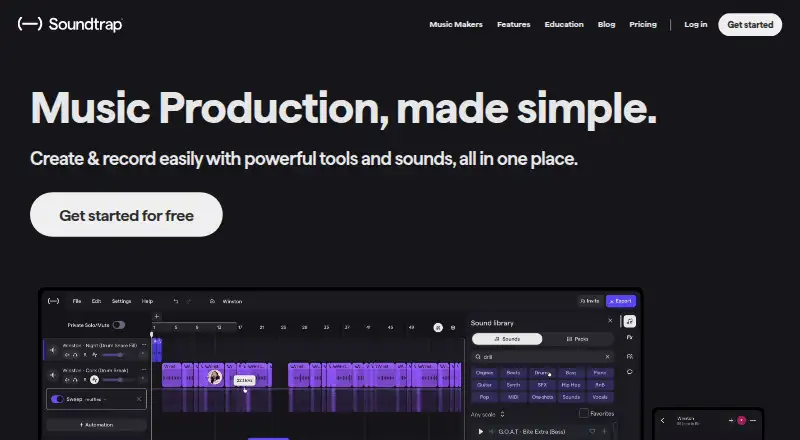
Soundtrap is a cloud-based digital audio workstation for making music and podcasts, available in a browser and on Windows, macOS, iOS, and Android.
What Soundtrap is
Soundtrap is a cloud-based digital audio workstation for making music and podcasts, available in a browser and on Windows, macOS, iOS, and Android. Its studio includes vocal and mixing tools, virtual instruments, a MIDI editor, and royalty-free loops and samples. Users can make multitrack projects, sequence MIDI, and use noise reduction. Collaboration features include real-time video and chat, comments on shared projects, and autosave. Soundtrap says its library contains up to 24,000+ loops and hundreds of presets, with new sound packs added every two weeks. A free account allows users to create and save projects and use selected free loops, instruments, drum kits, and studio tools; some sounds and features require a paid plan. Soundtrap for Education is designed for students and teachers, integrates with tools including Google Classroom and Microsoft Teams, and offers educators a 30-day free trial without upfront payment details. Some audio functions may not work fully across all browsers and operating systems, and recording may have higher latency. Mobile apps do not include automation or MIDI input. The Education service says it is designed to comply with COPPA, GDPR, and FERPA standards and supports CIPA certification.
Good
- Supports multitrack editing and MIDI sequencing.
- Offers real-time collaboration through video and chat.
- Free account can create and save projects.
- Education integrates with classroom platforms.
- Mobile apps are available for iOS and Android.
Watch out
- Some sounds and features require a paid plan.
- Mobile apps lack automation and MIDI input.
- Audio features may vary by browser and operating system.
- Recording may have higher latency.
Who it suits
Soundtrap suits people making music or podcasts who want browser or mobile access and collaborative project tools. Its Education service is designed for students and teachers creating audio projects across subjects and ability levels.
Verdict
Soundtrap combines recording, editing, and collaboration tools across web and mobile platforms, with a separate Education service. Browser variability and mobile feature omissions are worth considering if those workflows matter.
Plans and prices
From Soundtrap's own pricing page, checked 3 Oct 2026.
| Plan | Price | What it gives you |
|---|---|---|
| Soundtrap Basic | Free | Free account; limited loops and instruments |
| Music Production | — | Loops, one-shots, instruments, effects, high-quality downloads, and priority mixing |
| Production & Vocals | — | Includes features from Sound Starter, Music Production, and Vocals & Songwriting |
| Sound Starter | — | Music-making tools; professional features include vocal tuning, Time Restore, and automation |
| Soundtrap for Education | — | Education plans; features and integrations vary by plan · Annual subscription; price depends on Classroom, School, or District |
| Vocals & Songwriting | — | Vocal tools, presets, songwriting features, podcast creation, and interactive transcripts |
The facts
Each one read from Soundtrap's own pages, with the date it was checked.
What it does
- Audio tools
- The music studio includes vocal and mixing effects, virtual instruments, a MIDI editor, and royalty-free loops and samples.checked 3 Oct 2026
- Cloud collaboration
- Yeschecked 23 Sep 2026
- Collaboration
- Users can collaborate in real time through video and chat, comment on shared projects, and use autosave.checked 3 Oct 2026
- Education audience
- Soundtrap for Education is designed for students and teachers to create audio projects across subjects and ability levels.checked 2 Oct 2026
- Education compliance
- Soundtrap says its Education product is designed to comply with COPPA, GDPR, and FERPA standards and supports CIPA certification.checked 3 Oct 2026
- Education safety
- Soundtrap says Education accounts use a walled garden where student profiles are hidden outside the account and students cannot contact people outside their group.checked 3 Oct 2026
- Education support
- The Education School plan includes chat and email support, while the District plan includes an account manager and additional setup and professional development support for accounts with 400 or more seats.checked 2 Oct 2026
- History
- Soundtrap says it launched in 2013 and was founded in Stockholm, Sweden.checked 3 Oct 2026
- Integrations
- Soundtrap supports MIDI export to Flat.io and Noteflight; education integrations include tools such as Canvas, Schoology, Clever, ClassLink, and Skolon, depending on plan.checked 3 Oct 2026
- MIDI sequencing
- Yeschecked 23 Sep 2026
- Multitrack editing
- Yeschecked 23 Sep 2026
- Noise reduction
- Yeschecked 23 Sep 2026
- Product
- Soundtrap describes itself as a cloud-based digital audio workstation for creating music and podcasts.checked 3 Oct 2026
- Recording and editing
- The studio includes vocal and mixing tools, virtual instruments, a MIDI editor, and royalty-free loops and samples.checked 2 Oct 2026
Where it runs
- Browser limitation
- Some audio features may not work fully in every browser and operating system, and recording may have higher latency.checked 2 Oct 2026
- Browser support
- Soundtrap supports current versions of Chrome, Firefox, Edge, and Safari, and recommends Chrome or Chromium-based Edge.checked 3 Oct 2026
- Mobile apps
- Soundtrap offers iOS and Android apps, though its support page lists features that are unavailable on mobile, including automation and MIDI input.checked 3 Oct 2026
Money
- Education plans
- Education plans have a 50-seat minimum, and Classroom, School, and District plans target different school and district needs.checked 2 Oct 2026
- Education trial
- Educators can try Soundtrap for Education free for 30 days without providing a card or payment method upfront.checked 2 Oct 2026
- Free access
- The free version lets users create and save projects and use a selection of free loops, instruments, drum kits, and studio tools; some sounds and features require a paid plan.checked 2 Oct 2026
- Free plan
- Yeschecked 23 Sep 2026
- Free trial
- Soundtrap offers a free trial for premium personal plans and requires payment details to activate it; the opened page does not state the trial duration.checked 3 Oct 2026
The company
- Founded
- 2013checked 23 Sep 2026
- Headquarters
- Stockholm, Swedenchecked 23 Sep 2026
The full review of Soundtrap
Overview
Soundtrap is a cloud-based studio for making music and podcasts, best suited to creators who want recording and editing alongside shared, real-time project work. Its free account makes it possible to start and save projects, but a limited sound selection and browser or mobile constraints matter for more demanding workflows.
It brings multitrack editing, MIDI sequencing, noise reduction and collaboration into one service. A separate Education product adapts the studio for classroom use.
Key features
Recording and sound creation
The studio combines vocal and mixing effects, virtual instruments, a MIDI editor, and royalty-free loops and samples. Soundtrap describes a library of up to 24,000+ loops and hundreds of presets, with new sound packs added every two weeks. That breadth can help creators build arrangements without sourcing every sound themselves, while free accounts have only a limited selection of loops, instruments, drum kits and tools.
Plans name vocal tuning, Time Restore and automation as professional features; other tiers include one-shots, effects, high-quality downloads and priority mixing. These options make the paid range relevant to creators who need more than a starter sound palette, but plan prices are custom pricing.
Working together
Real-time collaboration includes video and chat, comments on shared projects, and autosave. That combination suits collaborators who need to discuss work in context and keep changes saved in the same cloud workspace. It is a more complete joint-creation setup than simply exchanging finished audio files.
Education
Soundtrap for Education is designed for students and teachers making audio projects across subjects and ability levels. Integrations include Noteflight, Flat.io, Google Classroom, Microsoft Teams, Canvas, Schoology and MusicFirst. Soundtrap says the Education service is designed to comply with COPPA, GDPR and FERPA standards, supports CIPA certification, and uses a walled garden to limit student collaboration to their account environment and groups.
Educators can try the Education service free for 30 days without providing a card or payment method upfront. Education plans have a 50-seat minimum, so they are aimed at institutions rather than individual learners. The School plan includes chat and email support; the District plan adds an account manager and setup and professional development support for accounts with 400 or more seats.
Pricing
Soundtrap is freemium. Soundtrap Basic costs nothing and provides a free account with limited loops and instruments; it suits exploring the studio or making projects within that narrower selection. Some sounds and features require a paid plan.
Paid music plans have custom pricing. Sound Starter adds music-making tools and professional features including vocal tuning, Time Restore and automation. Music Production focuses on loops, one-shots, instruments, effects, high-quality downloads and priority mixing. Vocals & Songwriting centers on vocal tools, presets, songwriting, podcast creation and interactive transcripts. Production & Vocals combines features from Sound Starter, Music Production, and Vocals & Songwriting. These tiers distinguish different creative needs, but the available prices do not allow a cost comparison.
Soundtrap for Education is an annual subscription with custom pricing that depends on Classroom, School or District plans; features and integrations vary by plan. Its 50-seat minimum is an important constraint for smaller groups, while the 30-day trial gives educators a way to assess the service before subscribing.
Platforms
Soundtrap supports web browsers, Windows, macOS, iOS and Android. It supports current Chrome, Firefox, Edge and Safari, and recommends Chrome or Microsoft Edge Chromium. Some audio features may not work fully in every browser and operating system, and recording can have higher latency. That variability makes browser choice consequential for recording work.
The iOS and Android apps extend access to mobile devices, but automation and MIDI input are unavailable on mobile. Creators who depend on either feature should plan to work on a computer rather than assume the app offers the full studio.
Who it's for
Soundtrap fits music and podcast creators who want recording, editing, sound creation and collaboration together, especially when several people need to contribute to shared projects. Its free account is a sensible starting point for modest projects; creators who need broader sound access or professional tools should compare the paid tiers and their custom pricing.
Education is a better fit for schools and districts seeking classroom-oriented audio projects and learning integrations. The seat minimum makes it a poor match for an individual educator buying access for only a few students.
Pros and cons
- Broad creation toolkit: Vocal and mixing effects, instruments, MIDI editing, loops and samples support both music and podcast work in one studio.
- Collaboration is built into the workflow: Real-time video and chat, project comments and autosave help teams coordinate while working on shared projects.
- Useful free entry point: Basic lets users create and save projects at no cost, though its loops and instruments are limited.
- Browser and OS variability: Some audio features may not work fully across every supported browser and operating system, and recording latency may be higher.
- Mobile feature gaps: Automation and MIDI input are unavailable in the iOS and Android apps, limiting mobile work for users who rely on them.
- Education's minimum commitment: The 50-seat minimum rules out small groups, even though the 30-day trial does not require upfront payment details.
Alternatives
Choose Flat instead if notation is central to the work: its free Basic plan includes core notation features, real-time collaboration and MIDI device transcription, with a 15-score limit.
Amped Studio is another freemium music-making option, with a Starter plan capped at 5 projects, 16 tracks and 0 GB external audio storage, or Premium at $6.99 a month after a billed 7-day trial.
Jamulus is a free, open-source alternative for readers who prioritize software with no stated usage limits.
For project review and file-sharing workflows, Pibox offers a free tier for 2 users, unlimited guests, up to 2 projects and 1 Gb storage.
Sessionwire may suit readers seeking a free collaboration option with unlimited connections, guest audio/video/file transfer, SessionChat and a free Plugin Suite.
Highnote is a shared-space option with a free Starter tier of 15 total tracks, 50GB cloud storage and unlimited shared spaces.
SonoBus is a free alternative available as standalone apps and audio plugins.
Sound Credit is another freemium option across web, Windows, macOS, iOS and Android.
Soundtrap also fits the Audio Editing Software and Music Collaboration Software categories.
Verdict
Choose Soundtrap if you want a single cloud studio for making music or podcasts and collaborating on projects in real time, or an education service built for classroom audio work. Look elsewhere if your recording workflow depends on consistent browser behavior, if you need automation or MIDI input on mobile, or if an Education plan's 50-seat minimum is too large.
Getting started
- Visit the Soundtrap website.
- Choose the free account to create and save projects with selected tools and sounds.
- Use Soundtrap in a supported web browser or on Windows, macOS, iOS, or Android.
- For classroom use, consider Soundtrap for Education and its 30-day educator trial.
Limits worth knowing
The free account has a limited selection of loops and instruments, and some sounds and features require a paid plan. Education plans have a 50-seat minimum, with features and integrations varying by plan.
Questions
Is Soundtrap free?
Soundtrap offers a free plan. The Soundtrap Basic plan is free.
What does the free account include?
It lets users create and save projects and use selected free loops, instruments, drum kits, and studio tools.
Which platforms does Soundtrap support?
It is available in a web browser and on Windows, macOS, iOS, and Android.
Does Soundtrap support collaboration?
Users can collaborate in real time through video and chat, comment on shared projects, and use autosave.
Is there a trial for Soundtrap for Education?
Educators can try it free for 30 days without providing a card or payment method upfront.
Which tools integrate with Soundtrap for Education?
It integrates with Noteflight, Flat.io, Google Classroom, Microsoft Teams, Canvas, Schoology, and MusicFirst.
Alternatives to Soundtrap
- 1
WavePad
Free planAndroidiOSmacOSWindows8.8From $39.95 a year - 2
n-Track Studio
Free planAndroidiOSLinuxmacOS8.7From $109 a year - 3
Zenbeats
Free planAndroidiOSmacOSWindows8.5From $2.99 a month - 4
Koala Sampler
Free planAndroidiOSLinuxmacOS8.4$2.99 one-time - 5
Pro Tools
Free planmacOSWindows8.3Free plan - 6
Riverside
Free planAndroidiOSWebAPI8.3Free plan