LinguaCafe
LinguaCafe is a free, open-source web app for learning languages through reading and vocabulary review.
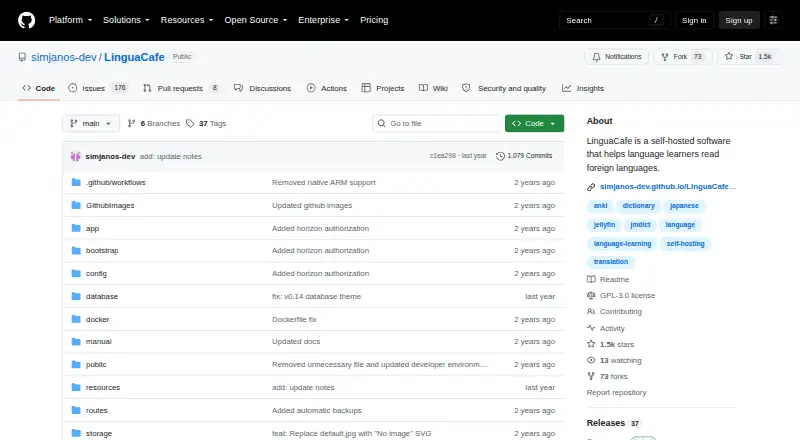
What LinguaCafe is
LinguaCafe is a free, open-source web app for learning languages through reading and vocabulary review. It is self-hosted, so users can run it on their own machine or private web server and control their data. Reading material can come from plain text, text files, ebooks, webpages, YouTube subtitles, subtitle files, or Jellyfin external subtitles. Readers can look up words and phrases, save translations, mark vocabulary as known or ignored, and track items by learning level. Spaced-repetition reviews follow an approach similar to the Leitner system, and highlighted cards can be exported to Anki or other SRS software. DeepL translations can appear in lookups when enabled. Text-to-speech uses the browser SpeechSynthesis API, with voice availability depending on the browser. The project lists support for languages including Chinese, English, French, German, Japanese, Korean, Spanish, and Welsh. It supports Progressive Web App installation to a mobile home screen and works in browsers at least 340 pixels wide. Setup uses Docker Compose, with a Windows installation script and Mac instructions. The project supports x64; Apple silicon needs an extra setup step, and other Armv8 devices such as Raspberry Pi 3 and newer are unsupported. One user per server is supported, and the maker warns the project may contain bugs during active development.
Good
- Imports ebooks, webpages, and subtitle material.
- Tracks vocabulary by learning level.
- Exports highlighted cards to Anki or other SRS software.
- Self-hosting gives users control over their data.
Watch out
- Only one user per server is supported.
- Other Armv8 devices such as Raspberry Pi do not work.
- The maker warns the active project may contain bugs.
Who it suits
LinguaCafe suits independent language learners who want to study with their own reading material and host the app themselves. It is also relevant to users who want to track vocabulary and export review cards to other SRS software.
Verdict
LinguaCafe combines reading-based study, vocabulary tracking, and spaced repetition in a self-hosted package. Check its installation requirements and one-user-per-server limit before setting it up.
Plans and prices
From LinguaCafe's own pricing page, checked 9 Oct 2026.
| Plan | Price | What it gives you |
|---|---|---|
| Free | Free | self-hosted · one user/server supported |
The facts
Each one read from LinguaCafe's own pages, with the date it was checked.
What it does
- Capacity
- The project says only one user per server is supported at this time.checked 9 Oct 2026
- Development status
- The maker warns that LinguaCafe is in active development and may contain bugs.checked 9 Oct 2026
- Hardware limits
- The README lists x64 support, says Apple silicon users need an additional step, and says other Armv8 devices such as Raspberry Pi 3 and newer do not currently work.checked 9 Oct 2026
- Installation
- The setup guide uses Docker Compose; it provides a Windows installation script and instructions for Mac users, including an additional Apple silicon setup step.checked 9 Oct 2026
- Integrations
- Vocabulary lookups can show DeepL translations when enabled, and imported reading material can include Jellyfin external subtitles.checked 9 Oct 2026
- Languages
- The project lists support for Chinese, Croatian, Czech, Danish, Dutch, English, Finnish, French, German, Greek, Italian, Japanese, Korean, Latin, Macedonian, Norwegian, Polish, Portuguese, Romanian, Russian, Slovenian, Spanish, Swedish, Thai, Turkish, Ukrainian, and Welsh.checked 9 Oct 2026
- Mobile access
- LinguaCafe supports Progressive Web App installation to a mobile device home screen and says it works in browsers on screens at least 340 pixels wide.checked 9 Oct 2026
- Privacy and data
- The maker says self-hosting lets users run the app on their own machine or private web server and control their data.checked 9 Oct 2026
- Purpose
- LinguaCafe is a self-hosted web app for learning foreign languages by reading and building vocabulary.checked 9 Oct 2026
- Reading materials
- You can import plain text, text files, ebooks, YouTube subtitles, subtitle files, Jellyfin external subtitles, and webpages.checked 9 Oct 2026
- Review
- LinguaCafe includes spaced-repetition reviews similar to the Leitner system and can export highlighted cards to Anki or other SRS software.checked 9 Oct 2026
- Speech
- Text-to-speech uses the browser SpeechSynthesis API, and support depends on the browser and available voices.checked 9 Oct 2026
- Support
- The project lists GitHub, Discord, Reddit, and email as contact channels, and says the maker will try to help with update problems reported on GitHub or Discord.checked 9 Oct 2026
- Vocabulary
- Readers can look up words and phrases, save translations, mark words as known or ignored, and track vocabulary by learning level.checked 9 Oct 2026
The full review of LinguaCafe
LinguaCafe is a self-hosted reading environment that turns foreign-language texts into vocabulary study and review. It is best suited to solo learners who already have their own books, subtitles, videos, or web material and want control over where their data lives. The trade-off is practical: installation requires some technical work, and each server currently supports only one user.
Overview
As an open-source, free application, LinguaCafe avoids subscriptions while giving independent learners a focused workflow: bring in material, investigate unfamiliar language, save useful terms, and revisit them later. Self-hosting means the app can run on your own machine or a private web server, which is a meaningful advantage for readers who do not want their study data tied to a hosted service. It is less suitable when several people need a shared account or when a managed, ready-to-use service is a priority.
Key features
Import support is unusually broad for a reading-centered tool. You can work with plain text, text files, e-books, webpages, YouTube subtitles, subtitle files, and Jellyfin external subtitles. That makes LinguaCafe practical for learners who study from novels, online articles, video captions, or media libraries rather than a single course catalog.
While reading, you can look up words and phrases, save translations, mark entries as known or ignored, and organize vocabulary by learning level. Those controls help separate genuinely new terms from items you have mastered or do not want to study. DeepL results can be shown in lookups when enabled, adding a convenient translation source without changing the self-hosted model.
Built-in reviews use a spaced-repetition approach comparable to the Leitner system. Highlighted cards can also be exported to Anki or another SRS application, so LinguaCafe can serve as the reading and capture stage even if your preferred long-term review system is elsewhere. Text-to-speech uses the browser SpeechSynthesis API; voice selection and quality therefore vary with the browser and voices installed on the device.
The language list covers Chinese, Croatian, Czech, Danish, Dutch, English, Finnish, French, German, Greek, Italian, Japanese, Korean, Latin, Macedonian, Norwegian, Polish, Portuguese, Romanian, Russian, Slovenian, Spanish, Swedish, Thai, Turkish, Ukrainian, and Welsh. Interactive practice is present through vocabulary review rather than a broad course curriculum.
Pricing
LinguaCafe has one plan: Free at free. It is self-hosted and supports one user per server. There is no trial period because the software is free outright, and there is no paid tier that raises the user limit or adds hosted operation. The price is excellent for an individual willing to manage installation, but it does not make LinguaCafe a practical multi-user deployment.
Platforms
The app is delivered through the web and can run on Linux, macOS, Windows, or a self-hosted server. Setup uses Docker Compose. Windows has an installation script, while Mac users receive installation instructions that include an additional step for Apple silicon. The project documents x64 support; Apple silicon needs that extra procedure, and Armv8 devices such as Raspberry Pi 3 and newer currently do not work.
LinguaCafe can be installed as a Progressive Web App on a phone's home screen and is intended to work in browsers on displays at least 340 pixels wide. That gives mobile access without making the phone the installation target, although the underlying server still has to be maintained.
Who it's for
Choose LinguaCafe if you are a technically comfortable language learner with a personal library of reading or subtitle material, value local data control, and want one place to connect reading with vocabulary and spaced repetition. It is especially compelling for people who want to export cards to Anki while keeping the import and lookup workflow in a private environment.
Look elsewhere if you need accounts for a household or class, broad Arm hardware support, or a hosted product that removes Docker and server administration. Active development also means the maker warns that bugs may occur; GitHub and Discord are the stated channels for help with update problems, alongside Reddit and email.
Pros and cons
Pros
- Wide material intake: books, webpages, subtitles, YouTube captions, and Jellyfin subtitles all fit a bring-your-own-content workflow.
- Useful vocabulary pipeline: lookups, saved translations, known/ignored states, learning levels, and SRS reviews connect reading to practice.
- Open and free: there is no subscription cost, and self-hosting keeps data under your control.
- Interoperable review: exporting highlighted cards to Anki or other SRS tools protects an existing study workflow.
Cons
- One user per server: it is designed for an individual, not a shared family or classroom installation.
- Technical setup: Docker Compose and platform-specific steps add work compared with hosted apps.
- Hardware exclusions: Raspberry Pi-class Armv8 devices do not currently run it, and Apple silicon needs an extra step.
- Variable speech support: text-to-speech depends on browser implementation and installed voices.
- Developing software: possible bugs make it a less predictable choice for users who require mature, managed infrastructure.
Alternatives
Lute is the closest free, locally installed option when you want a no-limits setup across Android, Linux, macOS, self-hosted web, and Windows.
Pick LingQ instead if you prefer a hosted service with Android, iOS, browser, and extension access and can accept a freemium model whose free membership allows 20 saved words and phrases, five imported lessons, and one audio playlist; its Premium plan is 215.76 USD.
OpenKoto is another free, open-source choice for iOS, Linux, macOS, web, and Windows, including an Apache 2.0 license.
Choose Readlang for its browser, mobile, and extension-based reading approach rather than a self-hosted server.
Learning with Texts is a free self-hosted alternative that requires a modern browser plus local web and database servers with PHP.
Beelinguapp is a mobile Android and iOS option with unlocked stories, news, glossary, and flashcards on its free plan, plus a free trial.
E-clair is a freemium Android and iOS alternative focused on collections and audio transcription.
jidoujisho is free, open-source software for Android 7.0 and newer.
Verdict
LinguaCafe is a strong recommendation for a solo, technically capable learner who wants to study personal reading and subtitle material privately, without paying for the software. Its strongest reason to choose it is the combination of broad imports, vocabulary control, built-in spaced repetition, and export to established SRS tools. Look elsewhere if you need multiple users on one server, unsupported Arm hardware, or a polished hosted experience with no maintenance.
Alternatives to LinguaCafe
- 1

Provenance
Free planOpen sourceiOSmacOS8.2From $39.99 a year - 2
SkyEmu
Free planOpen sourceAndroidiOSWebLinux8.0Free plan - 3
RetroArch
Free planAndroidiOSWebLinux7.7Free plan - 4
ares
Free planOpen sourceLinuxmacOSSelf-hostedWindows7.5Free plan - 5

OpenEmu
Free planOpen sourcemacOS7.3Free plan - 6
RustBoyAdvance-NG
Free planAndroidWebLinuxmacOS7.1Free plan