Lute
Lute is a locally installed web application for learning languages by reading texts.
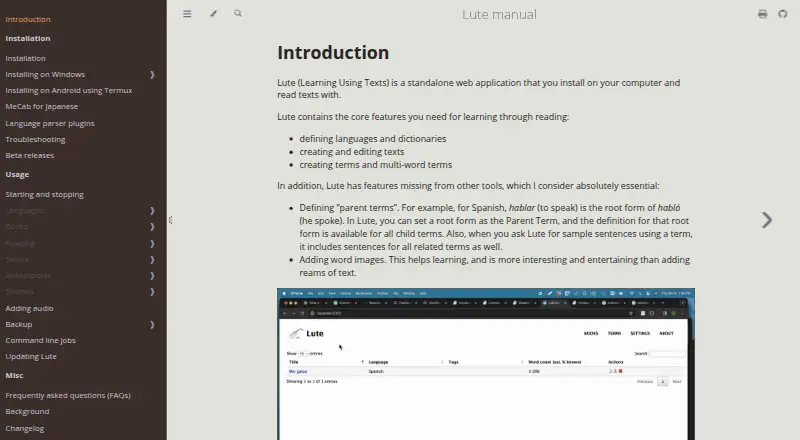
What Lute is
Lute is a locally installed web application for learning languages by reading texts. Readers can import or create texts, then save definitions and associations as they encounter words; these saved terms build a personal dictionary. The application supports defining languages and dictionaries, editing texts, and creating single-word or multi-word terms. Parent terms can share definitions with child terms, and sample sentences can include related terms. Users can add images to words and set statuses such as New, Learning, Well-known, or Ignore, including through bulk updates. Lute supports 66 languages; its manual lists over 50 predefined languages with sample stories and dictionaries, some requiring plugins. Languages can use multiple term and sentence dictionaries, displayed in embedded or pop-up views. Lute can export terms to Anki note types, and AnkiConnect enables communication with Anki. Content formats include text, TXT, EPUB, web pages, and book audio. Installation options are pip, Docker, or source code, and Android use is documented through Termux, Python, and pip. Lute is free, uses the MIT license, and runs on the user’s machine, where the user controls the data.
Good
- Free, locally installed software under the MIT license.
- Supports 66 languages and multiple dictionary views.
- Exports terms to Anki note types.
- Includes word images and status controls.
Watch out
- Designed for reading and has no testing.
- Cannot play audio for a single clicked word.
- Not designed for automated or bulk translation.
- Japanese study outside Docker requires MeCab and a suitable dictionary.
Who it suits
Lute suits language learners who want to build vocabulary while reading and keep their data on their own machine. It is designed for desktop and laptop use, though a running instance can also be accessed from mobile devices.
Verdict
Lute centers language study on reading and saving terms, with dictionary tools and Anki support. Its stated limits matter if you need built-in testing, single-word audio, or automated translation.
Plans and prices
From Lute's own pricing page, checked 9 Oct 2026.
| Plan | Price | What it gives you |
|---|---|---|
| Free | Free | Free, no limits · installed locally |
The facts
Each one read from Lute's own pages, with the date it was checked.
Where it runs
- Android
- The manual describes running Lute on an Android phone using Termux, Python, and pip.checked 8 Oct 2026
- Android installation
- The manual documents running Lute on Android using Termux.checked 9 Oct 2026
What it does
- Anki integration
- Lute exports terms to Anki through the AnkiConnect add-on; this requires Anki desktop and does not work from a mobile device.checked 9 Oct 2026
- Core workflow
- Users import texts, read them, and create saved definitions and associations that build a personal dictionary.checked 9 Oct 2026
- Dictionary lookups
- Language definitions can include multiple term and sentence dictionaries, shown embedded or in pop-up windows.checked 9 Oct 2026
- Installation
- The manual describes installation using pip, Docker, or source code.checked 8 Oct 2026
- Install options
- The manual lists installation through pip, Docker, or from source.checked 9 Oct 2026
- Japanese requirement
- Non-Docker users studying Japanese need MeCab and an appropriate dictionary to parse Japanese text.checked 9 Oct 2026
- Languages
- The manual lists over 50 predefined languages with sample stories and dictionaries, and says some require plugins.checked 8 Oct 2026
- License
- The Lute v3 repository says the software uses the MIT license.checked 8 Oct 2026
- Mobile use
- Lute was designed for desktop and laptop use, but a running instance can be accessed from a mobile device.checked 9 Oct 2026
- Notable limits
- Lute is designed for reading and has no built-in flashcard testing; Anki export is available, while single-word audio and automated bulk translation are listed as missing features.checked 9 Oct 2026
- Parent terms
- Parent terms let a root form’s definition apply to child forms, and sample sentences include related terms.checked 9 Oct 2026
- Purpose
- Lute is a standalone web application installed on your computer for learning languages by reading texts.checked 9 Oct 2026
- Reading controls
- Readers can use hotkeys to set term statuses including New, Learning, Well-known, and Ignore, and can make bulk updates.checked 9 Oct 2026
- Reading workflow
- You can create and edit texts, define languages and dictionaries, and create terms and multi-word terms while reading.checked 8 Oct 2026
- Security and data
- The manual describes Lute as locally installed and says it runs on the user’s machine, where the user owns and controls the data.checked 9 Oct 2026
- Security guidance
- The Docker installation instructions caution that disabling container permission restrictions may increase host security risk.checked 8 Oct 2026
- Support
- The manual directs users to Discord for help and asks documentation readers to report unclear or incorrect content through a GitHub issue.checked 9 Oct 2026
- Term images
- Users can add images to words.checked 9 Oct 2026
- Text and language tools
- Lute supports defining languages and dictionaries, creating and editing texts, and creating single-word and multi-word terms.checked 9 Oct 2026
- Word images
- Lute lets you add images to words.checked 8 Oct 2026
The company
- Founded
- 2022checked 28 Sep 2026
The full review of Lute
Lute is a locally installed reading app for language learners who want to build a personal dictionary from texts. It suits readers comfortable managing a desktop or self-hosted setup; its focus is deliberate reading, not drills or automated translation.
Overview
Import a text, read it, and save definitions and associations as you go. Lute supports editable texts, language and dictionary setup, and both single-word and multi-word terms. Parent terms can share definitions with child terms, and sample sentences can include related terms, which helps keep vocabulary connected rather than isolated.
Readers can add images to words and use hotkeys to assign statuses such as New, Learning, Well-known, or Ignore; bulk updates are also supported. Those controls make Lute useful for maintaining a growing reading vocabulary, though they do not turn it into a testing app: Lute has no testing feature.
Key features
Reading and dictionaries
Lute supports text, TXT, EPUB, web pages, and book audio. A language can use multiple term and sentence dictionaries, opened in embedded or pop-up views. The manual lists 66 supported languages, with over 50 predefined languages that include sample stories and dictionaries; some languages require plugins. Japanese learners installing without Docker need MeCab and an appropriate dictionary to parse Japanese text.
Anki and translation limits
Terms can be exported to Anki note types, and AnkiConnect lets Lute communicate with Anki. That makes Lute a plausible reading-and-vocabulary companion for someone who already uses Anki, rather than a replacement for its review workflow. Lute cannot play audio for a single clicked word and is not designed for automated or bulk translation, so learners who depend on either should look elsewhere.
Pricing
Free: free. The free plan is installed locally, has no limits, and has no free trial. That combination suits learners who want ongoing use without usage caps and are comfortable installing and maintaining software themselves. There is no paid tier to weigh against the free plan.
Installation options include pip, Docker, or source code. Docker instructions caution that disabling container permission restrictions may increase host security risk. Lute runs on the user's machine, where the user controls the data; its repository uses the MIT license.
Platforms
Lute is listed for Android, Linux, macOS, self-hosting, web, and Windows. It was designed for desktop and laptop use, but a running instance can be accessed from a mobile device. Android installation is documented through Termux, Python, and pip, so mobile access is possible but involves a setup process rather than a dedicated native-app workflow.
Who it's for
Lute is best suited to language learners who spend substantial time reading and want saved definitions, related terms, images, and status controls attached to that reading. It is a strong fit for people willing to configure dictionaries and run a local installation, especially those who want control over their data or plan to export vocabulary to Anki. It is a poor fit for learners seeking built-in quizzes, single-word audio playback, or bulk translation.
Pros and cons
- Pro: No usage limits on the free, locally installed plan make it practical for sustained reading without a quota.
- Pro: Multi-word terms, parent-child definitions, related sample sentences, and word images support richer vocabulary notes than isolated lookups.
- Pro: Anki export and AnkiConnect offer a route from reading notes into an existing flashcard workflow.
- Con: There is no testing, so learners need another tool for quizzes or structured review.
- Con: No single-click word audio or automated and bulk translation limits its usefulness for learners who rely on those conveniences.
- Con: Installation and language setup can demand technical effort; non-Docker Japanese setup specifically requires MeCab and an appropriate dictionary.
Alternatives
Browse Language Immersion Apps for a broader category comparison. Choose LingQ instead if you want a freemium service across Android, browser extension, iOS, and web; its free membership is capped at 20 saved words and phrases, 5 imported lessons, and 1 audio playlist. OpenKoto is another free option across iOS, Linux, macOS, web, and Windows, under the Apache 2.0 license.
Readlang is an alternative. Learning with Texts is a free option for Linux, macOS, self-hosting, web, and Windows that requires a modern browser plus a local web and database server with PHP. LinguaCafe is free, open source, and self-hosted, with one user per server supported. E-clair is a freemium Android and iOS alternative with limits on collections and monthly transcription of personal audio, while podcast episodes are handled more generously. jidoujisho is free, open-source Android software for Android 7.0 and later. Lector offers a freemium, web-based option with API and self-hosted access.
Verdict
Choose Lute if reading is your main study method and you want a no-limit local tool for building a connected personal vocabulary, with Anki support as a useful extra. Look elsewhere if you need built-in testing, clicked-word audio, or automated translation—or if you do not want to handle installation and configuration.
Getting started
- Visit https://luteorg.github.io/lute-manual/
- Install Lute using pip, Docker, or source code
- For Android, follow the manual's Termux, Python, and pip approach
- Import or create texts and define the language and dictionaries
- Create terms and save definitions as you read
Limits worth knowing
The Free plan is described as having no limits and requires local installation. Lute is designed for reading; it does not provide testing, single-clicked-word audio playback, or automated or bulk translation.
Questions
Is Lute free?
Yes. Its Free plan costs nothing and is described as having no limits.
Which platforms can I use Lute on?
The listed platforms are Android, Linux, macOS, self-hosted, web, and Windows. It is designed for desktop and laptop use, and a running instance can be accessed from a mobile device.
How do I install Lute?
The manual describes installation using pip, Docker, or source code. It also documents running Lute on Android through Termux, Python, and pip.
Can Lute connect to Anki?
Lute can export terms to Anki note types, and AnkiConnect lets Lute communicate with Anki.
Is Lute open source?
The Lute v3 repository says it uses the MIT license.
What content can I read in Lute?
Supported content formats include text, TXT, EPUB, web pages, and book audio.
Alternatives to Lute
- 1

Lector
Free planOpen sourceiOSWebAPISelf-hosted8.0From $5 a month - 2

LingQ
Free planAndroidiOSWebExtension8.0From $215.76 a year - 3

Readlang
Free planAndroidiOSWebExtension7.6From $48 a year - 4

Yabla
AndroidiOSWeb7.4 - 5
News in Slow Spanish
AndroidiOSWeb6.9From $6.90 a month - 6

Beelinguapp
Free planAndroidiOS6.8Free plan