OpenKoto
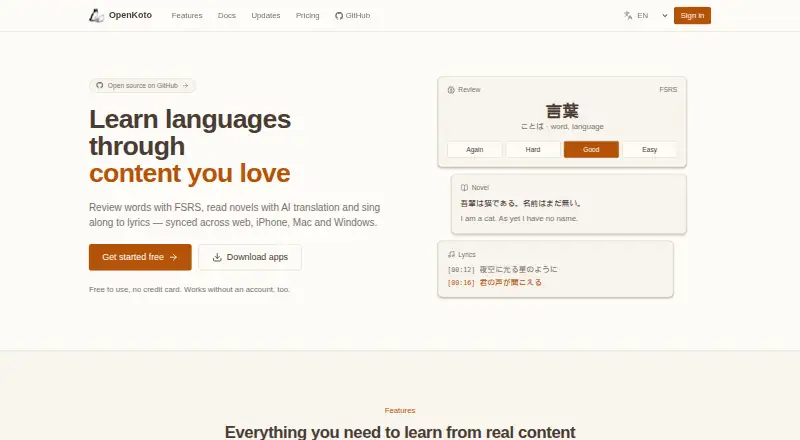
OpenKoto is an open-source language-learning app that turns material you select into reading, translation, and study resources.
What OpenKoto is
OpenKoto is an open-source language-learning app that turns material you select into reading, translation, and study resources. You can bring in web URLs or PDF, EPUB, TXT, Word, and Markdown files; the app translates them automatically and extracts vocabulary. Its reader supports switching languages while reading, instant word definitions, and grammar parsing. An AI assistant explains highlighted words in context, breaks down grammar, offers pronunciation guidance, and answers interactive questions about selected passages. OpenKoto supports learning and transcription in more than 100 languages, including Japanese, English, Chinese, Korean, French, German, Spanish, Italian, and Portuguese. Video learning includes synchronized subtitles and transcription support. Desktop downloads cover macOS, Windows, and Linux. Native iPhone and iPad apps provide offline-first use, vocabulary review, and video subtitles. Desktop processing runs locally, while iOS learning data stays on the device and API keys are kept in the iOS Keychain. The project uses the Apache 2.0 license and is free. Documentation covers connecting Google AI Studio or 302.AI API keys. The web version is being rebuilt, with vocabulary review, novels, and lyrics planned to sync with iOS and desktop.
Good
- Imports URLs and five document formats
- Supports learning in more than 100 languages
- Reader includes live language switching and grammar parsing
- AI gives contextual explanations and pronunciation guidance
- Native iPhone and iPad apps support offline-first use
- Apache 2.0 open-source license
Watch out
- AI features require connecting an external API key
- Web version is currently being rebuilt
- Video learning support is described by the maker
Who it suits
OpenKoto suits Japanese learners, English learners, polyglots, and anyone who prefers studying from content they enjoy. It is also suited to learners who want offline lessons, personalized review, and support across desktop, mobile, and web platforms.
Verdict
Pick OpenKoto if you want to study languages through your own web pages, documents, or videos, with vocabulary extraction and contextual AI help. Its broad language support, offline mobile use, and local processing make it a fit for independent learners. Look elsewhere if you do not want to configure Google AI Studio or 302.AI credentials for the AI assistant.
Plans and prices
From OpenKoto's own pricing page, checked 7 Oct 2026.
| Plan | Price | What it gives you |
|---|---|---|
| Free | Free | Free and open source · Apache 2.0 license |
The facts
Each one read from OpenKoto's own pages, with the date it was checked.
What it does
- AI assistant
- The AI assistant provides contextual word explanations, grammar breakdowns, pronunciation guidance, and interactive questions about highlighted text.checked 7 Oct 2026
- AI setup
- The documentation explains how to connect Google AI Studio or 302.AI API keys to OpenKoto.checked 7 Oct 2026
- Content import
- It imports URLs and PDF, EPUB, TXT, Word, and Markdown files with automatic translation and vocabulary extraction.checked 7 Oct 2026
- Desktop availability
- The maker lists desktop downloads for Mac, Windows, and Linux.checked 7 Oct 2026
- Intended users
- The documentation describes the app as suitable for Japanese learners, English learners, polyglots, and people who want to learn through content they enjoy.checked 7 Oct 2026
- Languages
- OpenKoto supports learning and transcription in more than 100 languages, including Japanese, English, Chinese, Korean, French, German, Spanish, Italian, and Portuguese.checked 7 Oct 2026
- Languages offered
- 100checked 23 Sep 2026
- License
- The project is distributed under the Apache 2.0 license.checked 7 Oct 2026
- Privacy
- The maker says the desktop app runs locally and processes data locally; the iOS app keeps learning data on the device and API keys in the iOS Keychain.checked 7 Oct 2026
- Product
- OpenKoto is an open-source language-learning app that turns content users choose into reading, translation, and learning material.checked 7 Oct 2026
- Reading tools
- Its reader offers real-time language switching, instant word lookup, and grammar parsing.checked 7 Oct 2026
- Support
- The maker directs users to open a GitHub issue or join project discussions for questions.checked 7 Oct 2026
- Video learning
- The maker describes video learning with synchronized subtitles and transcription support on its homepage.checked 7 Oct 2026
- Web version
- The project README describes the web version as being rebuilt, with vocabulary review, novels, and lyrics planned to sync with iOS and desktop.checked 7 Oct 2026
Money
- Free plan
- Yeschecked 23 Sep 2026
Where it runs
- iOS availability
- A native app is available for iPhone and iPad, with offline-first use, vocabulary review, and video subtitles.checked 7 Oct 2026
The full review of OpenKoto
OpenKoto is a free, open-source workspace for turning articles, books, documents and videos into language lessons. It is aimed at self-directed learners who already have material they want to understand, especially those studying across desktop and iPhone or iPad. The trade-off is that its most advanced help requires connecting an external AI service, while the web edition is still being rebuilt.
Overview
OpenKoto puts learner-selected content ahead of a preset syllabus. Import a URL or a PDF, EPUB, TXT, Word or Markdown file, and the app can translate it and extract vocabulary for study. That model suits motivated readers, polyglots and people learning through subjects they enjoy. It is a weaker fit for anyone who expects a sequenced course, teacher-led progression or lessons supplied by the app itself.
The project is released under the Apache 2.0 license. Its desktop application is described as running and processing locally, while the iOS app keeps learning data on the device and stores API keys in the iOS Keychain. Questions are directed to GitHub issues and project discussions, so support is community-oriented rather than a conventional help desk.
Key features
Flexible reading and lookup
The reader supports real-time language switching, instant word lookup and grammar parsing. Those controls make difficult passages useful study material instead of something that must be copied into separate dictionaries and translators. Automatic translation and vocabulary extraction reduce preparation work, although the quality and usefulness of a lesson still depend on the content you bring in.
Contextual AI assistance
Highlighted text can be used to request contextual word explanations, grammar breakdowns, pronunciation guidance and interactive questions. This is more targeted than a generic chatbot because the passage supplies the immediate context. OpenKoto does not provide that assistance as a self-contained service: its documentation explains how to connect Google AI Studio or 302.AI API keys, adding setup and potentially separate account considerations for users who want the AI layer.
Video and offline study
The maker describes video learning with synchronized subtitles and transcription support. On iPhone and iPad, the native app is designed for offline-first use and includes vocabulary review; offline lessons and personalized review are also part of the free offering. That combination is useful for travel and intermittent connectivity, while learners who mainly want a polished browser workflow should note that the web version is being rebuilt, with vocabulary review, novels and lyrics planned to synchronize with iOS and desktop.
Language coverage
OpenKoto supports learning and transcription in more than 100 languages, including Japanese, English, Chinese, Korean, French, German, Spanish, Italian and Portuguese. The breadth is a strong reason for polyglots or learners moving between less commonly supported languages, rather than users focused on a single mainstream course.
Pricing
| Plan | Price | What it includes |
|---|---|---|
| Free | free | Free and open source under the Apache 2.0 license; offline lessons, personalized review and mobile apps |
There is one plan, with no paid tier or seat limits stated. The free plan is therefore the natural choice for individual learners who can manage their own imported content and, when wanted, configure an AI provider. It does not remove the practical requirement to arrange Google AI Studio or 302.AI credentials for the assistant.
Platforms
OpenKoto is available on iOS, Linux, macOS, the web and Windows. Desktop downloads cover Mac, Windows and Linux, and the native iPhone and iPad app adds offline-first learning, vocabulary review and video subtitles. The web version is being rebuilt, so desktop applications or iOS are the safer choice for a complete current workflow.
Who it's for
Choose OpenKoto if you are a Japanese or English learner, a polyglot, or an independent student who wants to learn through personal books, articles, files or videos. Its import range, broad language support and local desktop processing reward users who value control and privacy. Look elsewhere if you need a fixed curriculum, built-in course content, or AI help without configuring an external API key.
Pros and cons
- Pros: imports URLs and five common document formats, making existing reading material immediately useful.
- Pros: combines translation, vocabulary extraction, grammar parsing and instant lookup in the reading flow.
- Pros: supports more than 100 languages and includes offline lessons and personalized review at no cost.
- Pros: local desktop processing and on-device iOS data handling limit the need to send learning data to a central service.
- Cons: the AI assistant requires Google AI Studio or 302.AI credentials, so setup is not entirely turnkey.
- Cons: the web version is being rebuilt, which makes it a poor choice for readers who want a settled browser-first product.
- Cons: self-directed importing is central to the experience; learners wanting a ready-made syllabus must supply their own structure.
Alternatives
Lute is the better pick for a free, locally installed experience with no stated limits across desktop, web and self-hosted setups.
LingQ suits learners who prefer a freemium service spanning Android, iOS, web and browser extension, with a limited free membership and a paid Premium option.
Readlang is worth considering for a freemium reading-focused service on Android, iOS, web and extension.
Learning with Texts fits users comfortable running a local PHP web and database server for a free, self-managed setup.
LinguaCafe is an open-source, self-hosted alternative intended for one user per server.
Beelinguapp is the alternative for Android and iOS users who want unlocked stories and news, with glossary and flashcard tools.
E-clair offers a freemium mobile option with collections and audio-transcription limits.
jidoujisho is a free, open-source Android choice.
For broader comparisons, see Language Immersion Apps and Language learning apps.
Verdict
OpenKoto is a strong choice for independent learners who want to study their own content across desktop and iOS, with unusually broad language coverage and useful contextual reading tools at no cost. Choose it for control, imports and local-first learning; look elsewhere if you want a finished web app, a prescribed curriculum or an AI assistant that works without external credential setup.
Getting started
- Open https://www.openkoto.com/
- Download the desktop app for macOS, Windows, or Linux, or install the native iPhone and iPad app
- Import a URL or a PDF, EPUB, TXT, Word, or Markdown file
- Connect a Google AI Studio or 302.AI API key for AI assistance
- Read with translation, word lookup, grammar parsing, and vocabulary review
Questions
How much does OpenKoto cost?
OpenKoto is free, with a free plan listed as free.
Which platforms support OpenKoto?
It is available on iOS, Linux, macOS, web, and Windows. Desktop downloads cover Mac, Windows, and Linux, and native apps are available for iPhone and iPad.
Is OpenKoto open source?
Yes. The project is distributed under the Apache 2.0 license.
Which languages can I study?
OpenKoto supports learning and transcription in more than 100 languages, including Japanese, English, Chinese, Korean, French, German, Spanish, Italian, and Portuguese.
Does OpenKoto work offline?
Offline lessons are supported, and the iOS app is designed for offline-first use.
What is needed for the AI assistant?
The documentation explains connecting Google AI Studio or 302.AI API keys to OpenKoto.
Alternatives to OpenKoto
- 1

Lector
Free planOpen sourceiOSWebAPISelf-hosted8.0From $5 a month - 2

LingQ
Free planAndroidiOSWebExtension8.0From $215.76 a year - 3

Readlang
Free planAndroidiOSWebExtension7.6From $48 a year - 4

Yabla
AndroidiOSWeb7.4 - 5
Lute
Free planAndroidWebLinuxmacOS7.3Free plan - 6
News in Slow Spanish
AndroidiOSWeb6.9From $6.90 a month