RustBoyAdvance-NG
RustBoyAdvance-NG is a free Nintendo Game Boy Advance emulator and debugger written in Rust.
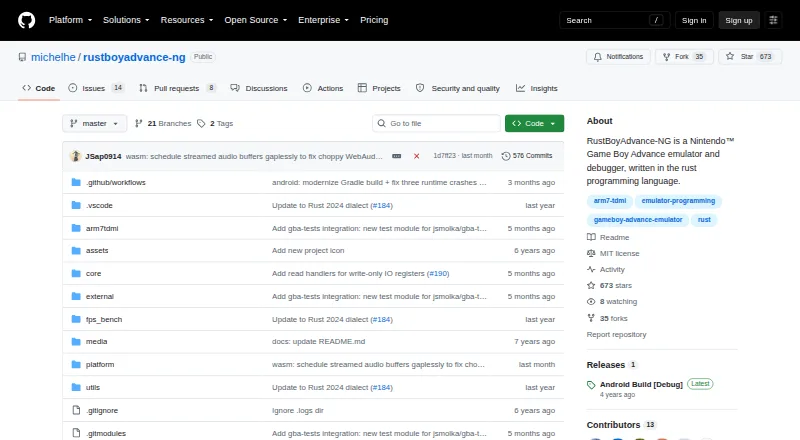
What RustBoyAdvance-NG is
RustBoyAdvance-NG is a free Nintendo Game Boy Advance emulator and debugger written in Rust. Its WebAssembly demo loads ROM files by drag and drop, and the desktop emulator accepts ROM files or ZIP archives containing .gba files. Desktop use requires a GBA BIOS binary; the project says an open-source BIOS is supported. The repository lists SDL2 and minifb desktop frontends, though minifb is no longer maintained, as well as Java JNI bindings and a terminal frontend. A proof-of-concept Android app can be opened in Android Studio and requires Rust Android targets with the NDK. The custom debugger and experimental GDB server are available behind build features. Desktop controls include saving a snapshot with F5 and loading one with F9. Building the desktop application requires Rust 1.51 or later and SDL2 dependencies on Linux and macOS. The project lists unfinished CGB audio work, including four wave-generator channels, and says desktop key bindings cannot currently be changed.
Good
- Web demo loads ROMs by drag and drop.
- Desktop supports ROM files and ZIP archives.
- Snapshot save and load commands are included.
- Custom debugger and experimental GDB server are available.
Watch out
- Desktop use requires a GBA BIOS binary.
- Desktop key bindings cannot be configured.
- CGB audio remains unfinished.
- The minifb frontend is not maintained.
Who it suits
It suits people looking for a free GBA emulator across desktop, web, or Android development environments. Users who want configurable desktop controls or complete CGB audio should note the stated limitations.
Verdict
RustBoyAdvance-NG offers several ways to run GBA ROMs, plus debugger features behind build options. Its BIOS requirement, fixed desktop controls, and unfinished audio are worth considering before choosing it.
Plans and prices
From RustBoyAdvance-NG's own pricing page, checked 30 Sep 2026.
| Plan | Price | What it gives you |
|---|---|---|
| Free | Free | MIT-licensed emulator and debugger |
The facts
Each one read from RustBoyAdvance-NG's own pages, with the date it was checked.
Where it runs
- Android
- The repository includes a proof-of-concept Android application that can be opened in Android Studio and requires Rust Android targets with the NDK.checked 29 Sep 2026
- BIOS requirement
- Desktop usage requires a GBA BIOS binary, and the README says an open-source GBA BIOS is supported.checked 30 Sep 2026
What it does
- Audio limit
- The emulation todo lists CGB audio, including four wave generator channels, as unfinished.checked 30 Sep 2026
- Controls limit
- The README says key bindings are currently not configurable.checked 30 Sep 2026
- Debugger
- The README documents a custom debugger requiring the debugger feature and an experimental GDB server requiring the gdb feature.checked 30 Sep 2026
- Desktop frontends
- The project includes SDL2 and minifb desktop applications, with the minifb frontend marked as unmaintained.checked 30 Sep 2026
- Desktop setup
- Building the desktop application requires Rust 1.51 or later and SDL2 dependencies on Linux and macOS.checked 30 Sep 2026
- Input limitation
- The README says desktop key bindings are currently not configurable.checked 29 Sep 2026
- Known emulation gap
- The README lists CGB audio with four wave-generator channels as remaining emulation work.checked 29 Sep 2026
- License
- The repository is distributed under the MIT License, which grants permission to use, copy, modify, distribute, sublicense, and sell copies subject to its conditions.checked 30 Sep 2026
- Operating systems
- The build instructions cover Linux, Windows, and macOS desktop dependencies.checked 29 Sep 2026
- Other frontends
- The project also lists Java JNI bindings, a terminal frontend using crossterm and viuer, and a proof-of-concept Android application.checked 30 Sep 2026
- Purpose
- RustBoyAdvance-NG is a Nintendo Game Boy Advance emulator and debugger written in Rust.checked 30 Sep 2026
- ROM loading
- The desktop emulator accepts ROM files or ZIP files containing .gba files by drag and drop.checked 30 Sep 2026
- Save snapshots
- The desktop key bindings include F5 to save a snapshot file and F9 to load one.checked 30 Sep 2026
- Save states
- The desktop key bindings include commands to save and load snapshot files.checked 29 Sep 2026
- Support and project status
- The repository exposes GitHub Issues and Discussions, and its releases page currently shows an Android Build [Debug] release.checked 30 Sep 2026
- Web emulator
- The browser demo is powered by WebAssembly and lets users load ROM files by dragging them into the screen.checked 30 Sep 2026
The full review of RustBoyAdvance-NG
Overview
RustBoyAdvance-NG is a Rust-based Game Boy Advance emulator with debugger tools and several ways to run it. It suits desktop users who want to explore or debug emulation as well as play ROMs. Its breadth of frontends is useful, but unfinished audio and unchangeable desktop controls make it a less convincing choice for a polished, player-first setup.
Key features
The WebAssembly demo accepts ROM files by drag and drop, giving browser users a direct route to the emulator. On desktop, users can drag in a ROM or a ZIP containing a .gba file. Snapshot shortcuts let players save with F5 and load with F9, handy for revisiting a point in a game, though fixed key bindings can be awkward if those keys conflict with a user's preferred setup.
The custom debugger is enabled through a build feature, while an experimental GDB server is available behind a separate feature. These tools make the project more compelling for developers and debugging work than for someone seeking only a simple game launcher. Other project options include Java JNI bindings, a terminal frontend using crossterm and viuer, and a proof-of-concept Android app.
Emulation still has a notable gap: CGB audio, including four wave-generator channels, remains unfinished. Players who prioritize complete audio emulation should look elsewhere. The MIT License permits use, modification, distribution, sublicensing, and sale subject to its conditions.
Pricing
Free — free. The plan includes the MIT-licensed emulator and debugger. There is no paid tier or free-trial term to weigh; users do, however, need to supply their own ROM files, and desktop use requires a GBA BIOS binary. The README says an open-source GBA BIOS is supported.
Platforms
RustBoyAdvance-NG targets Android, Linux, macOS, the web, and Windows, with desktop and mobile scope. The web demo uses WebAssembly. Desktop build instructions cover Linux, Windows, and macOS; building requires Rust 1.51 or later, with SDL2 dependencies on Linux and macOS. The repository lists SDL2 and minifb desktop frontends, but minifb is not maintained. Android support is explicitly a proof of concept: opening the app in Android Studio requires Rust Android targets and the NDK.
Who it's for
This is a good fit for technically comfortable users who want a free GBA emulator across browser and desktop frontends, or developers interested in its debugger and experimental GDB support. It is less suitable for players who expect configurable desktop controls, complete audio emulation, or a finished Android experience.
Pros and cons
- Pros: Browser and desktop frontends offer multiple ways to load ROMs, including ZIP files on desktop.
- Pros: Snapshot save/load shortcuts and optional debugger features serve players who want quick state recovery and developers who need debugging tools.
- Pros: MIT licensing allows broad use and modification, subject to the license conditions.
- Cons: Desktop key bindings cannot be customized, limiting control flexibility.
- Cons: CGB audio remains unfinished, so audio emulation is incomplete.
- Cons: The Android app is a proof of concept, and the minifb frontend is not maintained.
- Cons: Desktop use requires a GBA BIOS binary, adding a setup dependency.
Alternatives
For a broader list of options, see Game Boy Advance Emulators.
- RetroArch is a free, open-source option spanning Android, iOS, Linux, macOS, web, and Windows; choose it if you want a long-running multi-platform project.
- SkyEmu is free and open source across Android, iOS, Linux, macOS, web, and Windows. Its stable builds are free, though DS emulation is beta quality.
- ares is a free, open-source multi-system emulator for Linux, macOS, and Windows; choose it if you want a multi-system desktop alternative.
- GSE is a free, open-source option for Android, Linux, macOS, and Windows.
- gbajs3 is a free, open-source browser option that can also be self-hosted.
- Lemuroid is a free, open-source Android emulator; it does not include games, firmware, or copyrighted system files.
- GBA Emulator is a free, open-source option for Linux, macOS, and Windows.
- OpenEmu is a free, open-source macOS-only choice for playing games you already own.
Verdict
Choose RustBoyAdvance-NG if you want a free GBA emulator with browser and desktop frontends plus optional debugger tools. Its principal draw is that combination of access and developer-oriented features; look elsewhere if configurable controls, complete audio emulation, or a mature Android app matters more.
Getting started
- Visit https://github.com/michelhe/rustboyadvance-ng.
- For the browser demo, drag a ROM file into the WebAssembly emulator.
- For desktop, build with Rust 1.51 or later and the required desktop dependencies.
- Provide a GBA BIOS binary for desktop use; the project says an open-source BIOS is supported.
- For Android, open the proof-of-concept app in Android Studio and use Rust Android targets with the NDK.
Limits worth knowing
Desktop use requires a GBA BIOS binary, and desktop key bindings cannot currently be configured. The project lists CGB audio, including four wave-generator channels, as unfinished emulation work.
Questions
Does RustBoyAdvance-NG cost anything?
The Free plan costs nothing. The project is distributed under the MIT License.
Which platforms does it support?
Listed platforms are Android, Linux, macOS, web, and Windows. The repository also lists desktop and mobile scope.
Can it load ROM files in a browser?
Yes. Its WebAssembly-powered demo accepts ROM files by drag and drop.
Is it open source?
Yes. It is distributed under the MIT License, which grants permission to use, copy, modify, distribute, sublicense, and sell copies subject to its conditions.
Does desktop use require a BIOS?
Yes. Desktop use requires a GBA BIOS binary, and the project says an open-source GBA BIOS is supported.
What is required to build the Android app?
The proof-of-concept Android application can be opened in Android Studio and requires Rust Android targets with the NDK.
Alternatives to RustBoyAdvance-NG
- 1

Provenance
Free planOpen sourceiOSmacOS8.2From $39.99 a year - 2
SkyEmu
Free planOpen sourceAndroidiOSWebLinux8.0Free plan - 3
RetroArch
Free planAndroidiOSWebLinux7.7Free plan - 4
ares
Free planOpen sourceLinuxmacOSSelf-hostedWindows7.5Free plan - 5

OpenEmu
Free planOpen sourcemacOS7.3Free plan - 6

Eclipse
Free planAndroidiOSWeb6.8Free plan