LightX AI Mockup Generator
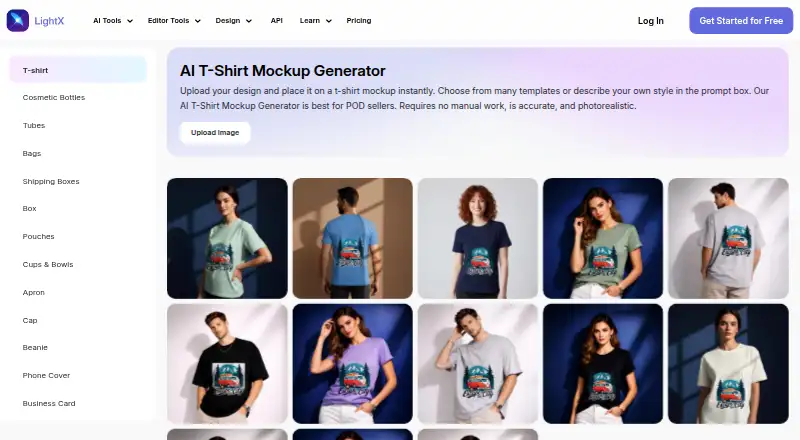
LightX AI Mockup Generator creates T-shirt mockups from uploaded artwork.
What LightX AI Mockup Generator is
LightX AI Mockup Generator creates T-shirt mockups from uploaded artwork. Users can select a preset scene or describe one with a text prompt, then preview and download the result. It accepts JPG, PNG or WebP artwork and offers JPG or PNG downloads. Listed garment styles include crew neck, polo, oversized, cropped, long sleeve, tank top and hoodie. Users can provide separate artwork for the front and back, preview both views and download the mockup. LightX says the rendering includes fabric texture, folds, lighting, shadows, design wrapping and color accuracy. The maker describes the tool as intended for print-on-demand sellers, clothing brands and designers. The free Starter plan provides six daily AI credits and up to 1GB of cloud storage; its listed exports are 512px JPG. Pro lists exports up to 4096px in JPG or PNG, includes 1,000 monthly AI credits and a seven-day trial, and is priced at ₹4,900 yearly. API integration examples cover CSS, React, Tailwind, JavaScript and Python.
Good
- Accepts JPG, PNG and WebP artwork.
- Supports separate front and back designs.
- Offers multiple garment styles, including hoodies and polos.
- Free Starter includes six daily AI credits.
- Pro exports up to 4096px in JPG or PNG.
Watch out
- Starter exports are limited to 512px JPG.
- Starter includes six daily AI credits.
- Pro costs ₹4,900 yearly.
- Commercial use is listed as unavailable.
Who it suits
It suits print-on-demand sellers, clothing brands and designers who need T-shirt mockups from their own artwork. The free tier may work for occasional creation, while higher-resolution exports are listed with Pro.
Verdict
LightX provides scene-based T-shirt mockups with front and back previews and several garment styles. The free tier has constrained export resolution, while higher-resolution formats are listed with the annual Pro subscription.
Plans and prices
From LightX AI Mockup Generator's own pricing page, checked 3 Oct 2026.
| Plan | Price | What it gives you |
|---|---|---|
| Starter | Free | 6 daily free AI credits · 1GB cloud storage · Free templates and assets · lifetime |
| AI Credits | $199, paid once | Up to 50 images · Up to 3 videos · No watermark · 200 AI Credits · Lifetime validity |
| Pro Subscription | ₹4,900 a year | 1,000 AI credits monthly · Up to 500 images monthly · Up to 10 videos monthly · 7 days free trial · Billed ₹4,900 yearly |
The facts
Each one read from LightX AI Mockup Generator's own pages, with the date it was checked.
What it does
- API and integrations
- LightX API documentation describes integration examples for CSS, React, Tailwind, JavaScript, and Python.checked 3 Oct 2026
- API privacy
- The virtual try-on API page says user inputs are automatically deleted after 24 hours and generated outputs are never saved.checked 3 Oct 2026
- API security
- The API page states it uses encryption, secure access controls, and continuous monitoring to safeguard data.checked 3 Oct 2026
- Export limits
- The pricing comparison lists Starter exports at 512px and JPG, while Pro lists exports up to 4096px and JPG or PNG.checked 3 Oct 2026
- Front and back views
- Users can upload separate artwork for the front and back of a garment, preview both views, and download the result.checked 3 Oct 2026
- Garment styles
- The page lists support for styles including crew neck, polo, oversized, cropped, long sleeve, tank top, and hoodie mockups.checked 3 Oct 2026
- Input and downloads
- It accepts JPG, PNG, or WebP artwork and offers downloads in JPG or PNG.checked 3 Oct 2026
- Intended users
- The maker describes the tool as built for print-on-demand sellers, streetwear and clothing brands, and designers.checked 3 Oct 2026
- Mockup generation
- The T-shirt mockup generator takes uploaded artwork and lets users choose from preset scenes or describe a scene with a text prompt.checked 3 Oct 2026
- Rendering
- LightX says its mockups render fabric texture, natural folds, lighting, shadows, design wrapping, and color accuracy.checked 3 Oct 2026
- Support
- The pricing page directs users to its support team and lists [email protected] for help.checked 3 Oct 2026
The company
- Company
- LightX's terms identify Andor Communications Pvt. Ltd. as the provider of the app and website service.checked 3 Oct 2026
Money
- Free tier limits
- The Starter plan includes 6 daily free AI credits and up to 1GB cloud storage.checked 3 Oct 2026
The full review of LightX AI Mockup Generator
LightX AI Mockup Generator turns uploaded artwork into T-shirt previews using preset scenes or text prompts. It is best suited to apparel designers and print-on-demand sellers who need to visualize designs across garment styles and both sides. The main trade-off is clear: free exports are limited to 512px JPG, while higher-resolution PNG and JPG exports require Pro.
Overview
LightX combines artwork upload with AI scene generation for apparel mockups. You can select a preset setting or describe one with a prompt, then preview the design on a garment. LightX says its rendering accounts for fabric texture, natural folds, lighting, shadows, design wrapping, and color accuracy. Those details matter when a design needs to look integrated with clothing rather than pasted onto a flat image.
Uploads can be JPG, PNG, or WebP, and downloads are JPG or PNG. Separate artwork can be supplied for the front and back, with both views available to preview and download. That makes the tool a better fit for concepts with distinct front and rear graphics than a mockup workflow limited to one view.
Key features
- Scene selection: Choose a preset scene or describe one with a text prompt. This offers more flexibility than a fixed setting list, though results still depend on the scenes the generator can produce.
- Garment styles: Supported options include crew neck, polo, oversized, cropped, long sleeve, tank top, and hoodie. The range suits apparel concepts across several familiar silhouettes, rather than only standard T-shirts.
- Front and back previews: Upload separate designs for each side and preview both. This is useful for planning garments with back graphics, but it does not by itself establish a production-ready print file.
- API integration: LightX API documentation includes examples for CSS, React, Tailwind, JavaScript, and Python, giving developers several routes to integrate API functionality. The virtual try-on API page says inputs are deleted after 24 hours and outputs are never saved; it also describes encryption, access controls, and continuous monitoring.
Pricing
LightX is freemium, with a free tier, a one-time credit purchase, and an annual subscription. The Starter plan costs nothing, billed for life, and includes 6 daily AI credits, up to 1GB of cloud storage, and free templates and assets. Its exports are capped at 512px JPG, so it is useful for trying the workflow or making small previews but restrictive for larger, polished assets.
The AI Credits plan costs $199, paid once, with 200 credits and lifetime validity. It allows up to 50 images and 3 videos, with no watermark. This avoids a recurring subscription, but it is a finite credit balance rather than an ongoing monthly allowance.
Pro Subscription costs $408.33 a year, billed ₹4,900 yearly, and includes a 7-day free trial. It provides 1,000 AI credits monthly, up to 500 images monthly, and up to 10 videos monthly. Exports go up to 4096px in JPG or PNG. Pro is the more suitable choice for recurring work or larger exports; the trial offers a short window to assess the paid tier before committing. LightX directs support requests to its support team and gives [email protected] for help.
Platforms
LightX lists Android, iOS, web, and API availability. That mix suits users who want to create on mobile or in a browser, as well as developers considering API integration. The provider named in LightX's terms is Andor Communications Pvt. Ltd.
Who it's for
LightX is aimed at print-on-demand sellers, streetwear and clothing brands, and designers who need apparel concepts with scene context and front-and-back views. The free tier suits occasional previews and early exploration. For repeated work, its daily six-credit allowance and 512px JPG cap make Pro more relevant, particularly when high-resolution exports are needed. This is less compelling for someone seeking a finished production asset from a free mockup workflow.
Pros and cons
- Pro: Separate front and back artwork can be previewed and downloaded, helping designers assess two-sided garment concepts.
- Pro: Scene prompts and a broad set of garment styles give apparel mockups more flexibility than a single-style, fixed-scene preview.
- Pro: Pro raises the export ceiling to 4096px and adds PNG alongside JPG, with substantial monthly credit and image allowances.
- Con: Starter exports are limited to 512px JPG, which is a serious restriction for anyone needing larger deliverables or PNG files.
- Con: The free plan's 6 daily credits constrain frequent generation, while the one-time credit plan has a finite 200-credit balance.
Alternatives
AI Mockup Generators is a useful starting point for comparing tools in this category. Choose FlexClip instead if its free plan's online projects, video duration, and stock-media allowance better match a video-oriented workflow; it also offers Android, iOS, web, and Windows apps.
Morphic may fit users who prefer a web-based tool with a free tier limited to 20 credits and one user. Mockey AI is another option for users who prioritize a free catalog of 1,000-plus mockups, with JPG downloads and a three-download daily cap for personal use.
Cloudinary is worth considering when an API and extension-based workflow is the priority; its free plan includes 25 monthly credits for up to three users on one account. Mew Design AI Product Mockup Maker may suit someone seeking a web-based product mockup tool with a free signup credit allowance and standard downloads.
Artboard Studio is an alternative for users who want a web or extension-based design tool with a free entry tier. Dynamic Mockups may be a better fit for API users who want to start with 50 credits and batch export up to five variations, accepting watermarked API access on its free tier. Keter Labs is another API-focused option, with free welcome credits and request limits.
Verdict
Choose LightX if you design apparel and want promptable scenes, several garment styles, and separate front-and-back previews in one workflow. Its free credits make it practical for trying ideas, but the 512px JPG limit is too restrictive for larger exports. If higher-resolution files matter, Pro is the relevant plan; if you need a capable free export workflow, compare alternatives before committing.
Getting started
- Open the LightX T-shirt mockup generator website.
- Choose the web, Android, or iOS platform, or use its API.
- Upload artwork in JPG, PNG, or WebP format.
- Choose a preset scene or describe a scene with a text prompt.
- Select a garment style and preview the mockup.
- Choose Starter or Pro; Pro has a seven-day free trial.
- Download the result in JPG or PNG.
Limits worth knowing
Starter includes six daily AI credits and up to 1GB cloud storage. Its listed exports are 512px JPG, while Pro exports reach up to 4096px in JPG or PNG.
Questions
Is LightX AI Mockup Generator free?
Yes. The Starter plan is free and includes six daily AI credits and up to 1GB of cloud storage.
What does Pro cost?
Pro is listed at ₹4,900 yearly and includes a seven-day free trial.
Which platforms can I use?
The listed platforms are Android, iOS, web, and API.
What artwork and download formats does it support?
It accepts JPG, PNG, or WebP artwork and offers JPG or PNG downloads.
Can I make front-and-back garment mockups?
Yes. Upload separate artwork for each side, preview both views, and download the result.
Does LightX offer API integrations?
Yes. Its documentation gives integration examples for CSS, React, Tailwind, JavaScript, and Python.
Alternatives to LightX AI Mockup Generator
- 1

Dreamina
Free planAndroidiOSWebmacOS8.3From $15 a month - 2

Recraft
Free planAndroidiOSWebAPI8.2Free plan - 3
FlexClip
Free planAndroidiOSWebWindows8.1From $143.88 a year - 4

Fotor
Free planAndroidiOSWebAPI7.5Free plan - 5
Mew Design AI Product Mockup Maker
Free planWebAPI7.5From $5.69 a month - 6
Morphic
Free planWeb7.4From $4 a month