
Artboard Studio
Artboard Studio is a browser-based mockup editor and generator for designers.
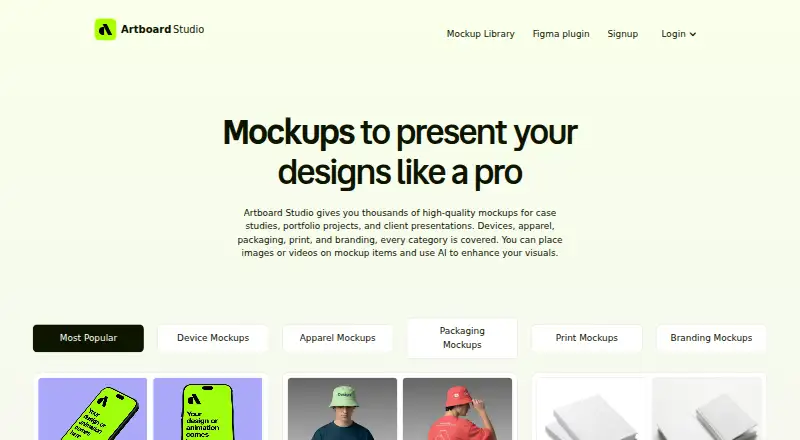
What Artboard Studio is
Artboard Studio is a browser-based mockup editor and generator for designers. Its library contains more than 5,000 mockups covering devices, apparel, packaging, print, and branding. In the editor, users can place images or videos on mockup surfaces, adjust backgrounds, and export high-resolution images. Image exports are available as PNG, JPEG, or WEBP, while video exports are MP4 or WEBM. Its AI generator creates mockups from a text prompt and a selected style. The Artboard Mockups plugin provides access to its mockup library, 3D models, and animations within Figma; an Adobe Express plugin is another optional way to use the service. Artboard Studio describes its mockups as useful for case studies, portfolio projects, and client presentations. The editor runs in a browser, so it does not require software installation. Listed options include Lite at $9 a year, Pro at $19 a year, and Lifetime Mockup at $129, paid once, with no recurring payments.
Good
- Library has more than 5,000 mockups.
- Supports image and video mockup exports.
- AI generator works from a text prompt and style.
- Browser editor requires no software installation.
- Free plan is available.
Watch out
- Lite is listed at $9 a year.
- Pro is listed at $19 a year.
- Lifetime Mockup costs $129, paid once.
Who it suits
Artboard Studio suits designers preparing mockups for portfolio projects, case studies, or client presentations. It may also suit people who want to work in a browser or access mockups through Figma.
Verdict
Artboard Studio combines an online editor, a large mockup library, and prompt-based generation, with image and video export options. A free plan is available, while paid choices include annual plans and a one-time plan.
Plans and prices
From Artboard Studio's own pricing page, checked 3 Oct 2026.
| Plan | Price | What it gives you |
|---|---|---|
| Free | Free | Start for free |
| Lite Plan | $108 a year | $108.00 per year (= $9.00/month, billed annually) |
| Lifetime Mockup | $129, paid once | no recurring payments |
| Pro Plan | $228 a year | Unlimited image and video exports · $228.00 per year (= $19.00/month, billed annually) |
The facts
Each one read from Artboard Studio's own pages, with the date it was checked.
What it does
- Adobe Express integration
- The site lists an Adobe Express plugin as an optional way to use Artboard Studio.checked 3 Oct 2026
- AI feature
- The AI mockup generator creates a mockup from a text prompt and chosen style.checked 3 Oct 2026
- Figma integration
- An Artboard Mockups plugin provides access to the mockup library, 3D models, and animations inside Figma.checked 3 Oct 2026
- Image and video mockups
- Users can place images or videos on mockup surfaces and export images as PNG, JPEG, or WEBP and videos as MP4 or WEBM.checked 3 Oct 2026
- Installation
- The online editor runs in a browser and does not require installing software.checked 3 Oct 2026
- Intended users
- The site describes the mockups as useful for case studies, portfolio projects, and client presentations.checked 3 Oct 2026
- Mockup library
- The service offers more than 5,000 mockups across device, apparel, packaging, print, and branding categories.checked 3 Oct 2026
- Online editor
- The browser editor lets users apply designs to mockups, adjust backgrounds, and export high-resolution images.checked 3 Oct 2026
- Product
- Artboard Studio is an online mockup generator and editor for designers that runs in a browser.checked 3 Oct 2026
- Support
- The site says users can contact support through the chat in the bottom right corner.checked 3 Oct 2026
The full review of Artboard Studio
Overview
Artboard Studio is a browser-based mockup editor for designers creating visual presentations of their work. It is best suited to people who need varied mockup subjects, video options, or access from Figma; its breadth is appealing, but the lower-cost plans require attention to export limits.
Key features
The library has more than 5,000 mockups covering devices, apparel, packaging, print, branding, and out-of-home formats. That range is useful for designers assembling case studies or client presentations across different kinds of work, rather than relying only on familiar device scenes. It is less compelling if you need only an occasional, narrow mockup selection.
Users can upload designs, place images or videos on mockup surfaces, adjust backgrounds, and export high-resolution images from the browser editor. Still-image exports support PNG, JPEG, and WEBP; video exports support MP4 and WEBM. Having both formats helps when a presentation needs motion as well as static visuals, though the Pro plan is the one that explicitly includes unlimited image and video exports.
A prompt and chosen style can generate an AI mockup, giving users another way to start a scene. The Artboard Mockups plugin brings the library, 3D models, and animations into Figma, which will suit designers who prefer to work there. An Adobe Express plugin is another optional route. The editor itself needs no software installation, and support is available through the site's chat.
Pricing
The Free plan costs nothing and provides a way to start without a subscription. The Lite Plan costs $108 a year, billed $108.00 per year (= $9.00/month, billed annually). It is the least expensive paid option for someone willing to commit annually, but the plan details do not establish its export allowance, so frequent production work should be weighed against the clearer Pro terms.
Lifetime Mockup costs $129, paid once, with no recurring payments. It may suit someone who prefers a single payment to an annual renewal, but the plan name and price alone do not establish its export limits or whether it includes the same ongoing benefits as a subscription.
The Pro Plan costs $228 a year, billed $228.00 per year (= $19.00/month, billed annually), and includes unlimited image and video exports. That explicit allowance makes it the strongest fit for regular output or video-heavy work. Compared with Lite, it costs more each year, so occasional users may not need to pay the difference. Commercial use is supported.
Platforms
Artboard Studio runs on the web and is also available as an extension. The browser editor avoids a software installation, while the Figma plugin gives users a way to access the mockup library, 3D models, and animations inside Figma. Adobe Express is another optional integration.
Who it's for
Artboard Studio is a good fit for designers who regularly prepare case studies, portfolio pieces, or client presentations and want mockups across several categories. It is also worth considering for users who need both image and video exports or want a Figma-based workflow. Those needing a predictable high-volume export allowance should look at Pro; users with occasional needs may find the paid commitment unnecessary.
Pros and cons
- Broad subject coverage: More than 5,000 mockups span devices, apparel, packaging, print, branding, and out-of-home work, reducing the need to switch tools for different presentation formats.
- Still and video output: PNG, JPEG, WEBP, MP4, and WEBM support varied deliverables, while Pro's unlimited image and video exports suit sustained use.
- Choice of workflow: A browser editor, Figma plugin, and Adobe Express plugin offer multiple ways to work with the service.
- Plan trade-offs are not equally clear: Pro explicitly includes unlimited exports, while the Lite and Lifetime Mockup plan descriptions do not establish their export allowances, making them harder to assess for frequent work.
- Annual commitment on subscriptions: Lite and Pro are billed yearly, which is less flexible for someone who only needs mockups for a short project.
Alternatives
Mockuuups Studio is worth considering if a free collection with attribution or a monthly Professional plan better suits your budget and commitment preference.
Presenta is another freemium option for users who want a web-based studio with a free plan that includes PNG, JPG, and WebP export.
Mediamodifier Mockup Generator may fit users looking for free mockup templates, fonts, and Unsplash and GIPHY integrations across web and mobile platforms.
LS Graphics is an alternative for users who want a monthly-priced online editor, with its Pro plan adding PSD, Sketch, and Figma downloads.
Polymock is a free web option with unlimited renders and end products under its Community License, which requires attribution.
Mockups Design suits users seeking downloadable Photoshop PSD mockups, including free lower-resolution versions.
Angle 4 is an option for Mac, Windows, or web users who want sample mockups and Figma, Sketch, and XD plugins on its free plan.
Monkr is a free web-based alternative.
For broader comparisons, browse Mockup Libraries, Mockup Generator Software, or AI Mockup Generators.
Verdict
Choose Artboard Studio if you need a large, varied mockup library, browser editing, and a route from Figma, especially when presentations benefit from video as well as images. Its main reason to look elsewhere is the annual commitment and unclear export allowances on lower-cost plans; for dependable unlimited output, Pro is the clearly defined choice, but its higher yearly cost may be excessive for occasional projects.
Alternatives to Artboard Studio
- 1

Mediamodifier Mockup Generator
Free planAndroidiOSWebAPI8.1From $15.83 a month - 2
The Mock House
Free planAndroidiOSWeb8.0From $29 a month - 3

Mockuuups Studio
Free planWebAPILinuxmacOS7.9Free plan - 4
Rotato
WebAPImacOSWindows7.3$79 one-time - 5

Angle 4
Free planWebmacOSWindows6.9$79 one-time - 6

Presenta
Free planWebAPI6.7From $8 a month