Lemora
Lemora turns lectures and course materials into study notes and learning resources.
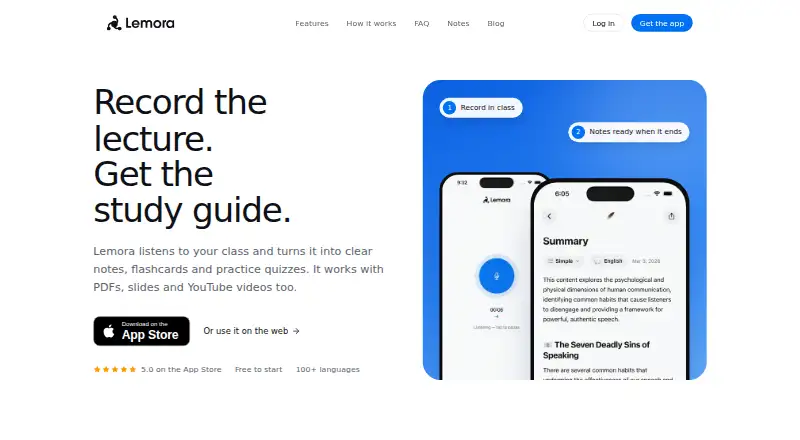
What Lemora is
Lemora turns lectures and course materials into study notes and learning resources. Students can provide live lectures, PDFs, slides, YouTube links, web pages, or text, then generate flashcards, quizzes, mind maps, and podcasts from that material. Its AI tutor answers typed or spoken questions using the learner’s notes and can explain answers aloud. Lemora supports recording and study in more than 100 languages, and users can choose the language of their notes. The site presents it as a study tool for students working on math, science, code, or a second language. Notes sync between the app and the web, and the service is available for Android, iOS, macOS, web, and Windows. The Free plan has daily limits on uploads and tutor chats; Lemora Pro removes those limits, though no Pro price is given. Lemora says uploaded personal content is not used to train its or third-party AI models, while submitted content may be shared with OpenAI and Anthropic to generate learning materials. Users can delete their account and associated data through app or web settings, though some data may remain in encrypted backups for a limited time. The site advises checking school rules before recording lectures.
Good
- Accepts lectures, PDFs, slides, YouTube links, web pages, and text.
- Creates flashcards, quizzes, mind maps, and podcasts.
- Tutor answers typed or spoken questions using the learner’s notes.
- Supports recording and study in more than 100 languages.
- Syncs notes between the app and web.
Watch out
- Free plan has daily upload and tutor-chat limits.
- Lecture recording may require permission under school rules.
Who it suits
Lemora suits students who want to turn lectures, course documents, or web materials into study aids. It may also help learners studying in another language, since it supports more than 100 languages and lets users choose the language of their notes.
Verdict
Pick Lemora if you want to convert class material into varied study resources and ask questions grounded in your notes.
Plans and prices
From Lemora's own pricing page, checked 29 Sep 2026.
| Plan | Price | What it gives you |
|---|---|---|
| Free | Free | Daily limits on uploads and tutor chats |
| Lemora Pro | Priced on request | Removes the free plan’s daily limits |
The facts
Each one read from Lemora's own pages, with the date it was checked.
What it does
- AI data use
- The privacy policy says uploaded personal content is not used to train Lemora’s or third-party AI models, and submitted content may be shared with OpenAI and Anthropic to generate learning materials.checked 29 Sep 2026
- AI tutor
- The tutor answers typed or spoken questions using the learner’s notes and can explain answers aloud.checked 29 Sep 2026
- Data deletion
- Users can delete their account and associated data through app or web settings, with some data potentially retained in encrypted backups for a limited time.checked 29 Sep 2026
- Designed for
- The site presents Lemora as a study tool for students, including people studying math, science, code or in a second language.checked 29 Sep 2026
- Inputs
- It accepts live lectures, PDFs, slides, YouTube links, web pages and text.checked 29 Sep 2026
- Languages
- Lemora supports recording and study in more than 100 languages, and lets users choose the language of their notes.checked 29 Sep 2026
- Purpose
- Lemora turns lectures and uploaded course materials into study notes and learning materials.checked 29 Sep 2026
- Recording caveat
- The site advises checking school rules because some schools require permission before recording a lecture.checked 29 Sep 2026
- Security
- The privacy policy says Lemora uses encryption in transit and at rest, secure authentication and regular security audits.checked 29 Sep 2026
- Study tools
- It can create flashcards, quizzes, mind maps and podcasts from class material.checked 29 Sep 2026
- Support
- Users can contact [email protected], and the support page says replies typically arrive within 24 hours.checked 29 Sep 2026
- Sync
- Notes sync between the app and the web.checked 29 Sep 2026
Where it runs
- Platforms
- Lemora has an iPhone and iPad app, runs on Macs with Apple silicon, and is available in a browser on Android, Windows and Chromebook.checked 29 Sep 2026
The full review of Lemora
Lemora is a study app that turns lectures and course materials into notes and revision tools. It best suits students who want to capture material from varied sources and study from it across devices. Its breadth is compelling, but daily limits on the free plan and the need to check recording rules matter.
Overview
Students can bring in live lectures, PDFs, slides, YouTube links, web pages and text. Lemora turns those inputs into study notes and learning materials, including transcript and webpage summaries. That range suits courses built around a mix of lectures and reading better than occasional, one-off summarization.
Notes sync between the app and web, while recording and study support more than 100 languages. Users can also choose the language of their notes, which can help multilingual learners or students working in a second language. The site advises checking school rules before recording, since some schools require permission.
Key features
Study aids from course material
Lemora creates flashcards, quizzes, mind maps and podcasts from class material. The variety gives students different ways to revisit a subject, from recall practice to alternative review formats. It is more useful to learners who will use those tools than to someone who only wants a concise summary.
Questions grounded in notes
The AI tutor answers typed or spoken questions using the learner’s notes and can explain answers aloud. That makes it relevant for follow-up questions about personal course material, rather than just general-purpose chat. Its usefulness depends on having notes that cover the topic at hand.
Privacy and support
Lemora says it uses encryption in transit and at rest, secure authentication and regular security audits. Uploaded personal content is not used to train Lemora’s or third-party AI models, though submitted content may be shared with OpenAI and Anthropic to generate learning materials. Users can delete their account and associated data through app or web settings; some data may remain in encrypted backups for a limited time. Support is available at [email protected], with replies typically arriving within 24 hours.
Pricing
The Free plan costs nothing and has daily limits on uploads and tutor chats. It is a practical way to try the study workflow, but students relying on frequent uploads or questions may run into those caps. Lemora Pro removes the free plan’s daily limits and has custom pricing, making it the more suitable option for regular use if the caps are restrictive.
Platforms
Lemora is available on Android, iOS, macOS, web and Windows. Notes sync between the app and web, supporting a workflow that moves between mobile and desktop.
Who it's for
Lemora is aimed at students, including those studying math, science or code and those learning in a second language. It is a strong fit when lectures and course materials need to become several kinds of study resources. It is less compelling for a reader who only needs occasional summaries or who cannot record lectures under school rules.
Pros and cons
- Pros: Accepts lectures and several common course formats, then turns them into multiple revision tools, so students can work from one set of material.
- Pros: The tutor answers spoken or typed questions from the learner’s notes and can explain aloud, giving course-specific follow-up support.
- Pros: More than 100 languages, selectable note language and app-to-web syncing support varied study contexts.
- Cons: Daily upload and tutor-chat limits on Free can interrupt a high-volume study routine.
- Cons: Recording may require school permission, so lecture capture is not always an available input.
- Cons: Submitted content may be shared with OpenAI and Anthropic to generate learning materials, which may matter to students handling sensitive course content.
Alternatives
For a broader set of summarization options, browse AI Summarizers. Choose QuillBot instead if paraphrasing is the priority: its free plan covers up to 100 words, two modes and basic grammar, rather than Lemora’s course-to-study workflow. AskSia is a better fit for daily problem solving with step-by-step solutions and photo input on its free plan.
Briefy may suit readers focused on summaries, with 30 free monthly credits and a Premium plan at $89.88 a year. For article reading, chats and feeds, smry offers a free plan with 20 summaries and 20 article chats per day. Summify is another option for analysis and learning cards, with five free analyses per day and a Scholar plan at $4.99 a month.
Grasp may fit users who want webpage lookups and follow-ups, with five daily runs or follow-ups and 100 lookups per month on its free plan. Scholarcy is an alternative for article summarization and flashcard export, though its free plan limits summaries to 10 and exports flashcards one at a time. SciSummary is an option for readers seeking a paper-focused service with a free trial rather than a free plan.
Verdict
Choose Lemora if you want to turn lectures and mixed course materials into varied revision resources and ask questions grounded in your notes. Its integrated inputs, study formats and tutor make it a strong student-oriented choice; look elsewhere if you need only occasional summaries, cannot record class, or need predictable uncapped use without custom-priced Pro.
Getting started
- Visit https://www.lemora.ai/.
- Use the app on Android, iOS, or macOS, or access Lemora on web or Windows.
- Provide a live lecture, PDF, slides, YouTube link, web page, or text.
- Start with the Free plan, which has daily upload and tutor-chat limits.
- Check school rules before recording a lecture.
Limits worth knowing
The Free plan has daily limits on uploads and tutor chats. Lemora Pro removes those daily limits.
Questions
Is Lemora free?
Yes. The Free plan costs nothing and has daily limits on uploads and tutor chats.
Which devices and platforms does Lemora support?
It is listed for Android, iOS, macOS, web, and Windows.
What materials can I use?
Lemora accepts live lectures, PDFs, slides, YouTube links, web pages, and text.
Does Lemora use uploaded content to train AI models?
Its privacy policy says uploaded personal content is not used to train Lemora’s or third-party AI models. Submitted content may be shared with OpenAI and Anthropic to generate learning materials.
Can I record lectures with Lemora?
Lemora supports live lecture recording, but advises checking school rules because some schools require permission first.
Alternatives to Lemora
- 1
QuillBot
Free planAndroidiOSWebExtension8.3Free plan - 2
Eightify
AndroidiOSWebExtension7.7From $59.99 a year - 3
Podwise
AndroidiOSWebAPI7.6From $70.80 a year - 4
Scholarcy
Free planWebAPIExtension7.5From $90 a year - 5
SciSummary
Free planWebAPIExtension7.4From $48 a year - 6
TLDR This
Free planWebAPIExtension7.4From $4 a month