Briefy
Briefy turns lengthy material into structured summaries and keeps them in a knowledge base for later use.
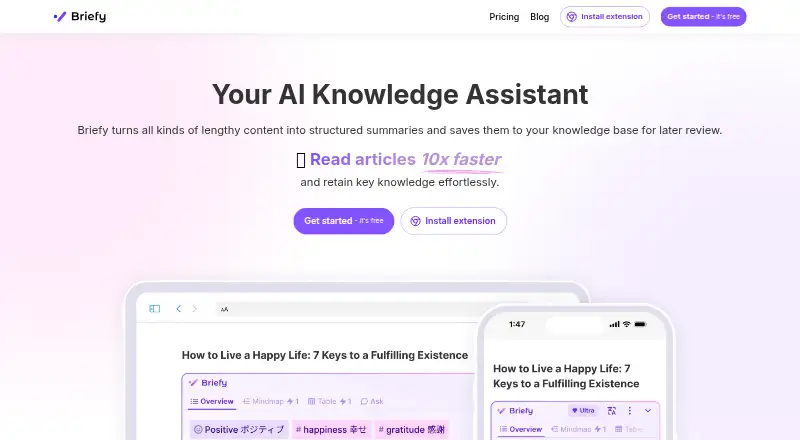
What Briefy is
Briefy turns lengthy material into structured summaries and keeps them in a knowledge base for later use. It can make overviews, tables, mindmaps, and timelines from websites, videos, email threads, podcasts, and PDFs. In the knowledge base, users can save, review, search, ask questions about, and share briefs, then follow source references to check details. Briefy supports multiple languages and inline translations, and its Gmail feature is described as an email copilot for skimming threads and composing replies. It is available as an extension, on iOS and macOS, and on the web; document upload, webpage summaries, and Markdown export are listed. The Free plan provides 30 credits per month at standard response speed. Premium is listed at $89.88 a year and Ultra at $167.88 a year, but new subscriptions are unavailable. PDF summarization requires Premium or Ultra, and YouTube summaries require subtitles.
Good
- Offers four summary formats.
- Knowledge base supports search and sharing.
- Source references link briefs to material.
- Supports multiple languages and inline translations.
- Available on web, iOS, macOS, and as an extension.
Watch out
- New subscriptions and credit purchases are unavailable.
- PDF summaries require Premium or Ultra.
- YouTube videos without subtitles are unsupported.
- Free plan includes 30 credits per month.
Who it suits
Briefy may suit students and academics, professionals, content creators, and people who want to read efficiently. It is useful for readers who want to organize summaries and return to source material to verify details.
Verdict
Briefy combines summaries in several formats with a knowledge base for revisiting and checking them. The subscription availability and PDF and video limits are important to check before choosing it.
Plans and prices
From Briefy's own pricing page, checked 4 Oct 2026.
| Plan | Price | What it gives you |
|---|---|---|
| Free | Free | 30 credits / month · Standard response speed |
| Premium | $89.88 a year | 700 credits / month · Fast response speed · PDF files up to 20MB · New subscriptions unavailable · $89.88 per year (= $7.49/month, billed annually) |
| Ultra | $167.88 a year | 1500 credits / month · Fast response speed · PDF files up to 50MB · Up to 2M words · New subscriptions unavailable · $167.88 per year (= $13.99/month, billed annually) |
The facts
Each one read from Briefy's own pages, with the date it was checked.
What it does
- Availability
- The pricing page states that new subscriptions and credit purchases are no longer available.checked 4 Oct 2026
- Data handling
- The privacy policy identifies OpenAI, Anthropic, and Google Cloud Platforms among its AI service providers.checked 4 Oct 2026
- Gmail feature
- Briefy for Gmail is described as an email copilot for skimming threads and composing replies.checked 4 Oct 2026
- Knowledge base
- The knowledge base lets users save, review, search, ask questions about, and share briefs.checked 4 Oct 2026
- Languages
- Briefy supports multiple languages and inline translations for summaries.checked 4 Oct 2026
- PDF limits
- PDF summarization is limited to Premium and Ultra, with file size caps of 20MB and 50MB respectively.checked 4 Oct 2026
- Security
- The privacy policy says Briefy has technical and organizational measures designed to protect personal information, while noting that no internet transmission or storage can be guaranteed fully secure.checked 4 Oct 2026
- Source references
- Users can navigate from a brief to its source material to cross-check details.checked 4 Oct 2026
- Summary formats
- It can create overview, table, mindmap, and timeline summaries.checked 4 Oct 2026
- Support
- The site lists [email protected] as its support contact.checked 4 Oct 2026
- Supported content
- The product describes summarizing websites, videos, email threads, podcasts, and PDFs.checked 4 Oct 2026
- Video limit
- The maker says YouTube summarization currently supports videos with subtitles and does not support videos without subtitles.checked 4 Oct 2026
- What it does
- Briefy turns lengthy content into structured summaries and saves them in a knowledge base for later review.checked 4 Oct 2026
- Who it is for
- Briefy names students and academics, professionals, content creators, and people who want to read efficiently as intended users.checked 4 Oct 2026
Where it runs
- Platforms
- Briefy offers a Chrome extension for desktop and a Safari extension for iOS, iPadOS, and macOS.checked 4 Oct 2026
The full review of Briefy
Overview
Briefy is a summarization app for people who need to turn long reading and media into notes they can revisit, check, and share. It is best suited to students, academics, professionals, and content creators who value source links and several ways to organize a summary. Its free tier offers a modest starting point, but the paid plans are closed to new subscribers.
Key features
Briefy can summarize websites, videos, email threads, podcasts, and PDFs into an overview, table, mind map, or timeline. That range makes it more adaptable than a tool that returns only a short passage: readers can choose a format that helps them scan, compare, or follow a sequence. The knowledge base extends the value beyond a single summary, with options to save, search, review, ask questions about, and share briefs. Users can also jump from a brief to its source material, which is useful for checking details a summary may compress or omit.
Multiple-language support and inline translations help readers working across languages. Document uploads are supported, inputs can reach 2 million words, and briefs can be exported in Markdown. YouTube summarization currently works only for videos with subtitles, ruling out subtitle-free videos. Briefy for Gmail is presented as an email copilot for skimming threads and composing replies.
PDF summarization is reserved for paid tiers: Premium caps files at 20MB and Ultra at 50MB. The privacy policy describes technical and organizational measures to protect personal information, while cautioning that transmission and storage over the internet cannot be guaranteed fully secure. It identifies OpenAI, Anthropic, and Google Cloud Platforms among its AI service providers.
Pricing
The Free plan costs nothing and includes 30 credits per month at Standard response speed. It is the only currently accessible tier for new users, but its credit allowance makes it a limited way to assess regular use.
Premium costs $89.88 a year (billed $89.88 per year (= $7.49/month, billed annually)). It includes 700 credits per month, Fast response speed, and PDF files up to 20MB. Ultra costs $167.88 a year (billed $167.88 per year (= $13.99/month, billed annually)); it raises the monthly allowance to 1500 credits, keeps Fast response speed, accepts PDFs up to 50MB, and supports up to 2M words. Ultra is the better fit for heavier use or larger PDFs, while Premium gives up those higher caps for a lower annual cost. Neither paid plan is open to new subscribers, and new credit purchases are also unavailable, so those prices do not represent a current purchasing option.
Platforms
Briefy is available as an extension, on iOS and macOS, and on the web. That spread suits readers who move between browser-based research and Apple devices, though no Android or Windows app is listed. Support is available at [email protected].
Who it's for
Briefy fits students and academics handling substantial reading, professionals sorting through long documents or email, content creators reviewing source material, and anyone trying to read more efficiently. The source navigation and searchable knowledge base are particularly useful when summaries need follow-up rather than a one-time skim. It is a weaker choice for someone who needs reliable summaries of videos without subtitles, routinely works with PDFs on the free tier, or needs to start a paid subscription now.
Pros and cons
- Pros: Four summary formats give users options for different kinds of material; searchable briefs and source navigation support later review and verification.
- Pros: Multiple languages, inline translations, Markdown export, and a 2-million-word input ceiling support varied reading workflows.
- Cons: New subscriptions and credit purchases are unavailable, leaving the paid PDF allowances and higher quotas inaccessible to new customers.
- Cons: The free plan has 30 credits per month, and PDF summarization is not included; YouTube summaries also require subtitles.
Alternatives
AI Summarizers is a useful place to compare more tools in this category. Choose QuillBot instead if you want a freemium option across Android, iOS, Windows, and desktop platforms, with paraphrasing and basic grammar tools in its free plan. Lemora is another freemium option, with Android and Windows support; its Pro plan removes daily limits on uploads and tutor chats.
AskSia may suit readers whose priority is daily problem-solving with step-by-step solutions and photo input. smry is worth considering for readers who want article chats, audio, feeds, and webpage monitoring in its free tier. Summify offers a free analysis workflow with Learn cards, quizzes, and saved analyses, while its Scholar plan is priced at $4.99 a month and requires an .edu school email.
Grasp is an alternative for people who want daily runs and follow-ups, monthly lookups, and file uploads within stated free-plan caps. Scholarcy is a fit for article-focused readers who want a free allowance of 10 summaries and flashcard exports. SciSummary may suit readers who prefer an API and web-based research workflow and can use its seven-day free trial.
Verdict
Briefy is a strong fit for readers who want summaries they can organize, revisit, and check against their sources, rather than disposable condensed text. Its format choices and knowledge base are persuasive strengths, but the 30-credit free allowance is small and the paid tiers are unavailable to new subscribers. Choose it if the free tier meets your needs; look elsewhere if you need PDF summarization, more monthly capacity, or a paid plan you can start today.
Getting started
- Visit https://briefy.ai/
- Use Briefy through its extension, iOS app, macOS app, or web service
- Start with the Free plan, listed as free and 30 credits monthly
- Upload a document or provide a webpage, video, email thread, podcast, or PDF
- Choose an overview, table, mindmap, or timeline brief
- Export a brief in Markdown
Limits worth knowing
The Free plan includes 30 credits per month with standard response speed. PDF summarization is limited to Premium and Ultra, with 20MB and 50MB file caps; Premium and Ultra subscriptions are unavailable for new subscribers.
Questions
Is there a free plan?
Yes. Free is listed as free and includes 30 credits per month with standard response speed.
What do Premium and Ultra cost?
Premium is listed at $89.88 a year, billed annually at $7.49 a month. Ultra is $167.88 a year, billed annually at $13.99 a month; both are marked unavailable for new subscriptions.
Which content can Briefy summarize?
It supports websites, videos, email threads, podcasts, and PDFs, plus document uploads and webpage summaries.
Can Briefy summarize YouTube videos without subtitles?
No. The maker says YouTube summarization currently supports videos with subtitles and not videos without subtitles.
What are the PDF limits?
PDF summarization is available only on Premium and Ultra, with file-size caps of 20MB and 50MB respectively.
Which platforms does Briefy support?
Briefy is available as an extension, on iOS and macOS, and on the web.
Alternatives to Briefy
- 1
QuillBot
Free planAndroidiOSWebExtension8.3Free plan - 2
Eightify
AndroidiOSWebExtension7.7From $59.99 a year - 3
Podwise
AndroidiOSWebAPI7.6From $70.80 a year - 4
Scholarcy
Free planWebAPIExtension7.5From $90 a year - 5
SciSummary
Free planWebAPIExtension7.4From $48 a year - 6
TLDR This
Free planWebAPIExtension7.4From $4 a month