
LanguageTool
LanguageTool is a writing assistant for checking grammar, spelling, punctuation, casing, and style across 31 languages.
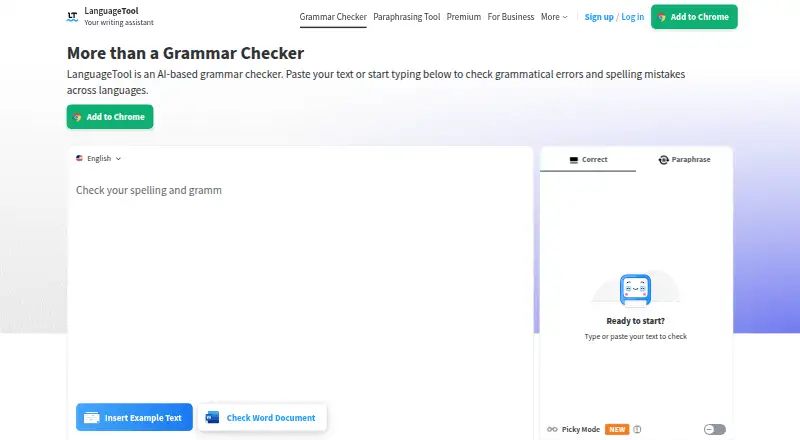
What LanguageTool is
LanguageTool is a writing assistant for checking grammar, spelling, punctuation, casing, and style across 31 languages. It also offers tone detection, writing statistics, and paraphrasing, with options to make sentences more formal, fluent, simple, or concise. The free version covers spelling, basic punctuation, and some style issues, with a limit of 2,000 characters per text field; Premium supports up to 150,000 characters per field. LanguageTool is available as a browser extension and as Windows, macOS, and iOS apps. It works with common browsers and word processors, including Google Docs, Microsoft Word, Apple Pages, and LibreOffice. Email add-ons are available for Gmail, Outlook, Apple Mail, and Thunderbird. Text written using the browser add-on is usually not saved, while text in the editor is stored and accessible from all devices. Teams can manage invited users and share style guides and dictionaries. Premium is available monthly, quarterly, annually, or every two years; plan prices are not listed.
Good
- Checks writing across 31 languages
- Offers paraphrasing and tone detection
- Integrates with major word processors
- Team plans include shared style guides and dictionaries
Watch out
- Free version is limited to 2,000 characters per field
- Premium plan prices are not listed
- Editor text is saved and accessible across devices
Who it suits
LanguageTool suits people who want writing checks across multiple languages and apps. Teams may value shared style guides and dictionaries; users editing longer text should note the free field limit.
Verdict
LanguageTool provides checks and rewriting options across browser, desktop, mobile, office, and email tools. Compare the free text limit with Premium’s 150,000-character field allowance before choosing a plan.
Plans and prices
From LanguageTool's own pricing page, checked 22 Sep 2026.
| Plan | Price | What it gives you |
|---|---|---|
| Basic | — | 2,000 characters per text field |
| Basic | Priced on request | 2,000 characters per text field |
| Premium Monthly | Priced on request | 150,000 characters per text field |
| Premium Monthly | — | 150,000 characters per text field |
| Premium Quarterly | Priced on request | 150,000 characters per text field |
| Premium Quarterly | — | 150,000 characters per text field |
| Premium Annual | Priced on request | 150,000 characters per text field |
| Premium Annual | — | 150,000 characters per text field |
| Premium 2-Year | Priced on request | 150,000 characters per text field |
| Premium 2-Year | — | 150,000 characters per text field |
| Team | — | 20 users · 150,000 characters per text field |
| Team | Priced on request | 20 users · 150,000 characters per text field |
| Team plan | — | For up to 20 users · billed annually at €56.90 per user |
| Annual subscription | — | Individual premium subscription · billed annually at €59.89 |
| Free plan | Free | Free version · Shown as EUR 0 per free on our read (localised); USD price not displayed to our checker |
| Monthly subscription | — | Individual premium subscription · billed monthly at €19.90 |
| Quarterly subscription | — | Individual premium subscription · billed quarterly at €39.90 |
| 2-year subscription | — | Individual premium subscription · billed every 2 years at €99.90 |
The facts
Each one read from LanguageTool's own pages, with the date it was checked.
Money
- Billing options
- Individual Premium is available monthly, quarterly, annually, or every two years.checked 27 Sep 2026
- Free plan
- Yeschecked 22 Sep 2026
- Free tier limits
- The free version covers spelling, simple punctuation, and some style mistakes.checked 27 Sep 2026
Where it runs
- Browser extension
- Yeschecked 22 Sep 2026
- Browser privacy
- Texts written using the browser add-on are usually not saved.checked 27 Sep 2026
- Desktop app
- Yeschecked 22 Sep 2026
- Mobile app
- Yeschecked 22 Sep 2026
- Supported platforms
- It works in common browsers and word processors, plus Windows, macOS, and iOS apps.checked 27 Sep 2026
The company
- Company locations
- The footer says LanguageTool is made in Europe and the US.checked 27 Sep 2026
- Founded
- 2003checked 23 Sep 2026
- Headquarters
- San Francisco, California, United Stateschecked 23 Sep 2026
- Team administration
- Teams can invite users by email and manage them.checked 27 Sep 2026
- Team style controls
- Teams get shared style guides and dictionaries for consistent wording and terminology.checked 27 Sep 2026
What it does
- Editor storage
- Texts in the editor are saved and accessible from all devices.checked 27 Sep 2026
- Email integrations
- Email add-ons are available for Gmail, Outlook, Apple Mail, and Thunderbird.checked 27 Sep 2026
- GDPR solutions
- Business solutions are described as GDPR-conform and support consistent brand voice.checked 27 Sep 2026
- Languages supported
- 31checked 22 Sep 2026
- Office integrations
- Integrations include Google Docs, Microsoft Word, Apple Pages, and LibreOffice.checked 27 Sep 2026
- Organization trust
- The site says more than 2,000 organizations trust its AI-based writing tools.checked 27 Sep 2026
- Paraphrasing modes
- The paraphraser can make sentences more formal, fluent, simple, or concise.checked 27 Sep 2026
- Premium text limit
- Premium supports up to 150,000 characters per text field.checked 27 Sep 2026
- Refund guarantee
- Premium has a 14-day money-back guarantee with cancellation and refund without questions.checked 27 Sep 2026
- Style suggestions
- Yeschecked 22 Sep 2026
- Support contact
- Customers can reach support, including for business VAT invoice questions.checked 27 Sep 2026
The full review of LanguageTool
Overview
LanguageTool is a multilingual writing assistant for people who want corrections across their browser, office documents, email, and dedicated apps. It suits individuals and teams who need more than spelling checks, though the free tier is best for short, basic corrections.
Its range of integrations and paraphrasing modes make it a capable everyday editor; the trade-off is that meaningful use on longer texts requires Premium, whose pricing is custom rather than stated here.
Key features
Corrections and rewriting
LanguageTool supports 31 languages and covers grammar, spelling, punctuation, casing, style, paraphrasing, and writing statistics. Tone detection and style suggestions help users look beyond basic errors, while the paraphraser can make sentences more formal, fluent, simple, or concise. Those options suit writers refining drafts, but the free plan only covers spelling, simple punctuation, and some style mistakes.
The Basic plan's 2,000-character field limit is restrictive for full-length documents. Premium raises that ceiling to 150,000 characters per text field, a substantial upgrade for long drafts; the stated monthly word limit is 150,000 words.
Editing across devices and teams
Browser add-on text is usually not saved, while text entered in the editor is saved and accessible from all devices. That distinction favors the editor for work you need to return to, and the add-on for text you do not want retained there. Office integrations cover Google Docs, Microsoft Word, Apple Pages, and LibreOffice; email add-ons cover Gmail, Outlook, Apple Mail, and Thunderbird.
Teams can invite and manage users by email, and share style guides and dictionaries. Business solutions are described as GDPR-conform and support a consistent brand voice, making the team offering more relevant to organizations than to solo writers.
Pricing
LanguageTool is freemium. The free plan is useful for basic checks, but it does not match Premium's broader writing coverage or 150,000-character field allowance. Basic has a 2,000-character limit per field. Premium is offered monthly, quarterly, annually, or every two years, with each option supporting 150,000 characters per field; the listed plans have custom pricing. Premium includes a 14-day money-back guarantee, with cancellation and refund without questions.
The Team plan supports 20 users and the same 150,000-character field limit, also at custom pricing. It is the sensible fit when shared terminology and brand voice matter across a group; individuals do not need its team administration. Support is available, including for business VAT invoice questions.
Platforms
LanguageTool has browser extensions, desktop apps for Windows and macOS, and an iOS app. Its browser, office, and email integrations let users apply checks in common writing environments rather than relying only on a standalone editor.
Who it's for
Choose LanguageTool if you write across several apps or languages and want correction, style guidance, and sentence-level rewriting in one service. It is also a strong fit for teams that need shared dictionaries and style guides. It is less compelling for anyone who only needs occasional basic proofreading, or who requires a published Premium price before committing.
Pros and cons
- Pros: Support for 31 languages and integrations across major office and email tools make it useful in varied writing workflows.
- Pros: Premium's 150,000-character field allowance accommodates long texts, while paraphrasing offers four distinct rewrite directions.
- Pros: Team dictionaries, style guides, and brand voice controls address consistency across group writing.
- Cons: The free plan is limited to spelling, simple punctuation, and some style mistakes, and Basic's field limit is only 2,000 characters.
- Cons: Premium and Team pricing is custom, so shoppers cannot compare a stated price against their expected use.
Alternatives
For other options, browse Grammar checkers, AI writing assistants, or AI Grammar Checkers.
- Ginger is another freemium choice, with a $13 a month Premium plan and platforms including Android, iOS, desktop, browser extension, and web.
- Grammarly is another freemium option, with a free plan and a Pro plan at $12 a month.
- Trinka is a freemium alternative with browser, desktop, web, API, and self-hosted platforms.
- Scribens offers a freemium plan and Premium monthly for €9.90 a month, with mobile and desktop Premium features.
- Sapling has a free plan and a free trial, with API, extension, self-hosted, web, and Windows support.
- Wordvice AI has a free Basic plan with 5,000 words per month and 500 words per submission, plus a Premium plan at $9.95 a month.
- ProWritingAid offers a free plan and a browser extension.
- Microsoft Editor offers Microsoft 365 Personal and Family plans at custom pricing.
Verdict
LanguageTool is a strong choice for multilingual writers who want corrections, rewriting, and broad app integrations, or teams that need consistent terminology and voice. Its clearest advantage is the combination of 31-language support and a 150,000-character Premium field limit. Look elsewhere if transparent paid pricing or a genuinely full-featured free tier is essential.
Getting started
- Visit languagetool.org.
- Choose a browser extension, Windows or macOS desktop app, or iOS app.
- Use the free plan for spelling, simple punctuation, and some style corrections.
- Choose a Premium billing period for up to 150,000 characters per text field.
- Connect it with a supported word processor or email service if needed.
Limits worth knowing
The free version has a 2,000-character limit per text field and covers spelling, simple punctuation, and some style mistakes. Premium supports up to 150,000 characters per text field.
Questions
Is LanguageTool free?
Yes. The free plan checks spelling, simple punctuation, and some style mistakes, with a 2,000-character limit per text field.
What does Premium cost?
The listed Premium plans do not provide prices. Individual Premium is available with monthly, quarterly, annual, or two-year billing.
Which platforms does LanguageTool support?
It is available as a browser extension and as Windows, macOS, and iOS apps. It also works with common browsers and word processors.
Which apps does it integrate with?
Integrations include Google Docs, Microsoft Word, Apple Pages, and LibreOffice. Email add-ons are available for Gmail, Outlook, Apple Mail, and Thunderbird.
What does LanguageTool check?
Its writing features include grammar, spelling, punctuation, casing, style, tone detection, paraphrasing, and statistics.
Can teams manage shared writing preferences?
Yes. Teams can invite and manage users and use shared style guides and dictionaries.
Alternatives to LanguageTool
- 1
Cordial
Free planAndroidiOSWebExtension8.7Free plan - 2
Grammarly
Free planAndroidiOS8.6From $12 a month - 3

GrammarCheck.ai
Free planAndroidiOSWebAPI8.6From $2.50 a month - 4

Wordvice AI
Free planWebExtensionmacOSWindows8.5Free plan - 5

Harper
Free planOpen sourceAndroidiOSWebAPI8.5Free plan - 6

Duden-Mentor
Free planWebAPIExtensionmacOS8.4From €2.99 a month