
Sapling
Sapling combines writing assistance with developer tools for adding language model-powered functionality to applications.
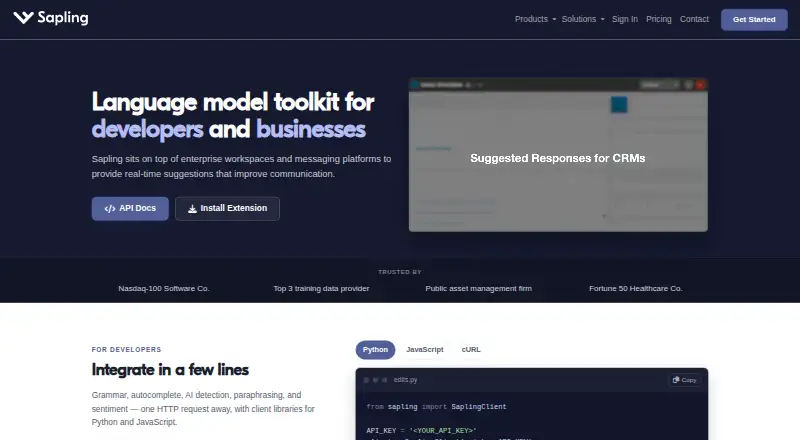
What Sapling is
Sapling combines writing assistance with developer tools for adding language model-powered functionality to applications. Its writing tools include grammar and spelling corrections, autocomplete, rephrasing, tone and sentiment checks, and AI content detection. It offers style suggestions and tone detection, with support for 14 languages. Developers can use HTTP API endpoints and SDK components, including Python and JavaScript client libraries. Sapling lists 73 integration guides, with examples for Zendesk, Salesforce, Slack, Google Docs, Microsoft Word, and browser extensions. It is available on the web, through browser extensions and Windows, via API, and in self-hosted deployments. Sapling says it uses TLS encryption in transit and AES-256 encryption at rest, and describes GDPR compliance and SOC 2 Type II certification. Enterprise accounts include audit logs, role-based access, and single sign-on; self-hosted deployments and custom retention options are available. The free plan includes AI detector limits. API trials have a character limit and expire after one month; API pricing covers only some endpoints.
Good
- Writing tools include grammar correction and rephrasing.
- Supports 14 languages.
- SDK clients are available for Python and JavaScript.
- Enterprise includes audit logs and role-based access.
- Self-hosted deployment options are available.
Watch out
- API trial has a character limit and expires after one month.
- API pricing covers only a subset of endpoints.
Who it suits
Sapling may suit teams seeking writing support across integrations, or developers adding language-model features through APIs and SDKs. Enterprise controls and deployment options may suit organizations with specific access, retention, or hosting requirements.
Verdict
Sapling spans writing assistance and developer tooling, with web, extension, Windows, API, and self-hosted options. Review API endpoint pricing and trial limits separately from writing-plan terms.
Plans and prices
From Sapling's own pricing page, checked 5 Oct 2026.
| Plan | Price | What it gives you |
|---|---|---|
| Pro | $144 a year | 100,000 AI detector characters per check · 10 AI detector files per batch · Unlimited snippets · $144.00 per year (= $12.00/month, billed annually) |
| Enterprise | $15 a month | Advanced writing and AI detection · Team controls · Analytics · Support · 100,000 characters per detector check · Starts at 10 seats; pricing varies by seat count and contract duration |
| API | Priced on request | Language and AI detection APIs · API pricing varies by endpoint and usage · Metered and usage-based; one-time $5 minimum |
| Free | — | Basic writing assistance · AI detector checks up to 2,000 characters per check · 5 files per AI detector batch · 20 snippets |
The facts
Each one read from Sapling's own pages, with the date it was checked.
What it does
- API pricing limit
- The API pricing page covers only a subset of endpoints and directs customers to sales for pricing on other endpoints and self-hosted solutions.checked 2 Oct 2026
- Data handling
- Sapling says it discards numbers, email addresses, and URLs before processing, and offers an option where data is never stored on disk.checked 2 Oct 2026
- Deployment
- The documentation says cloud-premises deployments support AWS, Azure, and GCP, while on-premises deployments require Docker containers.checked 2 Oct 2026
- Developer access
- The developer platform offers HTTP API endpoints and SDK components, including client libraries for Python and JavaScript.checked 2 Oct 2026
- Enterprise controls
- Enterprise accounts include audit logs, role-based access controls, and single sign-on; self-hosted deployments and custom data-retention options are available.checked 2 Oct 2026
- Healthcare and payment compliance
- Sapling says it supports customers with HIPAA and PCI compliance requirements.checked 2 Oct 2026
- Integrations
- Sapling lists 73 integration guides, including integrations for Zendesk, Salesforce, Slack, Google Docs, Microsoft Word, and browser extensions.checked 2 Oct 2026
- Languages supported
- 14checked 20 Sep 2026
- Paid from
- 12checked 20 Sep 2026
- Product
- Sapling provides an API/SDK toolkit for integrating language model-powered functionality into applications, alongside writing assistance for teams.checked 2 Oct 2026
- Security
- Sapling states that it uses TLS encryption in transit and AES-256 encryption at rest, and that it is GDPR compliant and SOC 2 Type II certified.checked 2 Oct 2026
- Style suggestions
- Yeschecked 20 Sep 2026
- Support
- The pricing page lists email and ticket support for paid tiers, and dedicated support contact for Enterprise.checked 2 Oct 2026
- Tone detection
- Yeschecked 20 Sep 2026
- Writing tools
- Its tools include grammar and spelling corrections, autocomplete, rephrasing, tone and sentiment checks, and AI content detection.checked 2 Oct 2026
Money
- API trial limit
- The API trial has a character limit and expires after one month.checked 2 Oct 2026
- Free plan
- Yeschecked 20 Sep 2026
- Free trial
- Individuals can start a free one-month Pro trial without a credit card; the billing FAQ says the trial cancels automatically if no payment method is added.checked 2 Oct 2026
Where it runs
- Browser extension
- Yeschecked 20 Sep 2026
- Desktop app
- Yeschecked 20 Sep 2026
The company
- Company background
- Sapling says the team's work comes from the Berkeley and Stanford AI labs and that the company is backed by Y Combinator and partnered with OpenAI.checked 2 Oct 2026
The full review of Sapling
Sapling is a writing-assistance suite for teams alongside an API toolkit for developers adding language features to applications. It suits organizations that need those capabilities across workplace tools or their own software; its range is the draw, while separate plan terms and API pricing make it less straightforward for a solo writer to choose.
Overview
Sapling brings grammar and spelling corrections, autocomplete, rephrasing, tone and sentiment checks, and AI content detection into one offering. Teams can connect it to existing workflows through 73 integration guides, including Zendesk, Salesforce, Slack, Google Docs, and Microsoft Word. Developers get HTTP endpoints and Python and JavaScript client libraries. That breadth makes Sapling relevant beyond proofreading, but the writing plans and usage-based API are distinct purchase decisions.
Key features
Writing tools and detection
Style suggestions and tone detection support 14 languages, alongside corrections, autocomplete, rephrasing, and sentiment checks. The detector’s limits differ sharply by plan: Free allows 2,000 characters per check and five files per batch, while Pro and Enterprise allow 100,000 characters per check. Free is useful for occasional short checks; it is a poor fit for repeated long-document or batch workflows.
Developer access and data controls
The API and SDK components give product teams a way to integrate language and AI-detection functionality rather than rely only on Sapling’s writing tools. However, published API pricing covers only a subset of endpoints; other endpoints and self-hosted solutions require a sales quote. The API trial is limited by characters and expires after one month, so it is a bounded evaluation rather than an open-ended test.
Sapling says it encrypts data in transit with TLS and at rest with AES-256, and is GDPR compliant and SOC 2 Type II certified. It supports customers with HIPAA and PCI requirements. Enterprise controls include audit logs, role-based access, and single sign-on; self-hosting, custom data retention, and an option to avoid storing data on disk add flexibility for organizations with stricter deployment or handling needs. Cloud-premises deployment supports AWS, Azure, and GCP, while on-premises deployment requires Docker containers.
Pricing
Sapling is freemium, with paid writing plans from $12/user/mo (annual) and a 30-day trial. The plan prices and allowances are not interchangeable with API terms:
| Plan | Price and terms | What it includes |
|---|---|---|
| Free | free; billed monthly | 2,000 AI detector characters per check, five detector files per batch, and 20 snippets. |
| Pro | $25 a month; billed Annual ($12 / mon) | Advanced writing assistance, detector checks up to 100,000 characters per check, 10 files per batch, and unlimited snippets. |
| Enterprise | $15 a month; starts at 10 seats, with price varying by seat count and contract duration | Advanced writing and AI detection, team controls, analytics, support, and 100,000 characters per detector check. |
| API | $5 a month; one-time $5 minimum | Usage-based language APIs, AI detection APIs, and developer access. |
Free has meaningful caps on both detection and snippets, so it is better for light use than team-wide adoption. Pro raises detector capacity and removes the snippet limit, making it the clearer fit for regular writing work, but the annual billing term matters despite the monthly-equivalent price. Enterprise starts at 10 seats and adds team controls, analytics, and support; its stated $15 a month should be weighed alongside variable seat and contract pricing. Paid tiers list email and ticket support, while Enterprise has a dedicated support contact. API’s one-time $5 minimum is not a complete budget: costs are usage-based, and some endpoint and self-hosted pricing requires contacting sales.
Platforms
Sapling is available on the web, as a browser extension and Windows desktop app, through APIs, and as a self-hosted deployment. That mix favors teams that want multiple routes into existing workflows or need deployment choices; it is less compelling for someone seeking only a lightweight standalone writing tool.
Who it's for
Sapling is strongest for customer-facing or product teams that need writing assistance in workplace applications, developers integrating language functionality, and organizations with explicit security, access-control, or deployment requirements. Solo writers who mainly want corrections may find the team features and developer offering unnecessary, while API buyers need to confirm endpoint costs and trial capacity against their intended workload.
Pros and cons
- Pros: A broad writing toolkit combines corrections, rephrasing, tone and sentiment checks, and AI detection, rather than stopping at grammar.
- Pros: 73 integration guides, APIs, and Python and JavaScript client libraries offer several paths to put Sapling into existing products and workflows.
- Pros: Enterprise controls, self-hosting, and configurable data handling address needs that a basic browser checker may not.
- Cons: Free detection is capped at 2,000 characters per check and five files per batch, limiting its usefulness for sustained long-form work.
- Cons: API pricing covers only some endpoints, and the trial expires after one month with a character limit, adding uncertainty for developer evaluation and budgeting.
- Cons: Enterprise starts at 10 seats, and its price varies with seats and contract duration, making it a poor match for a small individual account.
Alternatives
Choose AI Paraphrasing Tools or AI Detection Software if you want to compare options centered on those tasks rather than Sapling’s combined team-writing and developer scope. The Grammar checkers and AI Grammar Checkers lists suit readers prioritizing correction, while Writing Style Checkers focus the search on style. For broader writing help, compare the AI writing assistants list.
- RewritePal is a freemium alternative with Android, iOS, Linux, macOS, Windows, web, and extension support; its free plan has a 10,000-character rewrite limit.
- StealthWriter is a freemium web, Android, and iOS option whose free plan includes 10 humanizations and 10 AI scans per day, with a 1,000-word input limit.
- Phrasit is a web-only freemium alternative; its free plan allows 150 words per run.
- Wordtune offers extension, iOS, and web access; its free Basic plan includes 10 rewrites and AI suggestions per day, plus unlimited spelling corrections and grammar checks.
- Clever AI Humanizer is a free web option with no fixed monthly word allowance and up to 3,000 words per request, subject to service availability.
- Rewriter AI offers API, web, Linux, macOS, and Windows support; its Starter plan is $6.40 a month billed annually and includes 50,000 words per month and API access.
- Paraphraser.io includes Android, iOS, API, and web access; its Silver plan costs $4.55 a month for seven days of validity, with 10,000 words and 1,500 paraphrases.
- Paraphaser.ai is a free web option with six online tools and no signup requirement.
Verdict
Choose Sapling if your team needs writing support across workplace tools, or your developers need language APIs alongside enterprise deployment and data controls. Its breadth is the main reason to choose it; limited Free allowances and API pricing that requires sales for some endpoints are the main reasons to look elsewhere, especially for solo writers or teams needing predictable API costs.
Getting started
- Visit the Sapling website
- Use Sapling through the web, browser extension, or Windows app
- Choose the free plan or a paid tier
- Start the listed 30-day trial
- For development, use the HTTP API or Python and JavaScript SDK components
- For on-premises use, deploy with Docker containers
Limits worth knowing
The Free plan allows 2,000 AI-detector characters per check, five detector files per batch, and 20 snippets. API trial access is character-limited and expires after one month; other endpoints and self-hosted solutions may require sales pricing.
Questions
Is Sapling free?
Yes. Sapling lists a free plan with 2,000 AI-detector characters per check, five files per batch, and 20 snippets.
What does paid writing assistance cost?
A 30-day trial is listed.
Which platforms are supported?
Sapling lists web, browser extension, Windows, API, and self-hosted access.
Does Sapling provide developer tools?
Yes. It offers HTTP API endpoints and SDK components, including Python and JavaScript client libraries.
What integrations are documented?
Sapling lists 73 integration guides, including Zendesk, Salesforce, Slack, Google Docs, Microsoft Word, and browser extensions.
What enterprise controls are available?
Enterprise accounts include audit logs, role-based access controls, single sign-on, analytics, support, self-hosting, and custom data retention.
Alternatives to Sapling
- 1
Cordial
Free planAndroidiOSWebExtension8.7Free plan - 2
Grammarly
Free planAndroidiOS8.6From $12 a month - 3

GrammarCheck.ai
Free planAndroidiOSWebAPI8.6From $2.50 a month - 4

Wordvice AI
Free planWebExtensionmacOSWindows8.5Free plan - 5

Harper
Free planOpen sourceAndroidiOSWebAPI8.5Free plan - 6

Duden-Mentor
Free planWebAPIExtensionmacOS8.4From €2.99 a month