
Ginger
Ginger is an AI-powered grammar and spelling checker for English writing.
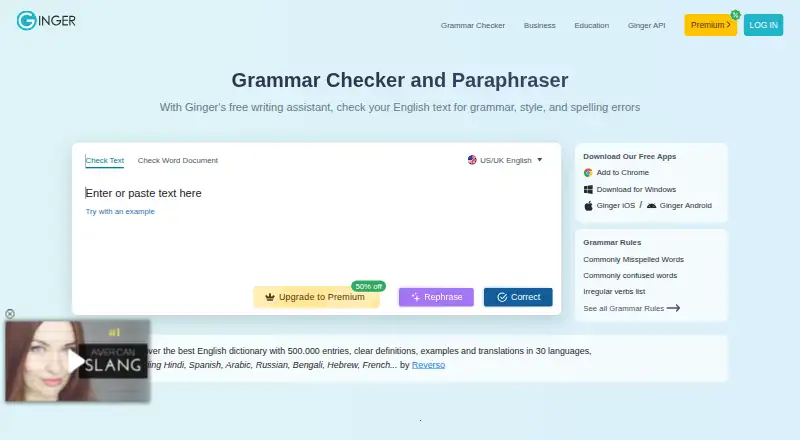
What Ginger is
Ginger is an AI-powered grammar and spelling checker for English writing. Its tools include punctuation checks, sentence rephrasing, online proofreading, essay checking, translation and a Personal Trainer. Core writing enhancement supports UK and American English; Premium adds unlimited corrections and rephrasing, a synonyms dictionary, a text reader and translation between more than 40 languages. Ginger has browser extensions for Chrome and Edge, and on Windows it integrates with Microsoft Word, PowerPoint and Outlook. Its API is intended for organizations with high-volume text processing needs, supports full-document proofreading and can connect with learning, customer-management and internal systems; it can also be installed on customer servers. Ginger says text is sent to correction servers and returned without storage or transfer to third parties. A free version offers essential functions with some limitations. Text analysis and correction require a stable internet connection.
Good
- Checks grammar, spelling and punctuation
- Includes sentence rephrasing and online proofreading
- Chrome and Edge extensions work across listed sites
- API supports full-document proofreading and local installation
- Premium translates text between over 40 languages
Watch out
- Core writing enhancement focuses only on English
- Text correction requires a stable internet connection
- Free version has limitations on essential functions
Who it suits
Ginger is suited to native and non-native English speakers, students and professionals who want writing checks and rephrasing. Its API and local installation option may also suit organizations processing large volumes of text.
Verdict
Ginger covers common English writing checks alongside rephrasing, translation and organizational API options. Its English-only core writing focus and internet requirement are important constraints to consider.
Plans and prices
From Ginger's own pricing page, checked 20 Sep 2026.
| Plan | Price | What it gives you |
|---|---|---|
| Premium Monthly | $13 a month | Unlimited enhanced Rephrase · Full-sentence corrections · Translation in 40+ languages · Billed every month |
| Premium Annual | $7.50 a month | Unlimited enhanced Rephrase · Full-sentence corrections · Translation in 40+ languages · Annual billing |
| Premium Annual | $7.50 a year | Unlimited enhanced Rephrase · Full-sentence corrections · Translation in 40+ languages · Annual billing |
| Premium Quarterly | $9.99 a month | Unlimited enhanced Rephrase · Full-sentence corrections · Translation in 40+ languages · Quarterly plan |
| Premium 2 years | $6 a month | Unlimited enhanced Rephrase · Full-sentence corrections · Translation in 40+ languages · Two-year plan |
| Premium 2 years | $6 a year | Unlimited enhanced Rephrase · Full-sentence corrections · Translation in 40+ languages · Two-year plan |
| Two Years | $5.99 a year | unlimited grammar check · unlimited rephrasing · unlimited synonyms · translation to 40+ languages · Billed as one payment of $143.76 |
| Monthly | $7.99 a month | unlimited grammar check · unlimited rephrasing · unlimited synonyms · translation to 40+ languages · automatically renews monthly |
| Annual | $59.88 a year | unlimited grammar check · unlimited rephrasing · unlimited synonyms · translation to 40+ languages · Billed as one payment of $59.88 |
The facts
Each one read from Ginger's own pages, with the date it was checked.
What it does
- API
- Ginger offers an API for businesses, institutions, and organizations with high-volume text-processing needs, including full-document proofreading and LMS, CRM, and internal-system integration.checked 28 Sep 2026
- Connectivity limit
- Ginger requires a stable internet connection to analyze and correct text.checked 28 Sep 2026
- Core language
- Ginger's core grammar and writing enhancement features focus solely on English, with UK and American English options.checked 28 Sep 2026
- GDPR
- Ginger says it follows GDPR principles including purpose limitation, data minimization, storage limitation, and integrity and confidentiality safeguards.checked 28 Sep 2026
- Integrations
- Ginger integrates with Microsoft Word, PowerPoint, and Outlook on Windows and provides browser extensions for Chrome and Edge that work on sites including Gmail, Google Docs, Facebook, and LinkedIn.checked 28 Sep 2026
- Languages supported
- 1checked 20 Sep 2026
- Local deployment
- The Ginger API can be installed locally on customers' own servers.checked 28 Sep 2026
- Premium limits
- Premium provides unlimited corrections, unlimited sentence rephrasing, translation, a synonyms dictionary, and a text reader.checked 28 Sep 2026
- Security and privacy
- Ginger says text is sent to correction servers and returned corrected, and that it does not store the text or transfer it to third parties.checked 28 Sep 2026
- Style suggestions
- Yeschecked 20 Sep 2026
- Support
- Ginger says its customer support team aims to respond to requests within 48 hours.checked 28 Sep 2026
- Target users
- Ginger says it serves native and non-native English speakers, students, professionals, and people with writing struggles such as dyslexia.checked 28 Sep 2026
- Tone detection
- Yeschecked 20 Sep 2026
- Translation
- Premium users can translate text between over 40 languages.checked 28 Sep 2026
- What it does
- Ginger is an AI-powered grammar and spell checker focused on English.checked 28 Sep 2026
- Writing tools
- Ginger lists grammar checking, sentence rephrasing, translation, punctuation checking, spell checking, Personal Trainer, online proofreading, and essay checking among its features.checked 28 Sep 2026
Where it runs
- Browser extension
- Yeschecked 20 Sep 2026
- Desktop app
- Yeschecked 20 Sep 2026
- Mobile app
- Yeschecked 20 Sep 2026
The company
- Company history
- Ginger says it was founded in 2010 and has received $25 million in investments.checked 28 Sep 2026
- Founded
- 2010checked 28 Sep 2026
Money
- Free plan
- Yeschecked 20 Sep 2026
- Free tier
- The free version provides essential functions with some limitations.checked 28 Sep 2026
The full review of Ginger
Overview
Ginger is an English-focused writing assistant for people who want corrections and rephrasing in the same tool. It is most useful to students, professionals and English learners who also value translation; readers who need offline editing or grammar support in multiple languages should look elsewhere.
Its appeal is breadth across everyday writing tasks, but not broad grammar-language coverage: corrections focus on English, and a stable internet connection is required.
Key features
Writing checks and rephrasing
Ginger combines grammar, spelling and punctuation checks with proofreading, essay checking and sentence rephrasing. Personal Trainer adds another learning-oriented tool. This range can serve writers who want to revise wording as well as fix errors, though the English-only correction focus makes it a poor fit for multilingual editing.
The free version covers essential functions with limitations. Premium removes limits on corrections and sentence rephrasing, and adds a synonyms dictionary and text reader. That makes the upgrade most relevant to frequent writers; occasional users may find the restricted free tier sufficient.
Translation and integrations
Premium translates text between more than 40 languages, but that should not be confused with multilingual grammar checking: Ginger’s writing enhancements remain focused on English, with UK and American English options.
On Windows, it integrates with Word, PowerPoint and Outlook. Chrome and Edge extensions work on sites including Gmail, Google Docs, Facebook and LinkedIn, helping writers check text where they compose it. Ginger also offers an API for organizations handling high text volumes, with full-document proofreading and integration into LMS, CRM and internal systems; the API can be installed on a customer’s own servers.
Privacy and connectivity
Ginger says text is sent to its correction servers and returned without being stored or transferred to third parties. It also says it follows GDPR principles, including data minimization and storage limitation. These assurances may suit users comfortable with server-based correction, but the service requires a stable internet connection and is not an offline editor. Customer support aims to respond within 48 hours.
Pricing
Ginger is freemium, with a free plan that provides essential functions subject to limitations. There is no free trial. The paid-plan details present several options with different billing terms, so check the term carefully before subscribing.
- Monthly: $7.99 a month, automatically renewing monthly. Includes unlimited grammar checks, rephrasing and synonyms, plus translation to 40+ languages. This suits readers who want flexibility without a longer commitment.
- Annual: $4.99 a year, billed as one payment of $59.88. It includes the same listed unlimited tools and translation, for readers willing to pay annually.
- Two Years: $5.99 a year, billed as one payment of $143.76. It offers the listed unlimited tools over a two-year term, but requires the largest upfront commitment.
- Premium Monthly: $13 a month, billed every month. It includes unlimited enhanced Rephrase, full-sentence corrections and translation in 40+ languages.
- Premium Quarterly: $9.99 a month on a quarterly plan, with the same listed Premium features. It trades monthly flexibility for a quarterly billing term.
- Premium Annual: $7.50 a year with annual billing, including unlimited enhanced Rephrase, full-sentence corrections and translation in 40+ languages.
- Premium 2 years: $6 a year on a two-year plan, with the same listed Premium features.
The annual and two-year price labels and billing descriptions do not align cleanly across the plan options, so confirm the checkout total and renewal terms before paying. No seat limits or usage quotas are given for these plans.
Platforms
Ginger is available on Android, iOS, macOS, Windows and the web, as well as through browser extensions and API access. A self-hosted option is also available for the API. Desktop and mobile apps broaden access, while the internet requirement remains a constraint across its correction workflow.
Who it's for
Ginger suits native and non-native English speakers, students and professionals who want correction, rephrasing and translation in one service. It may also help people with writing struggles such as dyslexia. Organizations processing large volumes of text can consider its API and local deployment option. It is less suitable for writers who need offline correction or grammar and style support in languages beyond English.
Pros and cons
- Pro: Grammar, spelling, punctuation, proofreading and rephrasing sit alongside one another, covering several common revision tasks.
- Pro: Premium translation spans 40+ languages, useful for readers who work across languages even though correction itself is English-focused.
- Pro: Windows Office integration, browser extensions and an API provide routes into individual and organizational workflows.
- Con: Core writing enhancement is limited to English, with UK and American options rather than multilingual grammar coverage.
- Con: A stable internet connection is necessary, ruling out disconnected editing.
- Con: Free use has limitations, and the mix of paid-plan billing terms merits close checking before commitment.
Alternatives
For a different grammar-checking option, compare LanguageTool; its Basic plan caps each text field at 2,000 characters and Premium at 150,000 characters, making those limits important to check against your typical documents.
Outwrite is worth considering if a free trial matters: it offers one, alongside a free plan with spelling and grammar, thesaurus, Google Docs, Word, browser extensions and a web app.
Consider Trinka as another freemium option with API, extension, macOS, self-hosted, web and Windows platforms.
Wordvice AI may suit lighter users who can work within its free allowance of 5,000 words per month and 500 words per submission.
GrammarCheck.ai is a web, iOS, Android and Linux alternative whose free plan has 5,000 credits and a 650-word submission limit.
Compare Grammarly if you want another freemium writing assistant; its free plan includes 100 AI prompts per month.
ORFO is another freemium option.
Sapling is another freemium alternative with API, extension, self-hosted, web and Windows platforms.
Browse the AI Grammar Checkers and Grammar checkers lists for more options.
Verdict
Choose Ginger if you want an English-focused checker that pairs corrections with rephrasing and, on Premium, broad translation. Its integrations and API give it reach beyond a standalone editor. Look elsewhere if you need offline work or grammar checking in languages other than English; those are fundamental limits, not gaps a higher plan resolves.
Alternatives to Ginger
- 1
Cordial
Free planAndroidiOSWebExtension8.7Free plan - 2
Grammarly
Free planAndroidiOS8.6From $12 a month - 3

GrammarCheck.ai
Free planAndroidiOSWebAPI8.6From $2.50 a month - 4

Wordvice AI
Free planWebExtensionmacOSWindows8.5Free plan - 5

Harper
Free planOpen sourceAndroidiOSWebAPI8.5Free plan - 6

Duden-Mentor
Free planWebAPIExtensionmacOS8.4From €2.99 a month