
Labvanced
Labvanced is a no-code platform for designing and running behavioral research experiments with graphical tools instead of code.
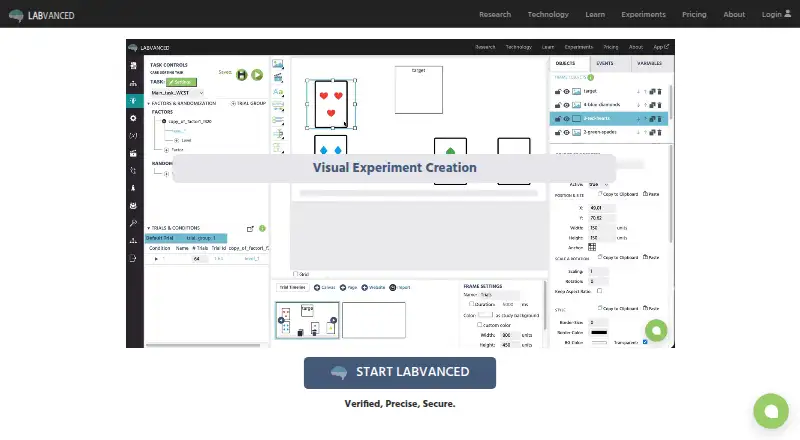
What Labvanced is
Labvanced is a no-code platform for designing and running behavioral research experiments with graphical tools instead of code. Researchers can collect millisecond-precise reaction-time measures and webcam-based eye tracking, and build studies with questionnaires, audio and video stimuli, mouse tracking, or real-time multi-participant sessions. Its recruitment guide documents connections to services including Prolific, CloudResearch, Sona Systems, Besample, Panelabs, Amazon Mechanical Turk, and Clickworker. The desktop app connects EEG systems, eye trackers, motion sensors, and wearables through Lab Streaming Layer, and can run locally without internet access; it is available to group and departmental license holders for Windows, MacOS, and Linux Ubuntu. A Chrome extension enables controlled studies on live third-party websites while recording gaze, clicks, hovering, and scrolling. Labvanced says webcam eye-tracking video is not sent to its servers or experimenters by default. The free plan includes 300 MB of storage, 10 recordings, and one active recruiting link. Labvanced was released in 2018 and is maintained by Scicovery GmbH.
Good
- Visual experiment builder requires no code
- Supports reaction-time measures and webcam eye tracking
- Study options include questionnaires and mouse tracking
- Desktop app can run without internet access
- Free plan includes 10 recordings
Watch out
- Free plan has 300 MB storage
- Free plan allows one active recruiting link
- Offline desktop app is limited to group and departmental license holders
Who it suits
It suits behavioral researchers who want to build studies without coding and use reaction-time measures, eye tracking, or participant recruitment integrations. The offline desktop app is an option for group and departmental license holders.
Verdict
Labvanced brings study design, behavioral measures, and recruitment integrations into a no-code platform. Its free plan has defined storage and recording limits, while offline desktop use is reserved for group and departmental license holders.
Plans and prices
From Labvanced's own pricing page, checked 30 Sep 2026.
| Plan | Price | What it gives you |
|---|---|---|
| Free | Free | 300 MB storage · 10 recordings · 1 active recruiting link |
| Researcher Basic | — | 3,000 MB storage · 200 recordings per year · selected active recruiting links · Duration 1 year (0% discount); price display shows € (excl. VAT) and € (including VAT), with no numeric amount |
The facts
Each one read from Labvanced's own pages, with the date it was checked.
Where it runs
- Browser extension
- The Chrome Web Bridge extension enables controlled studies on live third-party websites while recording gaze, clicks, hovering, and scrolling.checked 30 Sep 2026
The company
- Company and release
- Labvanced was released in 2018 and is built and maintained by Scicovery GmbH.checked 30 Sep 2026
- Founded
- 2017checked 28 Sep 2026
- Headquarters
- Paderborn, Germanychecked 28 Sep 2026
What it does
- Data privacy
- The security page says webcam eye-tracking video is not transmitted to Labvanced servers or experimenters by default.checked 30 Sep 2026
- Desktop operating systems
- The desktop app is compatible with Windows, MacOS, and Linux Ubuntu.checked 30 Sep 2026
- Experiment builder
- Its visual experiment builder lets researchers create studies using graphical tools without writing code.checked 30 Sep 2026
- Hardware integration
- The desktop app guide describes connecting EEG systems, eye trackers, motion sensors, and wearables through Lab Streaming Layer.checked 30 Sep 2026
- Measurement
- The platform supports millisecond-precise reaction-time measures and webcam-based eye tracking.checked 30 Sep 2026
- Offline desktop
- The desktop app can run locally without internet access and is available to group and departmental license holders.checked 30 Sep 2026
- Purpose
- Labvanced is a no-code platform for designing and running behavioral research experiments.checked 30 Sep 2026
- Recruitment integrations
- Its crowdsourcing guide documents integrations with Prolific, CloudResearch, Sona Systems, Besample, Panelabs, Amazon Mechanical Turk, and Clickworker.checked 30 Sep 2026
- Security
- Labvanced says its website is SSL encrypted and that participant names, email addresses, and IP addresses are not saved, except email collection for repeated-measures reminders.checked 30 Sep 2026
- Study features
- Features include questionnaires, audio and video stimuli, mouse tracking, and real-time multi-participant studies.checked 30 Sep 2026
- Support
- The license page lists documentation and study templates on the free plan, while paid tiers list live chat and some include premium email support or onboarding.checked 30 Sep 2026
- Who it serves
- The maker describes licenses for individuals, labs, departments and consortia, teaching, campuses, and commercial use.checked 30 Sep 2026
The full review of Labvanced
Labvanced is a no-code platform for building behavioral research experiments, aimed at researchers who need more than a survey tool. Its strongest case is the combination of study design, behavioral measures, and recruitment connections; researchers needing generous recording capacity or offline desktop access should check the license fit first.
Overview
Labvanced brings experiment creation and data collection into a visual workflow, so researchers can assemble studies graphically rather than write code. Its mix of reaction-time measurement, eye tracking, questionnaires, stimuli, and participant interaction makes it relevant to behavioral research across more than one study format. The breadth is useful, but it also means the platform is a better fit for structured research workflows than for someone seeking a narrowly focused gaze tracker.
Key features
Study design and measurement
The builder supports millisecond-precise reaction-time measures and webcam-based eye tracking. Researchers can add questionnaires, audio and video stimuli, and mouse tracking, or run studies with multiple participants in real time. That range gives a study designer room to combine response and behavioral measures in one experiment; the participant limit is 10.
Recruitment, hardware, and live websites
Labvanced documents connections to Prolific, CloudResearch, Sona Systems, Besample, Panelabs, Amazon Mechanical Turk, and Clickworker. These connections can simplify a recruitment workflow, although researchers still need to select and manage the service that suits their participant pool.
Through Lab Streaming Layer, the desktop app can connect EEG systems, eye trackers, motion sensors, and wearables. It can also run locally without an internet connection, a meaningful option for controlled settings, but only for group and departmental license holders. The Chrome Web Bridge extension supports controlled studies on live third-party websites while recording gaze, clicks, hovering, and scrolling; that capability depends on using Google Chrome.
Privacy and data handling
Labvanced says its website is SSL encrypted and that it does not save participant names, email addresses, or IP addresses, except for email collection used for repeated-measures reminders. Webcam eye-tracking video is not transmitted to Labvanced servers or experimenters by default, which may matter to researchers planning camera-based studies.
Pricing
Labvanced uses a freemium model and offers a 7-day trial. The Free plan costs nothing and includes 300 MB of storage, 10 recordings, and one active recruiting link. Documentation and study templates are included. Those caps make it a sensible starting point for learning the workflow or running a small study, but a limited fit for sustained recruitment or a growing study archive.
Researcher Basic has custom pricing. It is billed for a one-year duration with a 0% discount, and provides 3,000 MB of storage, 200 recordings per year, and selected active recruiting links. The larger annual recording allowance suits researchers whose needs exceed the free tier, though the storage and recruiting-link provisions remain bounded. Paid tiers list live chat; some also include premium email support or onboarding.
The maker describes licenses for individuals, labs, departments and consortia, teaching, campuses, and commercial use. Offline desktop use is reserved for group and departmental license holders, so individuals who need offline collection should not assume the free plan covers it.
Platforms
Labvanced supports web browsers and has desktop compatibility with Windows, MacOS, and Linux Ubuntu. The Chrome Web Bridge is a separate extension for Google Chrome. CSV and TSV exports support data workflows, while JSON export is available for experiment specifications. The platform also identifies API and extension support, alongside Linux, MacOS, web, and Windows availability.
Who it's for
Labvanced is best suited to researchers who want to build behavioral experiments without coding and bring measurement, participant tasks, recruitment connections, or research hardware into the same workflow. It is particularly relevant to labs and departments that can use its offline desktop option. A solo researcher with only a few recordings may find the free tier adequate; one expecting higher volume or more active recruitment will need to weigh a paid license. It is less compelling for someone who only needs a standalone eye-tracking tool.
Pros and cons
- Pros: A graphical builder supports study creation without code, alongside reaction-time measurement, webcam eye tracking, questionnaires, media stimuli, and mouse tracking.
- Pros: Documented recruitment connections and Lab Streaming Layer hardware support can bring participant sourcing and research equipment into the workflow.
- Pros: Offline desktop operation gives group and departmental license holders a local collection option.
- Cons: The free plan’s 300 MB storage and 10 recordings can constrain studies beyond an initial or small-scale use.
- Cons: Offline desktop use is not available to every license holder, and live-site studies require Chrome.
- Cons: Researcher Basic has custom pricing and a one-year billing duration, which makes it harder to judge as a short-term option.
Alternatives
For a broader set of options, see Eye Tracking Software. Choose GazePlotter if an open-source, free tool is the priority; it supports Android, iOS, Linux, MacOS, web, and Windows. GazeRecorder is another free option, with a non-commercial-use plan.
Hawkeye is worth considering for an iOS or web workflow with a free allowance of one project and five sessions; its Starter Plan is $39.99 a month, billed monthly. OpenGazer is a free, open-source gaze tracker for Linux, but requires a webcam and Linux build dependencies. Retra is a free, open-source Android option.
Pupil Core is the alternative to consider when a wearable eye-tracking headset and open-source software suite are the priority; its plan costs €3,615, paid once. Feng-GUI offers paid web and API plans, including Basic at $99 a month, billed monthly. GazeSense is a paid API, Linux, and Windows option with a 1-Month License at $199 a month, billed for the first month of use.
Verdict
Choose Labvanced if you need a no-code behavioral research platform that combines experiment design with measurement and connections to recruitment services or research hardware. Its broad study toolkit is the main reason to choose it; its free recording and storage caps, custom-priced annual tier, and license restriction on offline use are the reasons to look elsewhere or confirm the plan fit before committing.
Getting started
- Visit https://www.labvanced.com/.
- Start with the free plan or review the listed 7-day trial.
- Use the visual experiment builder to create a study.
- Use the web platform or the Chrome Web Bridge for supported browser-based studies.
- For offline desktop use, obtain a group or departmental license.
Limits worth knowing
The free plan includes 300 MB of storage, 10 recordings, and one active recruiting link. The offline desktop app is available to group and departmental license holders.
Questions
Is Labvanced free?
Yes. Its free plan costs nothing and includes 300 MB of storage, 10 recordings, and one active recruiting link.
Does Labvanced offer a trial?
Yes, the pricing note lists a 7-day trial.
Which platforms does Labvanced support?
Listed platforms include API, extension, Linux, MacOS, web, and Windows. The desktop app supports Windows, MacOS, and Linux Ubuntu.
What recruitment services does Labvanced document?
Its crowdsourcing guide documents Prolific, CloudResearch, Sona Systems, Besample, Panelabs, Amazon Mechanical Turk, and Clickworker.
Can Labvanced run offline?
Its desktop app can run locally without internet access, for group and departmental license holders.
What does Researcher Basic cost?
A numeric amount is not provided. The plan is billed for one year, with prices displayed in euros excluding and including VAT.
Alternatives to Labvanced
- 1

RealEye
AndroidiOSWeb7.0From $325 a month - 2
Hawkeye
Free planiOSWeb6.8From $39.99 a month - 3
GazeRecorder
Free planAndroidiOSWebWindows6.7Free plan - 4

Chiasm
Free planWebAPI6.6From €199 a month - 5

GazePlotter
Free planAndroidiOSWebLinux6.6Free plan - 6
iTrace
Free planWebLinuxSelf-hosted6.5Free plan