
Korra
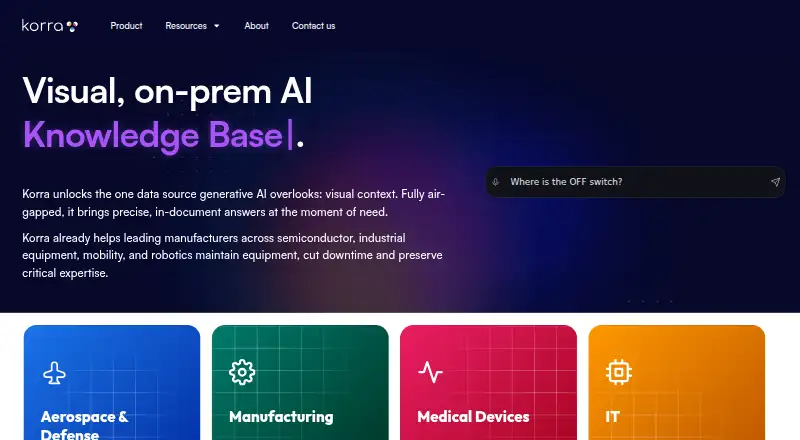
Korra turns uploaded documents into AI-powered search portals where users can ask questions and get answers based on their files.
What Korra is
Korra turns uploaded documents into AI-powered search portals where users can ask questions and get answers based on their files. Its GLYPH engine can pair text with diagrams, schemas, process tables, and financial graphs. Answers link to source material, with navigation to a specific data row or video second. Administrators can manage knowledge, create branded portals and filters, set response personas, and review FAQ question-and-answer pairs. Portals can be published as full pages, widgets, or SDKs; Search and Dashboard APIs, streaming events, and configurable UI widgets support integration with existing portals and dashboards. Upload formats include DOC, DOCX, PPT, PDF, CSV, MP4, and MOV. Korra describes deployment in a customer VPC, isolated on-premises servers, and tablets. It also describes containerized data isolation and secure knowledge distribution for isolated stations. The free plan includes up to 100MB. Business and Business Plus add automatic cloud sync, while Enterprise supports up to 2TB; paid pricing is available on request.
Good
- Answers link to specific source locations.
- Supports documents, videos, and several other file types.
- Portals can be published as pages, widgets, or SDKs.
- Free plan includes up to 100MB.
- Lists ISO, GDPR, SOC2, and CCPA compliance.
Watch out
- Free plan is limited to 100MB.
- Paid plan pricing is available only on request.
- Automatic cloud sync is limited to Business and Business Plus.
Who it suits
Korra is aimed at industrial organizations, including manufacturing, semiconductor, industrial equipment, mobility, and robotics teams. It may suit organizations that need document-based search portals with controls for administrators and deployment options that include VPC or on-premises environments.
Verdict
Korra combines file-based question answering with visual responses, source navigation, portal administration, and integration options. Its free capacity is limited, and paid plan pricing requires contacting the company.
Plans and prices
From Korra's own pricing page, checked 14 Oct 2026.
| Plan | Price | What it gives you |
|---|---|---|
| Free | Free | Testing all features · create a search portal · up to 100MB of files |
| Korra Free | Free | Up to 100MB |
| Business Plus | $199 a month | Up to 50GB of files · per user, per month |
| Business | Priced on request | Up to 5GB of files |
| Enterprise | Priced on request | Up to 2TB of files |
The facts
Each one read from Korra's own pages, with the date it was checked.
What it does
- Access controls
- Team roles include Admin, Owner, Editor and Viewer, with different settings and content permissions.checked 14 Oct 2026
- Administration
- Administrators can manage knowledge, create branded portals and filters, define response personas, and vet FAQ question-answer pairs.checked 5 Oct 2026
- Analytics
- Analytics records question volumes, individual queries, answer ratings, interface choices and content-format usage.checked 14 Oct 2026
- API
- Search and dashboard APIs, Server-Sent Events streaming and configurable widgets are documented for integrations.checked 14 Oct 2026
- APIs
- Korra offers Search and Dashboard APIs, Server-Sent Events streaming, and configurable UI widgets for integration into existing portals and dashboards.checked 5 Oct 2026
- Audience
- Korra describes its platform for industrial organizations and gives manufacturing, semiconductor, industrial equipment, mobility, and robotics as example sectors.checked 5 Oct 2026
- Chatbot
- Korra offers a chatbot interface that supports ongoing conversations and follow-up questions.checked 14 Oct 2026
- Cloud integrations
- The FAQ describes file upload and automatic folder synchronization with SharePoint, Google Drive, and Dropbox; automatic sync is available to Business and Business Plus users.checked 5 Oct 2026
- Cloud uploads
- The FAQ specifically documents direct uploads from Google Drive and Dropbox.checked 14 Oct 2026
- Customization
- Experience Creator supports branded headers, logos, placeholder text, avatars, colors, widget size and placement.checked 14 Oct 2026
- Deployment
- Korra states that it can run inside a customer VPC or on isolated on-premises servers.checked 14 Oct 2026
- Direct-to-answer viewer
- Users can jump to the exact document row or video timestamp supporting an answer.checked 14 Oct 2026
- Documentation
- Korra publishes a getting-started guide, FAQ and full guide covering file management, customization, publishing, analytics and administration.checked 14 Oct 2026
- FAQ training
- An AI Training Console accepts uploaded CSV question-and-answer pairs for vetted responses.checked 14 Oct 2026
- File access controls
- Portal owners can disable downloads, redirect users to another repository and require authorized-user login.checked 14 Oct 2026
Where it runs
- Air-gapped operation
- The product describes container monitoring, self-recovery and over-the-air knowledge synchronization for isolated stations.checked 14 Oct 2026
- Browser installation
- The getting-started guide says Korra runs entirely in a browser and needs no download or installation.checked 14 Oct 2026
- GetApp ease-of-use rating
- Korra has an ease-of-use score of 4.8 out of 5 from 17 GetApp reviews.checked 14 Oct 2026
- GetApp feature ratings
- GetApp shows 4.8 out of 5 for reporting/analytics, 5.0 for chatbot and 4.4 for access controls/permissions.checked 14 Oct 2026
- GetApp rating distribution
- GetApp reports 14 five-star reviews, 3 four-star reviews and no one-, two- or three-star reviews.checked 14 Oct 2026
The company
- Company headquarters
- LinkedIn lists the headquarters as New York and gives 400 Chambers St, New York, NY 10282 as the primary location.checked 14 Oct 2026
- Company ownership
- LinkedIn describes Korra as privately held.checked 14 Oct 2026
- Company size
- LinkedIn places Korra in the 11–50 employee range.checked 14 Oct 2026
- Founded
- LinkedIn states that Korra was founded in 2020.checked 14 Oct 2026
The full review of Korra
Overview
Korra is an AI search platform that turns organizational documents into question-answering portals. It is best suited to industrial teams that need employees to find and verify operational knowledge across files and connected applications. Its combination of visual answers and precise source navigation is compelling, though its small free allowance and custom-priced paid plans make it a less straightforward choice for teams seeking predictable, low-cost scaling.
Key features
Korra accepts DOC, DOCX, PPT, PDF, CSV, MP4, and MOV files. Its GLYPH engine can pair text answers with diagrams, schemas, process tables, and financial graphs, a useful distinction for technical material that loses context when reduced to plain text. Users can follow an answer to an exact data row or video second, helping them check the underlying source rather than rely on a summary alone.
Administrators can manage knowledge, create branded portals and filters, set response personas, and vet FAQ question-and-answer pairs. Portals can be published as a full page, widget, or SDK. Search and Dashboard APIs, Server-Sent Events streaming, and configurable UI widgets support embedding search in existing portals and dashboards; these options matter most to organizations with resources to integrate and maintain them.
Korra supports file uploads and automatic folder synchronization with SharePoint, Google Drive, and Dropbox, with automatic sync reserved for Business and Business Plus. Its ITSM page names Jira, Confluence, ServiceNow, GitHub, and SharePoint as integration targets. It also describes realtime content sync and role-based permission controls. Korra says it complies with ISO, GDPR, SOC2, and CCPA standards.
Deployment options include a customer VPC or isolated on-premises servers, plus tablet deployment. The product describes containerized data isolation, self-recovery, and secure over-the-air knowledge distribution for isolated stations. Those capabilities speak to industrial environments with deployment and isolation requirements, rather than teams looking only for a lightweight shared search box.
Pricing
Korra Free costs nothing and includes up to 100MB. That is enough for a small evaluation or limited collection, but a tight ceiling for a company-wide knowledge base.
Business and Business Plus have custom pricing, with pricing available by scheduling a demo or contacting Korra. Business includes up to 5GB and automatic cloud storage sync; Business Plus raises the allowance to 50GB and also includes automatic sync. They suit teams that need synced cloud folders and more room than Free, but prospective buyers must request pricing to compare cost against their storage needs.
Enterprise has custom pricing and supports up to 2TB. It is the tier aimed at larger content collections, but its price also requires contacting Korra. No trial or renewal terms are stated.
Platforms
Korra supports Android, iOS, Linux, macOS, Windows, and web, along with API, extension, and self-hosted options. That range accommodates both end-user access and organization-specific deployment or integration.
Who it's for
Korra is aimed at industrial organizations, including manufacturing, semiconductor, industrial equipment, mobility, and robotics businesses. It is a strong fit when staff need answers grounded in operational documents, visual material, or video and administrators need to control how knowledge is presented. Smaller teams with modest storage needs can start on Free; organizations needing larger synchronized collections should weigh the custom-priced tiers. Teams that do not need source-level navigation, visual answers, or deployment controls may find a simpler search product more appropriate.
Pros and cons
- Pros: Exact row- and video-second navigation makes answers easier to verify against source material.
- Pros: Visual answer formats and support for office documents, spreadsheets, and video suit technical knowledge collections.
- Pros: VPC, on-premises, and isolated-station deployment options address industrial environments with tighter deployment needs.
- Cons: The free plan stops at 100MB, limiting its use beyond a small collection.
- Cons: Business, Business Plus, and Enterprise all require custom pricing, complicating budget comparisons.
- Cons: Automatic folder sync begins with Business, so Free users must do without that workflow.
Alternatives
For a free, self-hosted option, Fess is worth considering; it is available at no cost and supports Linux, macOS, Windows, web, and API. OpenSearch is another free, open-source choice at no cost with no licensing fees, for teams seeking a self-managed search platform. Both are alternatives for readers prioritizing free software over Korra's described visual answers and source navigation.
Elastic Search AI offers a free and open self-managed plan at no cost, plus a free trial; consider it if a full Elastic Stack is a better fit. PipesHub has a forever-free, self-hosted Community Edition with core indexing and search, BYO LLMs and embeddings, and a no-code agent builder, making it an option for teams wanting those capabilities in an open-source Docker deployment.
Dropbox Dash is a paid alternative with a free trial; its Dash for Teams plan costs $19 a month for up to 100 users. SWIRL AI Search offers a paid pilot at $12,000, paid once for 60–90 days, credited to the first annual contract, for buyers who want a paid evaluation. SearchBlox SearchAI costs $24,000 a year for hybrid search covering 10,000 documents or URLs and 100,000 searches per month. Sinequa is another paid option, available on web and self-hosted deployments.
Browse AI Enterprise Search Software or AI Knowledge Base Software for more options in those categories.
Verdict
Korra is a strong choice for industrial organizations that need searchable operational knowledge with visual answers, source-level verification, and deployment options spanning cloud and isolated environments. Its clearest reason to choose it is the ability to follow an answer back to an exact row or video moment. Look elsewhere if 100MB is too little to evaluate your content or if your decision depends on knowing paid pricing upfront.
Getting started
- Open Korra’s website.
- Choose the free plan or contact Korra for paid plan pricing.
- Upload supported files, or use folder synchronization with SharePoint, Google Drive, or Dropbox on Business or Business Plus.
- Create and configure a portal, then publish it as a page, widget, or SDK.
Limits worth knowing
Korra Free supports up to 100MB. Business supports up to 5GB and Business Plus up to 50GB, each with automatic cloud storage sync; Enterprise supports up to 2TB.
Questions
Is Korra free?
Yes. Korra Free costs nothing and supports up to 100MB.
What do paid plans cost?
Business, Business Plus, and Enterprise pricing is available by contacting Korra.
Which files can I upload?
The FAQ lists DOC, DOCX, PPT, PDF, CSV, MP4, and MOV.
Does Korra sync cloud folders?
The FAQ describes automatic folder synchronization with SharePoint, Google Drive, and Dropbox. Automatic sync is available to Business and Business Plus users.
How can I publish a portal?
Portals can be published as a full page, widget, or SDK.
Which platforms does Korra support?
Korra lists Android, iOS, Linux, macOS, Windows, web, API, extension, and self-hosted platforms.
Alternatives to Korra
- 1

ProProfs Knowledge Base
Free planAndroidiOSWebAPI8.2From $0.99 a month - 2

Scribe
Free planWebAPIExtensionmacOS7.9From $17 a month - 3

GitBook
Free planWebAPI7.6From $65 a month - 4

Slite
AndroidiOSWebAPI7.5From $120 a year - 5

Conveyor
Free planWebAPIExtension7.4From $9,600 a year - 6

Recall
Free planAndroidiOSWebAPI7.4From $10 a month