Koma Koma
Koma Koma is stop-motion animation software designed to connect animation with education.
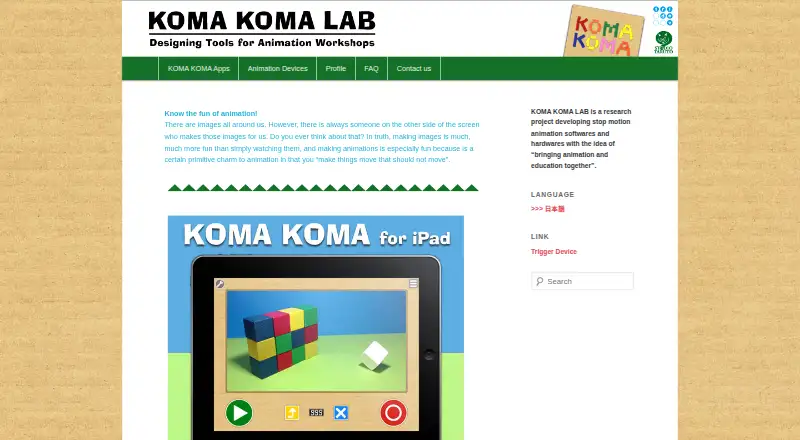
What Koma Koma is
Koma Koma is stop-motion animation software designed to connect animation with education. Its iPad app provides frame capture, deletion, loop playback, and saving, with onion skinning and automatic capture available. Users can set a variable frame rate from 1 to 30 fps and use 1280×720 images. A movie can contain up to 999 frames; Koma Koma Lite is limited to 18 frames per work. Completed movies can be saved to Camera Roll, and work can be emailed as flip-book-format images. The Windows and Mac program has a reflection function for arranging animation clips and commenting on them, and supports sharing work over a network from multiple terminals, such as in a classroom. That computer program runs with Adobe AIR, and the maker says it is distributed only to a set number of test users. Listed requirements are iPad 2 or newer with iOS 5 or later, and Windows XP through Windows 7 or Mac OS X 10.6 or 10.7 for the computer program.
Good
- Supports frame rates from 1 to 30 fps.
- Onion skinning and automatic capture are included.
- Movies can contain up to 999 frames.
- Work can be shared across terminals on a network.
Watch out
- Koma Koma Lite is limited to 18 frames per work.
- Computer program distribution is limited to test users.
- Listed desktop system requirements are older Windows and Mac versions.
Who it suits
Koma Koma suits learners and educators exploring stop-motion animation, including classroom settings where network sharing is useful. Its iPad app may also suit people who want frame capture and playback controls on an iPad.
Verdict
Koma Koma offers practical frame-capture tools for stop-motion work, along with classroom-oriented reflection and network sharing on desktop. Check the listed device requirements and the limited distribution of the Windows and Mac program before choosing it.
Plans and prices
From Koma Koma's own pricing page, checked 9 Oct 2026.
| Plan | Price | What it gives you |
|---|---|---|
| KOMA KOMA for iPad | Free | The maker lists an App Store release; no price is stated on the opened pages. |
| KOMA KOMA Lite for iPad | Free | Limited version; up to 18 frames per work. No price is stated on the opened pages. |
The facts
Each one read from Koma Koma's own pages, with the date it was checked.
What it does
- Automatic capture
- The iPad app supports automatic capture at intervals from 3 seconds to 10 minutes.checked 9 Oct 2026
- Classroom collaboration
- The Windows/Mac program lets users move and diagram works with its reflection function and share works over a network from multiple terminals, such as in a classroom.checked 9 Oct 2026
- Classroom sharing
- The Windows/Mac program allows works to be shared over a network from multiple terminals, such as in a classroom.checked 8 Oct 2026
- Desktop distribution
- The maker says the Windows/Mac program is currently distributed only to a set number of test users.checked 8 Oct 2026
- Desktop runtime
- The Windows/Mac program runs with Adobe AIR.checked 8 Oct 2026
- Export
- The iPad app can save movies to Camera Roll and email work in flip-book image format.checked 9 Oct 2026
- Frame limit
- The iPad app captures up to 999 frames per movie, while Koma Koma Lite captures up to 18.checked 9 Oct 2026
- Frame settings
- The iPad app supports variable frame rates from 1 fps to 30 fps and image size of 1280×720.checked 8 Oct 2026
- Image and playback
- The iPad app lists 1280×720 images and a variable frame rate from 1 to 30 fps.checked 9 Oct 2026
- iPad controls
- The iPad app uses four buttons for shooting, deleting frames, loop playback, and saving.checked 9 Oct 2026
- iPad requirements
- The listed iPad requirements are iPad 2 or newer and iOS 5 or later.checked 8 Oct 2026
- Onion skinning
- The iPad app includes onion skinning.checked 9 Oct 2026
- Project type
- KOMA KOMA LAB describes itself as a research project developing stop-motion animation software and hardware.checked 8 Oct 2026
- Publisher background
- The profile says Trigger Device Ltd. was established in 2000 by IAMAS students and has organized animation workshops and developed animation-making devices with Taruto Fuyama.checked 9 Oct 2026
- Purpose
- KOMA KOMA is a stop-motion animation app and program developed with the idea of bringing animation and education together.checked 9 Oct 2026
- Reflection feature
- The Windows/Mac program lets users arrange animation clips on screen and comment on them as part of its reflection function.checked 8 Oct 2026
- Security
- The opened maker pages do not state security or compliance details.checked 9 Oct 2026
- Support
- The maker provides a contact form for inquiries.checked 9 Oct 2026
- System requirements
- The maker’s tech specs list Windows XP through Windows 7 and Mac OS X 10.6 or 10.7 for the computer program, and iOS 5 or later on iPad 2 or newer for the iPad app.checked 9 Oct 2026
The company
- Founded
- 2000checked 28 Sep 2026
- Maker
- The profile names Taruto Fuyama as an animation filmmaker and researcher involved in Koma Koma’s research and development.checked 9 Oct 2026
Where it runs
- Windows and Mac program
- The maker says the Windows/Mac program runs with Adobe AIR and is distributed only to a set number of test users.checked 9 Oct 2026
The full review of Koma Koma
Koma Koma is stop-motion animation software built to connect frame capture with teaching and group reflection. It is most suitable for iPad learners, educators, and workshops that need straightforward animation exercises rather than a full production suite. The strongest case for it is the combination of focused capture tools and classroom-oriented desktop collaboration.
Overview
Koma Koma splits the workflow between an iPad app for creating animation and a Windows/Mac application for reviewing it. On iPad, users capture frame-by-frame movies, adjust playback, and export their work. On the computer, the reflection function places clips on screen so participants can move, diagram, and comment on them, while network sharing supports work across multiple terminals. That design favors lessons and critique sessions over solo, feature-heavy filmmaking.
The project comes from KOMA KOMA LAB, a research effort developing stop-motion software and hardware. Taruto Fuyama, an animation filmmaker and researcher, develops Koma Koma and workshops, while Trigger Device Ltd., established by IAMAS students in 2000, has organized animation workshops and built animation-making devices.
Key features
Frame capture
The iPad app reduces shooting to four controls: capture, delete, loop playback, and save. Frame rates range from 1 to 30 fps at 1280×720 image size. Onion skinning helps align successive positions, and automatic capture can fire at intervals from 3 seconds to 10 minutes. These choices are well suited to guided exercises, time-based demonstrations, and beginners who benefit from a small control set.
Koma Koma for iPad supports up to 999 frames per movie. KOMA KOMA Lite is capped at 18 frames, so it works for very short trials or demonstrations rather than developed sequences. The full app permits substantially longer clips, although its frame ceiling still defines the practical scope of a project.
Export and reflection
Finished movies can be saved to the iPad Camera Roll. The app can also email work as flip-book-format images, a useful format for sharing individual frame sequences or printed discussion material. The Windows/Mac program adds a different kind of output: users can arrange animation clips on screen, annotate them through the reflection feature, and share works over a network from several terminals. That makes Koma Koma particularly relevant when making and discussing animation are part of the same class.
Pricing
Koma Koma is free. KOMA KOMA Lite for iPad costs nothing and limits each work to 18 frames, making it appropriate for quick introductions. KOMA KOMA for iPad costs nothing and raises the limit to 999 frames. The listed plans do not add subscription terms or seat charges.
The free structure removes a purchasing barrier for schools and individual learners, but Lite's short frame allowance is restrictive for anything beyond a brief exercise. The full iPad app is the more sensible choice for sustained projects. The desktop reflection and sharing program has no separate paid tier described, and its restricted test-user distribution is a more important planning issue than price.
Platforms
Koma Koma supports iOS, Windows, and macOS. The iPad app requires an iPad 2 or newer with iOS 5 or later. The computer program runs with Adobe AIR; the stated computer requirements are Windows XP through Windows 7 or Mac OS X 10.6 or 10.7. Those requirements point to a legacy desktop environment, and the maker distributes the Windows/Mac program only to a set number of test users. The iPad support page provides help, technical specifications, an FAQ, and a contact form.
Who it's for
Koma Koma fits teachers, workshop leaders, and learners using iPads for short stop-motion assignments, especially when group reflection matters as much as capture. Its simple controls and automatic shooting intervals can support structured activities for beginners. It is less suitable for teams needing widely deployable desktop collaboration, modern operating-system coverage, or a production workflow beyond the stated frame and export tools.
Pros and cons
Pros
- Education-focused workflow: Capture on iPad and discuss clips through desktop reflection tools, matching classroom exercises to critique.
- Useful capture controls: 1–30 fps, onion skinning, and timed capture from 3 seconds to 10 minutes cover common teaching scenarios.
- Generous full-app frame limit: Up to 999 frames supports longer assignments than the 18-frame Lite version.
- Free access: Both listed iPad plans cost nothing.
Cons
- Lite is very limited: An 18-frame ceiling confines it to demonstrations and short experiments.
- Desktop availability is narrow: Windows/Mac software is distributed only to a set number of test users.
- Legacy requirements: The stated Windows, Mac, and iOS versions are old, which can complicate deployment on current equipment.
- Separate device roles: The capture app and reflection program divide the workflow between iPad and computer.
Alternatives
Cloud Stop Motion is the better pick when a freemium service spanning Android, iOS, Linux, macOS, the web, and Windows is more important than Koma Koma's classroom reflection model.
Choose MOTK Shoot for browser-based capture, a Windows local edition, and optional vendor-camera control with RAW capture.
Stop Motion Studio suits users wanting a cross-platform freemium app with a free download and a separate Pro option for iPhone and iPad.
Eagle Animation is an alternative for desktop or browser users seeking free GPLv3 open-source software.
Stopmotion Explosion Animator is worth considering if iOS, macOS, and Windows coverage matters and a $1.99 video-export unlock is acceptable.
Lapse It is aimed at time-lapse capture, with a free lower-resolution tier and a Pro option for 1080p output.
Pick OKIOCAM Stop-Motion when you use OKIOCAM hardware with its Windows, Mac, or Chrome extension software.
qStopMotion provides a free open-source desktop option for Linux, macOS, and Windows.
Browse the Stop Motion Software category for more choices.
Verdict
Koma Koma is a strong fit for iPad-based animation lessons that need simple capture, timed shooting, and a structured way to review work together. Its free apps and education-centered design are the main reasons to choose it. Look elsewhere if you need broadly available desktop collaboration, current system support, or a less divided workflow.
Getting started
- Open the Koma Koma website
- Install the iPad app on an iPad 2 or newer running iOS 5 or later
- Choose Koma Koma or the limited Koma Koma Lite edition
- Capture frames with the shooting control or automatic interval capture
- Set frame rate and image size, then save the movie to Camera Roll or email flip-book images
- Use the Windows or Mac Adobe AIR program if you are among its distributed test users
Limits worth knowing
Koma Koma Lite allows up to 18 frames per work, while the full iPad app allows up to 999 frames per movie. The Windows and Mac program is distributed only to a set number of test users.
Questions
Is Koma Koma free?
Yes. Koma Koma has a free plan, and both listed iPad plans show free.
Which platforms does it support?
Supported platforms are iOS, Windows, and macOS. The iPad requirements list iPad 2 or newer and iOS 5 or later.
How many frames can a movie contain?
The iPad app captures up to 999 frames per movie. Koma Koma Lite captures up to 18 frames per work.
Can it support classroom collaboration?
The Windows and Mac program can share works over a network from multiple terminals, such as in a classroom.
What can the iPad app export?
Movies can be saved to Camera Roll, and work can be emailed as flip-book-format images.
Alternatives to Koma Koma
- 1

Stop Motion Studio
Free planAndroidiOSmacOSWindows8.0$5.99 one-time - 2
Cloud Stop Motion
Free planAndroidiOSWebLinux7.9From $4 a year - 3

Dragonframe
AndroidiOSAPILinux7.7$195 one-time - 4
AnyMotion
Free planiOSmacOS7.5Free plan - 5
I Can Animate
AndroidiOSmacOSWindows6.7£29.95 one-time - 6

Life Lapse
Free planiOS6.7From $49.99 a year