Kleos
Kleos is cloud-native legal practice management software that requires an internet connection.
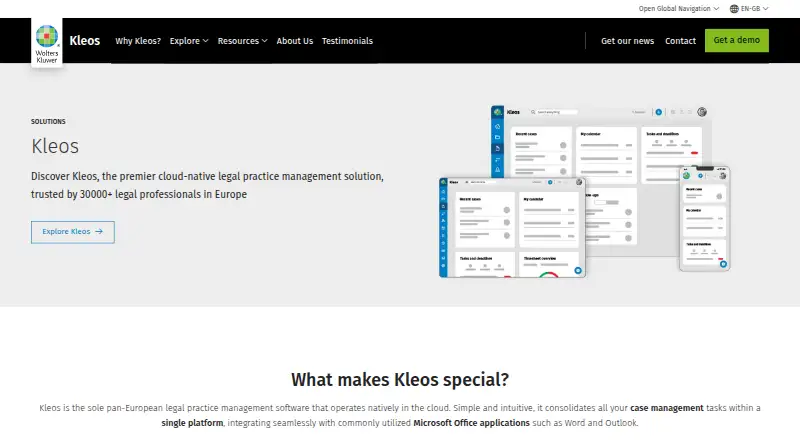
What Kleos is
Kleos is cloud-native legal practice management software that requires an internet connection. Its app is available for iOS and Android, and it integrates with Microsoft Word and Outlook. Time management syncs in real time with Microsoft Outlook or Google Calendar. Kleos Connect provides a platform for sharing documents with clients or other parties, and the service can accept online payments through Stripe. Three plans are listed: Core, Advanced and Advanced+, with pricing on request and no free plan stated. Included cloud storage is 15 GB with Core, 25 GB with Advanced and 30 GB with Advanced+. Advanced and Advanced+ include business reports and Microsoft Teams; Advanced+ adds single sign-on. An API is not available in Core and is offered as an add-on for the two higher plans. Kleos says it is GDPR compliant and certified to ISO/IEC 27001:2013 and 22301:2019. European data centers use HTTPS, TLS 1.2 and AES 256. Support includes phone assistance five days a week and a digital ticket system available 24/7.
Good
- Mobile apps are available for iOS and Android.
- Calendar syncs with Outlook or Google Calendar in real time.
- Documents can be shared through Kleos Connect.
- Online payments can be accepted through Stripe.
- Support tickets are available 24/7.
Watch out
- An internet connection is required.
- No free plan is stated.
- Pricing is on request.
- API is unavailable in Core.
Who it suits
Kleos suits legal professionals seeking cloud-based practice management with mobile access, document sharing and calendar syncing. Teams needing Microsoft Teams or business reports would need to consider Advanced or Advanced+.
Verdict
Kleos combines cloud legal practice tools with mobile apps, document sharing and payment support. Compare the plan-specific storage and features, and account for its internet requirement and pricing-on-request model.
Plans and prices
From Kleos's own pricing page, checked 27 Sep 2026.
| Plan | Price | What it gives you |
|---|---|---|
| Core | — | Per user; demo requested · 15 GB cloud storage · 49 EUR /Mes por usuario |
| Advanced | — | Per user; demo requested · 25 GB cloud storage · 65 EUR /Mes por usuario |
| Advanced+ | — | Special offer; per user; demo requested · 30 GB cloud storage · 69 EUR /Mes por usuario; regular price 79 EUR |
The facts
Each one read from Kleos's own pages, with the date it was checked.
What it does
- API integration
- An API is unavailable in Core and offered as an add-on in Advanced and Advanced+.checked 27 Sep 2026
- Calendar sync
- Time management syncs in real time with Microsoft Outlook or Google Calendar.checked 27 Sep 2026
- Cloud-native software
- Kleos is a cloud-native legal practice management solution operating natively in the cloud.checked 27 Sep 2026
- Encryption and storage
- European data centers use HTTPS, TLS 1.2, and AES 256; included storage varies by plan.checked 27 Sep 2026
- European users
- Kleos is trusted by more than 30,000 legal professionals in Europe.checked 27 Sep 2026
- Expert AI
- Kleos Expert AI can review, highlight, summarize, compare, and extract data from documents.checked 27 Sep 2026
- Included storage
- Core includes 15 GB, Advanced 25 GB, and Advanced+ 30 GB of cloud storage.checked 27 Sep 2026
- Internet required
- Using Kleos requires an internet connection.checked 27 Sep 2026
- Office integrations
- Kleos integrates with Microsoft Word and Outlook, with Teams on Advanced and Advanced+.checked 27 Sep 2026
- Secure file sharing
- Kleos Connect shares documents with clients or third parties through a secure platform.checked 27 Sep 2026
- Security certifications
- The service is GDPR compliant and certified to ISO/IEC 27001:2013 and 22301:2019.checked 27 Sep 2026
- Stripe payments
- Kleos can accept online payments directly through Stripe.checked 27 Sep 2026
- Support availability
- Support includes phone assistance five days weekly and a digital ticket system available 24/7.checked 27 Sep 2026
- Tiered pricing
- Three plans are listed: Core, Advanced, and Advanced+.checked 27 Sep 2026
The company
- Company scope
- Wolters Kluwer is a global provider of information solutions, software, and professional services.checked 27 Sep 2026
- Founded
- 1836checked 28 Sep 2026
- Headquarters
- Alphen aan den Rijn, Netherlandschecked 28 Sep 2026
- Team administration
- Advanced and Advanced+ include business reports and Microsoft Teams; Advanced+ adds SSO.checked 27 Sep 2026
Money
- Free plan
- Nochecked 20 Sep 2026
- Free tier
- No free plan is stated on the supplied pricing page.checked 27 Sep 2026
- Trial or refund
- No trial or refund terms are stated in the supplied text.checked 27 Sep 2026
Where it runs
- Mobile apps
- Yeschecked 20 Sep 2026
- Mobile platforms
- The Kleos App is available for iOS and Android.checked 27 Sep 2026
The full review of Kleos
Kleos is cloud-based legal practice software with mobile apps, client document sharing and online payment support. It is best suited to legal teams that want practice tools tied to Microsoft or Google calendars and can work with an always-online service. Its tiered storage and team features make the choice between plans consequential, while custom pricing means you will need a quote to compare total cost.
Overview
Kleos brings legal practice work into a cloud service, with document and time-management capabilities alongside client-facing tools. Its iOS and Android apps extend access to mobile devices, but an internet connection is required, so it is not a fit for teams that need to work offline.
Security is a notable part of the proposition: European data centers use HTTPS, TLS 1.2 and AES 256, and the service is GDPR compliant and certified to ISO/IEC 27001:2013 and 22301:2019. Kleos also supports secure document sharing through Kleos Connect and accepts online payments through Stripe. These features suit firms handling client files and payments within a connected workflow, though they do not remove the need to assess plan limits and custom pricing.
Key features
- Time management: Calendar activity syncs in real time with Microsoft Outlook or Google Calendar, which can help teams keep schedules aligned with tools they already use.
- Office integrations: Microsoft Word and Outlook integrations are included across the tiers; Microsoft Teams is reserved for Advanced and Advanced+. Teams that rely on Teams collaboration will need to budget for one of those higher plans.
- Client documents and payments: Kleos Connect provides a secure channel for sharing documents with clients or third parties, while Stripe support enables online payments. This makes the service more useful for firms that want client interactions to extend beyond internal case work.
- Administration and extensibility: Business reports are included in Advanced and Advanced+, and Advanced+ adds single sign-on (SSO). An API is unavailable in Core and can be added to either higher plan, so integration needs may push a firm beyond the entry tier.
- Expert AI: Kleos Expert AI can review, highlight, summarize, compare and extract data from documents.
- Support: Phone assistance is available five days a week, alongside a digital ticket system available 24/7. The ticket channel provides round-the-clock access to support requests, while phone help has a narrower schedule.
Pricing
Pricing is custom; the supplied plan terms show per-user monthly figures, but no currency-and-term price is published in a form that establishes the payable rate. Request a quote and confirm billing terms before choosing a tier.
| Plan | Included storage | What it suits |
|---|---|---|
| Core | 15 GB | Smaller teams that need the core cloud practice offering, Word and Outlook integration, and can do without Teams, business reports and an API. |
| Advanced | 25 GB | Teams that need business reports and Microsoft Teams, or want the option to add API access. |
| Advanced+ | 30 GB | Teams that need SSO as well as the Advanced features and can justify the highest tier. |
Storage rises by 10 GB from Core to Advanced and by a further 5 GB to Advanced+. The API is an add-on rather than a standard inclusion on the two higher plans, so firms that depend on integrations should establish its additional cost. There are no stated seat caps or trial terms to weigh against the per-user structure.
Platforms
Kleos offers mobile apps for iOS and Android, while its cloud-native service requires an internet connection. That combination is convenient for connected mobile work, but the online requirement is a clear limitation when connectivity is unreliable or offline access is essential.
Who it's for
Kleos is most compelling for legal practices that want cloud-based practice management with mobile access, secure client document sharing, calendar synchronization and online payments. Firms already using Outlook or Google Calendar can benefit from real-time syncing; teams that use Microsoft Teams, need business reporting or require SSO should compare the higher tiers. It is less suitable for buyers who need a free or offline option, or who cannot evaluate a per-user custom quote before committing.
Pros and cons
- Pros: Secure sharing, Stripe payments and real-time calendar sync bring client-facing and scheduling functions into the same cloud-oriented offering.
- Pros: European data-center encryption and named security certifications give firms concrete safeguards to consider for sensitive practice information.
- Pros: The three plans distinguish storage and team administration features, with SSO available in Advanced+.
- Cons: No free plan is offered, and custom pricing makes direct budget comparison harder before requesting a quote.
- Cons: Core omits Microsoft Teams, business reports and API availability; the API on higher plans is still an add-on.
- Cons: The internet requirement rules out offline work, and storage is capped at 15 GB, 25 GB or 30 GB according to plan.
Alternatives
For a broader view of legal tools, compare the Legal Practice Management Software and Legal Client Portal Software lists. For adjacent finance and tax needs, see Tax Provision Software, Fixed Asset Management Software, VAT Software and Tax Compliance Software.
Flowie is worth considering if you want a free entry point: its free plan is limited to 24 documents per month (300 per year), basic processing without workflows and one entity. OneStream is a paid alternative with broader platform availability, including mobile, web, Windows and self-hosted options; its platform price is discussed by demo. CSC Corptax is an enterprise corporate tax option with demo-request pricing. Lucasys Tax Provision, PowerPlan Tax Provision, TaxLab Nucleus and TaxProvision.net are other paid tax-provision options. Tax Series may suit buyers open to a proof-of-concept process, with licensing based on scope and a free trial.
Verdict
Choose Kleos if your legal practice wants connected cloud tools, mobile access, client sharing and payments, and values its documented security measures. Its main trade-offs are the always-online requirement, plan-dependent storage and team features, and the need to request custom pricing. Firms that need offline work, a free starting tier or clearer upfront costs should look elsewhere.
Alternatives to Kleos
- 1
CaseFox
Free planAndroidiOSWebAPI8.7From $45 a month - 2
RunSensible
Free planAndroidiOSWebAPI8.7From $49 a month - 3

8am MyCase
Free planiOSmacOS8.6From $39 a month - 4
CaseDesk
Free planAndroidiOSAPILinux8.6From $290 a year - 5
Clio Manage
AndroidiOSWebAPI8.5 - 6

CosmoLex
AndroidiOSWeb8.5From $49 a month