CaseFox
CaseFox is legal practice software for handling matters, billing, documents, and time.
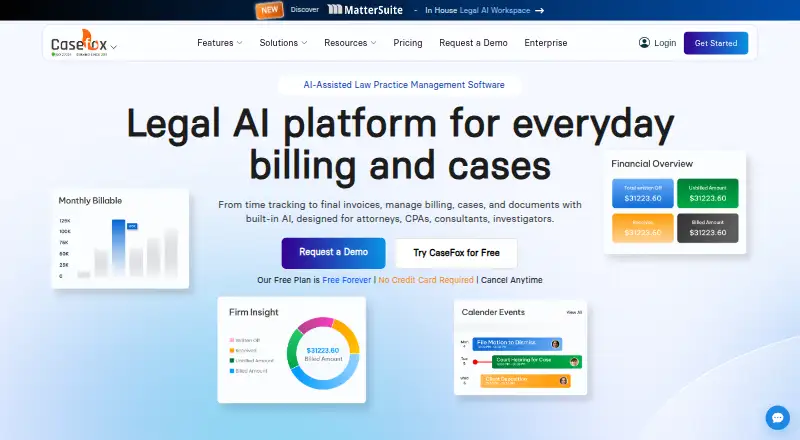
What CaseFox is
CaseFox is legal practice software for handling matters, billing, documents, and time. It combines case and task management with court calendars, deadline reminders, and reports that can be exported to Excel. Billing tools cover time and expenses, one-click or batch invoicing, recurring bills, UTBMS codes, and LEDES invoices. CaseFox AI can draft and review legal documents, examine case files and contracts, and pull details and citations from uploaded files. For financial work, it supports trust and operating accounts, IOLTA tools, ledgers, and accounting reports. The service integrates with tools including Box, Google Drive, Office 365, QuickBooks, Xero, PayPal, and LawPay. Its mobile apps support offline case work and later syncing, and the service is available on Android, iOS, and the web. CaseFox also offers a one-click Excel export of key records, including cases, invoices, transactions, calendar entries, and tasks.
Good
- Free Solo plan includes four cases and two users.
- Tracks deadlines, tasks, and court calendars.
- Supports LEDES invoices and UTBMS codes.
- Mobile app supports offline case work and later sync.
- Exports key records to an Excel workbook.
Watch out
- Solo is limited to four cases and two users.
- Professional costs $45 per user per month.
- Enterprise is $99 per user per month.
Who it suits
CaseFox suits solo practitioners and legal teams that need case management, billing, and trust-account tools together. It also lists CPAs, consultants, and investigators among its intended users.
Verdict
CaseFox brings matter management, billing, accounting, and AI document tools into one service. Its free plan is limited, while paid plans provide options for larger teams and case volumes.
Plans and prices
From CaseFox's own pricing page, checked 15 Oct 2026.
| Plan | Price | What it gives you |
|---|---|---|
| Solo | Free | 4 cases · 2 users · all Pro features · Free forever |
| Professional | $45 a month | Unlimited cases · 10 GB+ storage · 2-factor authentication · all Solo features · Per user/month |
| Enterprise | $99 a month | Everything in Pro · white labeling · complimentary firm website · custom data migration · priority support · $79 per month if billed annually |
The facts
Each one read from CaseFox's own pages, with the date it was checked.
What it does
- Accounting
- CaseFox supports trust and operating accounts, IOLTA tools, detailed ledgers, and accounting reports.checked 28 Sep 2026
- AI tools
- Paid plans include AI document drafting, document analysis, summarization and extraction of key details from uploaded files.checked 15 Oct 2026
- API
- A Web API exists but is offered selectively, with prospective users asked to contact CaseFox about their use case.checked 15 Oct 2026
- Case management
- CaseFox stores client, matter, document, task and calendar information in a centralized case workspace.checked 15 Oct 2026
- Client intake
- Customizable intake forms and built-in conflict checks support new-client screening and case setup.checked 15 Oct 2026
- Data export
- The service offers a one-click export of time and expense entries, trust transactions, clients, cases, invoices, payments, calendar entries, and tasks to an Excel workbook.checked 28 Sep 2026
- Data retention
- Terms say data older than five years may be purged after notice, and users should export older data beforehand.checked 15 Oct 2026
- Documentation
- The help center contains articles covering API, mobile apps, importing and exporting, integrations, calendaring, client intake, billing, trust accounting and troubleshooting.checked 15 Oct 2026
- Hosting model
- GetApp describes CaseFox as SaaS and the vendor describes it as cloud-based; no self-hosting deployment is documented on the reviewed pages.checked 15 Oct 2026
- Integrations
- Listed integrations include LawPay, PayPal, QuickBooks, Xero, Google Drive, Dropbox, Box, Google Docs, Microsoft 365, Google Calendar, Excel and Keap.checked 15 Oct 2026
- Intended users
- CaseFox says it serves solo practitioners, small and mid-sized firms, large firms, and enterprise legal teams across diverse practice areas.checked 28 Sep 2026
- Legal entity and founder
- Crunchbase lists the legal name as CaseFox Inc. and identifies Rajeev Madnawat as founder and CEO.checked 15 Oct 2026
- Limit: customer service and payments
- A Trustpilot reviewer reported rude support, difficulty making partial payments and historical invoices changing unexpectedly.checked 15 Oct 2026
- Limit: invoice editing
- GetApp's review summary notes complaints about invoice formatting and making edits after billing.checked 15 Oct 2026
- Limit: mobile and reporting
- G2 reviewers mention slow or limited mobile functionality, limited reporting customization and document-storage friction.checked 15 Oct 2026
- Mobile and offline
- CaseFox says its mobile app supports offline case work and later data sync; the company says mobile apps for iOS and Android launched in 2017.checked 28 Sep 2026
- Mobile scope
- The iOS and Android apps provide basic routine functions while the full feature set remains on the web application.checked 15 Oct 2026
Money
- Billing
- The product supports time and expense capture, automated billing, online payments, trust accounting and LEDES invoices.checked 15 Oct 2026
- Free plan
- Yeschecked 20 Sep 2026
The company
- Company facts
- LinkedIn identifies CaseFox, Inc. as founded in 2011, headquartered in Milpitas, California, and employing 11–50 people.checked 15 Oct 2026
- Founded
- CaseFox says it launched in 2011 as a legal billing and case management tool in Silicon Valley, California.checked 28 Sep 2026
- Headquarters
- Silicon Valley, Californiachecked 23 Sep 2026
Where it runs
- Limit: Android reliability
- Google Play reviews report failed login or fetch errors, broken updates and requests for more regional payment options and integrations.checked 15 Oct 2026
- Limit: iOS usability
- An App Store reviewer said the mobile app was insufficiently sophisticated for large practices, while another reported login and reliability problems.checked 15 Oct 2026
The full review of CaseFox
Overview
CaseFox brings case administration, billing, document work, time tracking, and accounting together in legal practice software. It is intended for attorneys, CPAs, consultants, and investigators. The maker says the service supports solo practitioners, firms of different sizes, and enterprise legal teams across varied practice areas.
CaseFox is made by CaseFox, founded in 2011 and based in Silicon Valley, California. It uses a freemium model: the Solo plan is free forever, while paid plans start at $45 per user per month. A free trial is available.
Key features
Casework and schedules
Case and task management sit alongside court calendars and deadline reminders. Case reports can be exported to Excel, and a one-click workbook export covers time and expense entries, trust transactions, clients, cases, invoices, payments, calendar entries, and tasks. That gives teams a way to take a broad set of operational records out of the service.
Time, billing, and payments
CaseFox tracks time and expenses, supports one-off and batch invoicing, and offers recurring billing. Legal billing options include UTBMS codes and LEDES invoices. The product also supports payment plans, a client payment portal, ACH and card payments, legal billing integration, and reconciliation tools.
AI and documents
CaseFox AI can draft and review legal documents, analyze case files and contracts, pull details and citations from uploaded files, and provide matter insights. Document and file workflows can connect with services including Box, Dropbox, Google Drive, and Microsoft Office 365.
Accounts and integrations
Accounting capabilities include trust and operating accounts, IOLTA tools, detailed ledgers, and accounting reports. Other listed integrations include Google Calendar, Gmail, Outlook, QuickBooks, Xero, PayPal, and LawPay.
Mobile work, security, and support
The iOS and Android apps support offline case work and later data synchronization; the maker says they launched in 2017. CaseFox says it uses SSL and other encryption, replicates its database to a data center in another state, makes regular backups, and limits server access to key personnel. It advertises 24/7 phone, email, and chat support, plus onboarding, staff training, and data migration services.
Pricing
The Solo plan costs free and is billed Free Forever. It includes access to 4 cases, 2 users, and all PRO features. The Professional plan costs $45 a month, billed per user/month, and includes unlimited cases, 10 GB+ document storage, 2-factor authentication, and free add-ons. The Enterprise plan costs $99 a month, billed per user/month. It includes everything in Pro, white labeling, a complimentary firm website, and custom data migration; customization is available at additional cost.
Platforms
CaseFox is available on Android, iOS, and the web. The mobile apps support offline case work with data syncing later.
Who it's for
The combination of case tracking, legal billing, trust accounting, and document tools may suit legal professionals who want these workflows in one service. Its stated audience spans solo practitioners, small and mid-sized firms, large firms, and enterprise legal teams, while the product description also names CPAs, consultants, and investigators.
Pros and cons
- Pros: The feature set covers case and task management, calendars, reminders, billing, trust accounting, AI document assistance, mobile offline work, and broad Excel export.
- Pros: A free forever plan is available, and the paid plans specify per-user monthly pricing.
- Cons: The free plan is limited to 4 cases and 2 users, which may constrain a growing practice.
- Cons: Enterprise customization costs extra, and the listed plan details do not state the amount.
Alternatives
For related legal software, compare CaseFox with Mitratech CaseCloud, Caddi, or Reflekt Legal. For billing-focused options, see our Legal Billing Software list; for broader case and firm workflows, browse Legal Practice Management Software. Readers evaluating payments can also consult Legal Payments Software, while firms focused on conflict checks can review Legal Conflict Checking Software.
Verdict
CaseFox is a broad legal practice platform whose scope extends from case calendars and time entries to invoices, trust accounts, AI document tools, and exportable records. Its free plan offers a starting point for a small caseload, while Professional and Enterprise add larger-scale options at stated per-user monthly rates. The main considerations are whether the Solo case and user limits fit, and whether the organization needs Enterprise services such as white labeling or custom migration.
Getting started
- Visit the CaseFox website.
- Choose the free Solo plan or a paid plan.
- Use the web service or access it on Android or iOS.
- Start the free trial if you want to try a plan before choosing.
Limits worth knowing
Solo is free forever and allows four cases and two users. Professional starts at $45 per user per month and includes unlimited cases and 10 GB+ document storage.
Questions
Does CaseFox have a free plan?
Yes. Solo is free forever and allows four cases and two users.
How much does CaseFox cost?
Professional costs $45 per user per month. Enterprise costs $99 per user per month.
Which platforms does CaseFox support?
CaseFox is available on Android, iOS, and the web.
Does CaseFox offer a free trial?
Yes, a free trial is available.
What integrations does CaseFox list?
Listed integrations include Box, Dropbox, Google Drive, Google Calendar, Gmail, Microsoft Office 365, Outlook, QuickBooks, Xero, PayPal, and LawPay.
Alternatives to CaseFox
- 1
RunSensible
Free planAndroidiOSWebAPI8.7From $49 a month - 2

8am MyCase
Free planiOSmacOS8.6From $39 a month - 3
CaseDesk
Free planAndroidiOSAPILinux8.6From $290 a year - 4
Clio Manage
AndroidiOSWebAPI8.5 - 5

CosmoLex
AndroidiOSWeb8.5From $49 a month - 6
Jarvis Legal
AndroidiOSWebmacOS8.4From €38 a month