
Kassly
Kassly is a point-of-sale and inventory management application operated by Symflo for Philippine businesses.
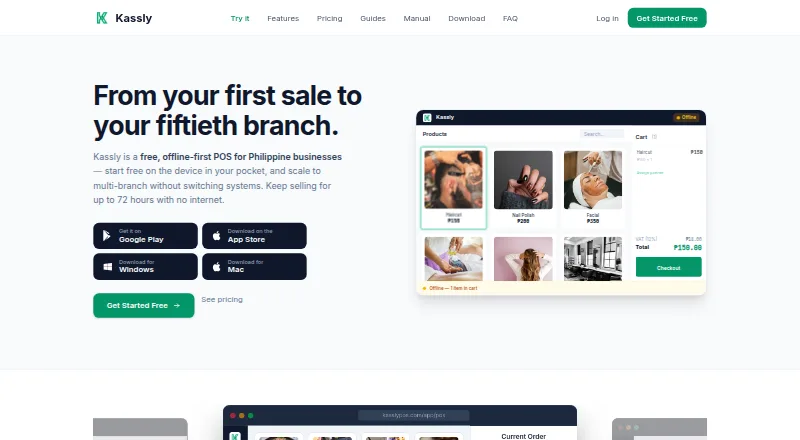
What Kassly is
Kassly is a point-of-sale and inventory management application operated by Symflo for Philippine businesses. It serves retail, food and beverage, and service businesses, and supports managing multiple businesses under one account. The POS can work offline for up to 72 hours, storing transactions locally until the connection returns. Payment options include cash, credit and debit cards, GCash, Maya, bank transfers, store credit, and split payments. Food businesses can use a Kitchen Display System, station pairing, tables and floor plans, and order modifiers. Inventory tools cover stock levels, suppliers, purchase orders, transfers, expiry alerts, and warehouse tools, though some are paid add-ons. Kassly runs in browsers on phones, tablets, laptops, and desktops and says no special hardware is required; 58mm or 80mm thermal printers can print transaction records. The free plan is free, billed Forever, for one branch, two users, 50 products, full POS, basic inventory and reports, and offline mode. Paid plans range from 449 PHP a month to 2,999 PHP a month per branch, with a 30-day free trial listed. Kassly states it is not a BIR-accredited CAS/POS system, and its transaction records are not official receipts or sales invoices.
Good
- POS works offline for up to 72 hours
- Supports cash, cards, GCash, Maya, transfers, and split payments
- Works in browsers on phones, tablets, laptops, and desktops
- Free plan includes one branch, two users, and 50 products
- Supports restaurant tables, floor plans, and kitchen display
Watch out
- Some inventory features are paid add-ons
- Not a BIR-accredited CAS/POS system
- Transaction records are not official receipts or sales invoices
- Free plan is limited to one branch, two users, and 50 products
Who it suits
Kassly suits Philippine retail, food and beverage, and service businesses seeking POS and inventory tools. It may be useful to businesses that need offline operation or different payment methods.
Verdict
Kassly combines POS, inventory, and business-specific tools, with offline mode and a listed free plan. Businesses needing BIR-accredited records should note that Kassly says its transaction records are not official receipts or sales invoices.
Plans and prices
From Kassly's own pricing page, checked 14 Oct 2026.
| Plan | Price | What it gives you |
|---|---|---|
| Free Forever | Free | 1 branch · 2 users · 50 products · 1 terminal · full POS and payments · basic inventory and reports · 72-hour offline mode · forever |
| Free plan | Free | 1 branch · 2 users · 50 products · full POS · basic inventory and reports · offline mode · Forever |
| Negosyo Starter | 449 PHP a month | Cash Drawer & Expenses · Business Reports · per branch/month |
| Gym Pack | 799 PHP a month | Customer Memory & Promos · Cash Drawer & Expenses · Business Reports · per branch/month |
| Service Jobs Pack | 849 PHP a month | Job Orders & Service Tickets · Customer Memory & Promos · Business Reports · per branch/month |
| Sports & Venue Pack | 999 PHP a month | Court & Room Rentals · Appointments & Bookings · Cash Drawer & Expenses · Business Reports · per branch/month |
| Beauty Pack | 1,099 PHP a month | Appointments & Bookings · Customer Memory & Promos · Staff Commissions · Business Reports · per branch/month |
| Tindahan Pack | 1,099 PHP a month | Inventory Pro · Customer Memory & Promos · Cash Drawer & Expenses · Business Reports · per branch/month |
| Repair Pack | 1,149 PHP a month | Job Orders & Service Tickets · Inventory Pro · Customer Memory & Promos · Business Reports · per branch/month |
| Kitchen Pack | 1,399 PHP a month | Kitchen Orders & Tables · Inventory Pro · Recipe Costing · Cash Drawer & Expenses · Business Reports · per branch/month |
| Everything Bundle | 2,999 PHP a month | 16 add-ons · unlimited users · excludes Consignment, Loans, Payroll and Franchise Management · per branch/month |
| Everything | 2,999 PHP a month | All 14 add-ons · unlimited users · 30-day free trial · Per branch per month |
The facts
Each one read from Kassly's own pages, with the date it was checked.
What it does
- API availability
- API Access is a paid add-on priced at ₱500 per branch per month.checked 14 Oct 2026
- API roadmap
- Kassly's roadmap lists a public API, webhooks and published API documentation as planned work rather than shipped functionality.checked 14 Oct 2026
- Audit security
- Audit entries are chained, cannot be edited or deleted, and exports include fingerprints for independent verification.checked 14 Oct 2026
- Barcode scanning
- The Android listing says products can be scanned with the phone camera and inventory is tracked in real time.checked 14 Oct 2026
- BIR limitation
- Kassly says it generates BIR-format reports but is not a BIR-accredited CAS/POS, so merchants must continue issuing their registered receipts.checked 14 Oct 2026
- Branch capacity
- The Android listing advertises multi-branch management for up to 50 branches.checked 14 Oct 2026
- Business types
- Kassly supports retail, food and beverage, and service businesses, with multiple businesses manageable under one account.checked 29 Sep 2026
- Compliance limit
- Kassly states it is not a BIR-accredited CAS/POS system and its transaction records are not official receipts or sales invoices.checked 29 Sep 2026
- Developer stack
- Symflo lists Laravel, PHP, PostgreSQL, MySQL, Redis, React, React Native, Kotlin, SQLite, Electron and other technologies in its toolkit.checked 14 Oct 2026
- Documentation
- The user manual is organized into 18 sections and 98 sections/pages covering setup, POS, inventory, purchasing, services, reports, compliance, offline mode and administration.checked 14 Oct 2026
- Founder
- Symflo's site identifies John Mark Ovalo as founder and lead engineer.checked 14 Oct 2026
- Google Play privacy
- Google Play reports no data shared with third parties, no data collected, encryption in transit and a data-deletion request option.checked 14 Oct 2026
- Hardware
- Kassly says it requires no special hardware and works in browsers on phones, tablets, laptops, or desktops; 58mm or 80mm thermal printers can print transaction records.checked 29 Sep 2026
- Hardware limitation
- Android tablets without Google Play, including many Huawei HarmonyOS models, cannot install the Kassly app through its supported distribution.checked 14 Oct 2026
- Integrations
- The FAQ names GCash, Maya, bank transfers, and card payments as supported payment methods and says reports can be exported to CSV.checked 29 Sep 2026
- Inventory
- Inventory tools include stock levels, transfers, low-stock alerts, batch and expiry tracking, valuation and audit history.checked 14 Oct 2026
Where it runs
- Apple app size
- The Apple listing reports a 52 MB app size and English as the supported language.checked 14 Oct 2026
- Apple compatibility
- The iOS listing requires iOS/iPadOS 15.1 or later and macOS 12 or later on an Apple M1-or-newer Mac.checked 14 Oct 2026
- Apple privacy disclosure
- Apple lists financial information, contact details, user photos or videos and user ID as data that may be linked to the user; device ID and diagnostics may be collected without linkage.checked 14 Oct 2026
- Appointments
- Service businesses can schedule appointments, assign staff and convert bookings directly into POS sales.checked 14 Oct 2026
The company
- Company legal name
- The maker identifies itself as Symflo IT Solutions.checked 14 Oct 2026
- Founded
- The opened company and store pages do not state a founding year.checked 14 Oct 2026
- Funding and ownership
- The opened company and store pages do not state external funding, an acquisition or a parent owner beyond Symflo IT Solutions operating Kassly.checked 14 Oct 2026
- Headquarters
- The Google Play developer listing gives Sagrada Familia, Camino Nuevo, Zamboanga City 7000, Philippines as the developer address.checked 14 Oct 2026
The full review of Kassly
Overview
Kassly is a POS and inventory system for Philippine retail, food and beverage, and service businesses. It suits operators who want sales, stock, and business-specific tools in one account, including multiple locations. Its main advantage is breadth across business types; its decisive limitation is that its transaction records are not official receipts or sales invoices.
The POS supports cash, cards, GCash, Maya, bank transfers, store credit, and split payments. It can keep working offline for up to 72 hours, storing transactions locally until internet access returns and they can sync. That is useful where connectivity is unreliable, though the offline window is finite.
For online ordering, Kassly accepts cash on delivery, GCash, or Maya. It does not dispatch deliveries or handle merchants’ money, so businesses must arrange those parts themselves. Kassly says account data is encrypted in transit and at rest, with business accounts isolated; it does not sell or rent personal information, but may share data with service providers or when legally required.
Key features
POS and business workflows
Core POS tools are paired with features for distinct operations. Food businesses can use a Kitchen Display System, station pairing, tables and floor plans, and order modifiers. Other paid packs target gyms, service jobs, beauty appointments, repairs, and general retail. This pack structure helps businesses pay for a more relevant workflow, but the free plan’s two-user and one-branch limits make it a narrow starting point for growing teams.
Inventory and online sales
Inventory covers stock levels, suppliers, purchase orders, transfers, expiry alerts, and warehouse tools, although some capabilities are in paid add-ons. The free plan includes basic inventory; Tindahan, Repair, Kitchen, and Everything include Inventory Pro. Businesses that need advanced stock control should compare the pack cost against that upgrade rather than assume it comes with the core POS.
Hardware and support
Kassly says it needs no special hardware and runs in browsers on phones, tablets, laptops, or desktops. A 58mm or 80mm thermal printer can print transaction records. Support runs Monday through Saturday, 9:00 AM to 6:00 PM Philippine Time, and Kassly provides a user manual and PDF.
Compliance
Kassly states that it is not a BIR-accredited CAS/POS system and that its transaction records are not official receipts or sales invoices. Businesses that require those documents should choose a compliant system instead of treating Kassly records as a substitute.
Pricing
Kassly has a free plan and a 30-day free trial on paid plans. The free tier is free, billed Forever, and includes one branch, two users, 50 products, full POS, basic inventory and reports, and offline mode. It is a practical way for a small operation to start, but the user, branch, and product caps constrain expansion.
Paid prices are per branch per month. Each named paid plan below includes a 30-day free trial:
- Negosyo Starter: 449 PHP a month for cash and expenses and business reports; suitable for businesses that need basic financial tracking beyond the free tier.
- Gym Pack: 799 PHP a month for customer memory, cash and expenses, and reports; aimed at gym operations needing customer records.
- Service Jobs Pack: 849 PHP a month for job orders, customer memory, and reports; a fit for service businesses organized around work orders.
- Tindahan Pack: 1,099 PHP a month for Inventory Pro, customer memory, cash and expenses, and reports; the stronger choice for a shop needing advanced stock tools.
- Beauty Pack: 1,099 PHP a month for appointments, commissions, customer memory, and reports; suited to appointment-led beauty businesses.
- Repair Pack: 1,149 PHP a month for job orders, Inventory Pro, customer memory, and reports; useful when repair workflows need both work orders and advanced inventory.
- Kitchen Pack: 1,399 PHP a month for kitchen display and tables, Inventory Pro, recipe costing, cash and expenses, and reports; tailored to food businesses that need kitchen workflow tools.
- Everything: 2,999 PHP a month for all 14 add-ons and unlimited users; the broadest option for businesses that need multiple add-ons or have outgrown the free plan’s user cap.
All paid prices are charged per branch per month, so multi-location businesses should account for each branch. The cheaper plans trade breadth for a narrower feature set; choose by the workflow you actually need rather than paying for an all-add-ons bundle by default.
Platforms
Kassly supports Android, iOS, macOS, web, and Windows. Its browser-based access and lack of special hardware requirements give businesses flexibility to use phones, tablets, laptops, or desktops, with optional thermal printing for transaction records.
Who it's for
Kassly is best suited to Philippine small businesses in retail, food and beverage, or services that want POS, inventory, and business-specific tools together, especially where offline operation matters. Its multiple-business and multi-location support can serve operators with more than one business or branch, while paid packs let them select specialized workflows. It is a poor fit for any merchant that needs Kassly itself to issue BIR-accredited official receipts or sales invoices.
Pros and cons
- Pros: The free tier includes full POS, basic inventory, reports, and offline mode, giving a small business a meaningful starting setup.
- Pros: Offline operation lasts up to 72 hours and syncs stored transactions when internet returns, helping maintain sales continuity during outages.
- Pros: Business-specific packs cover kitchen operations, appointments, job orders, and advanced inventory rather than forcing every user into one generic bundle.
- Cons: The free plan is capped at one branch, two users, and 50 products, which can quickly rule it out for expanding operations.
- Cons: Some inventory capabilities require paid add-ons, so basic inventory on the free plan may not be sufficient for stock-heavy businesses.
- Cons: Transaction records are not official receipts or sales invoices, excluding businesses that need Kassly as their BIR-accredited fiscal system.
- Cons: The online store does not dispatch orders or handle merchant funds, leaving delivery and payment handling to the business.
Alternatives
For a barbershop-focused shortlist, see Barbershop Software. If your priority is booking or salon workflows rather than Kassly’s POS and inventory mix, consider these alternatives:
- BARBER-OS has a free online booking and scheduling plan, making it a relevant alternative for barbers centered on appointments.
- Pronto offers a free plan with limits of one staff member, 100 clients, 50 bookings per month, and 100 products; it may suit a small salon that can work within those caps.
- Salonist has a free marketplace listing with 50 appointments per month, online booking, calendar and scheduling, and staff shift management, for businesses prioritizing those tools.
- Openfront Law Firm is another listed alternative.
- Apoynt is a paid scheduling alternative with a free trial.
- GlossGenius is a paid alternative with a free trial.
- Barberia.io is a paid alternative with a free trial.
- Razored is a freemium alternative.
Verdict
Choose Kassly if you run a Philippine retail, food, or service business that wants POS, offline sales continuity, and a plan tailored to its operations. The free tier is useful for a small start, while paid packs add more specialized workflows. Look elsewhere if you need BIR-accredited official receipts or sales invoices, or if you expect the online store to manage delivery and funds for you.
Getting started
- Open the Kassly website.
- Use Kassly in a browser on a phone, tablet, laptop, or desktop.
- Start with the free plan or choose a paid plan with a 30-day trial.
- Connect a 58mm or 80mm thermal printer if you want printed transaction records.
Limits worth knowing
The free plan covers one branch, two users, 50 products, full POS, basic inventory and reports, and offline mode. Some inventory features require paid add-ons.
Questions
Is Kassly free?
Yes. Its free plan is free, billed Forever, and covers one branch, two users, 50 products, full POS, basic inventory and reports, and offline mode.
What do paid plans cost?
Paid plans are priced per branch per month. Listed plans range from 449 PHP a month for Negosyo Starter to 2,999 PHP a month for Everything.
Is there a free trial?
Yes. A 30-day free trial is listed for paid plans.
What devices can run Kassly?
Kassly works in browsers on Android, iOS, macOS, and Windows devices, including phones, tablets, laptops, and desktops.
Can Kassly work offline?
Yes. The POS can operate offline for up to 72 hours, storing transactions locally and syncing when internet returns.
Is Kassly BIR-accredited?
Kassly states that it is not a BIR-accredited CAS/POS system, and its transaction records are not official receipts or sales invoices.
Alternatives to Kassly
- 1

Pronto
Free planOpen sourceWebLinuxmacOSSelf-hosted8.4From $19 a month - 2

Salonist
Free planAndroidiOSWebAPI8.3From $59 a month - 3

BARBER-OS
Free planAndroidiOSWebmacOS8.0From $29 a month - 4

GlossGenius
AndroidiOSWeb7.9From $28 a month - 5
SQUIRE
AndroidiOSWeb7.8From $30 a month - 6

Barbify
Free planWeb7.3From €11.99 a month