K3b
K3b is a free Linux application for burning CDs and DVDs.
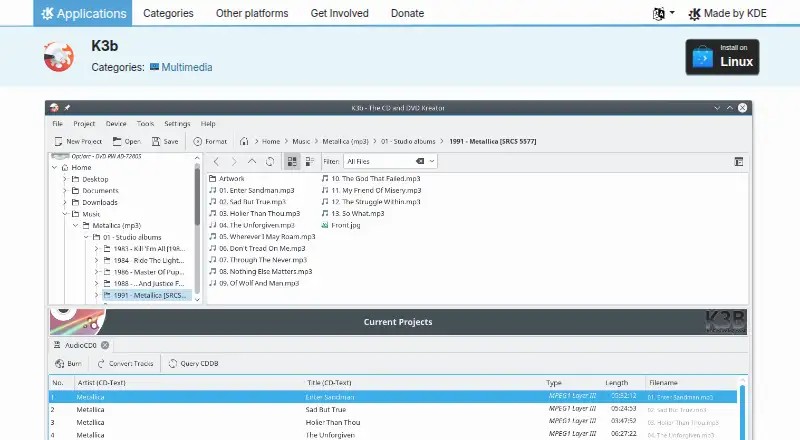
What K3b is
K3b is a free Linux application for burning CDs and DVDs. Users create a project from the file menu, add data, and prepare it for disc writing. The Tools menu includes CD copying and DVD formatting. Selecting a CD or DVD drive displays its contents and offers actions such as ripping audio CDs. K3b supports ISO and CUE image formats and can be installed through AppStream application stores or a Linux distribution’s package manager. The project page lists version 26.08.2, released 2026-10-08. KDE, K3b’s maker, is an international community that has built and distributed free, open-source software since 1996. The page links to a KDE forum, the #k3b Libera.chat channel, bug reporting, and a bug list. KDE’s privacy policy says its software generally transfers end-user information only after an explicit user action. K3b’s Free plan is listed as free.
Good
- Burns CDs and DVDs
- Supports ISO and CUE images
- Includes CD copying and DVD formatting
- Can rip audio CDs
- Available through AppStream or package managers
Watch out
- Linux only
- No free trial is listed
- Requires compatible optical-drive hardware
- Listed release is version 26.08.2
Who it suits
K3b suits Linux users who need CD or DVD burning, copying, formatting, image handling, or audio-CD ripping.
Verdict
K3b provides disc projects, copying, formatting, image support, and audio ripping in a free Linux application. Its usefulness depends on having Linux and an optical drive setup.
Plans and prices
From K3b's own pricing page, checked 9 Oct 2026.
| Plan | Price | What it gives you |
|---|---|---|
| Free | Free | CD and DVD burning application |
The facts
Each one read from K3b's own pages, with the date it was checked.
What it does
- Drive actions
- Clicking a CD or DVD drive icon shows its contents and offers further actions, such as ripping audio CDs.checked 9 Oct 2026
- Installation
- K3b can be installed on Linux through AppStream application stores or a distribution’s package manager.checked 9 Oct 2026
- Issue reporting
- The K3b page links to a bug reporting page and a bug list.checked 9 Oct 2026
- Latest release
- The page lists version 26.08.2, released 2026-10-08.checked 9 Oct 2026
- Privacy
- KDE’s software privacy policy says its software generally transfers end-user information only after an explicit user action.checked 9 Oct 2026
- Projects
- Users create projects from the file menu and fill them with data to burn.checked 9 Oct 2026
- Purpose
- K3b is a feature-rich, easy-to-handle CD burning application.checked 9 Oct 2026
- Support
- The K3b page links to a KDE forum and the #k3b channel on Libera.chat for help.checked 9 Oct 2026
- Tools
- The Tools menu offers tools such as CD copying and DVD formatting.checked 9 Oct 2026
The company
- Founded
- 1996checked 28 Sep 2026
- Maker
- KDE is an international community that has built and distributed free, open-source software since 1996.checked 9 Oct 2026
Money
- Software cost
- KDE says its software is Free Software and can in most cases be downloaded and installed free of charge.checked 9 Oct 2026
Alternatives to K3b
- 1
Alcohol 52%
Free planWindows7.3$27 one-time - 2
Avidemux
Free planOpen sourceWebLinuxmacOSWindows7.3Free plan - 3

AnyBurn
Free planWindows7.1$39.95 one-time - 4
Express Burn
Free planmacOSWindows6.7From $34.99 a year - 5
Active@ ISO Manager
Free planWindows6.6Free plan - 6

SysTools ISO Creator
Free planmacOSWindows6.6$29 one-time