JudgeCalc
JudgeCalc is a web-based court and legal deadline calculator, not a judicial analytics or judge-rating tool.
What JudgeCalc is
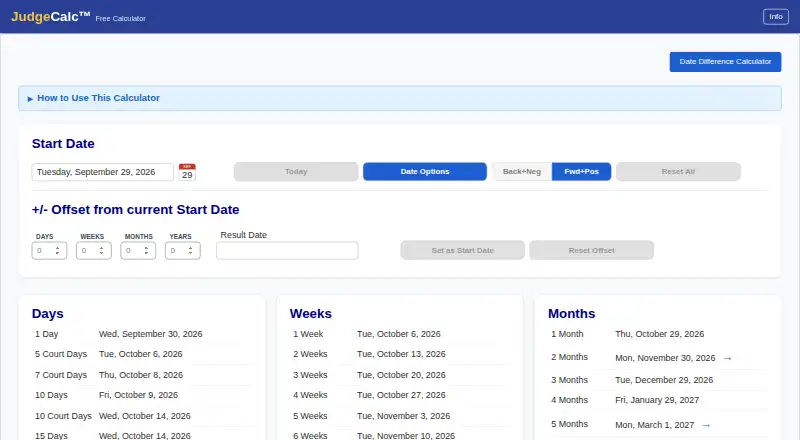
JudgeCalc is a web-based court and legal deadline calculator, not a judicial analytics or judge-rating tool. It offers 60 common deadlines across days, weeks, months, and years, as well as custom calculations using combinations of those units. Users can choose calendar days or court (business) days and configure exclusions for weekends and holidays. The Back+Neg feature counts backward from an event and can move an excluded landing date backward. Depending on selected settings, the free calculator automatically excludes the 11 standard U.S. federal holidays. The free calculator costs nothing, needs no sign-up or login, and performs calculations in the browser; entered dates are not sent to the maker or stored, and closing the page discards them. JudgeCalc Pro adds matter and client management, state holiday calendars, custom dates, deadline reports, and team permissions. Pro is billed per seat monthly or yearly in advance, and new firms get 30 days free; prices are shown before subscribing. The maker describes Pro as a deadline management system for law firms of any size and practice area. The terms state the tool is not legal advice, and users are responsible for confirming deadlines against governing rules and orders.
Good
- Free calculator requires no sign-up or login.
- Offers 60 common deadlines and custom calculations.
- Users can choose calendar or court days.
- Free calculator performs arithmetic in the browser.
Watch out
- Pro pricing is shown before subscribing.
- Users must confirm deadlines against rules and orders.
- JudgeCalc is not legal advice.
Who it suits
The free calculator may suit anyone needing to calculate court or legal deadline dates. Pro is described for law firms of any size and practice area that need deadline management features.
Verdict
JudgeCalc provides configurable deadline calculations, with additional matter and team tools in Pro. It is a calculation aid rather than legal advice, and users remain responsible for confirming each deadline against applicable rules and orders.
Plans and prices
From JudgeCalc's own pricing page, checked 14 Oct 2026.
| Plan | Price | What it gives you |
|---|---|---|
| JudgeCalc Free Calculator | Free | browser calculator · no sign-up or login · 11 federal holidays |
| JudgeCalc Pro | Priced on request | 30-day firm trial · prices shown before subscribing · matter and client management · state and custom holidays · reports · team permissions · per seat, billed monthly or yearly in advance |
The facts
Each one read from JudgeCalc's own pages, with the date it was checked.
What it does
- Backward calculations
- The Back+Neg shortcut counts backward from a hearing or trial date.checked 14 Oct 2026
- Backward counting
- The Back+Neg feature supports counting backward from an event and moving an excluded landing date backward.checked 7 Oct 2026
- Calendar-day counting
- Calendar-day mode counts every day and adjusts a result that lands on an excluded date.checked 14 Oct 2026
- Common deadlines
- The calculator displays 60 common deadlines across days, weeks, months, and years.checked 7 Oct 2026
- Copy formats
- Results can be copied in long or short date formats.checked 14 Oct 2026
- Counting options
- Users can choose calendar days or court (business) days and configure weekend and holiday exclusions.checked 7 Oct 2026
- Court-day counting
- Court-day mode excludes weekends and holidays from the count.checked 14 Oct 2026
- Custom calculations
- Users can enter custom combinations of days, weeks, months, or years to calculate a deadline.checked 7 Oct 2026
- Custom offsets
- Users can enter custom day, week, month and year offsets.checked 14 Oct 2026
- Data retention
- After a firm leaves, the maker says it will export or delete firm information within 30 days on request.checked 14 Oct 2026
- Date chaining
- Double-clicking a result makes it the next starting date for chained calculations.checked 14 Oct 2026
- Date tables
- The free calculator presents preset offsets in days, weeks, months and years.checked 14 Oct 2026
- Deadline responsibility
- The terms say JudgeCalc is not legal advice and users are responsible for confirming each deadline against governing rules and orders.checked 7 Oct 2026
- Documentation
- JudgeCalc publishes a Quick Start Guide and a longer User Guide in PDF form.checked 14 Oct 2026
- Federal holidays
- The free calculator includes the 11 standard U.S. federal holidays.checked 14 Oct 2026
- Filing-window handling
- Mixed positive and negative offsets can represent filing windows, with suggestions when an excluded date falls outside the window.checked 14 Oct 2026
- Holiday exclusions
- The calculator can exclude holidays, weekends, both, or neither.checked 14 Oct 2026
- Integrations
- The privacy policy names Stripe for payments, Resend for email, Cloudflare for delivery and analytics, and a hosting provider for Pro data.checked 14 Oct 2026
- Integrations and providers
- The privacy policy names Stripe for payments, Resend for email, Cloudflare for site delivery and analytics, and a hosting provider for Pro data storage.checked 7 Oct 2026
- Intended users
- JudgeCalc Pro is described as a deadline management system for law firms of any size and practice area.checked 7 Oct 2026
Where it runs
- Browser processing
- Free-calculator arithmetic runs in the browser and entered dates are not sent to the maker or stored.checked 14 Oct 2026
The company
- Company legal status
- Florida records list Black Robe Solutions, LLC as an active Florida limited-liability company.checked 14 Oct 2026
- Headquarters
- Florida, United Stateschecked 28 Sep 2026
Money
- Free calculator privacy
- The free calculator does its arithmetic in the browser; entered dates are not sent to the maker or stored, and closing the page discards them.checked 7 Oct 2026
The full review of JudgeCalc
JudgeCalc is a web-based tool for calculating court and legal deadlines, not for analyzing or rating judges. It suits lawyers who need configurable date arithmetic, while firms needing matter management can add Pro. Its appeal is a private, no-login calculator; its boundary is that every result still needs independent verification.
Overview
The free calculator focuses on a specific task: working out a date from a standard or custom deadline interval. Pro turns that calculator into a broader deadline-management system with matters, clients, reports, and team permissions. That split makes JudgeCalc practical for occasional calculations as well as firms seeking a shared workflow, but the free tier does not provide the firm-management features.
For the free calculator, arithmetic happens in the browser; entered dates are not sent to the maker or stored, and closing the page discards them. For Pro, the maker says firm and client information is used only to provide service to that firm, is not sold, and is not used for advertising. The privacy policy says connections are encrypted, passwords are stored as one-way hashes, and firm access follows the firm's settings. Stripe handles payments, Resend email, Cloudflare site delivery and analytics, and a hosting provider stores Pro data.
Key features
Configurable date calculations
The calculator presents 60 common deadlines across days, weeks, months, and years, and accepts custom combinations of those units. Users can choose calendar or court (business) days and configure weekend and holiday exclusions. This range makes the free tool useful for both routine calculations and intervals that do not match a preset, without requiring an account.
Backward counting and holidays
Back+Neg supports counting backward from an event and moving an excluded landing date backward, a useful option for calculations where the direction and landing date matter. The free calculator automatically excludes the 11 standard U.S. federal holidays, subject to the selected settings. Pro adds state holiday calendars and custom dates, which matter to firms whose calculations need more than the federal calendar.
Firm workflow and safeguards
Pro adds matter and client management, deadline reports, and team permissions. Those features make it the relevant tier for firms trying to manage deadlines across matters and colleagues rather than calculate isolated dates. JudgeCalc remains a calculation aid, not legal advice; users are responsible for confirming each deadline against applicable rules and orders.
Pricing
| Plan | Price and terms | What it suits |
|---|---|---|
| JudgeCalc Free Calculator | free. No sign-up or login required. | Individuals who need deadline arithmetic without managed matters or team features. |
| JudgeCalc Pro | Custom pricing; billed per seat, monthly or yearly in advance. New firms get 30 days free; prices are shown before subscribing. | Firms that need matter and client management, state holiday calendars, custom dates, reports, and team permissions. |
The free calculator costs nothing and avoids an account, but it does not include Pro's management and collaboration tools. Pro's per-seat billing means the cost depends on team size, and monthly or yearly terms are paid in advance. A 30-day trial gives new firms time to evaluate the paid workflow before subscribing.
Platforms
JudgeCalc runs on the web. That keeps the calculator accessible through a browser, but it is not a native desktop or mobile app.
Who it's for
Choose JudgeCalc Free for one-off or occasional date calculations, especially if keeping entered dates out of the maker's systems is important. Pro is aimed at law firms of any size and practice area that want matter-level tracking, reporting, and permissions. Look elsewhere if you need a substitute for checking court rules or orders, or if your workflow depends on a native app.
Pros and cons
- Pros: 60 common deadlines plus custom intervals cover a broad range of date arithmetic.
- Pros: Calendar-day and court-day options, configurable exclusions, and backward counting provide useful control over calculations.
- Pros: The free calculator runs in the browser without an account and discards entered dates when the page closes.
- Pros: Pro adds matter and client management, reports, state calendars, custom dates, and team permissions for firms.
- Cons: Pro pricing is custom and per seat, so firms need a quote and team-size assessment before budgeting.
- Cons: The free tier is a calculator, not a matter-management system, and supports federal rather than state holiday calendars.
- Cons: Results require user verification against governing rules and orders; the tool is not legal advice.
Alternatives
Browse Legal Calendaring Software for a broader category comparison. Consider these alternatives based on platform and plan needs:
- Dockets.ca is a paid option spanning Android, iOS, Linux, macOS, web, and Windows; choose it if broad platform coverage is the priority.
- Deadline Engine offers a free web calculator with citations and calculation steps, plus a one-off Evidence Record plan at 19.99 USD; choose it if those steps or a one-time purchase better fit your needs.
- ClockOrbit Court Deadline Calculator is a free web tool with no trial; consider it if you want a free alternative without a paid tier.
- LitigationDeadline offers free web calculators with federal defaults and no account; consider it for a no-cost, federal-default workflow.
- Case Calendar is a free option for Linux, macOS, self-hosted, web, and Windows.
- Court Deadline Calculator offers free web-based basic deadline calculation tools; consider it for a basic, no-cost calculation need.
- Docket Enterprise is a paid on-premise application for Android, iOS, Windows, and self-hosted use, with pricing by inquiry; consider it if on-premise deployment is central to your requirements.
- CourtAlert Case Management is a paid web, Windows, and self-hosted option with pricing by inquiry; cloud and on-premise share the software license cost, while cloud also carries a hosting fee.
Verdict
JudgeCalc is a strong fit for legal professionals who want configurable deadline arithmetic without an account, and for firms willing to consider a per-seat Pro plan for matter management and team tools. Its browser-based privacy for free calculations and range of counting options are the main reasons to choose it. Look elsewhere if you need a native app or a different workflow, and always confirm calculated deadlines against the governing rules and orders.
Getting started
- Open the JudgeCalc website
- Use the free calculator without creating an account
- Choose a common deadline or enter a custom time combination
- Select calendar or court days and configure exclusions
- Use Back+Neg when counting backward from an event
- Start a Pro subscription per seat monthly or yearly if firm features are needed
Limits worth knowing
The free calculator provides calculation tools, while matter management, client management, state holiday calendars, custom dates, deadline reports, and team permissions are Pro features. New firms receive 30 days free for Pro before paid billing begins.
Questions
What does the free JudgeCalc calculator cost?
The JudgeCalc Free Calculator costs nothing and requires no sign-up or login.
How is JudgeCalc Pro billed?
JudgeCalc Pro is billed per seat, monthly or yearly in advance. New firms receive 30 days free, and prices are shown before subscribing.
What platforms does JudgeCalc support?
JudgeCalc is available on the web.
Are calculator dates stored?
The free calculator performs arithmetic in the browser. Entered dates are not sent to the maker or stored, and closing the page discards them.
What does Pro add?
Pro adds matter and client management, state holiday calendars, custom dates, deadline reports, and team permissions.
Is JudgeCalc legal advice?
No. Its terms say it is not legal advice, and users are responsible for confirming each deadline against governing rules and orders.
Alternatives to JudgeCalc
- 1

ClockOrbit Court Deadline Calculator
Free planWeb6.6Free plan - 2

Court Deadline Calculator
Free planWeb6.6Free plan - 3

Deadline Engine
Free planWeb6.6From $299.99 a year - 4
Deadlines.com
iOSWebmacOSWindows6.6From $20 a month - 5
LitigationDeadline
Free planWeb6.6Free plan - 6
eLaw Case Tracking
iOSWebAPI6.5From $3.50 a month