Dockets.ca
Dockets.ca is a case management, scheduling, and e-filing portal for courts and tribunals.
What Dockets.ca is
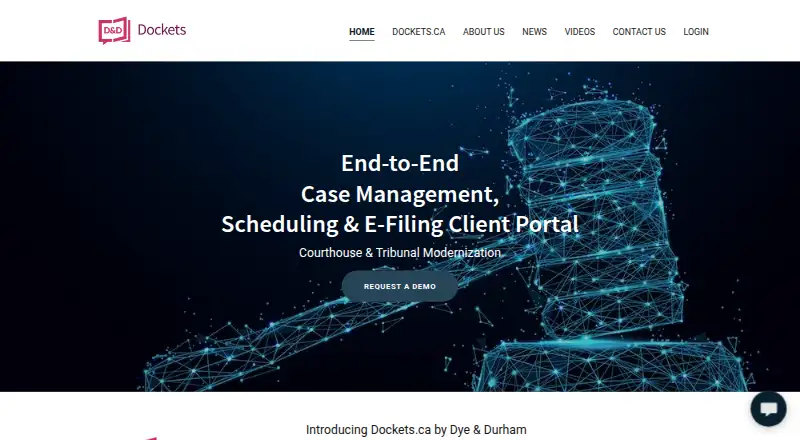
Dockets.ca is a case management, scheduling, and e-filing portal for courts and tribunals. It gives authorized court staff and judges access to designated electronic files for communication and collaboration, while connecting them with lawyers and members of the public, including self-represented litigants. The system handles court document filing and sends registered participants automatic email and text notices. For hearing and trial calendars, it offers scheduling templates and creates daily court lists from calendar information. It can generate operational reports, including case duration and the interval between evidence completion and judgment, with customizable reporting. Video-conference links can be included in scheduled events, with email notices sent to participants. The platform also collects prescribed filing fees electronically and can integrate with third-party accounting systems. Filed documents are organized in folders modeled on paper court files and aligned conceptually with the Rules of Civil Procedure. Dockets.ca is described as a secure cloud-based solution, with access to court documentation for authorized users on desktop operating systems and mobile phones. Pricing is available on request.
Good
- Automatic email and text filing notices for registered participants
- Hearing and trial calendars with scheduling templates
- Customizable operational reports
- Electronic collection of prescribed filing fees
Watch out
- Pricing is available only on request
- Access to documentation is limited to authorized users
Who it suits
Dockets.ca suits courts and tribunals seeking a shared system for case files, filing, calendars, and operational reporting. It also connects judges, court staff, lawyers, and members of the public, including self-represented litigants.
Verdict
Dockets.ca brings filing, scheduling, court communication, and reporting into a single court-focused portal. Prospective customers can request a demo or discuss their project with the team.
The facts
Each one read from Dockets.ca's own pages, with the date it was checked.
What it does
- Access
- Authorized users, including judges, can access court documentation online from desktop operating systems or mobile phones.checked 8 Oct 2026
- Availability
- The site presents Dockets as a commercial off-the-shelf solution built in Canada and ready for adoption across Canada.checked 8 Oct 2026
- Communication
- The platform provides internal communication between the public, lawyers, court staff and judges through endorsements and court orders.checked 8 Oct 2026
- Court access
- Authorized court staff and judges can access the system, which supports communication and collaboration in designated electronic court files.checked 4 Oct 2026
- Court record
- The system is designed so that, subject to court order, filed records are not altered and personal notes by judges and lawyers are excluded from court documents in the record.checked 8 Oct 2026
- Court reporting
- It provides automatic operational reports, including case duration and time from completion of evidence to judgment, with customizable reports.checked 4 Oct 2026
- Deployment
- The maker describes Dockets.ca as a Canadian-built commercial-off-the-shelf solution designed for adoption across Canada.checked 4 Oct 2026
- Document organization
- Filed documents are organized in folders that mirror the paper court system and conceptually align with the Rules of Civil Procedure.checked 4 Oct 2026
- E-filing
- The system supports electronic filing of court documents and sends registered case participants automatic email and text notices of filings.checked 8 Oct 2026
- E-filing notices
- Electronic filing supports court documents and automatic email and text notices to registered case participants.checked 4 Oct 2026
- Intended users
- The site identifies judges, court staff, lawyers and the public as participants who use the platform.checked 8 Oct 2026
- Payments and accounting
- Dockets collects prescribed court filing fees electronically and can integrate with third-party back-office accounting systems.checked 8 Oct 2026
- Product
- Dockets.ca is an end-to-end case management, scheduling, and e-filing client portal for courts and tribunals.checked 4 Oct 2026
- Purpose
- Dockets is a cloud-based case management system for Canadian courts and tribunals, with document management, scheduling and an e-filing client portal.checked 8 Oct 2026
- Scheduling
- Court hearing and trial scheduling includes templates for court staff and judges and automatic creation of daily docket lists.checked 8 Oct 2026
- Security
- The maker describes the product as a secure cloud-based solution with role management and administration across participants.checked 4 Oct 2026
- Security and data location
- The site says court data must be stored in Canada and electronic court files must have proper security and backup measures.checked 8 Oct 2026
- Support
- The contact page invites users to request a demo, talk to a founder or submit questions and says the team will respond with ideas for their project.checked 8 Oct 2026
- Video conferencing
- Embedded links to video conferencing services can send participants automatic email notices to join scheduled conferences.checked 8 Oct 2026
The full review of Dockets.ca
Dockets.ca is a court-focused portal that combines case management, e-filing, scheduling, and court communication for Canadian courts and tribunals. It suits court organizations seeking a shared system for staff, judges, lawyers, and litigants. Its breadth is compelling for institutional use, but custom pricing and a focus on court workflows make it a poor fit for someone who only needs a deadline calculator.
Overview
Dockets.ca connects authorized court staff and judges with lawyers and members of the public, including self-represented litigants, around designated electronic court files. Its strongest case is for courts that want filing, calendars, participant notices, and operational reporting in one cloud-based service rather than separate processes.
The product is described as a Canadian-built commercial off-the-shelf system intended for adoption across Canada. The maker says court data must be stored in Canada and electronic files need appropriate security and backup measures. It also describes role management and administration across participants, and a court-record design in which filed records are not altered except by court order; judges’ and lawyers’ personal notes are excluded from the record. These are consequential safeguards for court workflows, though buyers should assess how the system meets their own operational and security requirements.
Key features
Filing and court communication
Electronic filing supports court documents and sends registered case participants automatic email and text notices when filings occur. Endorsements and court orders provide internal communication among the public, lawyers, court staff, and judges. This can keep activity tied to the electronic file, but notices go to registered participants, so the workflow depends on accurate participant registration.
Scheduling and conferences
Hearing and trial calendars, scheduling templates, and automatic daily court lists support recurring court operations. Embedded video-conference links can trigger email notices to participants for scheduled conferences. Together, these tools can reduce the coordination burden of managing hearings, although the system is tailored to court calendars rather than general-purpose team scheduling.
Reporting, payments, and documents
Automatic operational reports cover measures such as case duration and the time from completion of evidence to judgment, with customizable reports for local needs. The system also collects prescribed filing fees electronically and can integrate with third-party back-office accounting systems. Filed documents are arranged in folders that mirror the paper court system and conceptually align with the Rules of Civil Procedure, a structure likely to feel familiar in court settings.
Authorized users can access court documentation online from desktop operating systems or mobile phones. The product is cloud-based, with access management across participant roles; that combination favors distributed access while keeping court files within a managed environment.
Pricing
Dockets.ca is paid software with custom pricing. Prospective customers can request a demo or discuss their project with the team, making it a procurement conversation rather than a self-serve subscription decision. No seat counts, usage quotas, trial terms, or renewal conditions are provided here, so organizations should establish those terms directly before budgeting.
With no free plan or published entry price, Dockets.ca is best evaluated by courts and tribunals with a defined case-management need and a budget for an institutional system. It is harder to justify for an individual lawyer or litigant seeking only deadline calculations.
Platforms
Dockets.ca supports web, Android, iOS, Linux, macOS, and Windows. The web and mobile access model suits participants who need to consult court documentation from different devices, while desktop operating-system support accommodates court offices with varied environments.
Who it's for
Courts and tribunals looking to bring filing, calendaring, communication, fee collection, and reporting into a court-specific portal are the clearest fit. Lawyers and self-represented litigants may benefit as participants in those court workflows, but Dockets.ca is not positioned as a standalone personal practice tool or a lightweight calculator.
Pros and cons
- Pros: Filing, notices, court communication, scheduling, and reporting sit within a single court-focused system, supporting connected case workflows.
- Pros: Email and text filing notices, plus automatic conference invitations, help keep registered participants informed without relying solely on manual updates.
- Pros: Customizable operational reports and integrations with third-party accounting systems give courts ways to adapt reporting and back-office processes.
- Cons: Custom pricing requires direct engagement, making costs harder to compare quickly with free tools.
- Cons: Its institutional court scope is excessive for users who only need a legal deadline calculator.
- Cons: Automatic filing notices depend on participants being registered, so they are not a substitute for maintaining accurate case contacts.
Alternatives
For a broader directory of scheduling tools, browse Legal Calendaring Software.
Choose Deadline Engine when the need is deadline calculation rather than court-wide case management; it has a free calculator and a one-off Evidence Record plan at 19.99 USD.
ClockOrbit Court Deadline Calculator is a free web option when a no-cost legal deadline tool is the priority.
JudgeCalc is another web-based choice for users wanting a free calculator, with a Pro plan also offered.
LitigationDeadline suits users who want free, account-free calculators with federal defaults.
Case Calendar is a free alternative for users seeking a calendar that supports Linux, macOS, Windows, web, and self-hosted deployment.
Court Deadline Calculator is a free web option for basic deadline calculations.
Docket Enterprise is worth considering when an on-premise application is preferred; its listed platforms include Android, iOS, self-hosted, and Windows.
CourtAlert Case Management is another paid case-management option, with web, Windows, and self-hosted platforms.
Verdict
Dockets.ca is the stronger fit for Canadian courts and tribunals that need one system spanning electronic files, schedules, participant communication, payments, and reporting. Its court-oriented breadth and Canadian data-location commitments are the main reasons to consider it; custom pricing and its institutional scope are the main reasons to look elsewhere if the need is narrower or budget comparison must be immediate.
Getting started
- Visit the Dockets.ca website.
- Contact the team to request a demo or talk with a founder.
- Share project details with the team to discuss ideas for adoption.
- Use the supported web platform or choose an available desktop or mobile platform.
Questions
What does Dockets.ca do?
It provides case management, scheduling, document management, and an e-filing client portal for courts and tribunals.
Who can use the system?
It connects judges, court staff, lawyers, and members of the public, including self-represented litigants. Access to designated electronic case files is available to authorized court staff and judges.
What does Dockets.ca cost?
It is a paid product, with pricing available on request.
Which platforms does it support?
Listed platforms are Android, iOS, Linux, macOS, web, and Windows.
Can it send filing and conference notices?
Registered case participants can receive automatic email and text notices for filings. Scheduled video conferences can send participants automatic email notices to join.
Where is Dockets.ca built for use?
The maker describes it as a Canadian-built commercial solution designed for adoption across Canada.
Alternatives to Dockets.ca
- 1
JudgeCalc
Free planWeb6.7Free plan - 2
ClockOrbit Court Deadline Calculator
Free planWeb6.6Free plan - 3

Court Deadline Calculator
Free planWeb6.6Free plan - 4
Deadline Engine
Free planWeb6.6From $299.99 a year - 5
Deadlines.com
iOSWebmacOSWindows6.6From $20 a month - 6
LitigationDeadline
Free planWeb6.6Free plan