
ClockOrbit Court Deadline Calculator
ClockOrbit Court Deadline Calculator is a free web tool that calculates a filing deadline from a triggering date and a number of days.
What ClockOrbit Court Deadline Calculator is
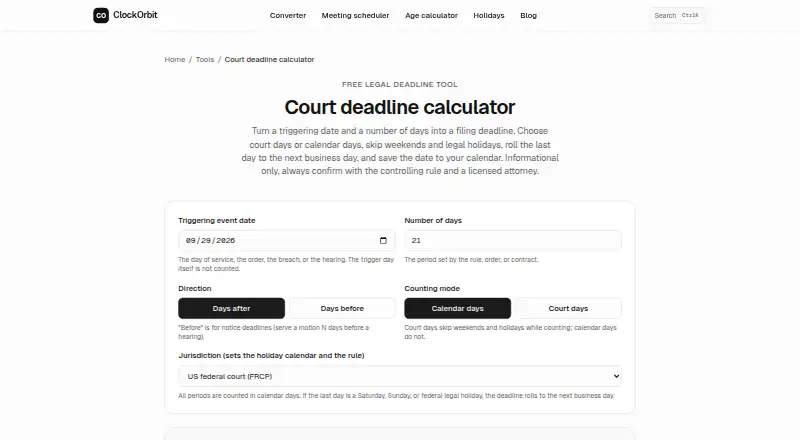
ClockOrbit Court Deadline Calculator is a free web tool that calculates a filing deadline from a triggering date and a number of days. Users can count calendar days or court days; court-day mode skips weekends and holidays. The trigger date itself is not counted, and users can calculate a deadline before or after it. If a forward deadline falls on a weekend or holiday, the calculator moves it to the next business day; backward notice deadlines are adjusted in the earlier direction. Holiday options cover US federal holidays, England and Wales bank holidays, common Canadian statutory holidays, or weekdays without holidays. Presets include complaint answers, discovery responses, civil appeals, motion notice and a California five-court-day notice. A result can be saved as a standards-compliant .ics file with a one-week alert, or shared by link. The tool does not account for local standing orders, e-filing cutoffs, service add-on days, tolling or claim-specific exceptions. Its maker describes results as informational drafts and advises verifying the controlling rule and consulting a licensed attorney.
Good
- Counts calendar days or court days.
- Offers holiday calendars for several jurisdictions.
- Includes common deadline presets.
- Can export an .ics file with a one-week alert.
Watch out
- Does not account for local standing orders or e-filing cutoffs.
- Excludes service add-on days, tolling and claim-specific exceptions.
- Results are informational drafts, not legal guidance.
Who it suits
It suits people who want a free web calculator for an initial filing-deadline estimate. Users should verify the applicable rule and consult a licensed attorney, particularly where the tool's listed exclusions may matter.
Verdict
ClockOrbit offers configurable deadline calculations, presets and calendar export at no charge. Its stated exclusions mean readers should verify the controlling rule rather than rely on the result alone.
Plans and prices
From ClockOrbit Court Deadline Calculator's own pricing page, checked 14 Oct 2026.
| Plan | Price | What it gives you |
|---|---|---|
| Free | Free | Court deadline calculator · no court rule library or statute limitations calculator included in this tool · No payment required |
The facts
Each one read from ClockOrbit Court Deadline Calculator's own pages, with the date it was checked.
What it does
- Adjustments
- It rolls a forward deadline that falls on a weekend or holiday to the next business day and adjusts backward notice deadlines in the earlier direction.checked 28 Sep 2026
- API and SDKs
- The opened product and maker pages do not document a public court-deadline API or SDK.checked 14 Oct 2026
- Before or after
- The calculator supports deadlines before or after a triggering date and excludes the trigger day from the count.checked 28 Sep 2026
- Calendar export
- The calculator exports a standards-compliant ICS calendar event with a one-week alert.checked 14 Oct 2026
- Counting modes
- Users can count calendar days or court days, with weekends and holidays skipped during court-day counting.checked 14 Oct 2026
- Data handling
- The privacy policy says anonymous tool counters do not retain user inputs, results, IP addresses, or device fingerprints.checked 14 Oct 2026
- Development stack
- The maker says ClockOrbit uses JavaScript, Node, and the web platform, with date-fns-tz and IANA time-zone data for time-zone calculations.checked 14 Oct 2026
- Direction
- Users can count forward from a trigger date or backward for notice deadlines.checked 14 Oct 2026
- Documentation depth
- The product page provides operational guidance and rule-counting explanations, but the opened pages do not show a developer API reference or installation guide.checked 14 Oct 2026
- Funding and revenue
- The maker says the site is funded by display advertising.checked 14 Oct 2026
- Holiday coverage
- The page describes US federal, England and Wales bank, and common Canadian statutory holiday calendars, plus weekday counting without holidays.checked 14 Oct 2026
- Independent listing
- MobilesTalk lists the product as a free web calculator and reports no reader reviews on its review page.checked 14 Oct 2026
- Independent ranking
- iTechFAQs places ClockOrbit Court Deadline Calculator first among 20 legal calendaring entries in its 2026 comparison, with a score of 7.3.checked 14 Oct 2026
- Integrations
- The calculator offers ICS export and share links; no direct law-practice management integration is documented on the product page.checked 14 Oct 2026
- Jurisdictions
- Its holiday calendars cover US federal holidays, England and Wales bank holidays, common Canadian statutory holidays, and a weekday count with no holidays.checked 28 Sep 2026
- Legal entity
- The terms refer to a formal company entity as something that may be published later, and do not name one.checked 14 Oct 2026
- Legal guidance
- The maker describes results as informational drafts and advises users to verify the controlling rule and consult a licensed attorney.checked 28 Sep 2026
- Legal use disclaimer
- ClockOrbit characterizes results as informational drafts and advises checking the controlling rule and consulting a licensed attorney.checked 14 Oct 2026
- Limit: holiday calendars
- The maker cautions that a court may close on additional local holidays absent from the reference calendars.checked 14 Oct 2026
- Limit: local and case-specific rules
- The calculator says it does not apply local standing orders, e-filing cutoffs, service add-on days, tolling, or claim-specific exceptions.checked 14 Oct 2026
- Limits
- It does not account for local standing orders, e-filing cutoffs, service add-on days, tolling, or claim-specific exceptions.checked 28 Sep 2026
The company
- Company size
- The maker describes ClockOrbit as a one-person operation.checked 14 Oct 2026
- Founded year
- The opened maker pages do not state a founding year.checked 14 Oct 2026
- Headquarters
- The maker and contact page place Vikas Dulgunde in London, United Kingdom.checked 14 Oct 2026
The full review of ClockOrbit Court Deadline Calculator
ClockOrbit Court Deadline Calculator is a free web calculator for working out a deadline from a triggering date and a day count. It best suits people checking routine dates against one of its supported holiday calendars. Its configurable counting and export options are useful, but the result needs independent rule-checking.
Overview
The calculator handles dates before or after a trigger and excludes the trigger day from the count. Users can count calendar days or court days, with weekends and holidays skipped in court-day mode. A forward deadline that lands on a weekend or holiday moves to the next business day; backward notice deadlines adjust in the earlier direction. These choices make it more useful than basic date arithmetic, but they do not resolve every rule that can affect a filing.
ClockOrbit says anonymous tool counters do not retain user inputs, results, IP addresses, or device fingerprints. Support is by email, with a stated aim to respond within two London business days; there is no phone line, live chat, or ticket portal.
Key features
Holiday calendars and presets
Calendar options cover US federal holidays, England and Wales bank holidays, common Canadian statutory holidays, and weekdays without holidays. Presets include federal complaint answers, discovery responses, civil appeals, motion notice, and a California five-court-day notice. These give users a practical starting point for familiar calculations, though ClockOrbit has no court-rule library or statute-of-limitations feature.
Calendar export and sharing
A calculated deadline can be saved as a standards-compliant .ics file with a one-week alert, or shared through a copied calculation link. Calendar export is a convenient handoff to a user's calendar, but the reminder channel is limited to that export rather than a broader reminder system.
Important limits
The calculator does not account for local standing orders, e-filing cutoffs, service add-on days, tolling, or claim-specific exceptions. ClockOrbit describes results as informational drafts and advises checking the controlling rule and consulting a licensed attorney. That makes the tool suitable for preliminary date work, not as the sole authority for a consequential filing.
Pricing
Free: free. There is no payment requirement to use the tool, and no free trial is offered. The plan provides automated deadline calculation and calendar (.ics) reminders, but no court-rule library or statute-of-limitations support. It is a sensible choice for occasional calculations within the supported calendars; readers needing rule-driven calendaring should look beyond it.
Platforms
ClockOrbit runs on the web. That suits users who want a browser-based calculator, but the supported platform is limited to web.
Who it's for
Choose ClockOrbit for quick, no-cost date calculations when the applicable calendar and counting approach are clear and you can verify the governing rule separately. It is less suitable for workflows that depend on local court instructions, service extensions, tolling, or case-specific exceptions.
Pros and cons
- Pros: Calendar-day and court-day counting, before-or-after calculations, and directional weekend and holiday adjustments handle more routine scenarios than a simple day counter.
- Pros: Several holiday calendars and common presets reduce the setup needed for supported situations.
- Pros: Free access, .ics export with a one-week alert, and share links support basic deadline handoff without a paid plan.
- Cons: No rule library, statute-of-limitations feature, or handling for several important deadline exceptions means users must verify dates independently.
- Cons: Calendar export is the only stated reminder channel, and support is email-only.
Alternatives
Legal Calendaring Software is a useful category starting point for comparing tools. For a free calculator that also shows citations and calculation steps without an account, consider Deadline Engine; it also offers an Evidence Record for $19.99, paid once. LitigationDeadline is another free web option with no account, but its calculators use federal defaults only. The free web Court Deadline Calculator is an alternative for basic deadline calculations.
For a paid option, Dockets.ca supports Android, iOS, Linux, macOS, web, and Windows. Deadlines.com has a $20 a month plan for 30+ cases, billed at $20.00 per case per month, with unlimited users and nationwide coverage. eLaw Case Tracking offers eWatch at $3.50 a month per case for Florida Circuit Courts and $5 a month per case for New York State Supreme and Civil Courts. MatterAlert is a paid web platform at $1,545 a month per user, with a minimum one-year term. DocketCalendar offers a free trial and Court and Calendar plans at $15 a month per court or calendar, respectively.
Verdict
ClockOrbit is a good fit for individuals who need free, flexible deadline arithmetic and can confirm the governing rule themselves. Its presets, holiday calendars, and calendar export make routine calculations more practical; its lack of rule-specific coverage is the main reason to choose a dedicated calendaring system instead.
Getting started
- Open the Court Deadline Calculator in a web browser.
- Enter the triggering date and number of days.
- Choose calendar-day or court-day counting and select the applicable holiday calendar.
- Choose a preset if it fits the deadline, or calculate before or after the trigger date.
- Save the result as an .ics file or copy a share link.
Limits worth knowing
The calculator does not account for local standing orders, e-filing cutoffs, service add-on days, tolling, or claim-specific exceptions. It has no court rule library or statute-of-limitations calculations.
Questions
How much does ClockOrbit Court Deadline Calculator cost?
It is free to use, and no payment is required for the tool.
Which platforms are supported?
The calculator is available on the web.
What holiday calendars can I use?
Options cover US federal holidays, England and Wales bank holidays, common Canadian statutory holidays, or weekday counting without holidays.
Can I save or share a calculation?
Yes. You can save it as a standards-compliant .ics file with a one-week alert or copy a share link.
Does the calculator provide legal advice?
ClockOrbit describes results as informational drafts and advises verifying the controlling rule and consulting a licensed attorney.
Does it account for every deadline rule?
No. It excludes local standing orders, e-filing cutoffs, service add-on days, tolling, and claim-specific exceptions.
Alternatives to ClockOrbit Court Deadline Calculator
- 1
JudgeCalc
Free planWeb6.7Free plan - 2

Court Deadline Calculator
Free planWeb6.6Free plan - 3

Deadline Engine
Free planWeb6.6From $299.99 a year - 4
Deadlines.com
iOSWebmacOSWindows6.6From $20 a month - 5
LitigationDeadline
Free planWeb6.6Free plan - 6
eLaw Case Tracking
iOSWebAPI6.5From $3.50 a month