JotMe
JotMe is a tool for multilingual meetings and events that combines live translation, transcription, chatbot features, and meeting notes across 200+ languages.
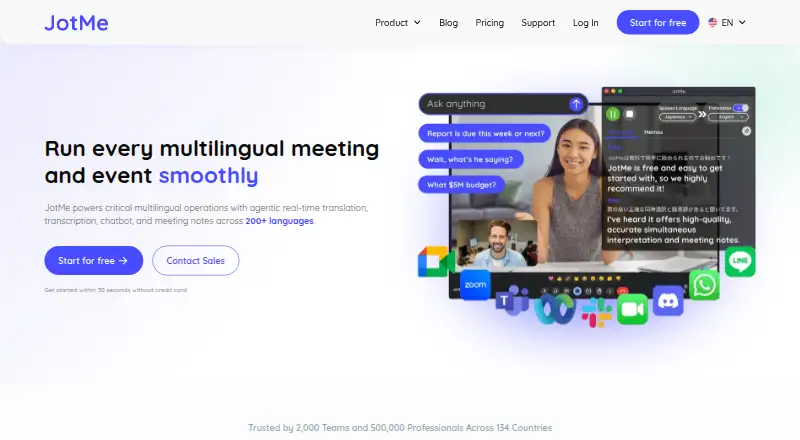
What JotMe is
JotMe is a tool for multilingual meetings and events that combines live translation, transcription, chatbot features, and meeting notes across 200+ languages. Its live translation uses AI agents to interpret intent and meaning as conversations develop. It creates speaker-labeled transcripts live or from uploaded audio and video, then generates notes and summaries in participants’ languages; users can add context with memos. Captions and voice translation can be shared by link, QR code, or on-camera subtitles without recipients installing an app. JotMe describes use with Zoom, Google Meet, Microsoft Teams, Webex, and in-person meetings, and says no bot joins calls. For Zoom, it captures audio on the user’s computer. Apps are available for Mac, Windows, iPhone, and Android, plus a Chrome extension for Google Meet. A free plan provides 20 monthly live-translation or summary minutes, 5 AI credits, and 50 monthly transcription minutes. Pro costs $10 a year per user/month with annual billing, or $120 billed annually. JotMe says data is encrypted in transit and at rest and recordings and transcripts are not used to train its AI models or sold.
Good
- Supports more than 200 languages.
- Creates speaker-labeled transcripts live or from files.
- Shares captions without requiring recipient app installation.
- Free plan includes translation and transcription allowances.
- JotMe says recordings and transcripts are not used for AI training.
Watch out
- Free plan limits monthly minutes and AI credits.
- Pro requires annual billing for its listed per-user price.
- SOC 2 Type II audit is still in progress.
Who it suits
JotMe suits people who need translation, transcripts, or meeting summaries across languages. Its no-bot approach and shareable captions may appeal to meeting participants who do not want others to install an app.
Verdict
JotMe combines live language support with transcripts and notes, and its share links can bring captions to people outside the app. The free plan has defined usage caps, while Pro and higher plans offer different allowances and administration options.
Plans and prices
From JotMe's own pricing page, checked 7 Oct 2026.
| Plan | Price | What it gives you |
|---|---|---|
| Free | Free | 20 monthly live-translation or real-time-summary minutes · 5 AI credits · 50 monthly transcription minutes · last 5 recordings · 5 custom terms · Per user/month, billed annually |
| Pro | $20 a month | 200 monthly live-translation or summary minutes · 20 AI credits · unlimited Google Meet Chrome-extension transcription · 500 desktop/file transcription minutes · 300k AI text-translation tokens · last 20 recordings · Per user/month, billed monthly |
| Teams | $30 a year | Flexible scaling · centralized billing · admin dashboard · Starting price |
| Premium | $30 a month | 500 monthly live-translation or summary minutes · 50 AI credits · 2,000 desktop/file transcription minutes · 700k AI text-translation tokens · 50 custom vocabulary · unlimited recordings · priority support · Per user/month, billed monthly |
| Teams | $60 a month | Flexible scaling · centralized billing · admin dashboard · Starting price |
| Pro | $120 a year | 200 monthly live-translation or summary minutes · 20 AI credits · unlimited Google Meet Chrome-extension transcription · 500 desktop/file transcription minutes · 300k AI text-translation tokens · last 20 recordings · Per user/month (save 50%), $120 billed annually |
| Premium | $180 a year | 500 monthly live-translation or summary minutes · 50 AI credits · 2,000 desktop/file transcription minutes · 700k AI text-translation tokens · 50 custom vocabulary · unlimited recordings · priority support · Per user/month (save 50%), $180 billed annually |
| Enterprise | Priced on request | For fast-growing global businesses and large enterprises · Custom |
The facts
Each one read from JotMe's own pages, with the date it was checked.
What it does
- Contextual translation
- Its live-translation feature uses AI agents to interpret speech intent and meaning as conversations evolve.checked 7 Oct 2026
- Data use
- JotMe says recordings and transcripts are not used to train its AI models or sold to third parties, and customers retain ownership of their data.checked 7 Oct 2026
- Downloads
- The maker offers desktop apps for Mac and Windows, mobile apps for iPhone and Android, and a Chrome extension for Google Meet.checked 7 Oct 2026
- Meeting notes
- It generates meeting notes and summaries in participants’ languages and supports memos for added context.checked 7 Oct 2026
- No-bot operation
- For Zoom meetings, JotMe says it captures audio on the user's computer and does not add a bot or require participants to install anything.checked 7 Oct 2026
- Purpose
- JotMe provides real-time translation, transcription, chatbot features, and meeting notes for multilingual meetings and events across 200+ languages.checked 7 Oct 2026
- Security
- JotMe says it is GDPR compliant, its SOC 2 Type II audit is in progress, and data is encrypted in transit and at rest.checked 7 Oct 2026
- Sharing
- Users can share live captions and voice translation by link, QR code, or on-camera subtitles without requiring recipients to install an app.checked 7 Oct 2026
- Support
- Premium includes priority customer support.checked 7 Oct 2026
- Transcription
- JotMe creates speaker-labeled transcripts live or from uploaded audio and video files.checked 7 Oct 2026
Where it runs
- Meeting platforms
- JotMe describes use with Zoom, Google Meet, Microsoft Teams, Webex, and in-person meetings; its homepage says no bot joins the call.checked 7 Oct 2026
Money
- Teams plan
- The Teams plan includes centralized billing and an admin dashboard and is listed with a starting price of $60 monthly or $30 with annual billing.checked 7 Oct 2026
The full review of JotMe
Overview
JotMe is meeting software for translating conversations, producing transcripts, and creating notes across languages. It is best suited to multilingual teams and event hosts who need people to follow along without installing another app. Its strongest differentiator is that combination of live language support and shareable captions; the trade-off is that the free plan’s monthly allowances are modest.
Key features
Live translation and transcripts
JotMe supports more than 200 languages, and its live translation is designed to interpret intent and meaning as a conversation develops. That makes it a better fit for following multilingual discussions in real time than a tool focused only on recording what was said. Speaker-labeled transcripts can be created live or from uploaded audio and video, and transcript search helps users return to specific passages. The Free plan allows only 20 minutes per month for live translation or real-time summaries and 50 transcription minutes, so it is better for trying the workflow or handling occasional meetings than regular use.
Notes, sharing, and capture
JotMe generates meeting notes and summaries in participants’ languages, with memos for added context. Live captions and voice translation can be shared by link, QR code, or on-camera subtitles, without requiring recipients to install the app. That is useful for events and guest-heavy meetings where requiring every participant to adopt software would get in the way.
JotMe describes use with Zoom, Google Meet, Microsoft Teams, Webex, and in-person meetings. It says no bot joins the call; for Zoom, it captures audio on the user's computer. That approach may suit hosts who do not want a meeting bot added, though the no-bot capture detail is specifically described for Zoom. The maker says data is encrypted in transit and at rest, recordings and transcripts are not used to train its AI models or sold to third parties, and customers retain ownership. JotMe says it is GDPR compliant; its SOC 2 Type II audit is in progress.
Pricing
JotMe is freemium, with a free plan and a trial. The prices below are per user per month on annual billing where stated.
| Plan | Price | What it includes |
|---|---|---|
| Free | free | 20 monthly live-translation or real-time-summary minutes, 5 AI credits, 50 monthly transcription minutes, last 5 recordings, and 5 custom terms. |
| Pro | $10 a year; $120 billed annually | 200 monthly live-translation or summary minutes, 20 AI credits, unlimited Google Meet Chrome-extension transcription, 500 desktop/file transcription minutes, 300k AI text-translation tokens, and last 20 recordings. |
| Premium | $15 a year; $180 billed annually | 500 monthly live-translation or summary minutes, 50 AI credits, 2,000 desktop/file transcription minutes, 700k AI text-translation tokens, 50 custom vocabulary, unlimited recordings, and priority support. |
| Teams | Starting at $30 monthly with annual billing, or $60 monthly | Flexible scaling, centralized billing, and an admin dashboard. |
| Enterprise | Custom pricing | For fast-growing global businesses and large enterprises. |
Free is suitable for occasional use, but its translation and transcription caps can be reached quickly in recurring meetings. Pro is the entry paid tier for a regular individual user, adding substantially more translation time and Google Meet extension transcription, though its desktop and file transcription remains capped at 500 minutes and it retains only the last 20 recordings. Premium suits heavier users who need larger transcription and translation allowances, a larger custom vocabulary, unlimited recordings, or priority support. Teams is aimed at organizations that need centralized billing and an admin dashboard; its starting price is higher, but includes administration features absent from the individual tiers. Enterprise uses custom pricing.
Platforms
JotMe offers apps for Android, iPhone, Mac, and Windows, a web version, and a Chrome extension for Google Meet. That gives users several ways to access it across devices, while the extension's unlimited transcription benefit on Pro is specific to Google Meet.
Who it's for
JotMe is a strong choice for multilingual teams, event organizers, and meeting hosts who need live translation plus transcripts and notes, particularly when external participants should be able to view captions without installing an app. It is less compelling for someone who only needs occasional transcription or expects generous free usage, since the free quotas are small and the paid plans divide allowances by capture method and usage type.
Pros and cons
- Pros: Supports more than 200 languages and generates notes in participants’ languages, making it suited to multilingual meetings rather than transcription alone.
- Pros: Caption and voice-translation sharing by link, QR code, or on-camera subtitles lets recipients follow along without an app install.
- Pros: Pro and Premium raise monthly translation and transcription allowances, while Premium adds unlimited recordings and priority support.
- Cons: Free includes just 20 monthly live-translation or summary minutes and 50 transcription minutes, limiting its usefulness for recurring meetings.
- Cons: Pro’s desktop/file transcription is capped at 500 minutes and it keeps only the last 20 recordings, which may constrain heavier individual use.
- Cons: Teams starts at $30 monthly with annual billing, a step up from individual plans for organizations that need centralized administration.
Alternatives
For a broad comparison, see Meeting Recording Software. Bluedot is another freemium option, with a free plan limited to five lifetime meetings. Notta may suit readers who want a free plan with 120 transcription minutes per month and one seat. Grain is an alternative with a free plan that includes a 45-minute meeting limit and 20 bot-recorded meetings for personal email users. OpenWhispr may be worth considering for readers who want a free plan with local AI models and five hours of meeting recordings per month. Read AI has a free plan capped at five meetings per month and includes 20+ languages. Avoma is another freemium option, with paid Startup seats at $19 a month billed annually and free view-only seats. Fathom may suit users seeking free, unlimited recordings and transcriptions with instant AI call summaries. MeetGeek is an alternative with a free plan that allows three hours of transcription per month and three months of transcript storage.
Verdict
Choose JotMe if multilingual meetings are a recurring part of your work and you need live translation, translated notes, and app-free caption sharing in one tool. Its strongest reason to choose is the way it combines live interpretation with practical access for outside participants. Look elsewhere if your main requirement is generous free transcription or if JotMe’s per-plan limits on minutes and recordings do not fit your workload.
Getting started
- Visit the JotMe website.
- Choose a platform: Mac or Windows desktop app, iPhone or Android app, or Chrome extension for Google Meet.
- Start with the free plan or review paid plans, including the free trial.
- Use it with Zoom, Google Meet, Microsoft Teams, Webex, or in-person meetings.
Limits worth knowing
The free plan includes 20 monthly live-translation or real-time-summary minutes, 5 AI credits, 50 monthly transcription minutes, the last 5 recordings, and 5 custom terms. Pro costs $10 per user/month with annual billing and has 200 monthly live-translation or summary minutes, 20 AI credits, and 500 desktop/file transcription minutes; Premium costs $15 per user/month with annual billing and has 500 monthly live-translation or summary minutes and 2,000 desktop/file transcription minutes.
Questions
Is JotMe free?
Yes. Its free plan costs $0 and includes monthly usage allowances, including 20 live-translation or real-time-summary minutes and 50 transcription minutes.
What does Pro cost?
Pro is $10 per user/month with annual billing, listed as $120 billed annually.
Which platforms does JotMe support?
It offers Android, iOS, macOS, web, Windows, and an extension. The Chrome extension is for Google Meet.
Does JotMe require a bot in meetings?
JotMe says no bot joins the call. For Zoom, it captures audio on the user’s computer without requiring other participants to install anything.
How does JotMe handle recordings and transcripts?
JotMe says recordings and transcripts are not used to train its AI models or sold to third parties, and customers retain ownership. It also says data is encrypted in transit and at rest.
Alternatives to JotMe
- 1

Maestra
WebAPIExtension6.9From $23 a month - 2
Interactio
AndroidiOSWebmacOS6.7 - 3
Microsoft Translator
Free planAPI6.7Free plan - 4
Akouo
AndroidiOSWeb6.0From €60 a month - 5
Wordly
AndroidiOSWeb5.7 - 6
Interprefy
AndroidiOSWeb5.4