
JobCost.com
JobCost.com is an integrated job cost management and accounting system designed for construction and service companies.
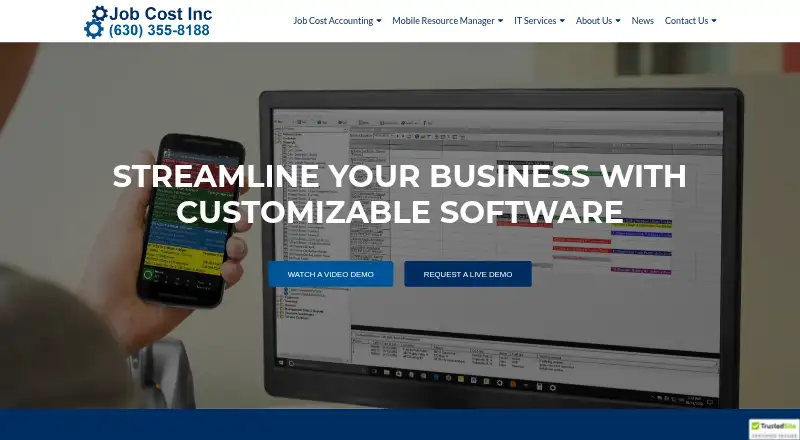
What JobCost.com is
JobCost.com is an integrated job cost management and accounting system designed for construction and service companies. It can be installed in-house or in the cloud and uses single-entry processing, so source documents are entered once. Its modules include accounts receivable and payable, job cost, cash management, general ledger, equipment, billing, payroll, and purchase orders. Job costing tracks phases, estimates, and change orders, with customizable job analysis and balance reports. Mobile Resource Manager schedules and dispatches work and monitors field progress in real time. Its Field App stores job data out of signal range and syncs updates when data or Wi-Fi is available. Time cards handle regular, overtime, and double-time hours assigned to job and phase codes. The system supports multiple companies, workstations, and bank accounts, and runs on PCs and Microsoft Networks. Pricing is available on request. Job Cost Inc provides personalized training and telephone support; the Mobile Resource Manager help site does not cover custom programming or features.
Good
- Source documents are entered once.
- Tracks phases, estimates, and change orders.
- Field App stores data without signal.
- Supports multiple companies and bank accounts.
Watch out
- Pricing is available on request.
- Runs on PCs and Microsoft Networks.
- Help site excludes custom programming and features.
Who it suits
JobCost.com is for construction and service companies that need job costing, accounting, and field operations tools. It may suit organizations that want field data to sync after connectivity returns.
Verdict
JobCost.com combines accounting and job costing with dispatching and mobile field tools. Its offline field data storage and synchronization may be useful for teams working beyond signal range.
The facts
Each one read from JobCost.com's own pages, with the date it was checked.
What it does
- Accounting features
- The software automates accounts receivable, payroll checks, government and union payroll reports, retainage tracking, and job-cost postings.checked 30 Sep 2026
- Accounting integrations
- Mobile Resource Manager can export customers and invoices for import into accounting software, including Peachtree and QuickBooks.checked 2 Oct 2026
- Accounting modules
- Modules include accounts receivable, accounts payable, job cost, cash management, general ledger, equipment, billing, payroll and purchase orders.checked 2 Oct 2026
- Cloud storage integrations
- The Time Card App can use Dropbox, Google Drive or OneDrive for optional notes and photo storage.checked 2 Oct 2026
- Customer base
- Job Cost says it has helped over 1,000 companies since its founding in 1979.checked 2 Oct 2026
- Dispatching
- Mobile Resource Manager schedules, dispatches, and monitors field progress in real time.checked 30 Sep 2026
- Field expenses
- Field employees can assign expenses to job and phase codes with optional notes, documents and photos.checked 2 Oct 2026
- Field operations
- Mobile Resource Manager schedules, dispatches and monitors job progress in real time.checked 2 Oct 2026
- Industry focus
- The software is built for construction and service companies.checked 2 Oct 2026
- Installation
- The software can be set up in-house or in the cloud.checked 30 Sep 2026
- Limit
- The Mobile Resource Manager help site covers the standard version and does not cover custom programming or features.checked 30 Sep 2026
- Offline field use
- The Field App stores job data when users are out of signal range and synchronizes updates when connected to data or Wi-Fi.checked 2 Oct 2026
- Operating environment
- JobCost.com runs on PCs and Microsoft Networks.checked 30 Sep 2026
- Purpose
- JobCost.com provides job cost accounting, mobile resource management, field service software and IT services.checked 2 Oct 2026
- Reporting
- It provides standard or user-defined reports for screen or paper output.checked 30 Sep 2026
- Security
- Job Cost says customer information is stored in its corporate database, is not shared or sold, and is secured in an in-house database.checked 2 Oct 2026
- Single entry
- The system uses single-entry processing requiring source documents to be entered once.checked 30 Sep 2026
- Support
- Job Cost offers personalized training and telephone support from experienced professionals.checked 2 Oct 2026
Where it runs
- Field app
- The Field App stores job data while out of signal range and synchronizes updates with the office when connected to data or Wi-Fi.checked 30 Sep 2026
- Mapping integrations
- Its mapping feature integrates with MapQuest, Google, and Bing.checked 30 Sep 2026
- Mobile platforms
- The Field App is designed for smartphones and tablets, and the Time Card App is downloaded from Google Play or the Apple App Store.checked 2 Oct 2026
The company
- Founded
- 1979checked 28 Sep 2026
- Headquarters
- Naperville, Illinois, United Stateschecked 28 Sep 2026
Money
- Job costing
- The Job Cost module tracks job phases, estimates, change orders and customizable job analysis and job balance reports.checked 2 Oct 2026
The full review of JobCost.com
Overview
JobCost.com is an integrated accounting, job-costing and field-operations system built for construction and service contractors. It suits companies that need payroll, job phases, dispatch and mobile data tied to the same office workflow. The main attraction is its unusually broad contractor accounting scope; the main caution is that pricing is custom and help coverage is narrower for bespoke work.
Designed by CPAs and established in 1979, Job Cost says it has helped more than 1,000 companies. It can be installed in-house or run in the cloud, giving organizations a choice between local control and hosted deployment.
Key features
The accounting modules cover accounts receivable, accounts payable, job cost, cash management, general ledger, equipment, billing, payroll and purchase orders. Single-entry processing means source documents are entered once rather than repeatedly across modules. Standard and user-defined reports can be viewed on screen or printed, which helps offices preserve established reporting routines.
Contractor-specific accounting is a strong point. The system automates accounts-receivable work, payroll checks, government and union payroll reports, retainage tracking and job-cost postings. It supports multiple companies, workstations and bank accounts, making it more suitable for multi-entity or multi-office operations than a basic small-business ledger. Password security by user and an audit trail provide accountability for access and activity.
The Job Cost module follows job phases, estimates and change orders and produces customizable job analysis and job balance reports. Variance analysis and overhead allocation support profitability reviews, although configuration needs will vary by company.
Mobile Resource Manager schedules and dispatches jobs and monitors field progress in real time. It creates work orders with customized Crystal Reports layouts and connects to MapQuest, Google and Bing for mapping. Connections to QuickBooks and Job Cost Accounting cover common accounting workflows, while support can create custom accounting integrations.
Field work remains useful outside coverage. The Field App stores job data when a device is out of signal range and synchronizes changes with the office over data or Wi-Fi. The Time Card App records regular, overtime and double-time hours against job and phase codes. Field employees can code expenses and attach notes, documents and photos; optional storage for those attachments can use Dropbox, Google Drive or OneDrive.
Pricing
JobCost.com uses paid, custom pricing, so a prospective customer must request a quotation. There is no published seat allowance, quota, trial term or renewal schedule to compare. That approach may accommodate complex deployments, but it makes budgeting and direct plan comparison difficult.
Platforms
The core system runs on PCs and Microsoft Networks and supports Microsoft Windows functions. Mobile Resource Manager's Field App is designed for smartphones and tablets. The Time Card App is downloaded from Google Play or Apple's App Store, covering Android and iOS field devices. Cloud or in-house setup is available.
Who it's for
JobCost.com is a strong candidate for construction and service companies that want one system for detailed job costing, contractor payroll, retainage, dispatch and field time and expenses. It is especially relevant to firms with multiple companies, workstations or bank accounts, and to crews that regularly work beyond reliable signal range.
It is less suitable for buyers who need transparent, self-serve pricing or a lightweight scheduling tool. Organizations planning extensive custom programming should also clarify support arrangements, because the Mobile Resource Manager help site covers the standard version rather than custom programming or custom features.
Pros and cons
Pros
- Broad contractor accounting: payroll reporting, retainage, job-cost postings and dedicated construction modules reduce the need to stitch together generic finance tools.
- Connected field workflow: dispatch, real-time progress, work orders, time cards and coded expenses link office and mobile operations.
- Offline synchronization: field data can be captured without signal and synchronized when connectivity returns.
- Flexible reporting and deployment: user-defined reports, Crystal Reports work orders, cloud hosting and in-house installation accommodate varied processes.
Cons
- Custom pricing: without published plans or terms, buyers cannot readily estimate cost or compare capacity before contacting sales.
- Support boundary: standard help documentation does not cover custom programming or features, an important limitation for tailored implementations.
- Windows-centered core: the primary system is built around PCs and Microsoft Networks, while mobile access is handled by separate apps.
Alternatives
Fieldified is the better starting point for teams wanting a freemium service platform, with a free plan covering scheduling, invoicing, CRM and reporting and a Basic plan at $49 a month billed for five users. Choose it when transparent entry pricing and web access matter more than JobCost.com's contractor accounting depth.
Trimble Viewpoint Vista suits buyers seeking a construction ERP available cloud-hosted or on premises, with Android, iOS, web and Windows support and pricing handled by sales.
Global Shop Solutions ERP is an alternative for organizations prepared for an upfront charge plus ongoing quarterly cost with pricing tailored to the company.
Technisoft Service Manager is a service-management option sold through a Sage 300 Solution Provider, with first-year Software Assurance compulsory.
Infor Construction is another paid construction-focused platform with Android, iOS and web support.
Jobber is preferable for smaller service businesses wanting a published starting point: Core is $29 a month billed annually for one user, with online booking and scheduling, plus a free trial.
Acumatica Construction Edition fits buyers wanting custom deployment and usage pricing with unlimited users.
CMiC is a paid alternative organized for general contractors, subcontractors and heavy-highway businesses.
For broader category comparisons, see the Job Costing Software and Cost Accounting Software lists.
Verdict
Choose JobCost.com if your construction or service company needs contractor-grade accounting, detailed job costing and dispatch and field capture in one environment, particularly where offline mobile work and multi-entity support matter. Look elsewhere if you require published pricing, a simpler service scheduler or guaranteed documentation for extensive custom programming.
Alternatives to JobCost.com
- 1
Odoo CRM
Free planOpen sourceAndroidiOSWebAPI8.8From $24.90 a month - 2
Foundation Software
Free planAndroidiOSWebAPI7.7Free plan - 3

Katana
Free planWebAPI7.6Free plan - 4
Microsoft Dynamics 365 Sales
AndroidiOSWebAPI7.6 - 5

abas ERP
AndroidiOSWebAPI7.5From $149 a month - 6

Rootstock ERP
AndroidiOSWebAPI7.4From $100 a month