jless
jless is a free command-line viewer for reading, exploring, and searching JSON data on macOS and Linux.
What jless is
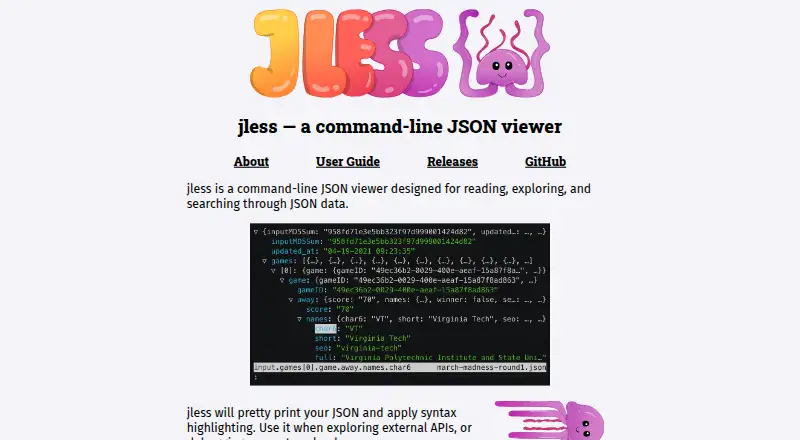
jless is a free command-line viewer for reading, exploring, and searching JSON data on macOS and Linux. It formats JSON for easier reading, adds syntax highlighting, and lets users expand or collapse objects and arrays with vim-inspired commands. Search supports both full-text and regular-expression-based queries. jless reads files or data from standard input, including newline-delimited JSON, and can display YAML when it detects the file extension or when given the `--yaml` flag. YAML comments and anchors are not displayed. Commands can copy values, keys, and paths to the system clipboard or print them in the terminal; the guide also describes showing a jq-style path for the focused node, though jq querying is not supported. Data mode offers a streamlined view, while line mode displays formatted JSON. The tool is MIT-licensed and can be installed through options including Homebrew, MacPorts, Linux package managers, Cargo, or downloadable binaries. Building clipboard access from source on Linux requires X11 libraries. The project says it does not yet support a configuration file.
Good
- Formats JSON with syntax highlighting.
- Search supports regular expressions.
- Reads newline-delimited JSON from standard input.
- Can copy values, keys, and paths.
- MIT-licensed and free.
Watch out
- Supports macOS and Linux only.
- Does not yet support a configuration file.
- YAML comments and anchors are not displayed.
- Linux source builds need X11 libraries for clipboard access.
Who it suits
jless suits developers who want to inspect JSON or YAML from files or standard input, including when exploring APIs or debugging request payloads. It is intended for macOS and Linux users comfortable with command-line tools.
Verdict
jless offers focused JSON and YAML inspection with search and navigation in the terminal. Its lack of a configuration file and limited platform support are worth noting.
Plans and prices
From jless's own pricing page, checked 9 Oct 2026.
| Plan | Price | What it gives you |
|---|---|---|
| Free | Free | MIT-licensed command-line tool · macOS and Linux |
The facts
Each one read from jless's own pages, with the date it was checked.
What it does
- Clipboard
- Commands can copy values, keys, and paths to the system clipboard, and print commands can display them in the terminal.checked 8 Oct 2026
- Clipboard and printing
- Commands can copy or print values, keys, and paths, including unescaped string contents.checked 9 Oct 2026
- Configuration limit
- The releases page says jless does not yet support a configuration file.checked 8 Oct 2026
- Display
- It pretty-prints JSON and applies syntax highlighting.checked 9 Oct 2026
- Formatting
- It pretty-prints JSON and applies syntax highlighting.checked 8 Oct 2026
- Input
- jless can read files or JSON from standard input, including newline-delimited JSON.checked 8 Oct 2026
- Input formats
- It reads files or standard input, supports newline-delimited JSON, and can display YAML.checked 9 Oct 2026
- Installation
- Installation options include Homebrew, MacPorts, Linux package managers, and building from source with Rust.checked 9 Oct 2026
- Install options
- The site lists Homebrew, MacPorts, Arch Linux, Void Linux, NetBSD, FreeBSD, Cargo, and downloadable binaries as installation options.checked 8 Oct 2026
- Intended users
- The project suggests using jless to explore external APIs or debug request payloads.checked 9 Oct 2026
- jq integration
- The user guide describes copying or printing a jq-style path for the currently focused node.checked 8 Oct 2026
- License
- The project is released under the MIT License.checked 9 Oct 2026
- Modes
- Data mode provides a streamlined view, and line mode displays pretty-printed JSON.checked 9 Oct 2026
- Navigation
- Objects and arrays can be expanded or collapsed, with vim-inspired commands for exploring data.checked 9 Oct 2026
- Notable limitation
- The releases page says jless does not yet support a configuration file.checked 9 Oct 2026
- Purpose
- jless is a command-line viewer for reading, exploring, and searching JSON data.checked 9 Oct 2026
- Search
- It supports full-text regular-expression search, including navigation between values with the same object key.checked 9 Oct 2026
- Standalone binary
- The GitHub README says jless is written in Rust and can be installed as a single standalone binary.checked 8 Oct 2026
- YAML
- It can read YAML by detecting the file extension or with the --yaml flag; YAML comments and anchors are not displayed.checked 8 Oct 2026
Where it runs
- Linux clipboard dependency
- Building clipboard access from source on Linux requires X11 libraries.checked 9 Oct 2026
- Platforms
- The site lists macOS and Linux support and links to binaries for multiple architectures.checked 9 Oct 2026
- Supported platforms
- The site says jless currently supports macOS and Linux.checked 8 Oct 2026
The company
- Maker
- The jless site credits its creator as CodeIsTheEnd.checked 8 Oct 2026
The full review of jless
jless is a focused terminal viewer for developers who need to inspect structured data during API work, debugging, or command-line operations. It is a strong fit for keyboard-oriented users on macOS and Linux; choose another tool when querying or transforming JSON is central to the job.
Overview
jless presents JSON as a pretty-printed, syntax-highlighted document that remains navigable as structures grow deep. Objects and arrays can be expanded or collapsed, and vim-inspired commands keep movement efficient for users already comfortable with modal keyboard controls. Data mode provides a streamlined view, while line mode shows formatted JSON when the exact layout matters.
Input can come from a file or standard input, including newline-delimited JSON, so it works naturally in pipelines and with API output that has not been saved. YAML is also supported through file-extension detection or the --yaml flag. Comments and anchors are omitted from YAML display, making jless appropriate for examining parsed structure rather than preserving every source annotation.
Key features
- Search: Full-text and regular-expression search helps locate keys or values in unfamiliar payloads. It accelerates investigation, but it does not extract, filter, or transform matches.
- Navigation: Expand and collapse nested data while retaining a clear view of hierarchy. Vim-style movement favors experienced terminal users over people seeking a mouse-driven interface.
- Paths and output: Commands can copy or print values, keys, and paths, including unescaped string contents. The documented jq-style path for the focused node is useful when handing a location to a separate jq command, although jless does not execute jq queries itself.
- Clipboard: System-clipboard commands make it practical to move a selected value or path into another command, editor, or ticket without manually retyping it.
- Input flexibility: Files, standard input, newline-delimited JSON, and YAML cover common inspection workflows without requiring conversion first.
Pricing
jless is free at no cost under the MIT License. There is no paid tier, trial period, seat charge, or usage quota to manage. That makes it suitable for individual developers and teams that want a repeatable command-line utility without procurement overhead, while the trade-off is that commercial support or hosted conveniences are not part of the offering.
Platforms
jless currently supports macOS and Linux. Installation options include Homebrew, MacPorts, Arch Linux, Void Linux, NetBSD, FreeBSD, Cargo, downloadable binaries, and building from Rust source. The project is delivered as a standalone Rust binary, which keeps deployment simple. Building clipboard access from source on Linux requires X11 libraries. Windows is not supported, so cross-platform teams will need another viewer on that platform. jless also has no configuration file yet, limiting persistent customization of its behavior.
Who it's for
Choose jless if you inspect external API responses, debug request payloads, or browse large JSON and YAML streams from a terminal. It suits developers who value keyboard navigation, searchable hierarchy, and quick copying of a node or its path. It is less suitable for analysts who need visual editing, for workflows that must retain YAML comments and anchors, or for anyone who needs built-in querying and transformation rather than inspection.
Pros and cons
Pros
- Free MIT-licensed software with no plan limits or renewal terms.
- Pretty-printing, syntax highlighting, folding, and vim-inspired navigation make nested data easier to read in a terminal.
- Regular-expression search and newline-delimited JSON support help with unfamiliar or streaming input.
- Copy and print commands expose values, keys, and paths, including jq-style paths for follow-up commands.
- Standalone binaries and multiple package-manager options simplify installation on supported systems.
Cons
- Only macOS and Linux are supported, excluding Windows installations.
- No configuration file means preferences cannot be saved persistently.
- YAML comments and anchors are not displayed, so source annotations disappear from the view.
- It is a viewer, not a jq-compatible query engine; extraction and transformation require another tool.
- Linux source builds need X11 libraries for clipboard functionality.
Alternatives
JSON Tools is the broader category to browse when you want to compare viewers and utilities. Pick jq instead when querying and transforming JSON matters more than an interactive viewer; it is free, MIT-licensed, and runs on Linux, macOS, Windows, web, and self-hosted setups. Dadroit JSON Viewer is the better choice for a graphical, multi-platform workflow, with a free non-commercial plan for files up to 50 MB and paid Standard licensing. Choose gojq for a free MIT-licensed CLI and Go library when you want jq-compatible processing in Go-oriented environments. BracketView suits users who prefer a web-based interface with encrypted snapshots and AI actions under its free tier. gron is worth considering for a dependency-free binary workflow across Linux, macOS, Windows, and FreeBSD. jaq is another free MIT-licensed command-line and Rust-library option for processing JSON. jidoujisho is an Android alternative, while JSON OS provides browser-based JSON editing and Markdown preview.
Verdict
jless is an excellent choice for macOS and Linux developers who want fast, keyboard-driven inspection of JSON or YAML in the terminal, especially when search, folding, and copyable paths are the priority. Look elsewhere if you need Windows support, saved configuration, preserved YAML annotations, or built-in querying and transformation.
Alternatives to jless
- 1
JSONZen
Free planWebAPILinuxmacOS7.6$1 one-time - 2
jaq
Free planOpen sourceWebAPILinuxmacOS7.5Free plan - 3
jq
Free planWebLinuxmacOSSelf-hosted7.2Free plan - 4
Dadroit JSON Viewer
Free planWebLinuxmacOSWindows6.9From $98 a year - 5

BracketView
Free planWebLinuxWindows6.7From $27 a year - 6
jidoujisho
Free planAndroid6.6Free plan