gojq
gojq is a Go implementation of the jq command for applying queries to JSON, and it can also be embedded as a library in Go applications.
What gojq is
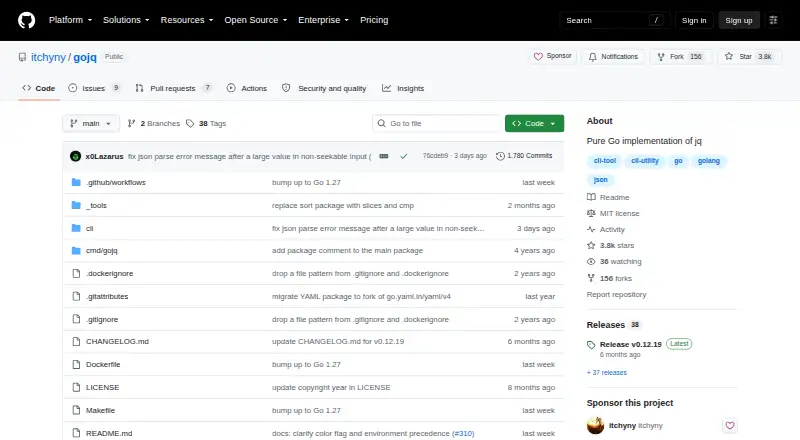
gojq is a Go implementation of the jq command for applying queries to JSON, and it can also be embedded as a library in Go applications. Its command-line queries can filter input, select fields, and update values, and it accepts multiple input values. gojq supports YAML input and output, as well as arbitrary-precision integer calculations for addition, subtraction, multiplication, modulo, and divisible division. Go applications can parse and run queries, compile them for reuse, and configure custom functions and iterators. The project describes the implementation as portable and documents installation through Homebrew, mise, Zero Install, source builds, and Docker images. It is available for Linux, macOS, Windows, and self-hosted use, and is licensed under MIT. There are compatibility differences to consider: object key order is not preserved, jq’s NaN, Infinity, and leading-zero number extensions are not parsed, and some regular-expression syntax differs. For library use, environment-variable access and module loading are disabled by default and require configured loaders. Library queries may run indefinitely or produce no output; the project recommends RunWithContext to limit execution time.
Good
- Supports JSON queries and YAML input and output.
- Offers arbitrary-precision integer arithmetic for listed operations.
- Can be embedded and configured in Go applications.
- Available for Linux, macOS, Windows, and self-hosted use.
Watch out
- Does not preserve object key order.
- Does not parse jq’s NaN or Infinity extensions.
- Some regular-expression syntax differs from jq.
- Library queries may run without ending.
Who it suits
gojq suits command-line users who need jq-style JSON queries, including YAML input or output. It also fits Go developers who want to embed query parsing and execution in an application.
Verdict
gojq combines a jq-style command-line interface with an embeddable Go library and YAML support. Users should account for its jq compatibility differences and the potential for library queries to run indefinitely.
Plans and prices
From gojq's own pricing page, checked 11 Oct 2026.
| Plan | Price | What it gives you |
|---|---|---|
| Free | Free | MIT-licensed open-source software · CLI and Go library |
The facts
Each one read from gojq's own pages, with the date it was checked.
What it does
- Compatibility limits
- gojq does not preserve object key order and lacks jq's keys_unsorted function and --sort-keys option.checked 11 Oct 2026
- Environment access
- For library use, OS environment variables are inaccessible to queries by default for security reasons and can be enabled with a configured environment loader.checked 4 Oct 2026
- Execution limits
- Library queries may emit infinitely many values or run without producing output, and the README recommends RunWithContext to limit execution time.checked 4 Oct 2026
- Install options
- The project documents installation through Homebrew, mise, Zero Install, go install, and Docker.checked 11 Oct 2026
- JSON queries
- The command applies jq queries to JSON input, including filtering, field selection, and updates.checked 4 Oct 2026
- Library integration
- Go applications can parse and run queries with gojq, compile queries for reuse, and configure custom functions and iterators.checked 4 Oct 2026
- Library limits
- The library requires query inputs to use []any for arrays and map[string]any for maps, and warns that queries can produce infinite results or run without producing output.checked 11 Oct 2026
- Library security
- For library use, OS environment variables are inaccessible to queries by default; a caller can configure an environment loader.checked 11 Oct 2026
- License
- The project is released under the MIT License.checked 11 Oct 2026
- Limits
- gojq does not preserve object key order and therefore does not provide the keys_unsorted function or the --sort-keys option.checked 4 Oct 2026
- Module loading
- The library's module feature is disabled by default and can be configured with a module loader.checked 4 Oct 2026
- Number precision
- gojq supports arbitrary-precision integer calculations for addition, subtraction, multiplication, modulo, and divisible division.checked 4 Oct 2026
- Numbers
- gojq supports arbitrary-precision integer calculations, while mathematical functions such as floor and round convert integers to floating-point numbers.checked 11 Oct 2026
- Other limits
- The README lists unsupported jq features, including some functions and flags, JSON extensions such as NaN and Infinity, and some regular-expression features.checked 11 Oct 2026
- Portability
- The README describes gojq as implemented purely in Go and completely portable.checked 11 Oct 2026
- Purpose
- gojq is a pure Go implementation of the jq command-line JSON processor and can also be embedded as a library in Go products.checked 11 Oct 2026
- Queries
- The CLI runs jq-style queries against JSON input and supports multiple input values.checked 11 Oct 2026
- Support
- The project directs users to report bugs through its GitHub Issues page.checked 11 Oct 2026
- YAML
- gojq supports YAML input with --yaml-input and YAML output with --yaml-output.checked 11 Oct 2026
The full review of gojq
gojq is a jq-style query tool for JSON, with a command-line interface and a library for Go applications. It is best suited to developers who want YAML support or query integration in Go software. Its main appeal is portability and flexible reuse; jq-dependent workflows should check its compatibility gaps first.
Overview
The CLI filters data, selects fields, makes updates, and accepts multiple input values. YAML input and output extend it to workflows that move between JSON and YAML. Written in Go, gojq is positioned as portable and can be installed through Homebrew, mise, Zero Install, source builds, or Docker images. That range makes it practical across Linux, macOS, Windows, and self-hosted environments.
Compatibility is the key trade-off. gojq does not preserve object key order, so it lacks keys_unsorted and --sort-keys. It also rejects jq's NaN, Infinity, and leading-zero number extensions, and differs on some regular-expression syntax, functions, and flags. It is a sound choice when its supported query behavior fits the job, but scripts that depend on those jq-specific details need a different tool or careful adjustment.
Key features
Queries and number handling
jq-style queries cover filtering, field selection, and updates. Integer addition, subtraction, multiplication, modulo, and divisible division support arbitrary precision, avoiding fixed-width limits in those operations. The benefit has boundaries: mathematical functions such as floor and round convert integers to floating-point numbers, so calculations using them do not retain that same precision.
YAML and Go integration
YAML input and output help when data moves between JSON-oriented tools and YAML files. Go applications can parse input, run queries, compile queries for reuse, and add custom functions and iterators. For library callers, arrays and maps must use Go's []any and map[string]any types. Environment variables are inaccessible to queries by default, a useful security boundary that can be relaxed through a configured environment loader; module loading is also off by default and requires a module loader.
Execution and safety
Library queries can produce an infinite stream of values or run without returning output. Applications that run untrusted or potentially unbounded queries should use RunWithContext to set an execution time limit. This makes gojq embeddable, but puts responsibility for controlling runtime on the host application.
Pricing
gojq is free at free. The Free plan includes the CLI and Go library, and the software is open source under the MIT License. There is no paid tier or trial to weigh against the free offering, making it accessible for both personal scripts and commercial Go applications.
Platforms
gojq supports Linux, macOS, Windows, and self-hosted use. Its Go implementation and installation routes, including package managers, source builds, and Docker images, suit developers who need to fit a query tool into different development or deployment environments.
Who it's for
Choose gojq if you need jq-style JSON queries in a portable CLI, want YAML input or output, or are embedding queries in a Go product. Its arbitrary-precision integer operations are useful where those calculations matter. Look elsewhere if your scripts rely on jq's unsupported flags, functions, number extensions, key-order behavior, or regular-expression syntax; those differences can affect both results and command compatibility.
Pros and cons
- Pro: The CLI and Go library are both included in the free MIT-licensed software, so the same query approach can serve command-line and embedded use.
- Pro: YAML input and output, multiple JSON input values, and portable installation options cover varied data workflows and environments.
- Pro: Several integer operations use arbitrary precision, avoiding fixed-width limits for addition, subtraction, multiplication, modulo, and divisible division.
- Con: Missing functions and flags, unsupported numeric extensions, key-order differences, and regular-expression differences can break assumptions in jq-based scripts.
- Con: Some mathematical functions convert integers to floating point, limiting where arbitrary precision applies.
- Con: Go library callers must use specific input types and should impose a runtime limit on queries that may not finish.
Alternatives
jq is the direct alternative for users who need jq itself, including its standalone binaries for Linux, macOS, and Windows. jaq is another free, MIT-licensed command-line program with a Rust library if Rust better fits the project. jless is a free command-line tool for macOS and Linux. gron offers a free option with no runtime dependencies and binary downloads for Linux, Mac, Windows, and FreeBSD. Dadroit JSON Viewer is a freemium choice for readers who want to open JSON files and convert them to CSV or XML, with its non-commercial plan capped at 50 MB. BracketView is another freemium option, with a free plan that caps uploads at 5 MB and limits snapshots, AI actions, and webhook use. jidoujisho is a free Android option. For browser-based editing and Markdown preview, JSON OS is a free web option. Browse more options in JSON Tools.
Verdict
Choose gojq if you want a free, portable jq-style CLI with YAML support or need to run queries inside a Go application. Its combination of command-line and library use is the strongest reason to pick it. Choose another tool when exact jq compatibility matters, or when your application cannot safely bound query execution.
Getting started
- Visit https://github.com/itchyny/gojq
- Install with Homebrew, mise, Zero Install, a source build, or a Docker image
- Run the CLI against JSON or YAML input with a jq query
- Embed the Go library when integrating into a Go product
- Configure an environment loader or module loader if embedded queries need those capabilities
- Use RunWithContext to limit embedded query execution time
Limits worth knowing
gojq does not preserve object key order and therefore lacks keys_unsorted and --sort-keys. It does not parse jq’s NaN, Infinity, or leading-zero number extensions, and some functions, flags, and regular-expression syntax differ; embedded queries may also run indefinitely or emit no output.
Questions
How much does gojq cost?
The Free plan costs nothing. It is MIT-licensed open-source software.
Which platforms are supported?
gojq is listed for Linux, macOS, Windows, and self-hosted use.
Can gojq process YAML?
Yes. It supports YAML input and YAML output.
Can Go applications embed gojq?
Yes. Go products can parse and run queries, compile queries for reuse, and configure custom functions and iterators.
How does gojq differ from jq?
It does not preserve object key order, does not parse jq’s NaN, Infinity, or leading-zero number extensions, and differs on some functions, flags, and regular-expression syntax.
Alternatives to gojq
- 1
JSONZen
Free planWebAPILinuxmacOS7.6$1 one-time - 2
jaq
Free planOpen sourceWebAPILinuxmacOS7.5Free plan - 3
jq
Free planWebLinuxmacOSSelf-hosted7.2Free plan - 4
Dadroit JSON Viewer
Free planWebLinuxmacOSWindows6.9From $98 a year - 5

BracketView
Free planWebLinuxWindows6.7From $27 a year - 6
jidoujisho
Free planAndroid6.6Free plan