
BracketView
BracketView is a workspace for viewing, formatting, validating, querying, and comparing JSON in a browser or desktop app.
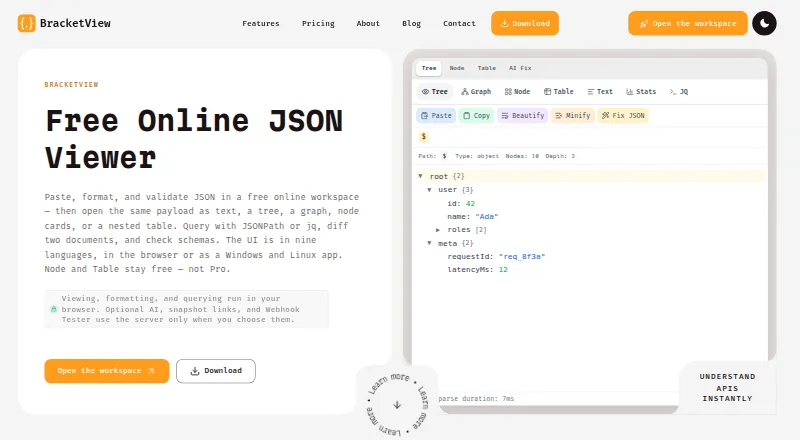
What BracketView is
BracketView is a workspace for viewing, formatting, validating, querying, and comparing JSON in a browser or desktop app. It presents JSON in text, tree, graph, node-card, and nested-table views, with Stats and JQ tools. Users can query with JSONPath or jq, which runs in the browser through WebAssembly. Validation supports OpenAPI definitions and custom JSON Schema rules, and the workspace can generate types for TypeScript, Python, Go, Rust, and other languages. A Webhook Tester can capture requests from services such as Stripe, GitHub, and Shopify. Core formatting, validation, comparison, and visualization run in the browser, while optional AI, snapshots, and webhook capture may send or store data on BracketView servers. AI features may send JSON or an excerpt to Groq and/or Google Gemini through those servers. Snapshot payloads are encrypted at rest with AES-256-GCM, but public-link holders can open them until expiry. The desktop app runs core tools offline and opens local files up to 200 MB; web uploads are limited to 5 MB on Free and 50 MB on Pro.
Good
- Offers text, tree, graph, and table views
- Supports JSONPath and jq queries
- Validates OpenAPI and custom JSON Schema
- Desktop core tools run offline
- Local desktop files can be up to 200 MB
Watch out
- Free web uploads are limited to 5 MB
- Optional AI may send JSON to external providers
- Public snapshot links can be opened until expiry
- Windows desktop build is unsigned
Who it suits
BracketView suits developers, API engineers, analysts, and students who inspect JSON responses, webhook payloads, or configuration files. Its desktop app also suits users who want core tools offline on Windows or Linux.
Verdict
BracketView combines JSON inspection, querying, validation, and comparison, with browser and desktop options. Consider its upload limits and the data handling implications of optional AI, snapshots, and webhook capture.
Plans and prices
From BracketView's own pricing page, checked 29 Sep 2026.
| Plan | Price | What it gives you |
|---|---|---|
| Free | Free | Uploads up to 5 MB · 5 encrypted snapshots/month with 10 min expiry · 20 AI actions/month · 3 webhook endpoints, 25 requests each, 2-day retention · $0 forever |
| Monthly | $3 a month | 50 MB uploads · Performance Mode · Unlimited snapshot links up to 2 hours · AI without a monthly cap · 25 webhook endpoints, 5,000 captures each, 30-day history · $3 per month |
| Yearly | $27 a year | Same Pro benefits as Monthly · 50 MB uploads · Performance Mode · Unlimited snapshot links up to 2 hours · AI without a monthly cap · 25 webhook endpoints, 5,000 captures each, 30-day history · $3$2.25 / mo; annual bill of $27 |
The facts
Each one read from BracketView's own pages, with the date it was checked.
What it does
- AI data handling
- AI features may send JSON or an excerpt to Groq and/or Google Gemini through BracketView servers.checked 29 Sep 2026
- Desktop
- The Windows and Linux desktop app runs local core tools offline without sign-in, AI, or cloud and opens local files up to 200 MB.checked 29 Sep 2026
- Integrations
- Webhook Tester can capture requests from services such as Stripe, GitHub, and Shopify; the page also names these as examples of webhook senders.checked 29 Sep 2026
- Privacy
- Core formatting, validation, comparison, and visualization run in the browser; optional AI, snapshots, and webhook capture may send or store data on BracketView servers.checked 29 Sep 2026
- Product
- BracketView is a JSON workspace for viewing, formatting, validating, querying, and comparing JSON in a browser or desktop app.checked 29 Sep 2026
- Queries
- Users can query JSON with JSONPath expressions or jq running in the browser via WebAssembly.checked 29 Sep 2026
- Schema and types
- The workspace validates against OpenAPI definitions or custom JSON Schema rules and generates types for TypeScript, Python, Go, Rust, and more.checked 29 Sep 2026
- Snapshot security
- Snapshot payloads are encrypted at rest with AES-256-GCM, but anyone with the public link can open them until expiry.checked 29 Sep 2026
- Support
- The site lists [email protected] for product, billing, privacy, and policy questions.checked 29 Sep 2026
- Use cases
- The maker describes it for developers, API engineers, analysts, and students who inspect JSON responses, webhook payloads, and config files.checked 29 Sep 2026
- Views
- It provides text, tree, graph, node-card, and nested-table views, plus Stats and JQ tools.checked 29 Sep 2026
- Web upload limits
- The web upload limit is 5 MB on Free and 50 MB on Pro.checked 29 Sep 2026
Where it runs
- Desktop platform limits
- The download page specifies Windows 10 or 11 x64 and Linux x86_64 with WebKitGTK 4.1, and notes the Windows build is unsigned.checked 29 Sep 2026
The full review of BracketView
BracketView is a JSON workspace for browser and desktop use, aimed at people who need more than formatting alone. Developers and API engineers in particular can inspect, query, validate, and compare data in one place. Its breadth is compelling, but web file limits and the handling of optional cloud features deserve a close look.
Overview
BracketView combines several jobs that often arise around API responses, webhook payloads, and configuration files: reading JSON, checking its shape, querying values, and comparing documents. That makes it a sensible choice for developers, API engineers, analysts, and students who move between those tasks. If you only need a quick formatter or a standalone command-line query tool, the wider workspace may be unnecessary.
Key features
Views, queries, and comparison
Text, tree, graph, node-card, and nested-table views give users different ways to navigate a payload, while Stats and JQ tools add analysis in the same workspace. JSONPath expressions and jq queries run in the browser through WebAssembly. Together with JSON comparison, these tools suit recurring inspection work better than a single-purpose viewer; the range matters less when plain text is all a task requires.
Validation and type generation
Validation against OpenAPI definitions or custom JSON Schema rules helps check whether incoming data matches an expected structure. Type generation for TypeScript, Python, Go, Rust, and more extends that workflow toward application code. This is useful when schema checks and implementation work are part of the same process, but it is more tooling than a reader needs just to view a file.
Webhook capture and data handling
Webhook Tester can capture requests from services such as Stripe, GitHub, and Shopify, making it relevant to people inspecting integration traffic. Core formatting, validation, comparison, and visualization run in the browser. Optional AI, snapshots, and webhook capture may send or store data on BracketView servers, however, so sensitive payloads call for care. AI may send JSON or an excerpt through BracketView servers to Groq and/or Google Gemini. Snapshot payloads are encrypted at rest with AES-256-GCM, but anyone with the public link can open a snapshot until it expires.
Pricing
The Free plan costs nothing, billed $0 forever. It includes uploads up to 5 MB, five encrypted snapshots per month with 10-minute expiry, 20 AI actions per month, and three webhook endpoints with 25 requests each and two-day retention. That is a useful starting point for occasional work, but small uploads and tight snapshot and webhook allowances limit it for sustained use.
Yearly costs $2.25 a year, billed $2.25 per month with an annual bill of $27. Monthly costs $3 a month, billed $3 per month. Both paid plans include Pro benefits: 50 MB uploads, Performance Mode, unlimited snapshot links with up to two-hour expiry, AI without a monthly cap, and 25 webhook endpoints with 5,000 captures each and 30-day history. Yearly suits users willing to pay annually to lower the monthly equivalent; Monthly avoids an annual bill at the higher rate. The increase in upload size and webhook capacity is most useful to regular users, while the longer snapshot window still does not make public links appropriate for data that must remain private.
Platforms
BracketView is available on the web and as desktop software for Windows and Linux. Its desktop app runs core tools offline without sign-in, AI, or cloud, and opens local files up to 200 MB. That provides a substantially larger local-file option than the web upload caps, particularly for users who want core tools offline. The desktop requirements are Windows 10 or 11 x64, or Linux x86_64 with WebKitGTK 4.1; the Windows build is unsigned. Web uploads are capped at 5 MB on Free and 50 MB on Pro.
Who it's for
BracketView is best for people who repeatedly switch among JSON inspection, queries, schema validation, comparison, type generation, and webhook review. Analysts and students can also benefit from the multiple views, while developers gain more from the schema and code-oriented tools. It is a weaker fit for someone seeking only a lightweight formatter, or for teams whose data policy rules out server-side handling by optional features.
Pros and cons
- Pros: Multiple visual layouts, JSONPath and jq queries, schema validation, comparison, and type generation bring a broad JSON workflow together.
- Pros: Desktop core tools work offline without sign-in, and local files can be up to 200 MB.
- Cons: Free web uploads stop at 5 MB, and its snapshot, AI, and webhook quotas are limited.
- Cons: Optional AI, snapshots, and webhook capture can involve BracketView servers; public snapshot links are accessible to anyone holding the link until expiry.
- Cons: The Windows desktop build is unsigned, and Linux desktop use requires WebKitGTK 4.1.
Alternatives
JSON Tools is the broader category to browse if BracketView is not the right fit. Choose JSON Crack if a free, open-source online tool and extension meet your needs; its free plan handles approximately 300 KB, depending on data complexity and hardware. jsonfmt.dev is an alternative for API-oriented use, with free API access including 100 requests per minute and 1,000 requests per month. Pick JSONZen if you want a free web and API option with 32 KB share links and three locally stored snippets per device. JSON Formatter suits users who prefer a free web tool with no sign-up and no hard file-size limit beyond what their machine can handle. Choose jq for a free, MIT-licensed standalone query tool with binaries for Linux, macOS, and Windows. JSONLint is another option, including a $6.99 USD one-time Pro plan for macOS 12.0 or later. Dadroit JSON Viewer offers a free non-commercial plan for files up to 50 MB and JSON-to-CSV or XML conversion. JSON Editor Online is a web alternative whose svelte-jsoneditor library is released under the ISC license.
Verdict
Choose BracketView if you regularly need a single workspace for viewing, querying, validating, comparing, and generating types from JSON, especially with offline desktop access for larger local files. Its strongest reason to look elsewhere is the combination of restrictive free web uploads and server involvement for optional features; readers handling sensitive data or needing only a simple formatter may prefer a narrower tool.
Getting started
- Open BracketView in a browser or download the Windows or Linux desktop app
- Choose the Free plan or a paid Monthly or Yearly plan
- Load JSON in the browser or open a local file in the desktop app
- Use text, tree, graph, node-card, or nested-table views
- Run JSONPath or jq queries and apply schema validation
- Add webhook capture, snapshots, or AI features when needed
Limits worth knowing
The Free plan allows uploads up to 5 MB, five encrypted snapshots per month with 10-minute expiry, 20 AI actions per month, and three webhook endpoints with 25 requests each and two-day retention. Paid plans raise uploads to 50 MB and expand snapshots, AI, and webhook quotas.
Questions
Is BracketView free?
Yes. The Free plan costs 0.00 USD and is billed at $0 forever.
What do paid plans cost?
The Monthly plan costs $3 a month. The Yearly plan is listed at $2.25 a year, with an annual bill of $27.
Which platforms are supported?
BracketView runs on the web, Windows, and Linux. Desktop downloads target Windows 10 or 11 x64 and Linux x86_64 with WebKitGTK 4.1.
Does BracketView support JSON schemas and queries?
Yes. It validates OpenAPI or custom JSON Schema rules and supports JSONPath and jq queries.
What happens to data used with optional features?
Optional AI, snapshots, and webhook capture may send or store data on BracketView servers. AI may send JSON or an excerpt to Groq or Google Gemini through those servers.
Alternatives to BracketView
- 1
JSONZen
Free planWebAPILinuxmacOS7.6$1 one-time - 2
jaq
Free planOpen sourceWebAPILinuxmacOS7.5Free plan - 3
jq
Free planWebLinuxmacOSSelf-hosted7.2Free plan - 4
Dadroit JSON Viewer
Free planWebLinuxmacOSWindows6.9From $98 a year - 5
jidoujisho
Free planAndroid6.6Free plan - 6
JSONBuddy
Free planAPIExtensionWindows6.6$15 one-time