
JSON Formatter
JSON Formatter is a free web tool for formatting, validating, and minifying JSON.
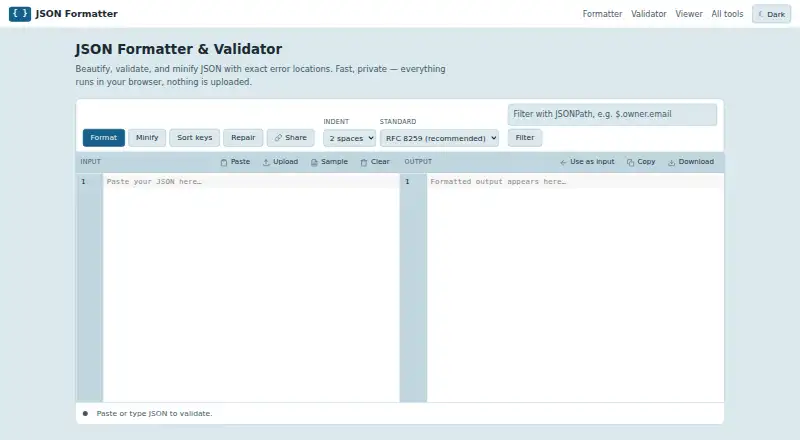
What JSON Formatter is
JSON Formatter is a free web tool for formatting, validating, and minifying JSON. It reports syntax errors by line and column, and supports indentation using two, three, or four spaces or tabs. Validation covers RFC 8259, RFC 7159, RFC 4627, and ECMA-404. Its repair feature addresses common invalid JSON, including single quotes, unquoted keys, trailing commas, comments, and Python-style True or None literals. A JSONPath filter can extract selected fields, while command input can extract JSON bodies from pasted curl or wget commands using -d, --data, or --json. Formatting, validation, minification, and filtering run in the browser; the site says JSON is not uploaded, stored, or logged. Share links carry the JSON in the link rather than relying on server storage. Other listed workflow features include dark mode, drag-and-drop upload, download, autosave, and search. The tool is free with no sign-up and no hard file-size limit, though practical capacity depends on the user's machine. Its audience includes people reading or debugging minified API and log JSON and catching syntax errors before production.
Good
- Reports syntax errors with line and column
- Supports several JSON validation standards
- JSONPath filters can extract selected fields
- Processing runs in the browser
- Free to use with no sign-up
Watch out
- Practical file capacity depends on the user's machine
- Share links include the JSON in the link
Who it suits
JSON Formatter suits people who want to inspect, repair, validate, or filter JSON in a browser. It is useful for debugging API or log data, with practical file capacity dependent on the user's machine.
Verdict
JSON Formatter covers common formatting, validation, repair, and filtering tasks in a browser, and the site says it does not upload or log JSON. For large documents, practical capacity depends on the user's device.
Plans and prices
From JSON Formatter's own pricing page, checked 3 Oct 2026.
| Plan | Price | What it gives you |
|---|---|---|
| JSON Formatter | Free | All tools free · no sign-up · no hard file-size limit; depends on your machine |
The facts
Each one read from JSON Formatter's own pages, with the date it was checked.
What it does
- Audience
- The site describes formatting as useful for reading and debugging minified API and log JSON, and for catching syntax errors before production.checked 3 Oct 2026
- Command-line input
- The formatter can extract JSON bodies from pasted curl or wget commands using -d, --data, or --json.checked 3 Oct 2026
- File size
- The site says there is no hard file-size limit and that practical capacity depends on the user's machine; documents in the tens of megabytes work in modern browsers.checked 3 Oct 2026
- Indentation
- Formatting supports 2 or 3 or 4 spaces, or tabs.checked 3 Oct 2026
- JSONPath
- A JSONPath filter extracts selected fields from a document.checked 3 Oct 2026
- Local processing
- Formatting, validation, minification, and filtering run in the browser, and the site says JSON is not uploaded, stored, or logged.checked 3 Oct 2026
- Purpose
- The browser tool formats, validates, and minifies JSON, and reports syntax errors with their line and column.checked 3 Oct 2026
- Repair
- The repair feature handles common invalid JSON such as single quotes, unquoted keys, trailing commas, comments, and Python-style True/None literals.checked 3 Oct 2026
- Sharing
- Share links pack the JSON into the link itself without using a server to store it.checked 3 Oct 2026
- Shortcuts
- Ctrl+Enter (Cmd+Enter on Mac) formats input, Ctrl+F opens search, and Tab indents.checked 3 Oct 2026
- Standards
- Validation supports RFC 8259, RFC 7159, RFC 4627, and ECMA-404.checked 3 Oct 2026
- Workflow features
- The page lists dark mode, drag-and-drop upload, download, autosave, and Ctrl+F search.checked 3 Oct 2026
Alternatives to JSON Formatter
- 1

JSONZen
Free planWebAPILinuxmacOS7.6$1 one-time - 2
jaq
Free planOpen sourceWebAPILinuxmacOS7.5Free plan - 3
jq
Free planWebLinuxmacOSSelf-hosted7.2Free plan - 4
Dadroit JSON Viewer
Free planWebLinuxmacOSWindows6.9From $98 a year - 5

BracketView
Free planWebLinuxWindows6.7From $27 a year - 6
jidoujisho
Free planAndroid6.6Free plan