gron
gron is a free, open-source command-line tool that turns JSON into separate assignments with visible paths.
What gron is
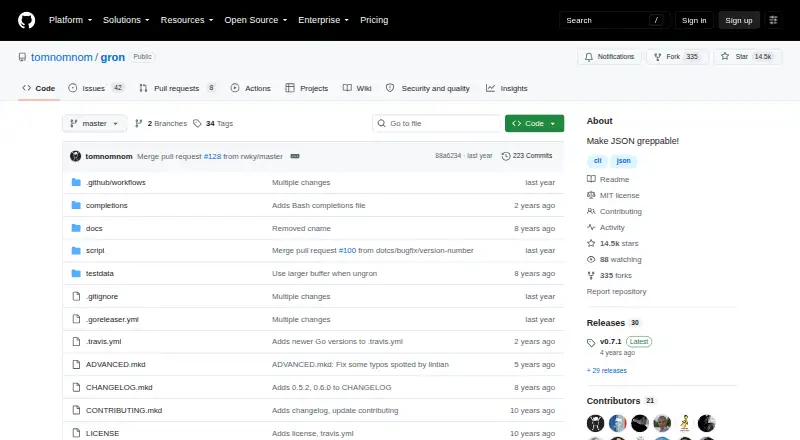
gron is a free, open-source command-line tool that turns JSON into separate assignments with visible paths. This can help users locate values in large or deeply nested JSON when its structure is unfamiliar, including responses from poorly documented APIs. It accepts input from a file, a URL, or standard input. The --ungron option converts assignments back to JSON, and --json represents gron data as a JSON stream. Other options include value-only output, colorized or monochrome output, line-by-line streaming, insecure certificate mode, and skipping sorting. The project notes that gron output is valid JavaScript and demonstrates comparing JSON files by diffing their gron output. When array entries are missing, ungron fills gaps with null values to preserve array keys. gron has no runtime dependencies; installation instructions cover binary downloads, Homebrew, and Go install. It supports Linux, macOS, and Windows, while the plan information also lists binary downloads for FreeBSD. The repository uses the MIT license.
Good
- Accepts files, URLs, and standard input.
- Can convert assignments back into JSON.
- Has no runtime dependencies.
- MIT licensed and open source.
Watch out
- Command-line tool rather than a graphical editor.
- Insecure certificate mode disables certificate validation.
Who it suits
gron may suit developers and other command-line users who need to find paths in unfamiliar or deeply nested JSON. It is especially relevant when examining API responses or comparing JSON files.
Verdict
gron gives command-line users a path-oriented way to inspect and compare JSON, with reverse conversion and no runtime dependencies. Its terminal-based workflow and certificate-validation option are worth considering before use.
Plans and prices
From gron's own pricing page, checked 9 Oct 2026.
| Plan | Price | What it gives you |
|---|---|---|
| gron | Free | No runtime dependencies · binary downloads available for Linux, Mac, Windows, and FreeBSD |
The facts
Each one read from gron's own pages, with the date it was checked.
What it does
- Array behavior
- When array entries are missing, ungron pads arrays with null values to preserve their keys.checked 9 Oct 2026
- Dependencies
- The installation instructions state that gron has no runtime dependencies.checked 9 Oct 2026
- Diffing
- The README demonstrates diffing JSON by comparing gron output from two files.checked 9 Oct 2026
- Input sources
- gron accepts input from a file, URL, or standard input.checked 9 Oct 2026
- Installation
- The README provides binary downloads and instructions for Homebrew and Go install.checked 9 Oct 2026
- Intended users
- The README describes gron as useful for finding paths in deeply nested JSON when the structure is not yet known.checked 9 Oct 2026
- JavaScript output
- The README states that gron output is valid JavaScript.checked 9 Oct 2026
- JSON exploration
- The README says gron helps explore APIs that return large JSON blobs with poor documentation.checked 9 Oct 2026
- JSON stream
- The --json option represents gron data as a JSON stream.checked 9 Oct 2026
- License
- The repository lists the MIT license.checked 9 Oct 2026
- Other options
- The help output lists value-only output, colorized or monochrome output, line-by-line streaming, insecure certificate mode, and an option to skip sorting.checked 9 Oct 2026
- Purpose
- gron transforms JSON into discrete assignments so users can grep for values and see their paths.checked 9 Oct 2026
- Reverse conversion
- The --ungron option turns gron assignments back into JSON.checked 9 Oct 2026
- Security option
- The --insecure option disables certificate validation when fetching URLs.checked 9 Oct 2026
The company
- Founded
- 2016checked 28 Sep 2026
The full review of gron
gron is a focused command-line utility for turning JSON into searchable, path-labelled assignments. It suits developers investigating unfamiliar API responses and other deeply nested data in a terminal. Choose it when path-based searching and diffing matter more than graphical browsing or editing.
Overview
Large JSON responses are difficult to search when their structure is unknown. gron flattens each value into an individual assignment that includes its path, giving command-line users a direct way to locate fields with familiar search tools. That narrow design is particularly useful for poorly documented APIs and exploratory work, but it assumes comfort with terminal output rather than offering a visual tree or general data-editing workspace.
The project is open source, originated in 2016, and is released under the MIT license. It has no runtime dependencies, which keeps installation and deployment straightforward for scripts, build environments, and portable toolboxes.
Key features
Input can come from a local file, a URL, or standard input. That range lets gron handle downloaded responses, saved fixtures, and pipelines without changing the basic workflow. The resulting assignments are valid JavaScript, so the representation can also fit JavaScript-oriented processing.
--ungron reverses the transformation and rebuilds JSON from assignments. When array entries are absent, it inserts null values to preserve the original keys; that behavior avoids silently shifting array positions during reconstruction. --json emits gron data as a JSON stream, while value-only output, colorized or monochrome display, line-by-line streaming, and an option to skip sorting provide useful control for terminals and automated processing.
Diffing is one of gron's strongest practical uses. Comparing the gron output from two JSON files exposes changed paths and values in a form that is often easier to scan than raw nested documents. The trade-off is that the workflow remains text-oriented: users who need schema editing, visual navigation, or rich formatting will need another tool.
URL fetching includes an --insecure mode that disables certificate validation. That can help with endpoints using problematic certificates, but it removes an important transport safeguard and should be reserved for controlled situations.
Pricing
gron has one free, open-source plan:
| Plan | Price | Includes |
|---|---|---|
| gron | free | No runtime dependencies; binary downloads for Linux, Mac, Windows, and FreeBSD |
There is no trial period or paid tier to evaluate. The free plan is the complete utility, making it suitable for individual developers, teams scripting JSON workflows, and organizations that can use MIT-licensed software. There are no seat, quota, or renewal charges described for this plan.
Platforms
gron supports Linux, macOS, and Windows, with binary downloads documented alongside Homebrew and Go installation methods. FreeBSD binaries are also included in the plan description. The command-line format makes it portable across these systems, provided the user is comfortable installing and invoking terminal software.
Who it's for
Pick gron for API investigation when you do not yet know a response's schema, for locating deeply nested paths quickly, or for reviewing JSON changes in source-control-style diffs. It also fits pipeline authors who need stdin input, streaming output, and a reversible representation.
It is a poor fit for nontechnical users, visual browsing, or interactive editing. A GUI viewer or browser-based editor will be more appropriate when navigation, formatting, and direct manipulation matter more than grep-friendly text.
Pros and cons
Pros
- Path-first exploration: Flattened assignments make values and their locations searchable in unfamiliar JSON.
- Useful round trip: --ungron restores JSON and preserves missing array positions with null padding.
- Flexible inputs and output: Files, URLs, stdin, JSON streams, streaming lines, and display controls fit varied shell workflows.
- Practical comparison: gron output provides a clear basis for diffing two JSON documents.
- Low deployment friction: No runtime dependencies and published binaries simplify installation.
Cons
- Terminal-only focus: Users seeking a visual tree, editor, or broad data workspace will find the scope limited.
- Security trade-off: The insecure URL option disables certificate validation and requires careful use.
- Flattened output requires adaptation: Readers must understand assignment paths rather than inspect native nested JSON directly.
Alternatives
jq is the better choice when you need a mature JSON command-line processor with standalone binaries across Linux, macOS, and Windows, plus web and self-hosted availability.
gojq suits users who want MIT-licensed open-source software that also provides a Go library alongside its CLI.
jless is preferable for a dedicated terminal viewer on macOS or Linux rather than gron's assignment-and-diff workflow.
jaq fits readers seeking an MIT-licensed command-line program and Rust library across desktop and self-hosted environments.
Dadroit JSON Viewer is the alternative for a graphical viewer with a free non-commercial tier and conversion to CSV or XML, with paid Standard licensing.
BracketView is a freemium Linux, Windows, and web option when encrypted snapshots, uploads, webhooks, and AI actions are more relevant than shell processing.
jidoujisho is an Android-only free and open-source option.
JSON OS is a browser-based JSON editor with Markdown preview.
For more options, browse JSON Tools.
Verdict
gron is a strong recommendation for command-line users who need to discover JSON paths, compare documents, and move between flattened assignments and JSON without installing a runtime. Its free, dependency-free distribution removes cost and deployment barriers. Look elsewhere if you need a graphical browser, interactive editor, or a richer general-purpose JSON environment.
Alternatives to gron
- 1
JSONZen
Free planWebAPILinuxmacOS7.6$1 one-time - 2
jaq
Free planOpen sourceWebAPILinuxmacOS7.5Free plan - 3
jq
Free planWebLinuxmacOSSelf-hosted7.2Free plan - 4
Dadroit JSON Viewer
Free planWebLinuxmacOSWindows6.9From $98 a year - 5

BracketView
Free planWebLinuxWindows6.7From $27 a year - 6
jidoujisho
Free planAndroid6.6Free plan