
JDownloader
JDownloader is a free, open-source download management tool for handling downloads on supported devices and systems.
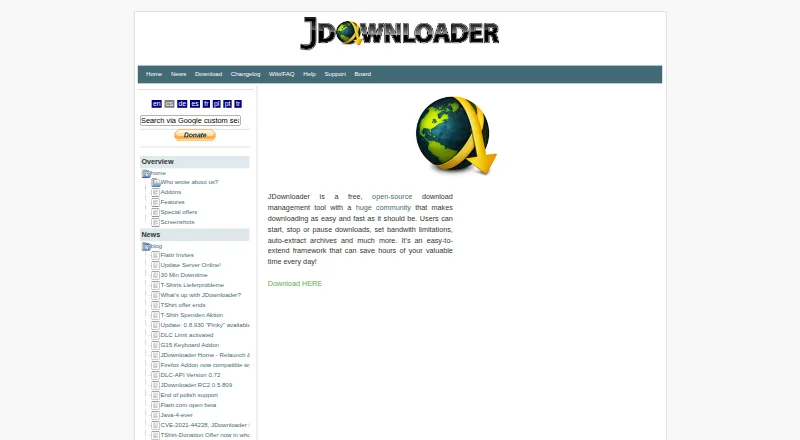
What JDownloader is
JDownloader is a free, open-source download management tool for handling downloads on supported devices and systems. Users can start, stop or pause downloads, set bandwidth limits, and download several files at once using multiple connections. It can automatically extract RAR archives and search password lists, and its feature list includes video downloading. The project lists about 110 hoster plugins and more than 300 decrypt plugins. MyJDownloader provides remote control of a JDownloader installation running on a computer through a web interface, API, browser extension or Android app. The official download page offers JDownloader 2 for Windows, Linux and macOS, along with a multi-OS JAR. The software is described as GPL open source. MyJDownloader's free use requires registration and is limited in scope; paid service packages can extend it, but prices are not stated in the listed terms. Support includes email, tickets, a public forum and remote support, generally from 09:00 to 17:00 CEST rather than 24/7. The privacy statement says transmissions are encrypted and the operator cannot see which files users download through the service.
Good
- Start, stop or pause downloads and limit bandwidth
- Handles multiple files and connections at once
- Automatically extracts RAR archives
- Available as GPL open-source software
- Transmission is encrypted, according to its privacy statement
Watch out
- MyJDownloader free use requires registration
- Free MyJDownloader service has limited scope
- Support is generally not available 24/7
- Other-provider installers may include ads or optional offers
Who it suits
JDownloader suits people who want download controls such as pausing, bandwidth limits and parallel downloads. MyJDownloader may suit users who want to control an installation remotely through a browser, API, extension or Android app.
Verdict
JDownloader offers detailed download controls, archive extraction and remote operation through MyJDownloader. Note that MyJDownloader's free service is limited, and installer options from other providers may include advertising or optional software offers.
Plans and prices
From JDownloader's own pricing page, checked 29 Sep 2026.
| Plan | Price | What it gives you |
|---|---|---|
| JDownloader | Free | No price stated on the page |
| JDownloader 2 | Free | desktop download manager; optional third-party software offers on the main Windows installer |
| MyJDownloader free use | Free | Registration required · limited service scope |
The facts
Each one read from JDownloader's own pages, with the date it was checked.
What it does
- API extensibility
- The API documentation exposes typed objects for downloads, link collection, packages, extensions, captcha jobs and configuration.checked 15 Oct 2026
- API security
- The My.JDownloader REST API uses AES-128-CBC and HMAC-SHA256 and routes front-end traffic through a connection server to avoid NAT and port-forwarding problems.checked 15 Oct 2026
- API shape
- The public API documentation describes GET and POST routes, request IDs, signatures and an endpoint at api.jdownloader.org.checked 15 Oct 2026
- Archive extraction
- JDownloader can automatically extract archives and search password lists for archive passwords.checked 15 Oct 2026
- Captcha handling
- Captcha recognition and remote captcha solving are supported features.checked 15 Oct 2026
- Chrome extension complaints
- Chrome-extension review data includes complaints about poor usability, broken CAPTCHA integration, NAS/headless incompatibility and failures on ARM Macs.checked 15 Oct 2026
- Clipboard and link collection
- Independent testing describes a clipboard monitor that analyzes copied URLs and adds them for batch downloading.checked 15 Oct 2026
- Documentation
- The official knowledge index includes addon lists, getting-started material, development, GUI, terminal UI, tools, update and FAQ sections.checked 15 Oct 2026
- Download controls
- Users can start, stop or pause downloads and set bandwidth limits.checked 29 Sep 2026
- Host and decrypt plugins
- The feature page states that JDownloader has about 110 hoster plugins and over 300 decrypt plugins.checked 29 Sep 2026
- Hoster support
- The project describes support for more than 150 hosters, 30 premium hosters and 180 link-crypter services in its development interview.checked 15 Oct 2026
- Installer note
- The privacy statement says an installer from another provider may contain advertising or offer optional software, and the official download page links an alternative Windows installer without optional software offers.checked 29 Sep 2026
- Installer offers
- AppWork says the main Windows installer can present optional third-party software offers, while a separate offers-free installer is available.checked 15 Oct 2026
- Installer verification
- Official installers are digitally signed, and AppWork instructs users to verify that the signer is AppWork GmbH using VirusTotal or platform signature tools.checked 15 Oct 2026
- Licence
- The published source header states that JDownloader is licensed under the GNU General Public License, version 3 or later.checked 15 Oct 2026
- Limit: complexity
- TechRadar and VideoHelp reviewers said the interface and large feature set can feel intimidating and require time to learn.checked 15 Oct 2026
- Limit: installer trust
- TechRadar criticized the adware-laden installer, and Trustpilot reviewers repeatedly alleged unwanted bundled software, malware or deceptive installation prompts.checked 15 Oct 2026
- Limit: performance
- TechRadar reported slow startup and high memory use, while a VideoHelp reviewer reported tiny or garbled rendering on a 4K monitor.checked 15 Oct 2026
Where it runs
- Browser integrations
- Official integrations are listed for Firefox, Chrome, Opera and Edge, alongside web, Android and iPhone clients.checked 15 Oct 2026
- Desktop platforms
- Official installers are provided for Windows, Linux and macOS, with Java-version and CPU-architecture variants plus a multi-OS JAR.checked 15 Oct 2026
- Google Play app limits
- The independently published Android remote-control app requires a running JDownloader installation and MyJDownloader account for all features, with Pro functionality sold as a one-time in-app purchase.checked 15 Oct 2026
The company
- Company leadership
- The imprint names Thomas Rechenmacher and Daniel Wilhelm as CEOs.checked 15 Oct 2026
- Headquarters
- Abenberg, Germanychecked 23 Sep 2026
- Maker headquarters
- AppWork GmbH is listed at Spalter Straße 58, 91183 Abenberg, Germany.checked 15 Oct 2026
The full review of JDownloader
Overview
JDownloader is a free, open-source download manager for people who want fine-grained control over file transfers and hosted links. It suits users managing large queues or archives particularly well; its main caveat is that remote access through MyJDownloader is limited on the free service.
Key features
Transfer control and link handling
Start, pause or stop downloads and set bandwidth limits, which is useful when transfers need to share a connection with other activity. JDownloader can handle several files at once and use multiple connections. Its plugins cover about 110 hosters and more than 300 decryptors, making it a capable choice for working with hosted links rather than only straightforward file URLs.
Archives and automation
The automatic extractor handles RAR archives and can search a password list, reducing manual work when a download arrives in a protected archive. Video downloading, scheduling and browser integration broaden its usefulness beyond queue management. A portable version is also supported.
Remote operation and privacy
MyJDownloader lets users operate an installation running on their computer from a web interface, API, browser extension or Android app. That is useful when a download needs attention away from the host computer, but free access has a limited service scope, and paid packages are available to extend it. The service encrypts data transmitted between JDownloader, MyJDownloader and the user; its operator says it cannot see which files are downloaded through the service.
Open source and support
JDownloader is complete open source under the GPL, a meaningful advantage for readers who prefer software they can inspect and use without a subscription for the core manager. Support includes email, tickets, a public forum and remote support, but is generally available from 09:00 to 17:00 CEST rather than around the clock.
Pricing
JDownloader is free. The JDownloader plan is free, with no price stated on the page; its core download manager is offered as a free, open-source tool. MyJDownloader free use is free and requires registration, with a limited service scope. Readers who need more from the remote service can consider its paid packages, which extend the free service; those packages use custom pricing.
Platforms
JDownloader is offered for Windows, Linux and macOS, with a multi-OS JAR option. Its wider platform support includes Android, iOS, web browsers and API access, principally for operating or integrating with a computer installation through MyJDownloader rather than as a replacement for that installation.
Take care when choosing an installer: one from another provider may include advertising or optional software offers. The official download page links an alternative Windows installer without optional offers.
Who it's for
Choose JDownloader if you want a free desktop download manager with simultaneous transfers, bandwidth controls, extensive hoster and decrypt plugins, and RAR extraction. It is also a strong fit for users who want to manage an installation remotely and can work within MyJDownloader free-use limits. It is less compelling if you need unrestricted remote service without paying or expect support at any hour.
Pros and cons
Pros
- Flexible transfer controls: Pause and resume downloads, set bandwidth limits, and run several files with multiple connections.
- Broad hosted-link support: About 110 hoster plugins and over 300 decrypt plugins help with varied hosted links.
- Useful archive handling: RAR extraction with password-list search can save manual effort.
- Free and open source: The core manager costs nothing and is released under the GPL.
- Remote operation: Web, API, browser-extension and Android access can control a running computer installation.
Cons
- Free remote service is limited: Registration is required, and users who need a broader service scope may need a paid package.
- Installer choice matters: Third-party installers may include advertising or optional software offers.
- Support is not 24/7: Its general availability is 09:00 to 17:00 CEST.
Alternatives
4K Video Downloader+ is worth considering if you want a freemium video downloader with a permanent basic-features plan and a free trial.
Gopeed may suit readers looking for a free, open-source option described as having no ads and no tracking.
AB Download Manager is another free option, with its free plan described as ad-free and open source.
BitComet is a free alternative for private, personal, non-commercial use.
Free Download Manager is a free, no-ads option that accepts optional donations.
Motrix is another free, open-source download manager.
Clean Download Manager is another free alternative.
Xtreme Download Manager is a free, open-source option that also supports video downloading.
Browse more options in Download Manager Software.
Verdict
JDownloader is the right choice for users who want a free, open-source manager with extensive hosted-link support, archive extraction and adjustable transfer controls. Its biggest trade-off is the limited free MyJDownloader service, so readers who need more remote access should weigh paid packages or choose another tool.
Getting started
- Visit https://jdownloader.org/
- Download JDownloader 2 for Windows, Linux or macOS, or use the multi-OS JAR
- Install and run JDownloader on your computer
- Register for MyJDownloader free use if you want remote access
- Use the web interface, API, browser extension or Android app to operate the installation
Limits worth knowing
MyJDownloader free use is limited in scope and requires registration.
Questions
Is JDownloader free?
The listed JDownloader plan is free, and the software is described as free and open source.
Which platforms are supported?
The supported-platform list includes Windows, Linux, macOS, Android, iOS, web browsers and API. The official download page offers JDownloader 2 for Windows, Linux and macOS, plus a multi-OS JAR.
Is JDownloader open source?
Yes. The features page describes it as complete open source under the GPL.
What does MyJDownloader do?
It lets users operate a JDownloader installation running on their computer through a web interface, API, browser extension or Android app.
Does remote access have a free option?
MyJDownloader free use is free, requires registration and has limited service scope. Paid packages can extend the service.
What support is available?
The support page lists email, a ticket system, a public forum and remote support. Support is generally available from 09:00 to 17:00 CEST rather than 24/7.
Alternatives to JDownloader
- 1

ClipGrab
Free planOpen sourceLinuxmacOSWindows7.9€10 one-time - 2

4K Video Downloader+
Free planAndroidLinuxmacOSWindows7.8Free plan - 3

AB Download Manager
Free planOpen sourceAndroidiOSAPIExtension7.8Free plan - 4

Gopeed
Free planOpen sourceAndroidiOSWebAPI7.7Free plan - 5

BitComet
Free planAndroidWebAPIExtension7.5Free plan - 6
Hydra
Free planOpen sourceWebAPILinuxSelf-hosted7.3Free plan